Disclosure: we make ThumbnailPeak, a thumbnail tester. Every size below comes from the platform's own help pages as of 5 November 2026, and everything we say is cut off or covered was measured on each platform's website that day, signed out. How we measured is at the end.
Every platform asks for a picture to stand for your video, and calls it something different: a thumbnail, a cover, show art. Here's what to upload to each, and the one thing to know about what it shows.
- YouTube video: 16:9, 3840×2160 recommended, at least 640 pixels wide. The video's length covers the bottom-right corner. More
- YouTube Shorts: 9:16, 1080×1920 or 2160×3840, uploaded from a computer. Shorts tiles are 2:3, so 150 pixels go from each end of a 1080×1920 picture. More
- Instagram Reel cover: 9:16, 1080×1920. The profile grid is 3:4, so 240 pixels go from each end, and Instagram says you can't change the cover after posting. More
- TikTok cover: 9:16, 1080×1920, as TikTok recommends. Its grids are 3:4 too, so the same 240 pixels go. More
- Facebook video: every video is now a reel. Facebook publishes no size; match the video, up to 10 MB, and upload it on a computer, from a Page or in Meta Business Suite. A Page's Videos tab on a computer shows only the middle third of a vertical cover. More
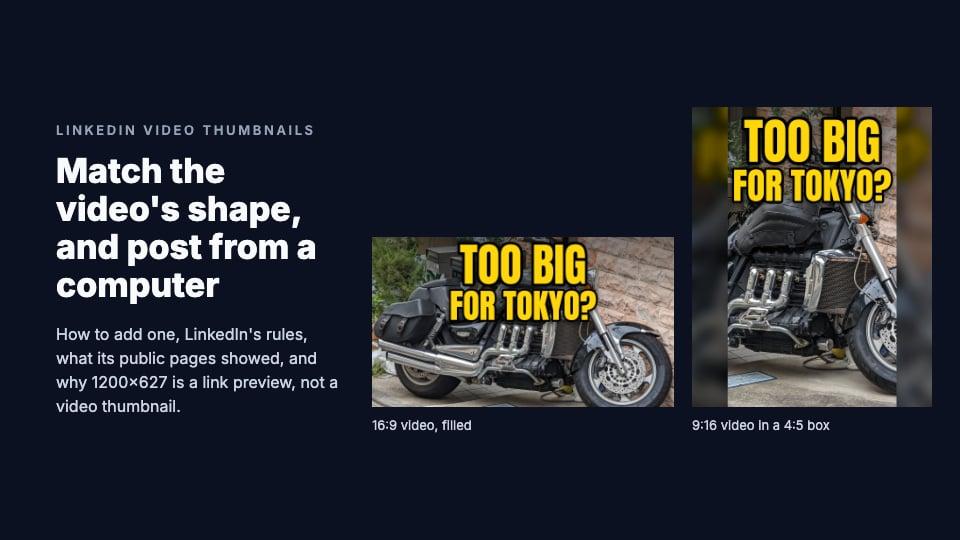
- LinkedIn video: the same shape and resolution as the video, up to 2 MB, added on a computer while you post. Nothing was cut off; a vertical video sits in a 4:5 box. More
- X video: X publishes no thumbnail size; match the video, 1280×720 for 16:9. You can choose one only in Media Studio, which X says is for verified subscribers; otherwise X shows the first frame. More
- Twitch past broadcasts, highlights and uploads: 16:9, at least 1280×720. Labels cover three corners, and a live stream can't have a custom thumbnail at all. More
- Video podcasts: a 16:9 thumbnail for each episode (Spotify suggests 1920×1080) and a square cover for the show, 3000×3000 to suit Apple, Spotify and YouTube. More
Three shapes cover almost everything
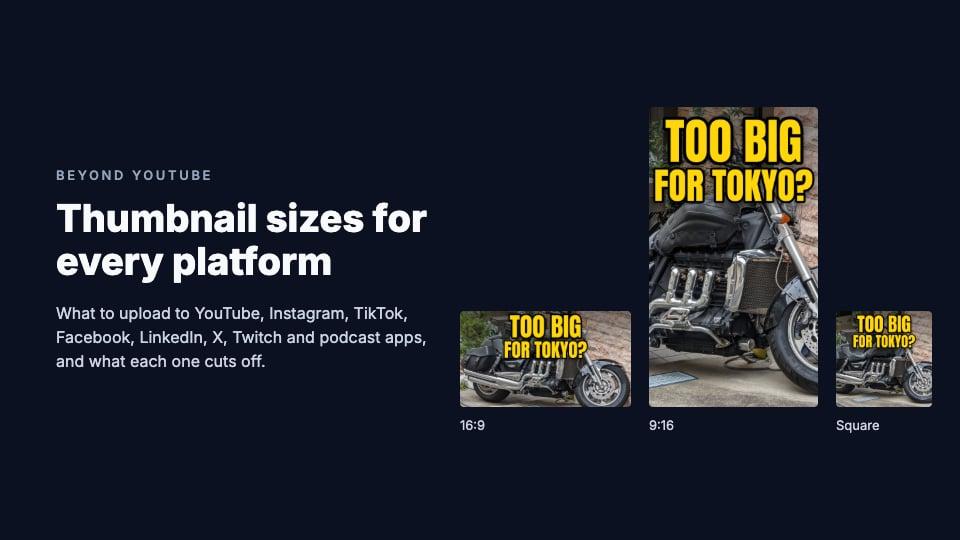
Look past the names and there are only three shapes:
- 16:9, horizontal: YouTube videos, Twitch, Spotify video episodes, and horizontal videos on Facebook, LinkedIn and X.
- 9:16, vertical: YouTube Shorts, Instagram Reels, TikTok and vertical Facebook videos.
- Square: podcast show covers, and square videos on LinkedIn and X.
So for one video you rarely need more than two pictures: a 16:9 one and a 9:16 one, plus a square cover if it's a podcast. What differs between platforms is what they do to the picture once it's up: which part they cut off, and what they draw on top.
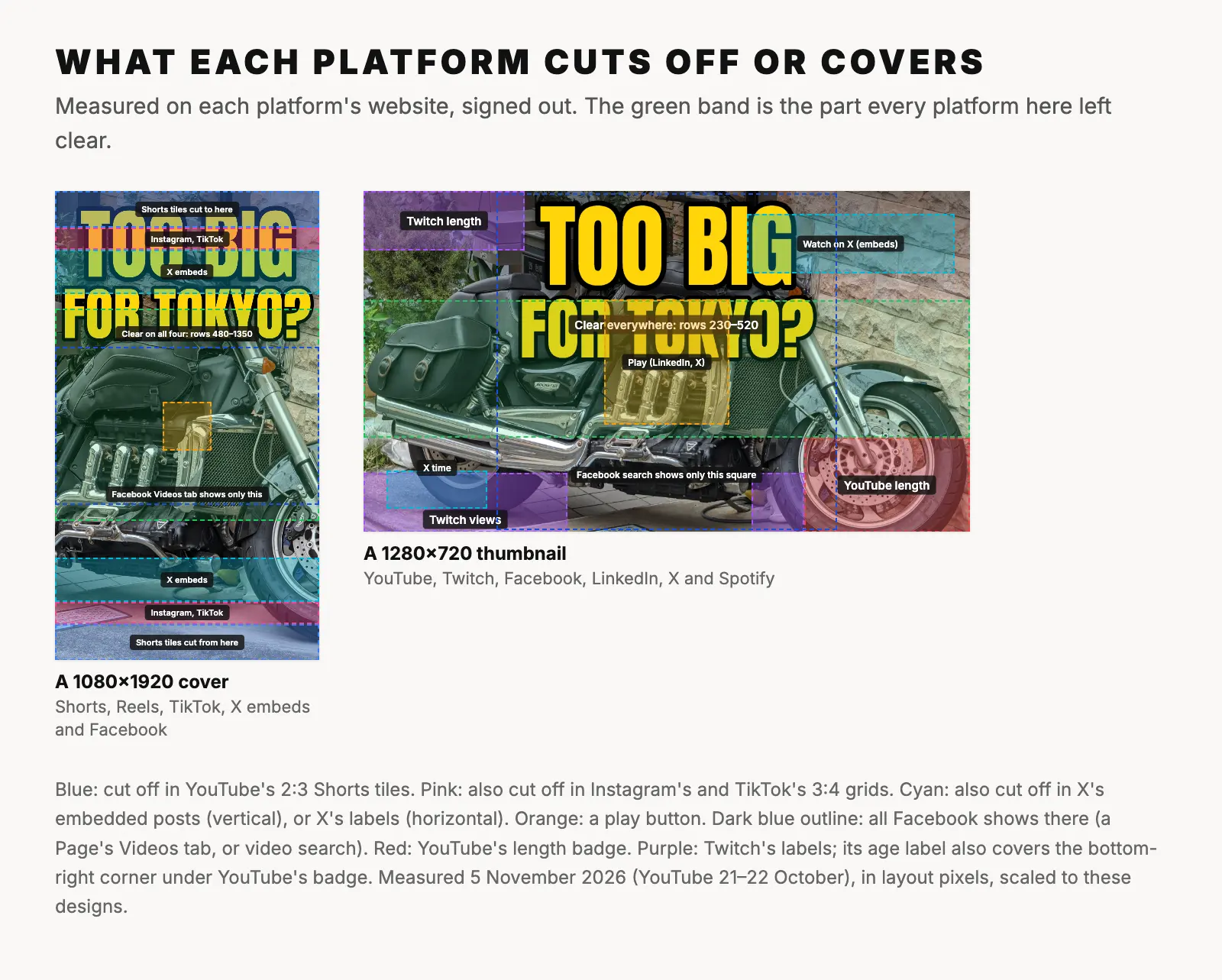
What each platform cuts off or covers
We measured the tiles each platform's website draws, signed out, on a computer and on two phones' screen sizes. Two things happen to a picture: the platform crops it to fit a tile of a different shape, or it draws something on top.
Cropped to a different shape:
- YouTube Shorts shows a 9:16 thumbnail in 2:3 tiles, cutting 150 pixels from each end of a 1080×1920 picture. On a phone, the title and view count sit over the bottom quarter.
- Instagram shows Reel covers in a 3:4 profile grid: rows 240 to 1680 of a 1080×1920 cover. On a computer, the Reels tab cuts less, about 120 pixels from each end.
- TikTok shows covers in 3:4 tiles everywhere we looked, profiles, hashtag pages and Explore: the same rows 240 to 1680.
- Facebook shows a Page's videos in 5:3 tiles on a computer. A 16:9 thumbnail loses 39 pixels from each side, but a vertical cover keeps only rows 636 to 1284, the middle third. Video search crops to squares, and a Page's Reels tab shows a vertical cover almost whole.
Shown whole, with something drawn on top:
- YouTube draws the video's length in the bottom-right corner of a 16:9 thumbnail. In a 1280×720 design, keep the bottom-right 350×200 clear.
- Twitch shows the whole 16:9 picture, but puts the length in the top-left corner and the views and age in the two bottom corners. On a computer it loads only a 320×180 copy, so small words blur.
- LinkedIn shows the whole thumbnail with only a round play button in the middle. A vertical video's thumbnail sits in a 4:5 box with blurred copies of it down the sides.
- Spotify's website showed every 16:9 episode thumbnail whole, with nothing on it. But on a computer an episode's page leads with its square art, and Spotify's search on a phone listed episodes with square art too.
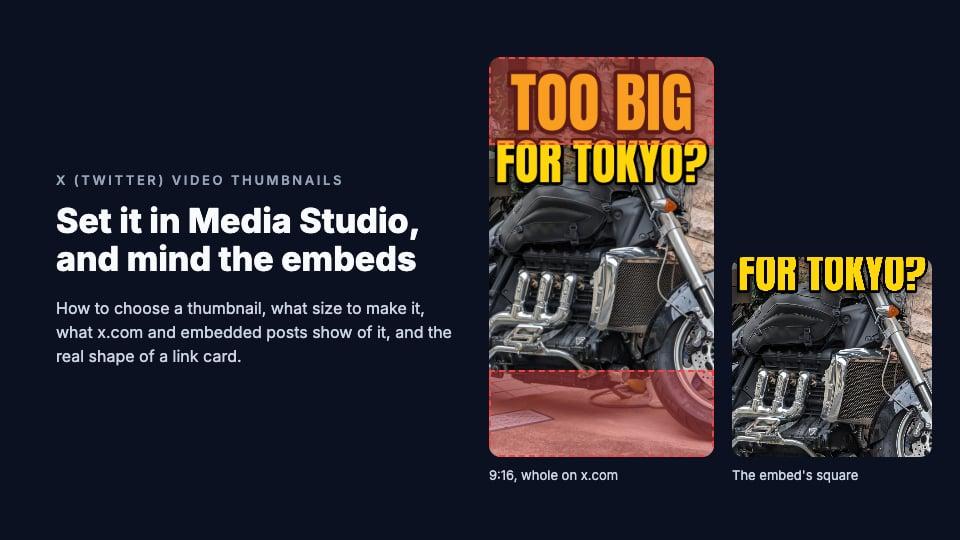
- X shows the whole thumbnail on x.com, at the video's own shape, with the time in the bottom-left corner and a play button in the middle. But a post embedded on another website cuts a vertical thumbnail to its middle square: rows 420 to 1500 of a 1080×1920 picture.
One vertical cover for Shorts, Reels and TikTok
If one 1080×1920 picture has to serve YouTube Shorts, Instagram and TikTok, design for the part all three show clear:
- Rows 480 to 1350. Instagram's grid and TikTok's cut 240 pixels from each end, and Instagram's icons reach row 475. At the bottom, YouTube's title and view count cover a phone's Shorts tile from row 1354, and TikTok's counts and names start around row 1440.
- Not the exact center. Instagram's and TikTok's phone websites both put a play icon in the middle, about columns 440 to 640 and rows 860 to 1060. A face can sit there; a small word or a logo shouldn't.
That band is less than half the picture's height, so it holds a face and a short headline, not a paragraph. It also survives X's embedded posts, which keep only rows 420 to 1500 of a vertical thumbnail.
Facebook is the exception. A Page's Videos tab on a computer shows only rows 636 to 1284 of a vertical cover, in a 5:3 tile. If that tab matters to you, keep the headline and the face inside those rows; the Reels tab shows nearly the whole cover. Each post has a free safe zone template for its own platform: Shorts, Instagram and TikTok.
One 16:9 thumbnail for YouTube, Twitch, Facebook, LinkedIn, X and Spotify
A 16:9 picture travels further: the same 1280×720 file fits YouTube, Twitch, Spotify's video episodes, and a 16:9 video on Facebook, LinkedIn or X. What changes is what covers it:
- The corners. YouTube covers the bottom right; Twitch the top left and both bottom corners; X the bottom left; Facebook the bottom right, with the length. On other websites, X's embedded posts put a label in the top right, and Facebook's embedded player a dark bar across the top. On the platforms' own websites the top right was clear everywhere, so it's the best place for a small logo.
- Rows 230 to 520, across the full width, were clear everywhere apart from the center. Put the face and the words there.
- The center gets a play button on LinkedIn, X and Facebook's phone website, and on Spotify's website when someone hovers. The biggest, in X's embeds, covers about columns 510 to 770 and rows 230 to 490. Keep words off it; a face can sit behind it.
- Facebook's video search shows only the middle square, columns 280 to 1000. If that matters to you, keep the headline inside it.
On YouTube, ThumbnailPeak's free thumbnail tester shows a 16:9 thumbnail in a feed beside real videos, with the length drawn on, before you publish.
Where you can't choose, or can't change, the picture
- Twitch live streams can't have a custom thumbnail. Twitch shows a snapshot of the stream, taken about every 5 minutes.
- Instagram says you can't change a Reel's cover after posting.
- LinkedIn lets you add a thumbnail only on a computer, while you post. Afterwards, only the text can be edited.
- TikTok's help pages describe choosing a cover only before you post.
- Facebook's help pages describe choosing or changing a thumbnail only on a computer, on facebook.com or in Meta Business Suite, not in the app.
- X lets you choose a thumbnail only in Media Studio, which its help says is for verified subscribers. Posted from the app or x.com, a video shows its first frame.
- YouTube, Twitch and Spotify let you change a video's thumbnail whenever you like: in YouTube Studio, Twitch's Video Producer and Spotify for Creators.
So on Instagram, TikTok and LinkedIn, the cover you pick when you post is very likely the one you keep. Make it before you upload.
Link previews are a different picture
When you share a link rather than upload a video, the platform builds a card from the web page's own preview image, its og:image. You don't upload that picture with the post; the web page supplies it.
- LinkedIn frames it at 1200×627, 1.91:1. On its public pages we saw cards keep their image's own shape rather than crop it, but 1.91:1 fills the frame wherever the card appears.
- X draws large link cards at 1.91:1, not the 2:1 its old developer documentation gave. So 1200×628 fits exactly, and a 1200×600 image loses 27 pixels from each side.
- TikTok builds a 1200×630 card for a link to your video: the whole cover in the middle, on a blurred copy of itself, with a large play button over the center.
1200×627 is the size people often quote as LinkedIn's video thumbnail. It isn't: LinkedIn's video thumbnail should match the video.
Make each size from one picture
ThumbnailPeak's free thumbnail resizer turns one image into each of these sizes in your browser, with nothing uploaded and no sign-up. Pick a preset, then Crop to fill and drag to choose what stays, or Fit + blur to keep the whole picture on a blurred copy of itself:
- YouTube: Thumbnail 1280×720, Shorts 1080×1920.
- Instagram: Story / Reel 1080×1920, Post 3:4 1080×1440, Portrait 1080×1350, Post 1080×1080.
- TikTok: Video 1080×1920.
- Twitch: Video thumbnail 1280×720.
- LinkedIn: Link post 1200×627.
- Podcast: Video episode 1920×1080, Cover 3000×3000.
Turning a 16:9 design into a 9:16 one by cropping keeps less than a third of its width, so words near the edges are lost. Fitting it on a blurred background keeps everything, but small: a 1280×720 picture becomes a band 608 pixels tall across the middle of a 1080×1920 cover. For a cover that matters, rebuild the design at 9:16 from the original photo, with the words in the safe band. We tried each way on a picture of the wrong shape for YouTube.
Frequently asked questions
What is the best thumbnail size for all platforms?
There isn't one. Make a 16:9 picture at 1280×720 or larger for YouTube, Twitch, Spotify and horizontal videos elsewhere, and a 9:16 picture at 1080×1920 for Shorts, Reels and TikTok. Add a 3000×3000 square for a podcast.
Can I use my YouTube thumbnail on Instagram or TikTok?
Not as it is. Reels and TikTok covers are 9:16, and their grids show a 3:4 window. Crop the middle of your thumbnail, fit it on a blurred background, or rebuild it at 9:16 with the words between rows 480 and 1350.
Why is my cover cropped on my profile?
Because Instagram's and TikTok's grids, and YouTube's Shorts tiles, aren't 9:16. Instagram and TikTok show the middle 3:4 of a cover, cutting 240 pixels from each end of a 1080×1920 picture; Shorts tiles show the middle 2:3, cutting 150.
Which platforms let you change a thumbnail after posting?
YouTube, Twitch (for past broadcasts, highlights and uploads) and Spotify do. Facebook's help says its thumbnail options are there when you edit a Page's video on a computer. Instagram says you can't change a Reel's cover, LinkedIn says only a post's text can be edited, and TikTok's help pages describe choosing a cover only before you post.
Is 1200×627 a video thumbnail size?
No. It's LinkedIn's frame for a link preview, the image it takes from a web page you share. A video thumbnail on LinkedIn should match the video's own shape.
How we measured: on 5 November 2026 we opened each platform's website in an automated Chrome browser, signed out, in US English, at 1920×1080 and 1366×768 and at the screen sizes and settings of an iPhone 15 and a Pixel 7, and measured each tile and what was drawn over it in layout pixels (CSS pixels). The YouTube figures are from our measurements of 21 and 22 October 2026. Each platform's post says which pages we measured, what we couldn't see without an account, and where a website stopped us. We measured no apps and no signed-in views. The sizes and steps come from each platform's help pages. The sample pictures are ours, made from "Big motorcycle in Tokyo" by Syced (CC0).