Disclosure: we make ThumbnailPeak, a thumbnail tester. The steps come from TikTok's Help Center and Creator Academy as of 5 November 2026, and every size was measured on TikTok's website that day, signed out. How we measured is at the end.
TikTok calls a video's thumbnail its cover. TikTok recommends making it 9:16, at 1080×1920 pixels, and you choose it while you post:
- Pick a frame from the video, in the TikTok app.
- Upload your own picture as the cover, in the app's cover editing.
Whichever you use, people browsing your profile don't see all of it. We measured the grids of videos on TikTok's website, signed out, and found:
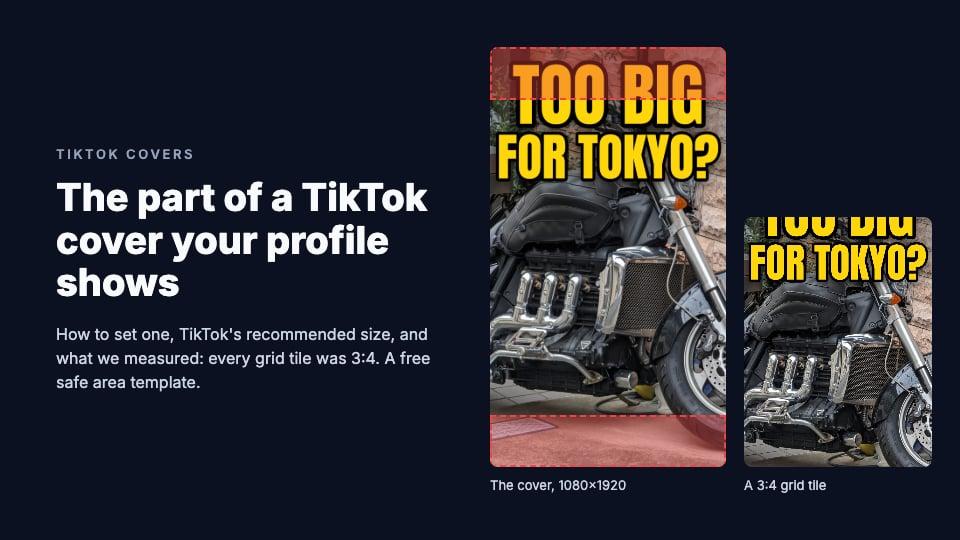
- Every tile was 3:4, not 9:16. TikTok fills the tile with your cover and cuts off what doesn't fit: 240 pixels off the top and 240 off the bottom of a 1080×1920 cover.
- TikTok draws over the tile. On a profile, a view count sits in the bottom-left corner and pinned videos get a "Pinned" label in the top left. On TikTok's mobile website, a play icon sits in the middle.
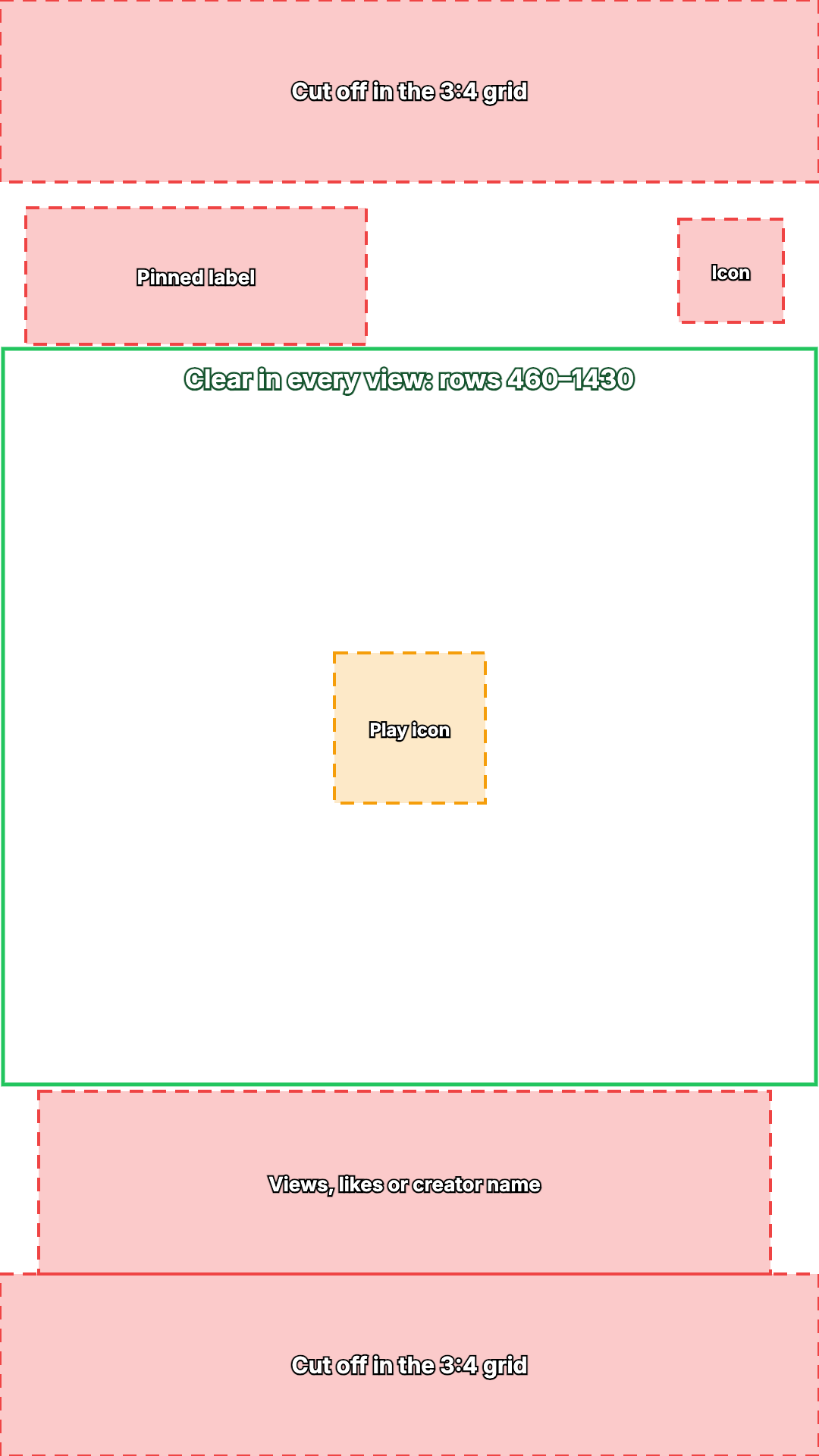
- Rows 460 to 1430 were clear in every view we measured, apart from that small play icon on phones. Our free template marks them.
Our guide to thumbnail sizes on every platform has the other platforms.
How to choose a TikTok cover in the app
These steps are from TikTok's help pages, as of 5 November 2026. We have no TikTok account, so we couldn't try them ourselves.
To use a frame from the video, as TikTok's Help Center describes it:
- Record or upload your video, add your edits and tap Next to reach the post screen.
- Tap Select cover on the video thumbnail.
- Drag the frame to the moment you want.
- Tap Save at the top, then post.
To upload your own picture, TikTok's Creator Academy page on video covers says: "Click the "+" button on TikTok, choose "cover editing," and then "upload local cover" to insert your video cover." Make the picture first, at 1080×1920, and save it to your phone.
To add words to the cover, TikTok's Creator Academy suggests "adding text to your covers", but neither it nor the Help Center gives steps for typing text onto a cover. The sure way is to put the words in the picture before you upload it.
For a photo post, TikTok's Help Center lists Edit cover among the options on the screen after you tap Next.
How to set a cover on a computer
You can upload from a computer in TikTok Studio, at tiktok.com/tiktokstudio, or with the Upload button on tiktok.com. TikTok's help page on tools for creators says that once a video is uploaded there, you can set its "Cover: Select a cover image for your video."
That page doesn't say whether you can upload your own picture there or only choose a frame, and we couldn't open the upload screen without an account. If you can't upload one on the computer, post from the app.
Can you change a TikTok cover after posting?
TikTok's help pages don't describe a way. The Help Center says: "You can select a video cover before posting a new video." TikTok Studio lets you change a posted video's privacy settings or delete it, and names no cover option. Your app may offer more, but we couldn't check.
If you can't find an option, the only sure way is to delete the post and post the video again with a new cover, starting again with no views, likes or comments. So set the cover before you tap Post.
What size is a TikTok cover?
- Recommended: 1080×1920 pixels. TikTok's Creator Academy says: "Use a 9x16 aspect ratio and a 1080x1920 pixel resolution for the best results."
- Aspect ratio: 9:16, the same shape as a full-screen vertical video.
- Minimum, file type and file size: TikTok doesn't publish any for a cover picture. For the video itself, an upload on a computer must be "720x1280 resolution or higher", MP4 or WebM, and less than 10 GB.
- No borders: for a cover made of several pictures, TikTok's advice is to "fit the images to your frame without black borders or a margin".
The thumbnail resizer crops or fits any image to 1080×1920 in your browser, with its TikTok — Video 1080×1920 preset.
Where viewers see a TikTok cover
Not in the For You feed. There, the next video simply plays. TikTok's Help Center says a cover "previews your video in places like your profile or search results", and on TikTok's website we found it in these places:
- Your profile's grid of videos, on computers and phones. TikTok's Creator Academy calls your profile "a major traffic source".
- Hashtag pages, such as tiktok.com/tag/space.
- Explore, on a computer.
- Shared links. TikTok's preview picture for a link to your video is 1200×630: your whole cover in the middle, on a blurred copy of itself, with a large play button over the center. Each app may crop it further; we didn't measure the apps.
We couldn't see search results: TikTok's website asked us to "Log in to search for popular content".
What a TikTok tile shows of your cover
TikTok recommends a 9:16 cover, but every grid tile we measured on 5 November 2026 was 3:4: wider for its height. TikTok scales your cover to fill the tile, keeps the middle and cuts off the top and bottom.
Here are the sizes we measured, in layout pixels:
- A profile on a computer: 255×340 in a 1920-wide window. Six tiles to a row.
- Explore on a computer: 256×341 at 1920 wide, 164×218 at 1366.
- Hashtag pages on a computer: 203×269 at 1920 wide, 164×217 at 1366.
- Hashtag pages on a phone: 130×173 on an iPhone 15, 137×182 on a Pixel 7. Three tiles to a row, edge to edge.
After our first visit, TikTok's website stopped showing our automated browser the videos on a profile, so that's the only profile view we could measure. Every other grid of videos we could load used the same 3:4 tile.
All of them are 3:4, so on a 1080×1920 cover each tile shows the middle 1080×1440 pixels, rows 240 to 1680. The hashtag pages' tiles are a hair narrower and cut 244 pixels from each end. Nothing is cut from the sides.
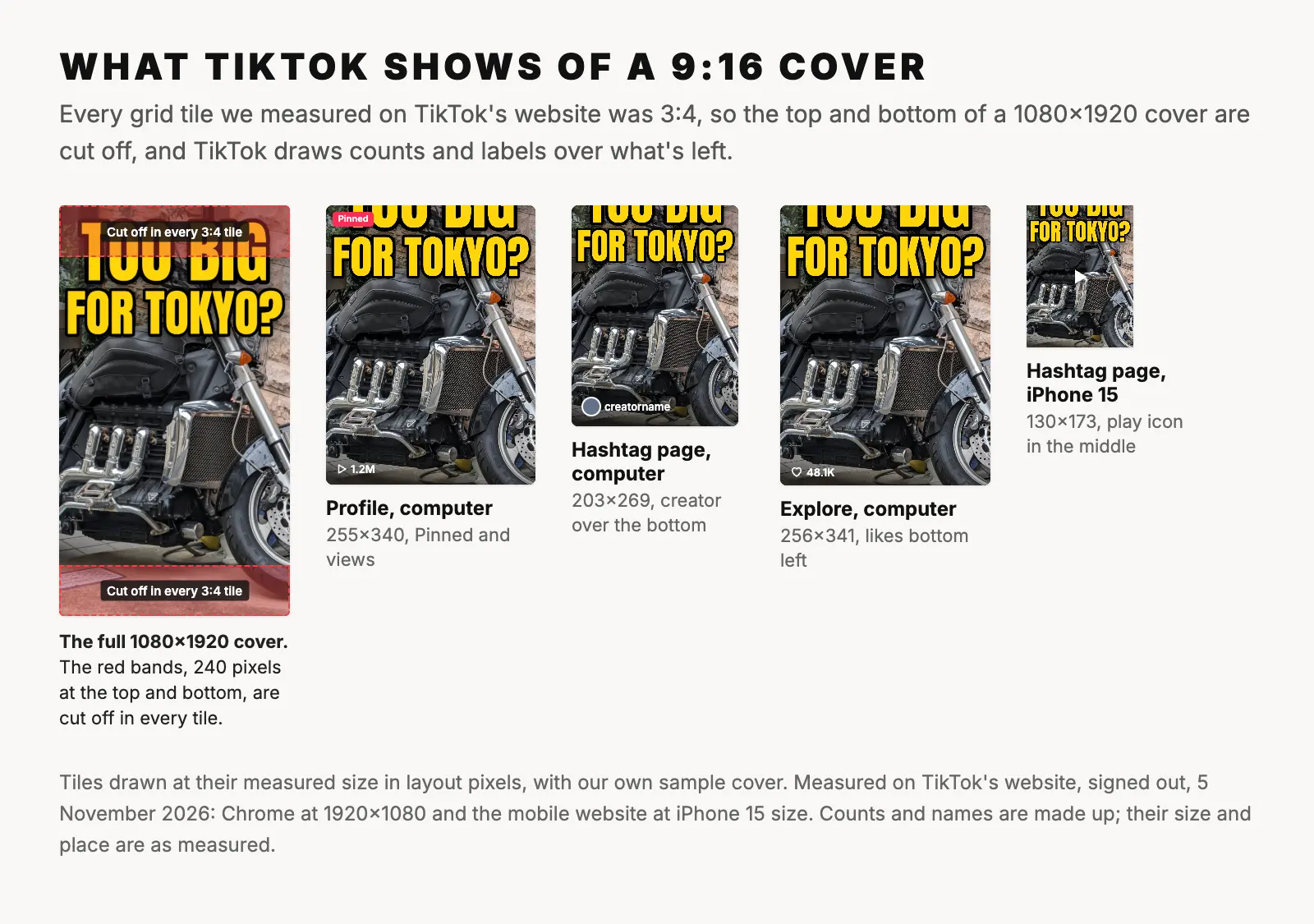
TikTok also draws on top of the tiles:
- A view count with a play icon, in the bottom-left corner of every video on a profile. Explore shows a heart and the number of likes there instead.
- The creator's picture and name over the bottom of each tile on hashtag pages on a computer.
- A "Pinned" label, red, in the top-left corner of videos pinned to the top of a profile.
- A small icon in the top-right corner of photo posts, on a computer.
- A play icon in the center of every video tile on TikTok's mobile website, 24 pixels across.
- A dark fade behind the bottom of the tile, under the count or name.
TikTok doesn't force a cover to be 9:16, either. One NASA video's cover was stored at 1048×1518; its tile showed the middle 3:4 of that, the same way.
A safe area for TikTok covers
Put together, that leaves a clear band across the middle of a 9:16 cover. On a 1080×1920 design:
- The top and bottom 240 pixels are cut off in every tile.
- The top-left corner gets the "Pinned" label on pinned videos: down to about row 350 on a computer. TikTok draws the label at a fixed size, about 50×18 layout pixels, so on a phone's smaller tile it would reach about row 454 and column 483. We couldn't see a pinned video on a phone.
- The top-right corner, columns 895 to 1033 and rows 289 to 425, gets an icon on photo posts.
- From about row 1440 down, the view count, likes or the creator's name cover the bottom left, and the name runs across to column 1016. The dark fade behind them starts higher, from row 1280 on a hashtag page.
- The very center, columns 441 to 640 and rows 861 to 1059, gets the play icon on TikTok's mobile website.
- Rows 460 to 1430 were clear in every view we measured, apart from that center icon.
Download the TikTok cover safe area template (PNG, 1080×1920, transparent). Put it on the top layer of your design, check that no face or word sits in a marked box, then hide it before you export.
One more reason to keep words off the center: in the preview picture for a shared link, TikTok's play button covers about columns 300 to 775 and rows 720 to 1200 of your cover. So words are safest between rows 460 and 720, or 1200 and 1430, with your subject in the middle.
Our sample shows why this matters. Its headline starts 80 pixels from the top, so in every tile "TOO BIG" loses more than half of its height. Starting it at row 460 instead would keep every letter inside every tile.
Using a YouTube thumbnail as a TikTok cover
A YouTube thumbnail is 16:9 and a TikTok cover is 9:16, the same shape on its side. You have three choices:
- Rebuild it at 9:16. Go back to the photo or design file, set the canvas to 1080×1920, and put the subject and words inside rows 460 to 1430. This is the only choice that fills the cover with your design.
- Crop it. A 9:16 crop of a 1280×720 thumbnail keeps a strip 405 pixels wide, under a third of the width, and the grid shows only the middle 405×540 of that. It works only when the subject is in the middle and no words are near the sides. In the thumbnail resizer, choose the TikTok — Video 1080×1920 preset and Crop, then drag the picture until the right part is in the frame.
- Fit it on a blurred background. The whole picture stays, 1080×608 in rows 656 to 1264, inside the part the grid shows. But it fills less than half of a tile's height, and TikTok advises against borders and margins. Use it only when nothing else will do.
Our guide to fitting a picture that isn't 16:9 covers the other direction. If the 16:9 version is your YouTube thumbnail, the thumbnail tester shows it in a YouTube feed beside real videos.
Frequently asked questions
What size should a TikTok cover be?
1080×1920 pixels, 9:16, as TikTok's Creator Academy recommends. TikTok doesn't publish a minimum, a file type or a file size for a cover picture. Keep faces and words between rows 460 and 1430, because grid tiles are 3:4 and cut off the top and bottom.
Can I change my TikTok cover after posting?
TikTok's help pages only describe choosing a cover before you post. If your app shows no way to change it, the only sure way is to delete the post and post it again, starting from no views, likes or comments.
Can I use a photo as my TikTok cover?
Yes. TikTok's Creator Academy says to tap "+", then "cover editing", then "upload local cover". Make the photo 1080×1920 first.
Why does my TikTok cover look cut off on my profile?
Because profile tiles are 3:4, not 9:16. TikTok fills the tile with your cover and cuts 240 pixels off the top and bottom of a 1080×1920 cover, an eighth of its height at each end.
How we measured: on 5 November 2026 we opened TikTok's website in Chrome, signed out, in US English, and measured every tile in layout pixels (CSS pixels), on a computer at 1920×1080 and 1366×768 and on TikTok's mobile website at the screen size and settings of an iPhone 15 and a Pixel 7: NASA's profile, the #space hashtag page, and Explore, which we could only measure on a computer because phones were sent to the For You feed. TikTok's CSS fills each tile with the cover and centers it, and we checked that against a NASA cover downloaded at full size. After our first visit, which measured NASA's profile on a computer at 1920 wide, TikTok's website stopped sending our automated browser the list of videos on a profile, so we couldn't measure profiles at other sizes. The hashtag pages and Explore loaded normally. We recorded what TikTok drew over each tile, and measured the link preview picture for two videos. Search asked us to log in, so we couldn't measure it, and we did not measure the TikTok apps or what signed-in viewers see. The steps come from TikTok's Help Center and Creator Academy. The sample cover is ours, made from "Big motorcycle in Tokyo" by Syced (CC0).