Disclosure: we make ThumbnailPeak, and this post tests its critique and Edit. Every score below is what they returned on 22 October 2026, on our own account. The photo is a public-domain (CC0) picture from Wikimedia Commons; the thumbnail made from it is ours.
A YouTube thumbnail is 16:9. Plenty of pictures aren't: a phone photo is 4:3, an Instagram post is square, a Shorts cover is 9:16. YouTube will take any of them. It doesn't refuse a thumbnail for its shape, and it doesn't stretch it.
What it does instead depends on where the thumbnail is shown. Here's what we found:
- Most places, YouTube adds black bars. It shrinks the picture until it fits the 16:9 frame and fills the sides with black. In 23 recent videos with thumbnails that weren't 16:9, YouTube's widescreen copy had black bars down both sides every time.
- On a phone's channel page, it crops instead. The same thumbnails were cut to fill the frame there, losing their top and bottom. One headline was cut in half.
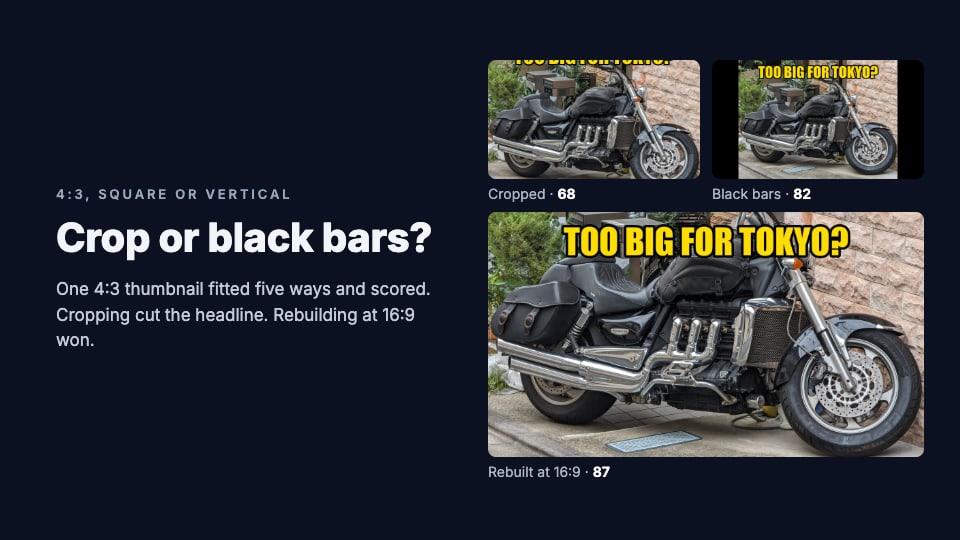
- In our test, cropping scored lowest and rebuilding at 16:9 scored highest. We fitted one 4:3 thumbnail five ways. Our critique scored them from 68 (cropped, headline cut off) to 87 (rebuilt at 16:9 from the full photo).
What YouTube does with a picture that isn't 16:9
YouTube's developer documentation is clear: an uploaded thumbnail is resized "without changing its aspect ratio", and it "is not cropped, but may include black bars". YouTube's help page for custom thumbnails just asks for 16:9.
To see what that looks like in practice, we checked 10,084 recent videos: every video in ThumbnailPeak's Breakouts sample on 22 October 2026, each published between 2 and 20 October with at least 5,000 views. Only 23 of them, 0.2%, had a thumbnail that wasn't 16:9. Almost every successful video uses a 16:9 thumbnail.
For all 23, YouTube's own 16:9 copies of the thumbnail, the files its feeds load, had black bars down both sides. None was cropped or stretched.
Then we looked at six of those videos on their channels' pages. On a computer, they showed with the black bars. On YouTube's mobile site, a channel's Videos tab loads a different copy, YouTube's 4:3 one, and crops it to fill a 16:9 tile. For a 16:9 thumbnail, that crop removes the black bars YouTube adds to its 4:3 copy, and nothing is lost. For a 4:3 thumbnail, it removes the top and bottom of the picture.
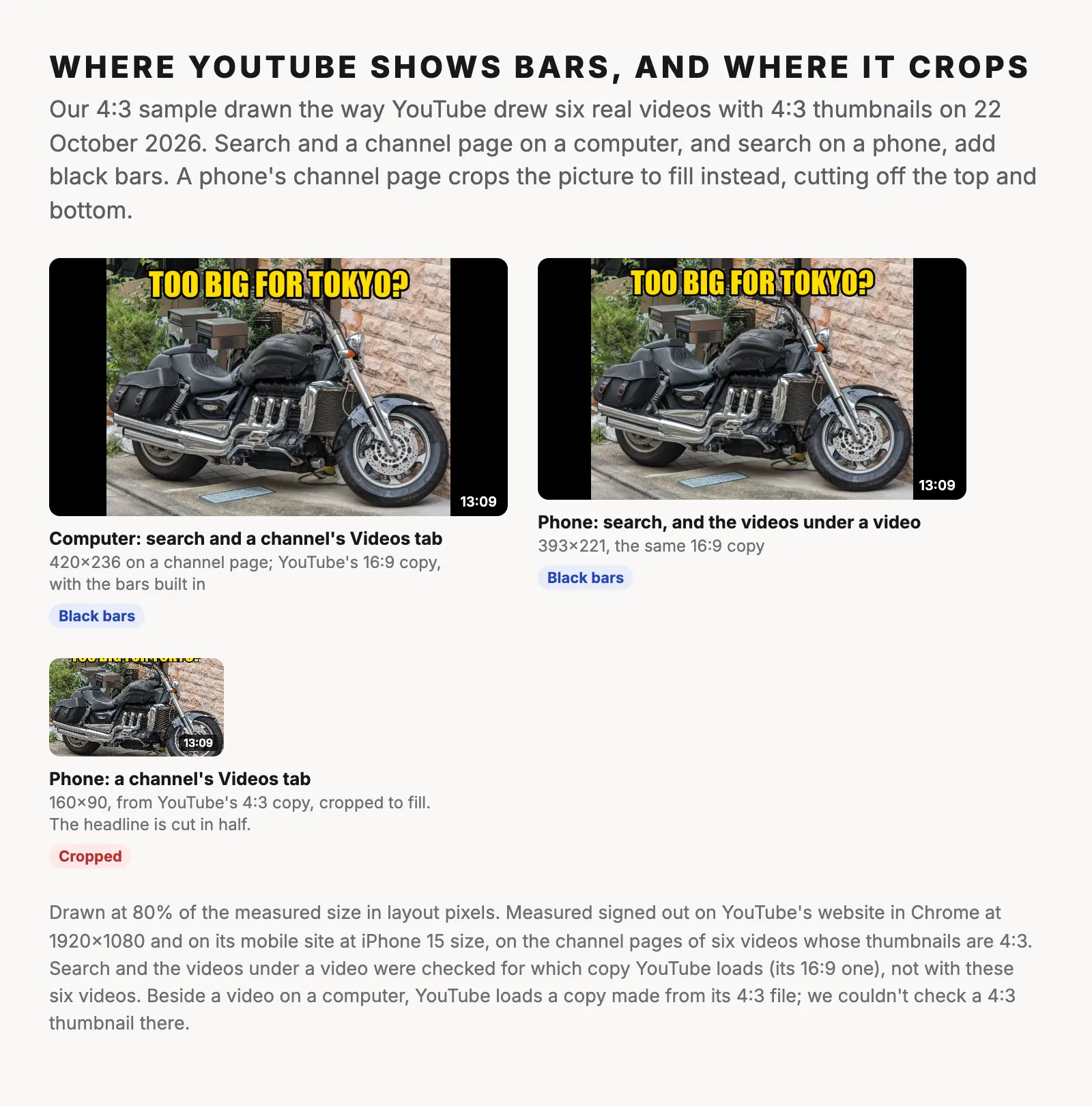
So a picture that isn't 16:9 gets the worst of both: smaller, with dead space, in most places, and cropped in one. Fitting it to 16:9 yourself means you choose what viewers see.
One 4:3 thumbnail, fitted five ways
We made a thumbnail the way it often happens: on a photo straight from a camera, at the camera's 4:3 shape. It's a big motorcycle parked by a wall in Tokyo, with the headline "TOO BIG FOR TOKYO?" across the top, 1600×1200 pixels.
Then we fitted it to 16:9 five ways and ran each through ThumbnailPeak's AI critique, with the title "Is This Motorcycle Too Big for Tokyo?":
- Black bars, the way YouTube shows it: 82.
- Crop to fill, keeping the middle: 68.
- Fit on a blurred background: 83.
- Black bars filled in by AI, with ThumbnailPeak's Edit: 82.
- Rebuilt at 16:9 from the full camera photo: 87.
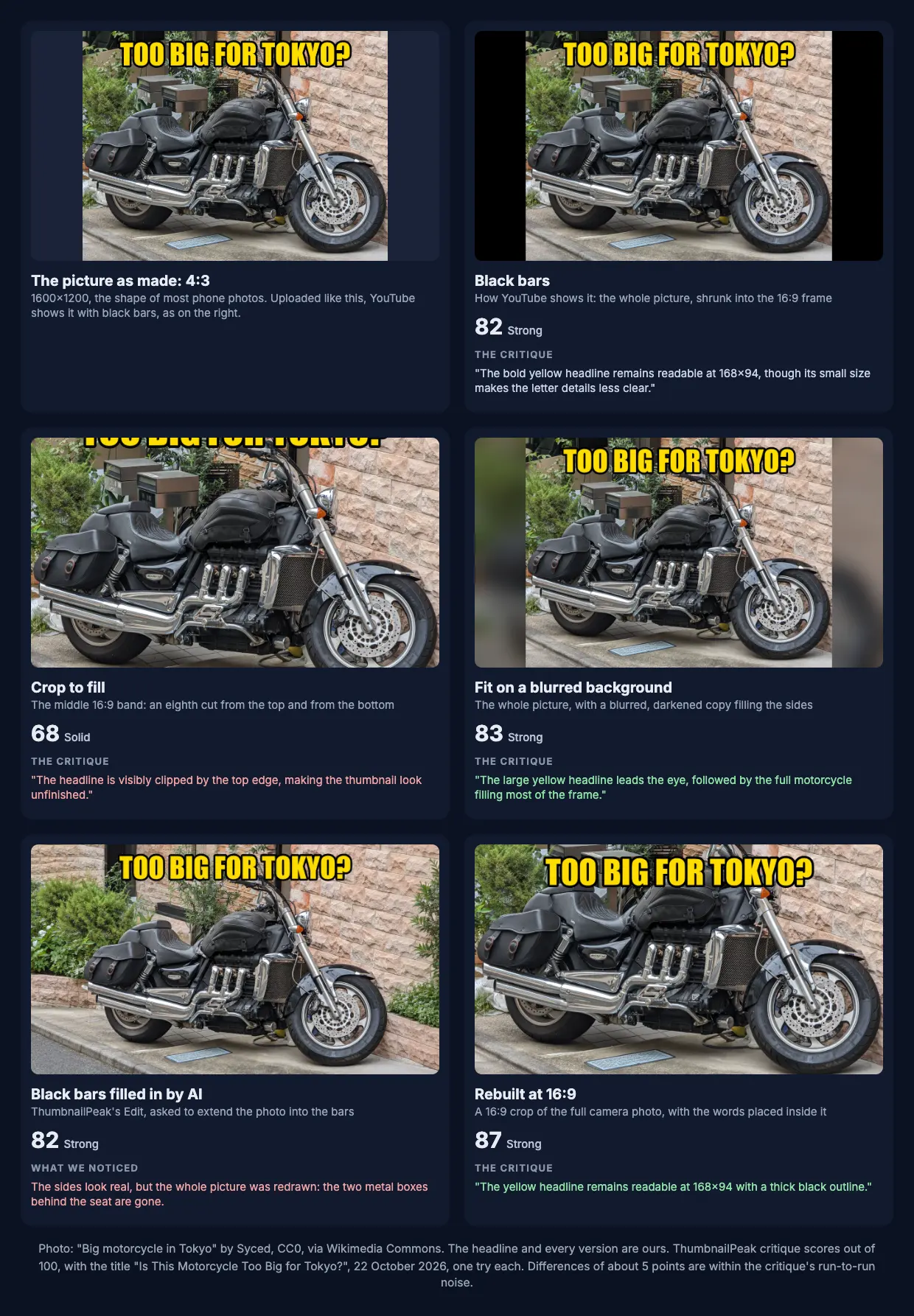
Crop to fill cut off the headline. A 4:3 picture cropped to 16:9 loses an eighth of its height from the top and an eighth from the bottom. The headline sat at the top, so its upper half went. The critique marked its legibility down to 1 out of 4 and said: "The headline is visibly clipped by the top edge, making the thumbnail look unfinished." It's the lowest score of the five by 14 points.
Black bars kept everything, a little smaller. Nothing was lost, but the picture fills only three quarters of the frame's width, so every part of it is a quarter smaller. The critique still read the headline at 168×94, the size it checks words at, "though its small size makes the letter details less clear."
A blurred background looked finished. The fit is the same as black bars, with a blurred, darkened copy of the photo filling the sides instead of black. It scored a point above black bars, which is well within the critique's noise. What it changes is how the thumbnail looks next to others: like a designed thumbnail rather than an upload that didn't fit.
Rebuilding at 16:9 scored highest. We went back to the full camera photo, cut a 16:9 band from it that keeps both wheels, and put the headline inside the frame. The motorcycle fills the width, and the headline is bigger. That's the best fix whenever you still have the original photo or design file.
All five lost the same points for one reason that has nothing to do with shape: the headline repeats the title. That's a separate problem.
Can AI fill the black bars?
It can, convincingly. We gave Edit the black-bars version with one request: "Replace the black bars on the left and right by extending the photo naturally: more of the stone wall, plants and pavement. Keep the motorcycle and the words exactly as they are." It returned a full 16:9 picture with more wall and plants at the sides, and you'd never guess where the bars had been.
It scored 82, the same as the black bars it replaced. And up close, it isn't the same photo.
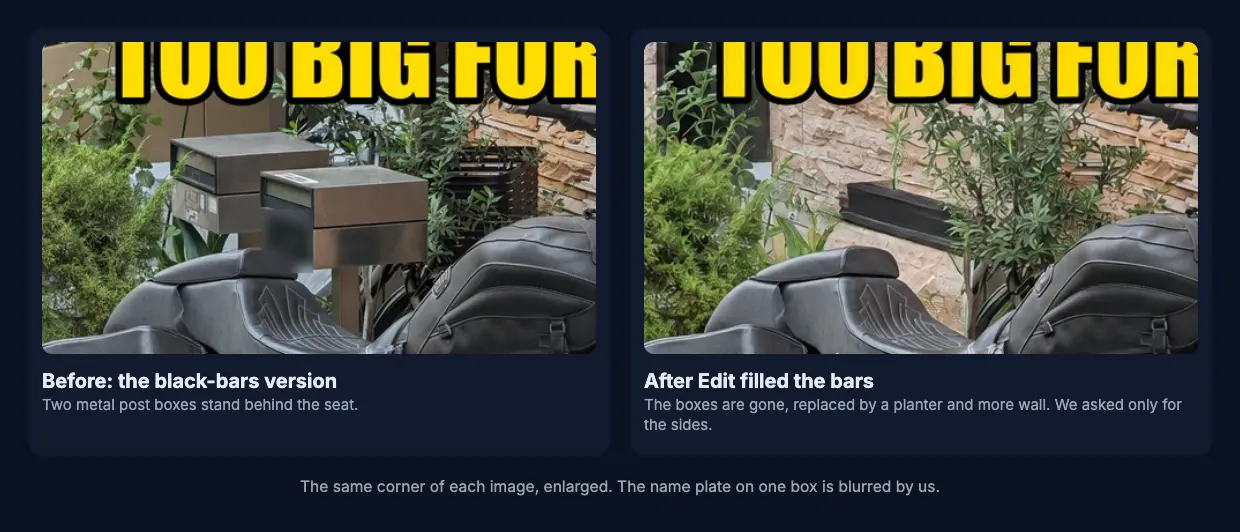
Edit redraws the whole picture, not only the bars. Two metal post boxes behind the seat disappeared, and about 31% of the pixels in the original part of the picture changed noticeably. We found the same thing when we redrew blurry thumbnails: the result looks right, but it's a new picture. For a street scene that's fine. For your face or a product, check every detail before you use it.
A vertical picture has no good fit
A 9:16 picture is much harder. We cropped the same photo to 9:16 around the front of the motorcycle, as if reusing a Shorts cover, and tried it on a regular video.
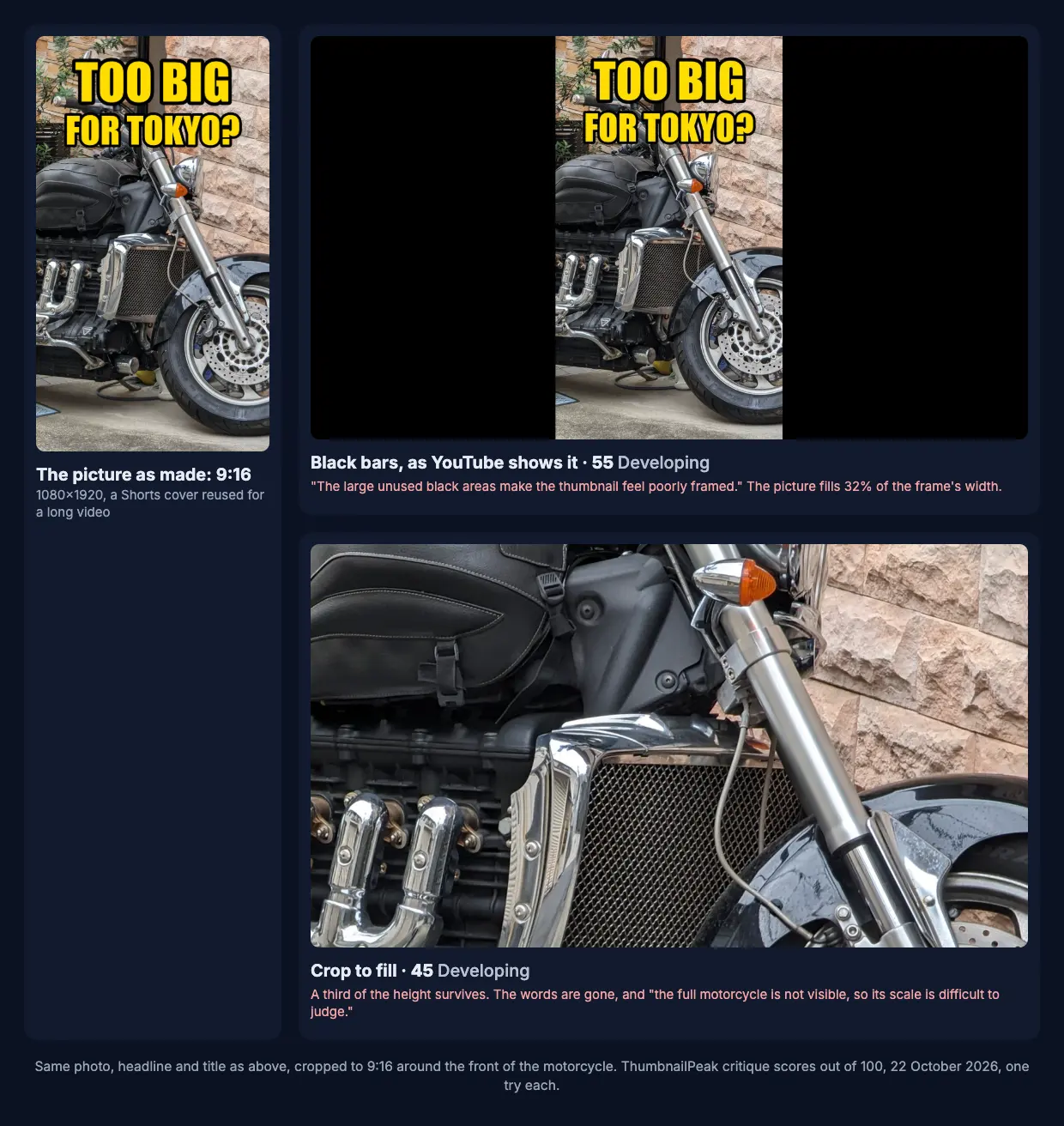
- With black bars, the picture filled less than a third of the frame's width. It scored 55. The critique flagged "very wide black bars on both sides" as a technical flaw.
- Cropped to fill, only the middle third of its height survived: an engine and a fork, no headline. It scored 45.
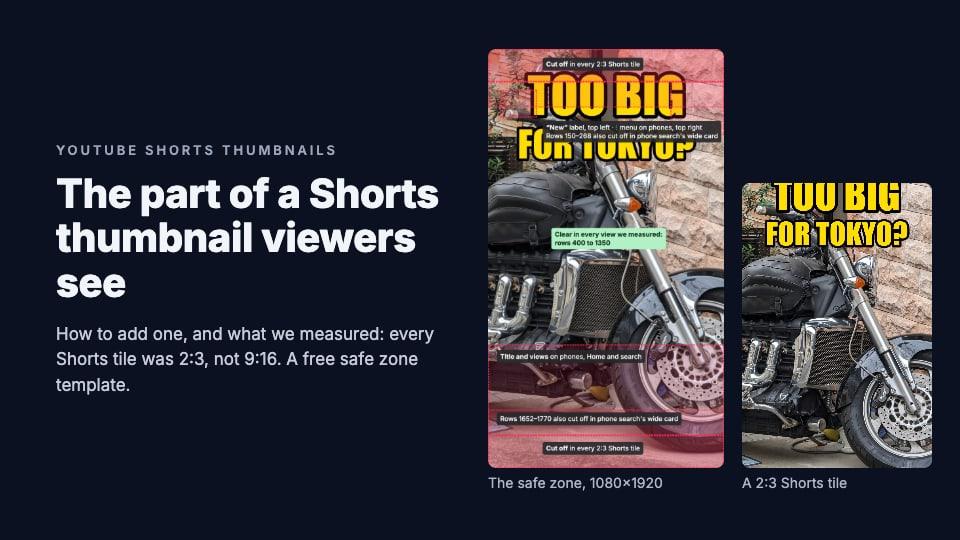
Neither works. A vertical picture needs a new 16:9 design. If you made it for a Short, our guide to Shorts thumbnails covers the other direction.
How to fit a picture that isn't 16:9
In order of what worked best:
- Rebuild it at 16:9. Go back to the original photo or design file, set the canvas to 1280×720 or larger, and place the subject and words inside it. Keep words away from the edges and out of the bottom-right corner, where YouTube draws the video's length.
- Fit it on a blurred or solid background. The whole picture stays, and the sides look intentional. The thumbnail resizer does this in your browser: choose Fit + blur or Fit + color.
- Crop it, choosing what stays. If the picture has room around the subject and no words near the top or bottom, a crop is fine. Choose the crop yourself: in the resizer's Crop to fill, drag the picture until the right part is in the frame.
- Fill the bars with AI, if you have no other picture. Check the result at full size for anything that changed.
- Leave the black bars only as a last resort. Nothing is lost, but your thumbnail is smaller than every 16:9 thumbnail next to it, and on a phone's channel page it gets cropped anyway.
Whichever you choose, look at the result at the sizes viewers see it. ThumbnailPeak's thumbnail tester accepts a picture of any shape at least 640 pixels wide and fits it to 16:9 for you, either cropped to fill or with black bars. A switch next to the "Resize to 16:9" link changes which. Then it shows your thumbnail in a YouTube feed beside real videos, on a computer, a phone and a TV.
How often creators bring a picture that isn't 16:9
Until 15 October 2026, ThumbnailPeak's critique refused any image that wasn't close to 16:9. That happened 253 times in two months, which made it one of the most common reasons a run on ThumbnailPeak failed. Since then, the critique accepts any shape and scores the fitted copy, and tells you which fit it scored.
From 15 to 22 October, 15 of the 355 thumbnails critiqued on ThumbnailPeak were fitted from another shape or had black bars: about 1 in 24. Among the 10,084 recent videos above, it was 1 in 438.
Frequently asked questions
Can a YouTube thumbnail be 4:3?
Yes. YouTube accepts it, but shows it with black bars at the sides in most places, and crops off its top and bottom on a phone's channel page. Fit it to 16:9 yourself so you choose what viewers see.
Can I use a square image as a YouTube thumbnail?
Yes, but a square picture fills only 56% of the 16:9 frame's width when YouTube adds black bars, and loses 44% of its height when cropped. Rebuild it at 16:9, or fit it on a blurred background.
Does YouTube crop thumbnails?
Not the file you upload: YouTube's documentation says it isn't cropped. But on a phone, a channel's Videos tab shows a crop of YouTube's 4:3 copy. A 16:9 thumbnail loses nothing there; a 4:3 one loses its top and bottom.
Why does my YouTube thumbnail have black bars?
Either your image isn't 16:9, so YouTube added bars to fit it, or you're looking at one of YouTube's 4:3 copies (the 480×360 and 640×480 sizes), which put black bars above and below every 16:9 thumbnail. The 1280×720 copy from the thumbnail downloader has no bars.
What's the best aspect ratio for a YouTube thumbnail?
16:9, such as 1280×720, 1920×1080 or 3840×2160. The YouTube thumbnail size guide has the full requirements.
How we did it: the thumbnail was made from "Big motorcycle in Tokyo" by Syced, published under CC0 on Wikimedia Commons; the headline and every version are ours. Each version was critiqued once on 22 October 2026 with the same title and no description; differences of about 5 points are within the critique's run-to-run noise. The 10,084 videos are those in ThumbnailPeak's Breakouts sample that day: long and medium-length videos published 2 to 20 October 2026, each with at least 5,000 views and at least its channel's usual views. We counted a thumbnail as not 16:9 when YouTube's 4:3 copy of it had no black bars above and below, and looked at YouTube's 16:9 copies of those 23. The channel pages were loaded signed out in an automated Chrome browser at 1920×1080 and on YouTube's mobile site at iPhone 15 size. The ThumbnailPeak counts cover critiques from 15 to 22 October 2026, each picture once, with our own account's critiques and the critiques our tools run on their own results left out.