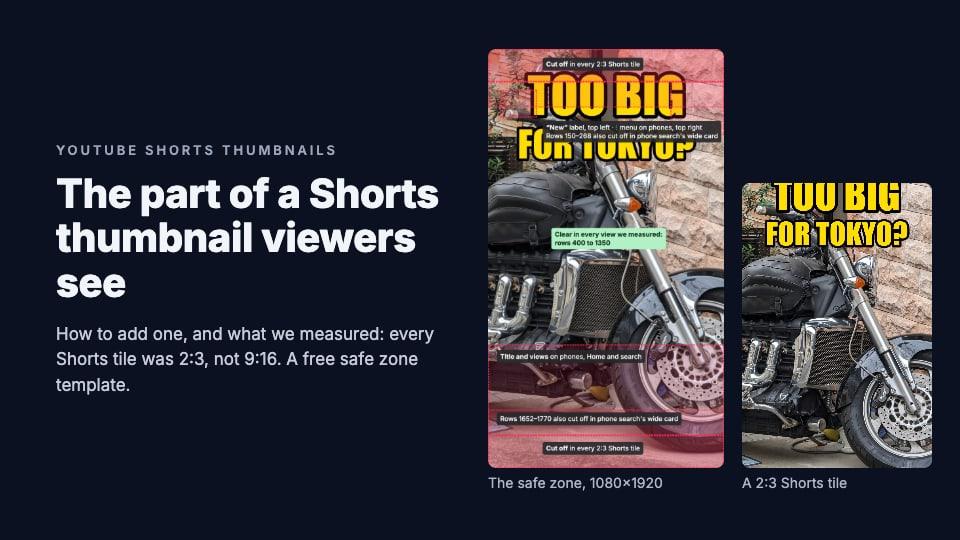
Disclosure: we make ThumbnailPeak, a thumbnail tester. The steps come from YouTube's help pages as of 22 October 2026, and every size was measured on YouTube itself that day. How we measured is at the end.
There are two ways to give a YouTube Short a thumbnail:
- Pick a frame from the video. In the YouTube app on your phone, while you upload the Short or later from Your videos.
- Upload your own picture. In YouTube Studio on a computer. YouTube began rolling this out in July 2026, starting with channels in the YouTube Partner Program, so not every channel has it yet.
Whichever you use, viewers never see the whole picture. We measured every Shorts tile YouTube drew on its website and mobile site, and here's what we found:
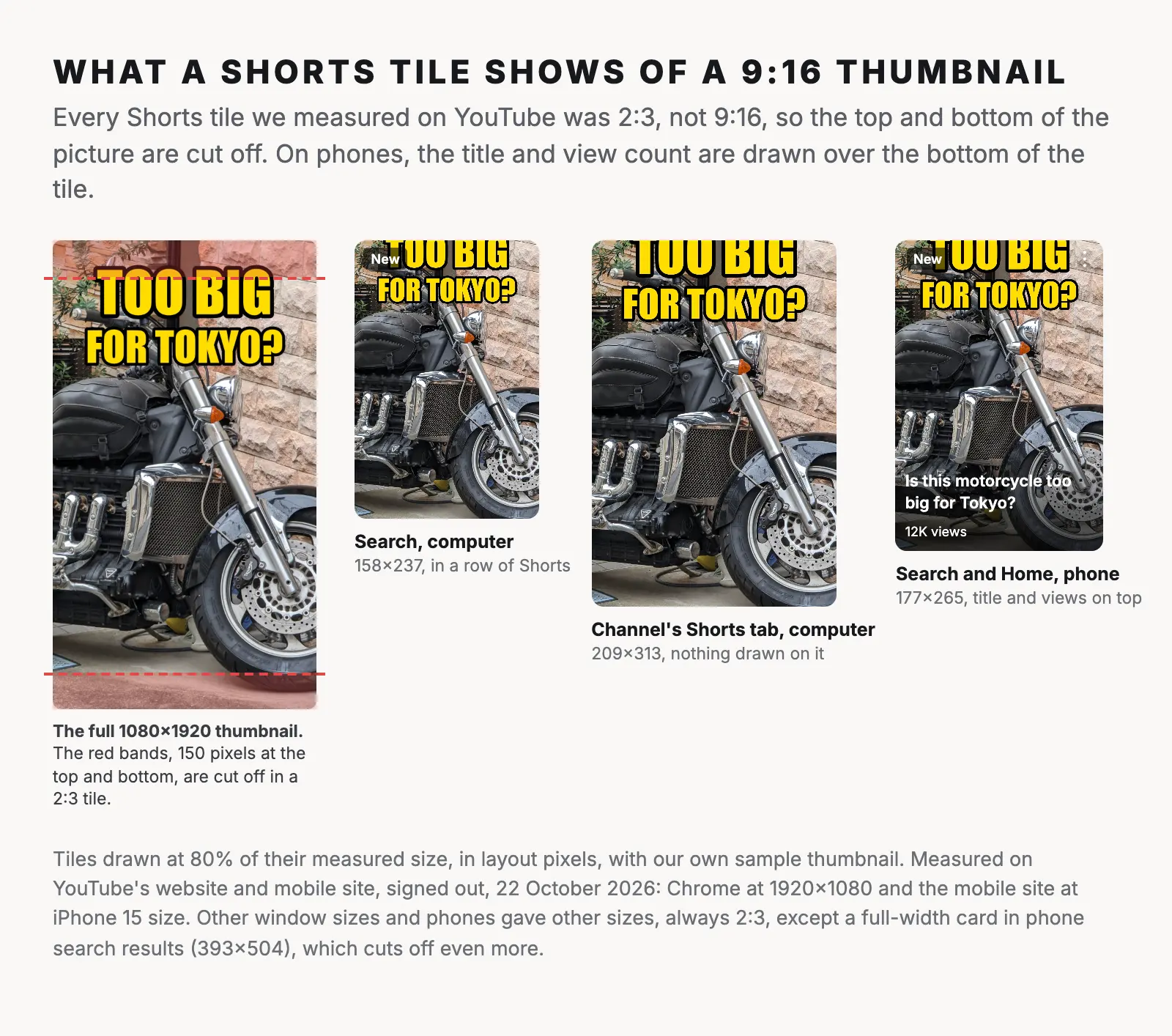
- Every Shorts tile was 2:3, not 9:16. YouTube trims the top and bottom of a 9:16 thumbnail to fit: 150 pixels off each end of a 1080×1920 image.
- On a phone, the Short's title and view count sit over the bottom of the tile. On Home and in search, they cover roughly the bottom quarter.
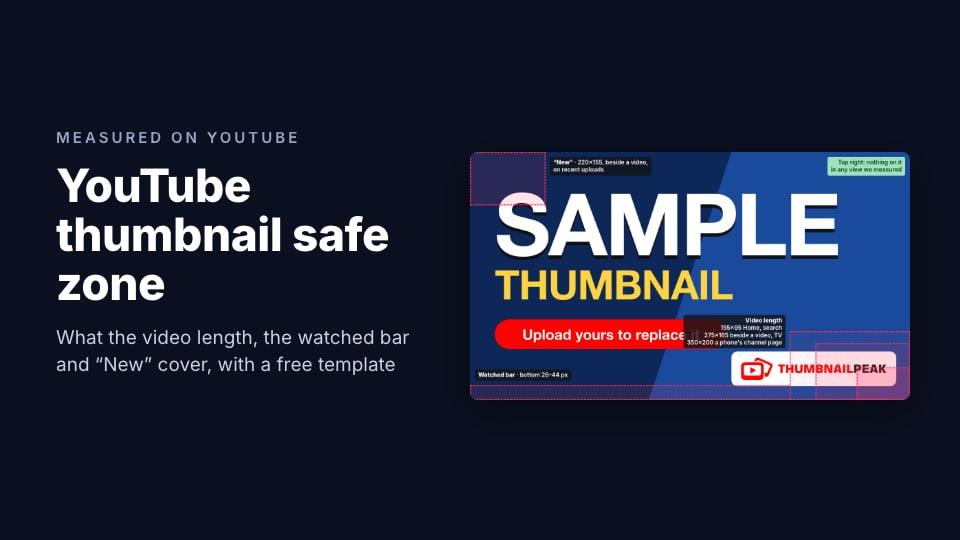
- The safe area is rows 400 to 1350 of a 1080×1920 thumbnail. Nothing was cut off or drawn over there in any view we measured. Our free template marks it.
How to add a thumbnail to a Short on your phone
On a phone you can choose a frame from the Short, but you can't upload a separate picture. YouTube's help page says custom Shorts thumbnails can only be added in YouTube Studio on a computer.
While you upload: after you've recorded or picked your Short in the YouTube app, the screen where you add the details has a thumbnail option. Tap it, slide along the video to the frame you want, and confirm.
After it's posted:
- In the YouTube app, tap your profile picture, then Your videos.
- Find the Short, tap More (the three dots), then Edit.
- Tap the thumbnail and slide to the frame you want.
- Save your changes.
The YouTube Studio app can't add a custom thumbnail to a Short.
How to upload a custom thumbnail for a Short
These steps are from YouTube's help page for adding video thumbnails, as of October 2026:
- Sign in to YouTube Studio on a computer.
- In the left menu, click Content, then the Shorts tab.
- Find the Short and click the edit icon beside it to open its details.
- Under Thumbnail, choose Upload file and pick your image. YouTube recommends 9:16.
- Click Save.
You can add it while uploading from a computer, or to a Short that's already live. If you upload from your phone, add the thumbnail later from a computer.
If you don't see Upload file: YouTube announced custom Shorts thumbnails on 24 July 2026, rolling out to Partner Program channels first. Your account also has to be verified. Until then, you can still pick one of the suggested frames. For every other reason an upload fails, see why YouTube won't take your custom thumbnail.
What size is a YouTube Shorts thumbnail?
- Recommended: 2160×3840 pixels. 1080×1920 is the same shape and works just as well.
- Aspect ratio: 9:16.
- Minimum: 640 pixels tall.
- Format: JPG or PNG.
- File size: up to 50 MB, since Shorts thumbnails are uploaded from a computer.
The YouTube thumbnail size guide has the rules for regular videos, and the thumbnail resizer crops or fits any image to 1080×1920 in your browser.
Where viewers see a Shorts thumbnail
Not in the Shorts feed. There, the next Short simply starts playing, so no thumbnail shows. A Shorts thumbnail appears where YouTube shows Shorts as tiles:
- in a row of Shorts in search results, on a computer and on a phone
- in a row of Shorts on Home
- on your channel's Shorts tab
- in the subscriptions feed
So it matters most to people who are looking for something, or looking at your channel, rather than swiping.
What a Shorts tile shows of your thumbnail
YouTube recommends a 9:16 thumbnail, but it doesn't show one. Every Shorts tile we measured on 22 October 2026 was 2:3: wider than 9:16 for its height. YouTube fills the tile with your picture and cuts off what doesn't fit, which is the top and bottom.
Here are the sizes we measured, in layout pixels:
- Search on a computer: 158×237 in a 1920-wide window, 207×311 at 1366 wide. With another search, YouTube showed bigger tiles: 237×356.
- A channel's Shorts tab on a computer: 209×313 at 1920 wide, 208×311 at 1366.
- Search and Home on a phone: 177×265 on an iPhone 15, 186×279 on a Pixel 7.
- A channel's Shorts tab on a phone: 195×292 on an iPhone 15, 204×306 on a Pixel 7.
All of them are 2:3. The only exception was a full-width card that phone search sometimes shows for a single Short, 393×504 on an iPhone 15, which cuts off even more: about 270 pixels from each end of a 1080×1920 picture.
YouTube also draws on top of some tiles:
- A "New" label in the top-left corner of recent Shorts, on computers and phones.
- A menu button (three dots) in the top-right corner, on phones.
- The title and view count over the bottom of the tile on a phone's Home and search, on a dark fade. On a channel's Shorts tab on a phone, only the view count.
On a computer, the title sits under the tile, not on it.
A safe zone for Shorts thumbnails
Put together, that leaves a clear band in the middle of a 9:16 thumbnail. On a 1080×1920 design:
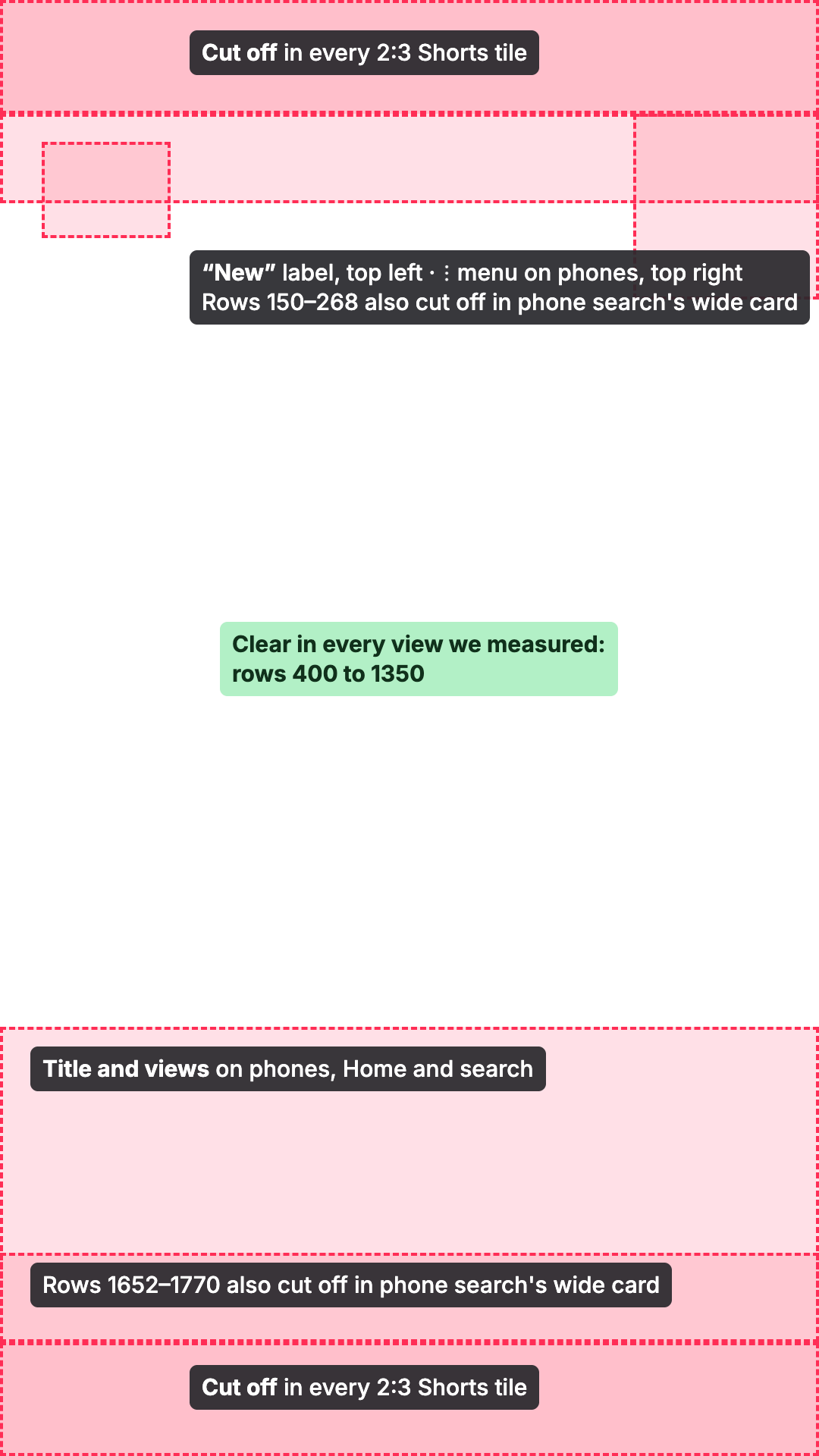
- The top and bottom 150 pixels are cut off in every 2:3 tile.
- Rows 150 to 268 and 1652 to 1770 are also cut off in phone search's full-width card.
- The top-left corner, down to about row 314, can be covered by the "New" label, and the top-right corner, down to row 395, by the menu button on phones.
- From row 1354 down, the title and view count cover the picture on a phone's Home and search.
- Rows 400 to 1350 were clear in every view we measured. Put faces and words there.
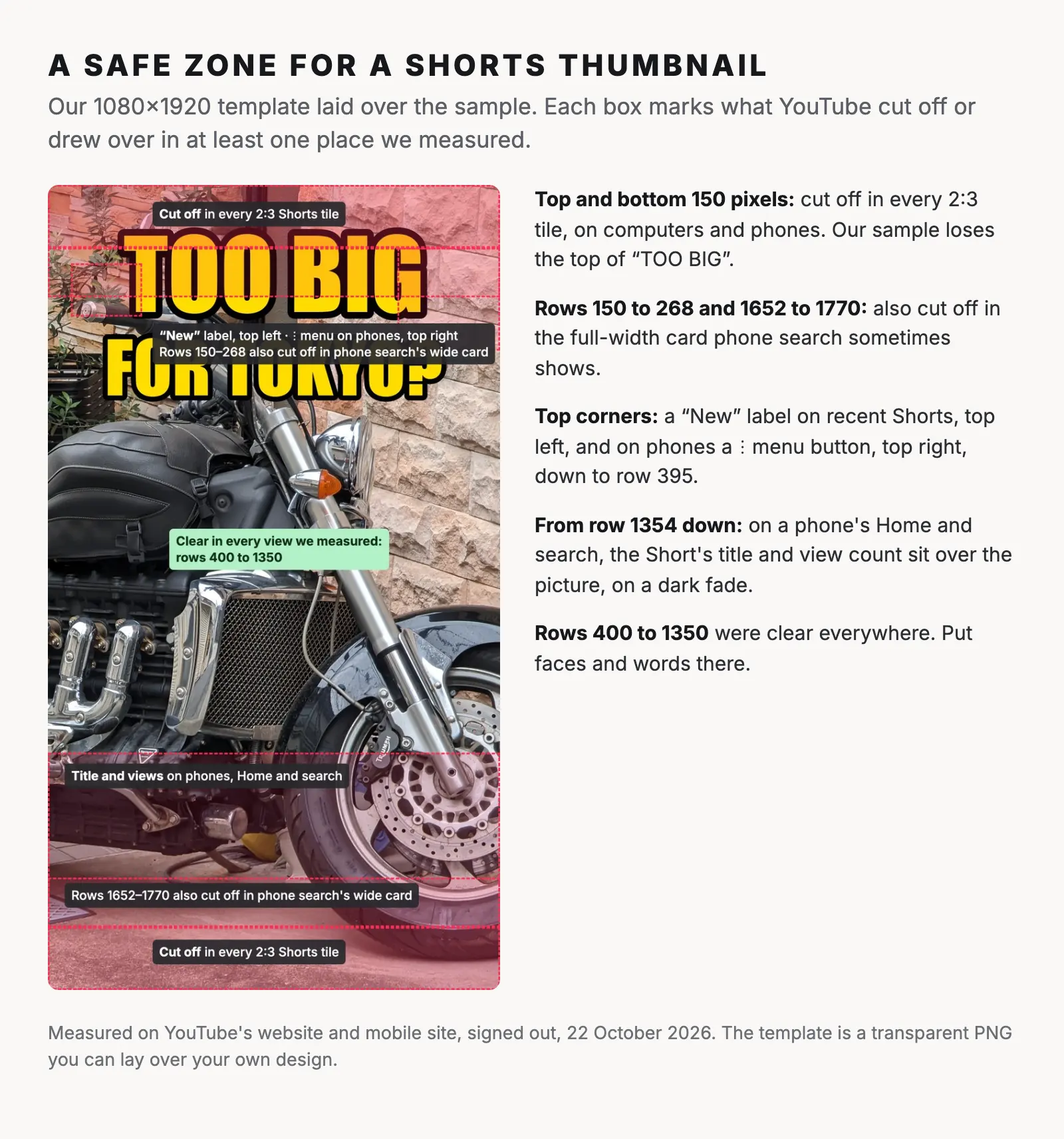
Download the Shorts safe zone template (PNG, 1080×1920, transparent). Put it on the top layer of your design, check that no face or word sits in a red box, then hide it before you export. For a 2160×3840 design, scale it to 200%.
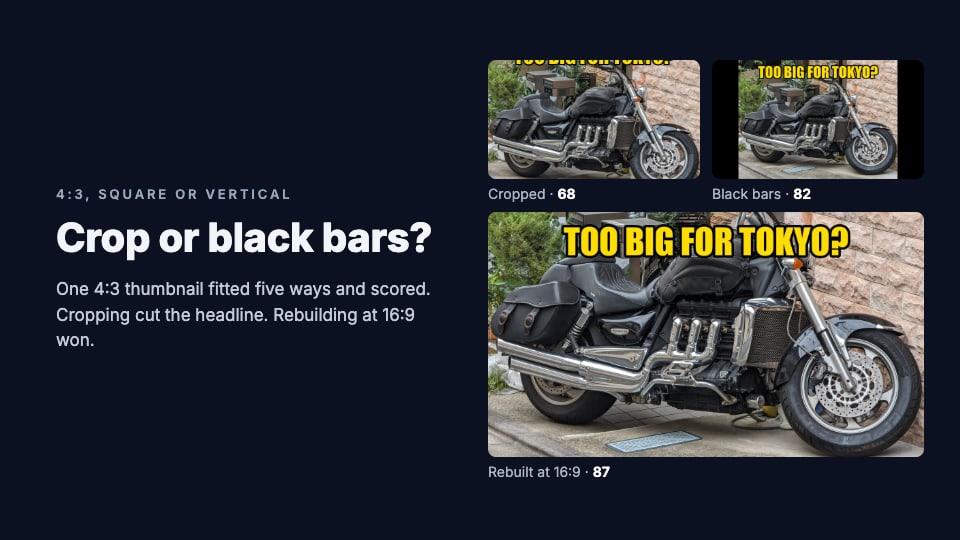
Our sample shows why this matters. Its headline starts 70 pixels from the top, so in every tile "TOO BIG" loses its top. Moved down to row 400, it would survive everywhere.
Can you use a 16:9 thumbnail on a vertical video?
You can, but YouTube may not show it. Its help page says that a vertical video with a 16:9 custom thumbnail gets "an auto-generated 4:5 thumbnail" instead "on the home, explore, and subscription pages". The 16:9 thumbnail still appears "on the watch feed, watch history, and non-mobile platforms".
So if the thumbnail matters on a vertical video, make it vertical.
The reverse matters too: a 9:16 picture uploaded for a regular, horizontal video is shown with wide black bars down both sides. When we tested a 9:16 picture on a 16:9 video, it filled less than a third of the frame.
Can you A/B test a Shorts thumbnail?
Not yet. YouTube's help page for its A/B test feature says: "You are not able to A/B test Shorts, Scheduled Lives, and Premiere videos at this time." Our guide to YouTube's thumbnail A/B test covers what it can test.
Frequently asked questions
Why can't I add a custom thumbnail to my Short?
Usually because you're on your phone: custom Shorts thumbnails can only be uploaded in YouTube Studio on a computer. If the option is missing there too, your channel may not have the feature yet, since it's rolling out to Partner Program channels first, or your account isn't verified. You can still choose a frame from the video.
What size should a YouTube Shorts thumbnail be?
2160×3840 or 1080×1920 pixels, at 9:16, as a JPG or PNG. Keep faces and words between rows 400 and 1350 of a 1080×1920 design, because Shorts tiles are 2:3 and cut off the top and bottom.
Can I change a Short's thumbnail after posting it?
Yes. In YouTube Studio on a computer, open the Short's details from the Shorts tab and upload a new image. In the YouTube app, you can pick a different frame from Your videos.
Do Shorts thumbnails matter?
Less than for regular videos, because most Shorts are watched in the Shorts feed, where no thumbnail is shown. They do show in search, in rows of Shorts on Home, on your channel's Shorts tab and in subscriptions.
Why does my Shorts thumbnail look cropped?
Because Shorts tiles are 2:3, not 9:16. YouTube fills the tile with your picture and cuts off the top and bottom, about 8% from each end.
How we measured: on 22 October 2026 we opened YouTube in an automated Chrome browser, signed out, in US English, and measured every Shorts tile on the page in layout pixels (CSS pixels): search results for two searches and two channels' Shorts tabs, on a computer at 1920×1080 and 1366×768, and on YouTube's mobile site at the screen size and settings of an iPhone 15 and a Pixel 7, plus Home on the phones after the browser had watched three videos. On a computer, YouTube's Home showed no row of Shorts to a signed-out visitor. We recorded what YouTube drew over each tile. We did not measure the YouTube apps for phones and tablets, the subscriptions feed or what signed-in viewers see. The steps come from YouTube's help pages; the July 2026 launch is from YouTube's announcement as reported by Tubefilter. The sample thumbnail is ours, made from "Big motorcycle in Tokyo" by Syced (CC0).