Disclosure: we make ThumbnailPeak, a thumbnail tester. The steps and requirements come from Twitch's help pages as of 5 November 2026, and every size was measured on Twitch's website that day, signed out. How we measured is at the end.
Twitch lets you upload your own thumbnail for three kinds of video: past broadcasts (VODs), highlights and uploads.
- Size: 16:9, at least 1280×720 pixels.
- Where: in the Video Producer, in your Creator Dashboard on a computer. Open the video's edit panel and change the thumbnail.
- Live streams: you can't set one. Twitch takes a snapshot of your stream about every 5 minutes and shows that.
Nothing gets cut off, but some of it gets covered. We measured Twitch's video tiles on its website and mobile site, and here's what we found:
- Every video tile was 16:9 and showed the whole picture, with square corners.
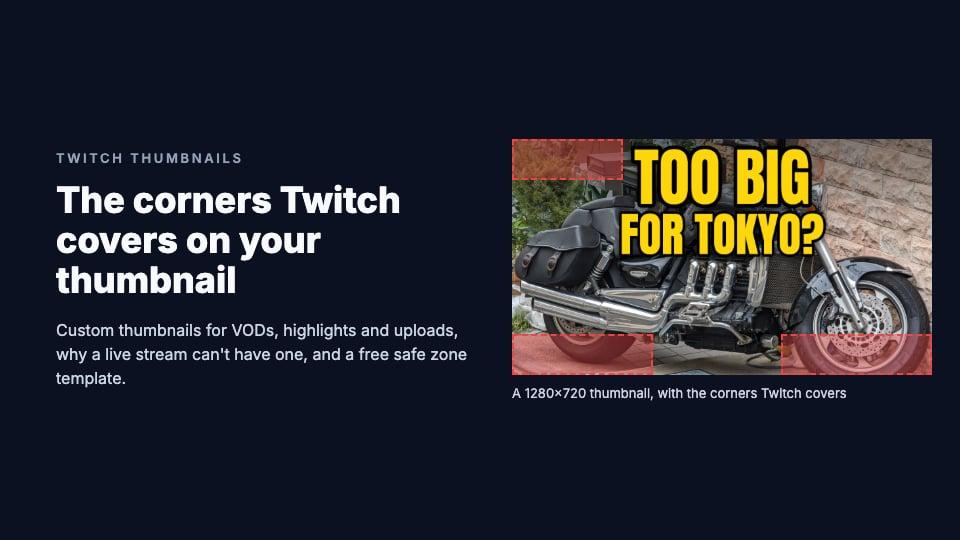
- Twitch draws over three corners. The length sits in the top-left corner, and the view count and age in the bottom-left and bottom-right.
- On a computer, Twitch shows a 320×180 copy of your thumbnail, even on a sharp screen, so small text goes soft. Phones get the 1280×720 copy.
- The safe area is the middle band and the top right. Our free template marks it.
Our guide to thumbnail sizes on every platform has the rest.
How to add a custom thumbnail to a Twitch VOD, highlight or upload
These steps are from Twitch's help pages, as of 5 November 2026. We don't have a Twitch account, so we couldn't open the screen ourselves.
- On twitch.tv on a computer, click your profile picture, then Creator Dashboard.
- Open the Content menu and choose Video Producer. The drop-down above the list shows past broadcasts, highlights or uploads.
- Click the video, or its three-dot menu and then Edit, to open the edit panel.
- Change the thumbnail. Twitch's help page on videos says the panel lets you "adjust the video thumbnail", beside the title, description and category.
- Click Save Changes.
Until you do, Twitch shows a thumbnail it generates automatically. Its 2015 announcement said channel editors can upload one too.
Where it's worth the effort:
- A past broadcast's thumbnail goes when the video does. Twitch keeps past broadcasts for 7 days, 14 for Affiliates, and 60 for Partners and Prime and Turbo users.
- Highlights and uploads stay until you delete them, within a 100-hour storage limit they share. A good thumbnail keeps working there.
- Uploads are for Affiliates and Partners only.
On a phone: Twitch's help pages describe changing a thumbnail only in the Video Producer on the web. Their guide to the app's Creator Mode lists stories and clips under Content, and sends you to twitch.tv in a browser for channel changes. We couldn't confirm a way to change a video's thumbnail in the app.
Clips get theirs automatically: "You cannot change thumbnails in Clips," Twitch's help says.
What size is a Twitch thumbnail?
- Aspect ratio: 16:9.
- Minimum: 1280×720 pixels. Twitch's guide to the channel page says "Thumbnails must be 16:9 (minimum size 1280x720px)", as its 2015 announcement did.
- Recommended: Twitch names no size beyond the minimum. 1280×720 is enough: it's the largest copy Twitch's website loaded in any view we measured.
- Format and file size: Twitch doesn't publish either. Custom thumbnails on Twitch's own channel are PNG and JPEG files, so both work.
Can you set a thumbnail for a Twitch live stream?
No. Twitch's help page says live thumbnails "are updated automatically with a snapshot of your stream around every 5 minutes, and cannot be customized." Viewers see the newer snapshot when they refresh the page.
So your stream's thumbnail is whatever was on screen. What you control:
- Your overlay. Twitch's advice is to "stand out from other streams with an overlay that captures what your content is about."
- The two corners Twitch covers. Every live tile we measured had a red "LIVE" label in the top-left corner and the viewer count in the bottom-left. On a 1280×720 stream, they cover up to about the first 230×150 pixels and a strip up to about 570 pixels wide along the bottom, from row 575. Keep your name, camera and on-screen text out of them.
- Your title, category and tags, which show under the live tile, not on it.
Live tiles in the directories and home page rows were 318×179 to 353×198 on a computer and 247×139 to 380×214 on phones. After the stream, you can replace the past broadcast's thumbnail.
Where viewers see a Twitch video thumbnail
Signed out, the thumbnails you set appeared on your channel's Videos tab, on your channel's home page on a phone (your latest past broadcast), on a category's Videos tab on a computer (the mobile site said that page was unavailable), and in search results, where a channel's entry on a computer also shows its last stream.
The home page and a category's main page showed only live streams. So the thumbnails you set are seen mostly by people who come to your channel or search.
What Twitch shows of your thumbnail
Every video tile we measured was 16:9 and drew the whole picture, scaled to fit. On two custom thumbnails from Twitch's own channel, we checked that the copy Twitch loads is the full picture, not a crop.
The sizes we measured, in layout pixels:
- A channel's Videos tab on a computer: 305×172 in a 1920-wide window, 331×186 at 1366 wide; 290×163 in the rows of recent videos.
- A category's Videos tab on a computer: 318×179 at 1920 wide, 353×198 at 1366.
- Search on a computer: 214×120 for past videos, 120×68 for a channel's last stream.
- A channel's Videos tab and home page on a phone: 361×203 on an iPhone 15, 380×214 on a Pixel 7; 290×163 in the rows of recent videos.
- Search on a phone: 160×90.
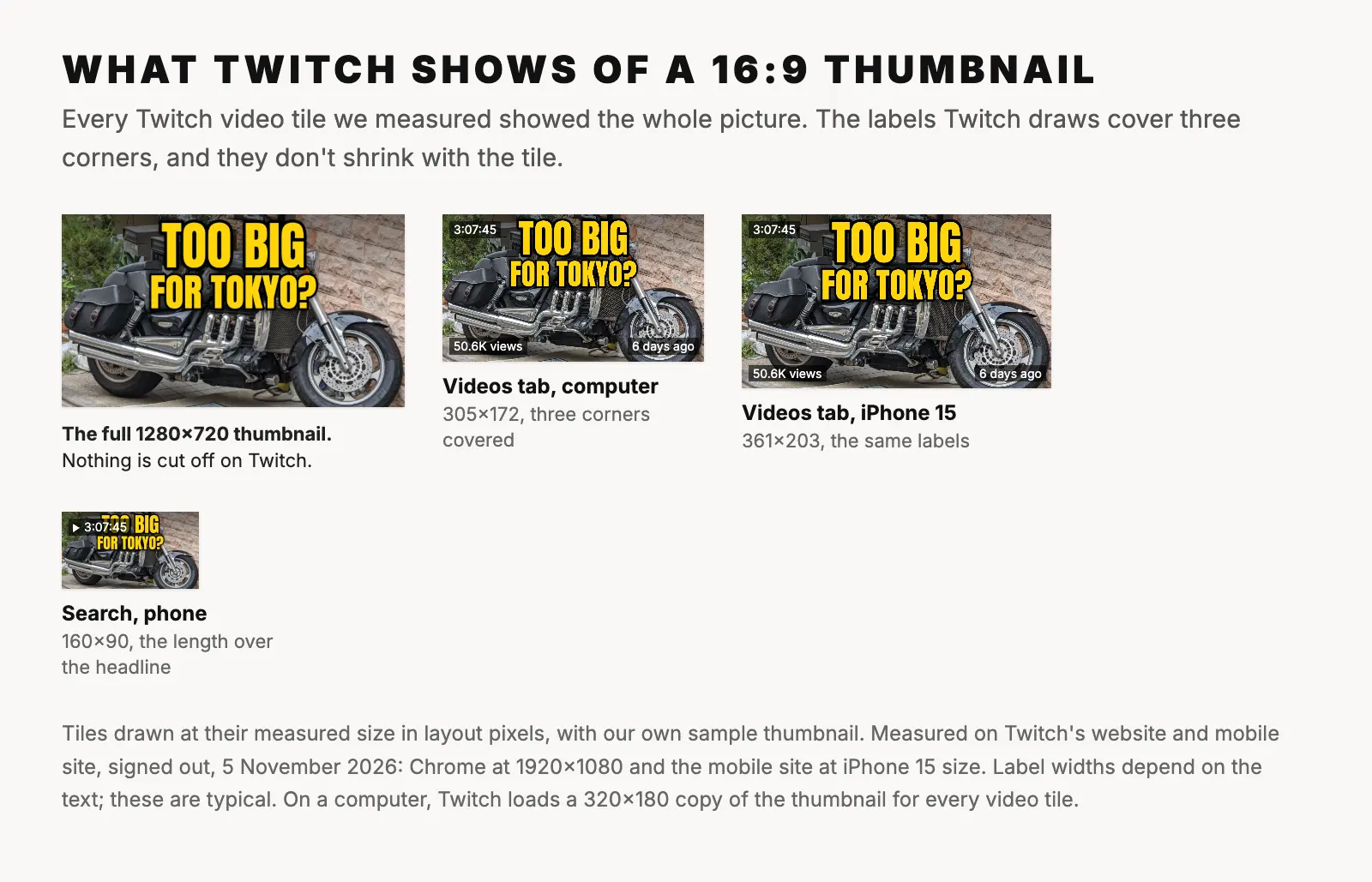
Twitch draws on top, about 8 pixels in from the edges, in white text on dark, see-through boxes:
- The length in the top-left corner, with a play icon in search.
- The view count in the bottom-left corner and the age ("6 days ago") in the bottom-right, on the Videos tabs. On a phone's channel home page, the view count takes the top-left corner instead of the length.
The labels are the same size in every tile, so they cover more of smaller tiles: the length takes about a quarter of the width on a channel's Videos tab, and up to more than half in phone search.
On a computer, your thumbnail is shown from a 320×180 copy (214×120 in search), whatever the tile's size, even on a screen with twice the pixel density. A 353×198 tile stretches it. Phones loaded the 1280×720 copy. So design for 320×180: a few big words survive, small text doesn't. Our post on how much text fits on a thumbnail has the test we use.
A safe area for Twitch thumbnails
On a 1280×720 thumbnail:
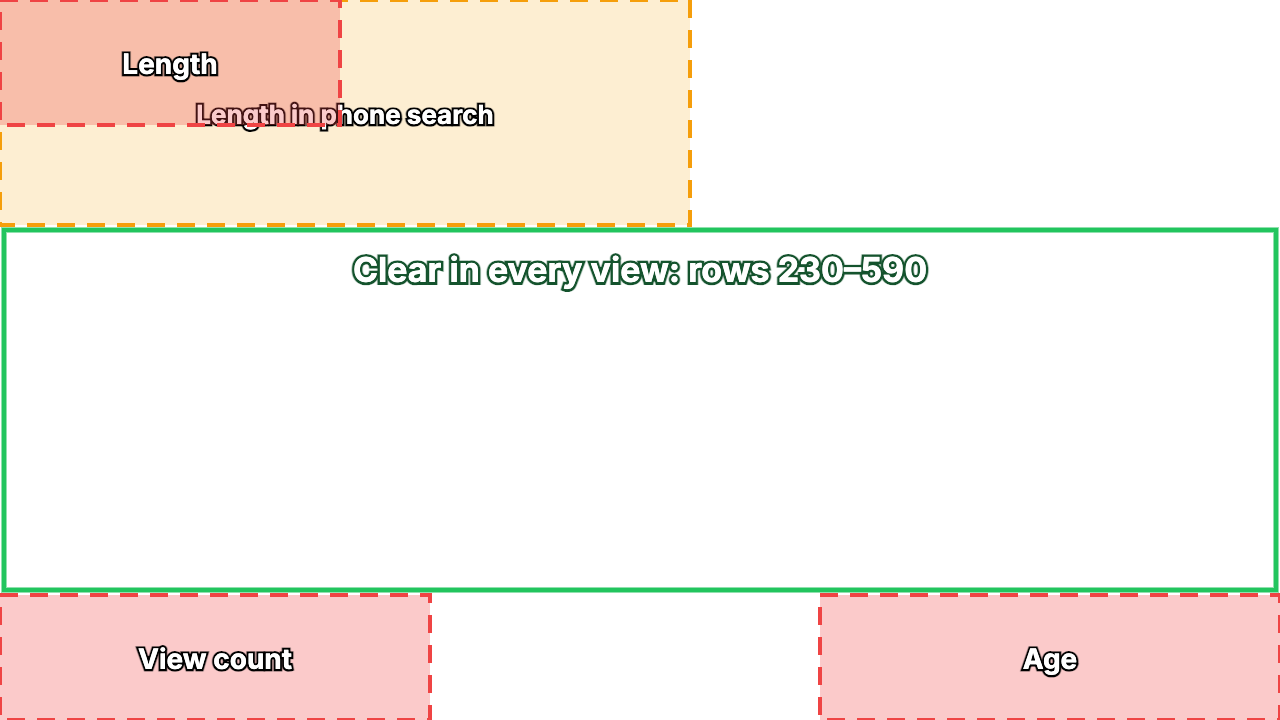
- The top-left corner, up to about x 340 and row 125, is covered by the length on the Videos tabs. In search, where tiles are smaller, it reaches x 690 and row 225 on a phone.
- The bottom-left corner, up to about x 430 from row 595, is covered by the view count.
- The bottom-right corner, from about x 820 and row 595, is covered by the age.
- Rows 230 to 590, across the full width, were clear in every view we measured, except the 120×68 last-stream thumbnail in computer search. So were the top right, from x 700, and the bottom middle, from x 430 to 820.
Put faces and words in that middle band or the top right. A headline across the top, like our sample's, loses its first word to the length in phone search.
Download the Twitch safe zone template (PNG, 1280×720, transparent). Put it on the top layer of your design, check that no face or word sits in a red box, then hide it before you export. For a 1920×1080 design, scale it to 150%.
Using your YouTube thumbnail on Twitch
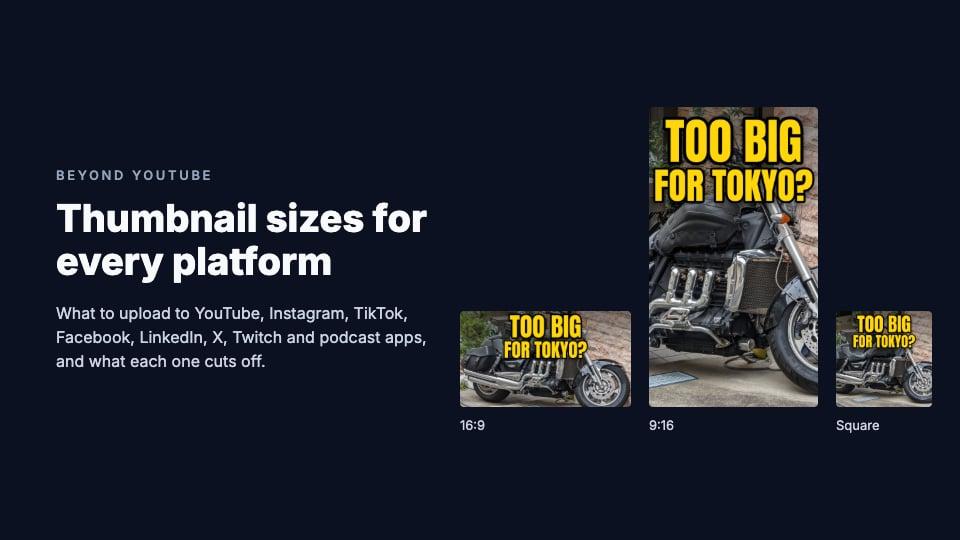
A YouTube thumbnail is the same shape and size, 16:9 and 1280×720, so it can go straight on Twitch, uncropped.
Check the corners first. YouTube puts the length in the bottom-right corner; Twitch covers the top-left and both bottom corners. Words or a face in the top-left of a YouTube thumbnail get covered on Twitch. Our YouTube thumbnail safe zone shows the YouTube side.
If your picture isn't 16:9, the free thumbnail resizer fits it with the Twitch Video thumbnail preset, 1280×720: the shape Twitch asks for, at its minimum size. Crop to fill and drag to choose what stays, or fit it on a blurred or solid background so nothing is lost.
If you also post on YouTube, our YouTube thumbnail size guide covers its rules, and ThumbnailPeak's thumbnail tester shows a 16:9 thumbnail in a YouTube feed beside real videos (not on Twitch).
The Twitch profile banner and offline banner
Profile banner. Twitch recommends 1200×480, up to 10 MB, as GIF, JPG or PNG; add it in the Creator Dashboard under Settings, Channel, Brand. On a computer, while you're offline, it fills the top of your channel page, with a card about your channel and a carousel of your videos over most of its middle. On a phone, only a strip through the middle shows: rows 103 to 377 on an iPhone 15. The one part we saw in every view was the right end of that strip, about columns 980 to 1160 and rows 110 to 370, though a small arrow button sat over part of it at 1366 wide. Twitch's help says to "concentrate the graphics on the left", but on the computer pages we measured, the offline card covered the left of the middle. So put your name or logo at the right end. The resizer's Twitch Banner 1200×480 preset makes one.
Offline banner (Twitch calls it the video player banner). Twitch's help gives no size; a 2017 Twitch post recommended "1920x1080 image with any text or important content near the center." We couldn't measure one: the offline channel we checked showed only its profile banner.
Frequently asked questions
What size is a Twitch thumbnail?
16:9, at least 1280×720 pixels, for past broadcasts, highlights and uploads. Twitch publishes no file-size limit or format list; PNG and JPEG both work. Keep faces and words out of the top-left and bottom corners.
Can you change a Twitch stream's thumbnail while you're live?
No. Twitch takes a snapshot of your stream about every 5 minutes, overlay included, and it can't be customized. You can set one for the past broadcast afterwards.
How do I change a VOD thumbnail on Twitch mobile?
Twitch's help pages only describe the Video Producer on the web: Creator Dashboard, Content, Video Producer, then edit the video. We couldn't confirm a way in the app.
Does Twitch crop thumbnails?
No. Every video tile we measured showed the whole 16:9 picture, but labels cover the top-left and bottom corners.
Why does my Twitch thumbnail look blurry?
On a computer, Twitch shows a 320×180 copy (214×120 in search), even on sharp screens and in tiles up to 353×198. Small text blurs at that size. Use fewer, bigger words.
Does Twitch accept a thumbnail smaller than 1280×720?
Twitch's help says the minimum is 1280×720, yet some custom thumbnails on Riot Games' channel are stored no larger than 640×360, and two on Twitch's own at 1000×562 and 1095×616, so it may not refuse a smaller file. Every one we found was 16:9. Use at least 1280×720: phones load that copy.
How we measured: on 5 November 2026 we opened Twitch's website in an automated Chrome browser, signed out, in US English, and measured up to 12 video or live tiles on each page in layout pixels (CSS pixels), with what Twitch drew over each: a channel's Videos tab (past broadcasts, highlights and the rows of recent videos, on Twitch's own channel and Riot Games'), a category's Videos tab and directory, search results and the home page, on a computer at 1920×1080 and 1366×768. At the screen size and settings of an iPhone 15 and a Pixel 7, Twitch sent us to its mobile site, m.twitch.tv, where we measured the same pages; a category's Videos tab wasn't available there. We checked which copy of each thumbnail the pages loaded, and compared custom thumbnails with the largest copies Twitch's image server returned. The banner was measured on Twitch's own channel page while it was offline. We did not measure the Twitch apps or what signed-in viewers see. The steps come from Twitch's help pages, the 2015 and 2017 details from Twitch's blog. The sample thumbnail is ours, made from "Big motorcycle in Tokyo" by Syced (CC0).