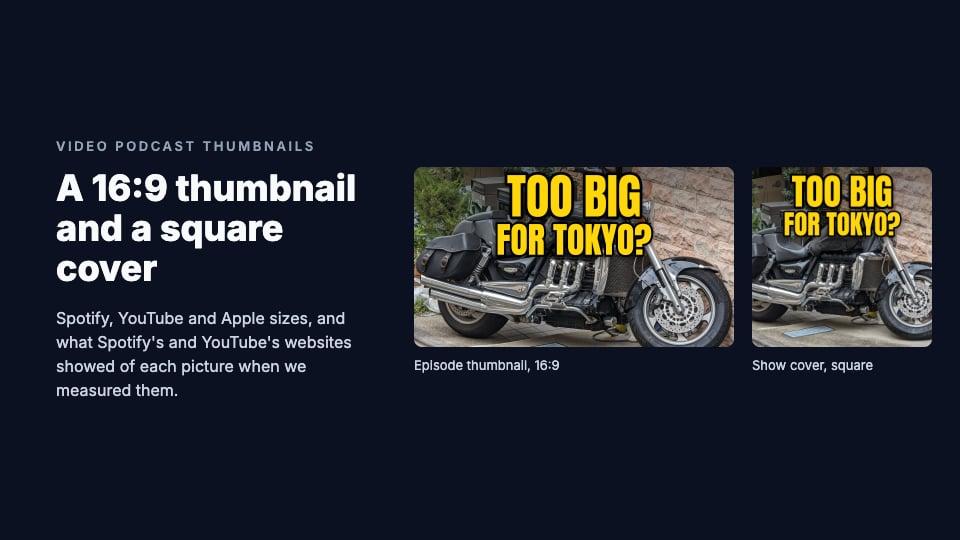
Disclosure: we make ThumbnailPeak, a thumbnail tester. The steps and specs come from Spotify's, YouTube's and Apple's help pages as of 5 November 2026, and every size was measured on Spotify's and YouTube's websites that day. How we measured is at the end.
A video podcast needs two pictures:
- A 16:9 thumbnail for each episode. Spotify asks for a horizontal, 16:9 image and suggests 1920×1080. On YouTube an episode is an ordinary video, so it takes an ordinary YouTube thumbnail: 16:9, at least 640 pixels wide.
- A square cover for the show. YouTube recommends 1280×1280 for a podcast's square thumbnail. Apple Podcasts takes 1400×1400 to 3000×3000. One 3000×3000 cover works on all three.
You add the episode thumbnail in Spotify for Creators on the web and in YouTube Studio. The square cover goes in your show's settings on Spotify and YouTube, and through your host for Apple. Here's what we found when we measured Spotify's and YouTube's websites:
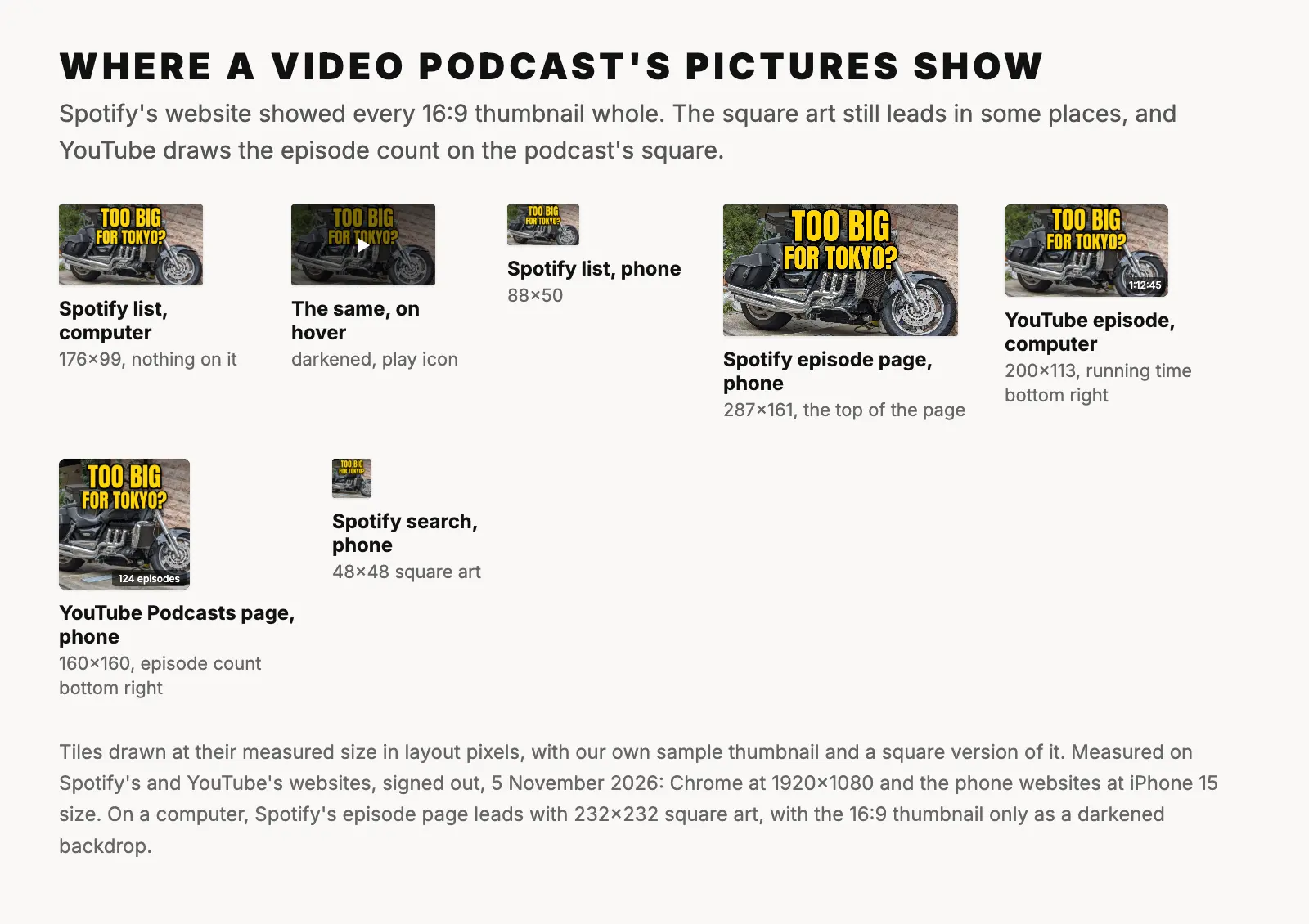
- Spotify showed the whole 16:9 thumbnail in every episode list. Nothing was cut off, and nothing was drawn over it except a play button when you hover on a computer.
- The square still matters for video episodes. On a computer, Spotify's episode page leads with the square episode art, and the thumbnail is only a dark backdrop. On a phone, Spotify's search listed episodes with their square art.
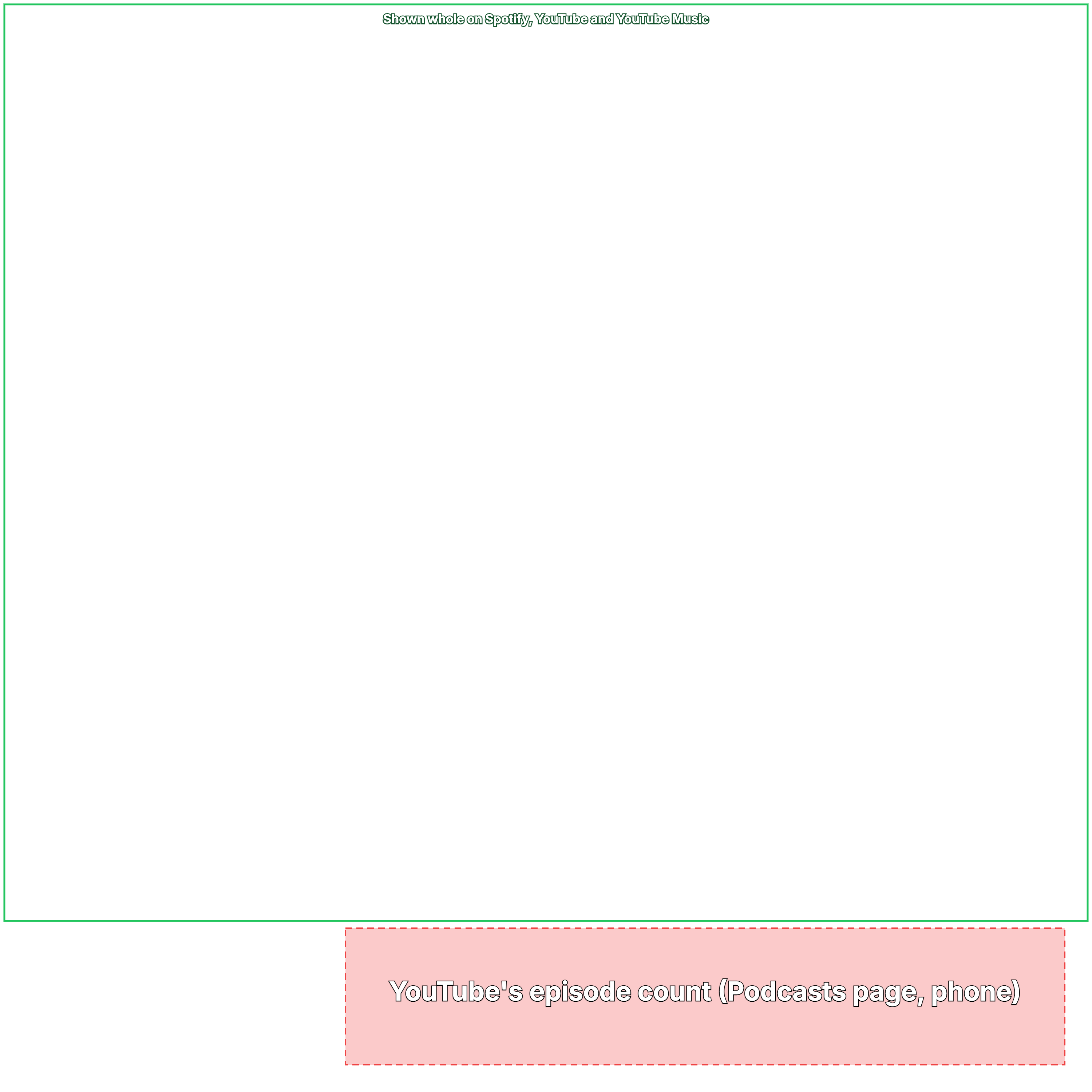
- YouTube puts the episode count on the square, in its bottom-right corner, on its Podcasts page.
Our guide to thumbnail sizes on every platform has the rest.
How to add a thumbnail to a video episode on Spotify
These steps are from Spotify's help page for thumbnails, as of 5 November 2026. You do it in Spotify for Creators on the web, while you upload the video or later:
- Log in to Spotify for Creators on the web.
- For a new episode, click New Episode and select your video file. For an episode that's already up, go to Episodes, click it, and open the Details tab.
- Under Thumbnail, select one of the frames Spotify offers, or click Upload and choose your own image.
- Click Next to keep publishing, or Save if you're editing.
Spotify's frames are taken "from the beginning, middle and end of your video". Its help doesn't say which one an episode gets if you don't choose, so choose. If another host sends your videos to Spotify, ask that host how to set the thumbnail.
How to set the square podcast thumbnail on YouTube
On YouTube, "a podcast show is a playlist, and podcast episodes are videos in that playlist", says YouTube's help page on creating a podcast. Each episode gets a normal video thumbnail; the podcast gets a square one. These steps are from that page, as of 5 November 2026:
- In YouTube Studio, go to Content, then Podcasts.
- Hover over your podcast and click the edit icon.
- On the Details page, upload your square podcast thumbnail.
- Click Save.
For a new podcast, click Create, then New podcast: the square thumbnail is one of the details you fill in. YouTube won't let you edit a podcast's details until it has one.
On Spotify, the cover is under Settings, then Update show art. Apple Podcasts reads it from your RSS feed, so you change it through your host.
What size is a video podcast thumbnail?
The episode thumbnail (16:9):
- Spotify: horizontal, 16:9, with a "suggested resolution of 1920 x 1080". Spotify doesn't publish a minimum size, a file type or a file-size limit for thumbnails.
- YouTube: 3840×2160 recommended, at least 640 pixels wide, JPG or PNG, up to 50 MB from a computer or 2 MB from a phone. Our YouTube thumbnail size guide has the details.
The show cover (square):
- Apple Podcasts: 3000×3000 preferred, and anything from 1400×1400 to 3000×3000 accepted. PNG or JPG, in RGB color, with no transparency.
- YouTube: 1:1, with 1280×1280 recommended. JPG or PNG, up to 50 MB from a computer or 10 MB from a phone.
- Spotify: its help center gives no size. Its podcast delivery specification says images must be "fully squared (1:1)", as TIFF, PNG or JPEG, in "the highest resolution available". A 2019 Spotify for Creators article suggests 1400×1400 to 3000×3000.
Episode art is optional square art for a single episode. Spotify and Apple show your cover when an episode has none, and Apple's size rules for it are the same as for the cover.
What Spotify shows of your thumbnail
Spotify's help says thumbnails appear "in the Spotify mobile app on your show page, episode page and in search results". We couldn't measure the app, but Spotify's website uses them too. On 5 November 2026 we measured two big video podcasts there, in layout pixels:
- Episode lists on a computer (the show page and episode search): 176×99. "More episodes like this" on an episode page was 176×99 in a 1920-wide window and 100×56 at 1366 wide.
- Episode lists on a phone: 88×50 on an iPhone 15 and a Pixel 7.
- The top of an episode page on a phone: 287×161, the thumbnail itself, on both phones.
Every one of these showed the whole picture. Nothing was drawn over it, except on a computer when you hover over it: the thumbnail darkens by half and a play icon appears in the middle.
Two things are worth knowing:
- A thumbnail that isn't exactly 16:9 is trimmed on a computer. One show's thumbnails were 1831×1080, slightly narrower than 16:9. A computer's 176×99 tile cut 25 rows off the top and bottom. A phone showed the whole picture in a slightly taller box, 88×52.
- The phone list is tiny. At 88 pixels wide, a 1280×720 design is shown at about a fourteenth of its size, so letters 100 pixels tall come out about 7 pixels tall. Use few, big words.
Where Spotify shows the square instead
Spotify's help says audio episodes "feature your episode or show artwork". Video episodes do too, in two places we measured:
- An episode page on a computer leads with the square: 232×232 in a 1920-wide window, 223×223 at 1366. The 16:9 thumbnail is only the backdrop behind the title, under a black layer at 75% opacity, and only roughly its top half shows: rows 68 to 330 of a 1280×720 design at 1920 wide.
- Search on a phone listed episodes with their square art at 48×48. On a computer, Spotify's episode search showed the 16:9 thumbnails at 176×99.
Both shows we measured had square art for each episode. Without it, Spotify's help says, an episode uses the show's cover, and that's what people see in both places.
What YouTube shows: a square for the show, 16:9 for each episode
On YouTube's Podcasts page, every podcast is a square tile: 259×259 in a 1920-wide window, 203×203 at 1366 wide, and 160×160 on an iPhone 15 and a Pixel 7. Each one has the episode count, such as "124 episodes", in its bottom-right corner. That label is 20 pixels tall and up to 105 pixels wide, so on a phone it can cover two-thirds of the tile's width.
A podcast's own playlist page shows the square at 312×312 on a computer and 208×208 on a phone, with nothing on it. The episodes are listed as ordinary 16:9 video tiles, 200×113 on a computer and 160×90 on a phone, with the running time in the bottom-right corner. In YouTube Music on a computer, the squares were 225×225 on the Podcasts page and 264×264 on a podcast's page, with nothing drawn on them until you hover.
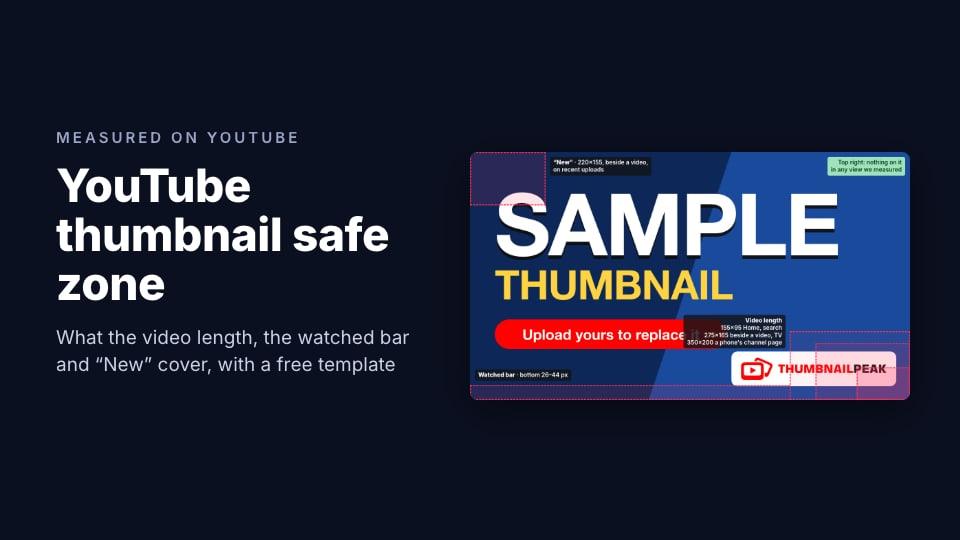
Each episode's thumbnail follows the same rules and safe zone as any other YouTube video's.
A safe area for the square cover
Every square tile we measured, on Spotify, YouTube and YouTube Music, showed the whole cover. Only one thing was drawn on it: YouTube's episode count. On a 3000×3000 cover, it can cover the bottom-right corner from row 2550 down and from column 950 across. Keep faces and words out of that corner.
Download the podcast cover safe zone template (PNG, 3000×3000, transparent). Put it on the top layer of your design, check that nothing important sits in the marked corner, then hide it before you export.
Apple's Show Cover template marks the whole square as safe. Its Episode Art template marks a strip along the bottom and two corners where Apple's app may sit over the art.
Using one picture on YouTube and Spotify
One 16:9 picture can serve both. 1920×1080 is Spotify's suggested size and three times YouTube's 640-pixel minimum width. If your design is bigger, export it at 1920×1080 for Spotify and keep the full size for YouTube.
The free thumbnail resizer crops or fits any image to 1920×1080 in your browser with its Podcast Video episode preset. Start from your largest copy of the picture: a resizer can't add detail that isn't there.
Because a YouTube episode is an ordinary video, its thumbnail competes in the same feeds as every other video. Our free YouTube preview shows how it looks there, beside real videos, before you publish.
The square cover is a separate design, not a crop of the thumbnail. Cut to a square, a 1280×720 thumbnail leaves 720×720, below YouTube's recommended size and Apple's minimum. Start from the original photo, and fit or crop it to a square with the resizer's Podcast Cover preset, 3000×3000.
Nothing requires the pictures to match, either. One show we measured used a different thumbnail and title for the same episode on Spotify and on YouTube.
What about Apple Podcasts?
Apple Podcasts plays video. Apple announced it in February 2026, and its page on publishing video says that from iOS 26.4, shows with video episodes carry a badge. You publish video through a hosting provider that supports it.
But every episode picture Apple describes is square: Episode Art, 1400 to 3000 pixels, which "appears in a square format wherever listeners encounter a show episode". We found no Apple page with a 16:9 thumbnail size. Apple's pages also disagree on words: the Episode Art page says to "avoid using your podcast logo or any text", while its RSS guide says to include "a title, brand, or source name".
One more catch: Spotify says videos published through Spotify for Creators "are only available on Spotify". Other platforms get the audio.
Frequently asked questions
What size should a video podcast thumbnail be?
1920×1080 pixels, 16:9. That's Spotify's suggested size, and it's well above YouTube's minimum of 640 pixels wide. YouTube recommends 3840×2160, the same shape.
Does Spotify have a minimum thumbnail size?
Spotify doesn't publish one. Its help page asks for a horizontal, 16:9 image and suggests 1920×1080. It doesn't list a file type or a file-size limit either.
What size should a podcast cover be?
3000×3000 pixels, square, as a JPG or PNG in RGB with no transparency. Apple accepts 1400×1400 to 3000×3000, YouTube recommends 1280×1280, and Spotify asks for a square in the highest resolution you have.
Can I use my YouTube thumbnail on Spotify?
Yes. Both are 16:9, and Spotify suggests 1920×1080. Spotify's website showed the whole picture in every list we measured. Keep words away from the bottom-right corner, where YouTube puts the running time.
Why does Spotify show my square art instead of my thumbnail?
Because some places use the square. On 5 November 2026, Spotify's episode page on a computer led with the square episode art, and search on a phone listed episodes with it. If an episode has no art of its own, Spotify uses the show's cover.
Does Apple Podcasts use a 16:9 thumbnail for video?
Not that Apple's pages say. Apple Podcasts has played video since iOS 26.4, but its only episode picture is square Episode Art, 1400 to 3000 pixels.
How we measured: on 5 November 2026 we opened Spotify's and YouTube's websites in an automated Chrome browser, signed out, in US English, and measured every picture tile in layout pixels (CSS pixels), rounded to the nearest pixel: the show and episode pages of two big video podcasts and Spotify's search, YouTube's Podcasts page and two podcast playlists, on a computer at 1920×1080 and 1366×768 and at the screen size and settings of an iPhone 15 and a Pixel 7. YouTube Music we measured on a computer at 1920×1080 only; it refused the automated browser until we sent Chrome's ordinary browser name. We recorded what each site drew over each tile, at rest and, on Spotify, on hover. We did not measure any app, TVs, signed-in views or Apple Podcasts' website; Apple's facts come only from Apple's pages. The steps and specs come from the three platforms' help pages, Spotify's podcast delivery specification, and Spotify's and YouTube's own creator articles. The sample thumbnail is ours, made from "Big motorcycle in Tokyo" by Syced (CC0).