Give us the thumbnail you want fixed. An AI critique scores it first. Then you choose how far Improve goes — Keep my design or Bigger changes — and we make an improved version of your own image.
The analysis is included in the improve's 3 credits.
What it did to a real thumbnail
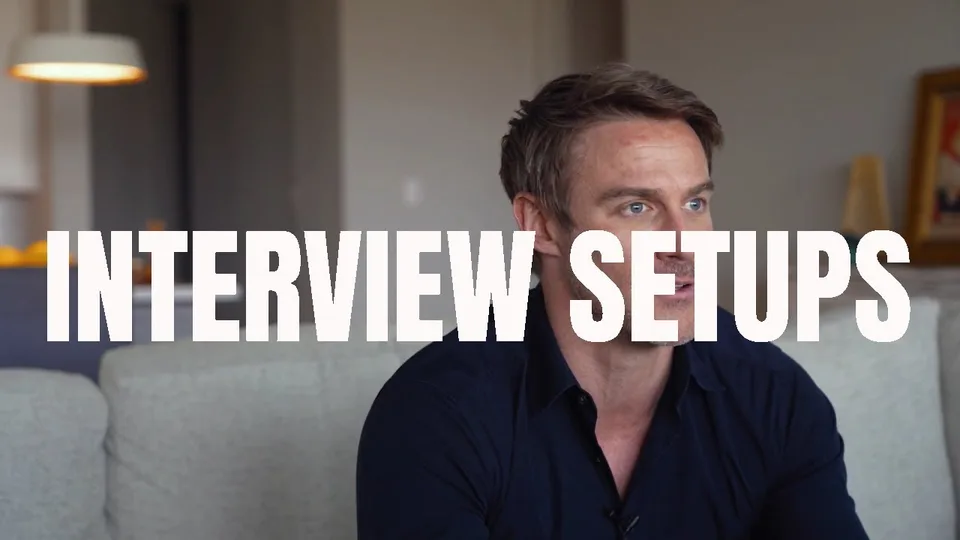
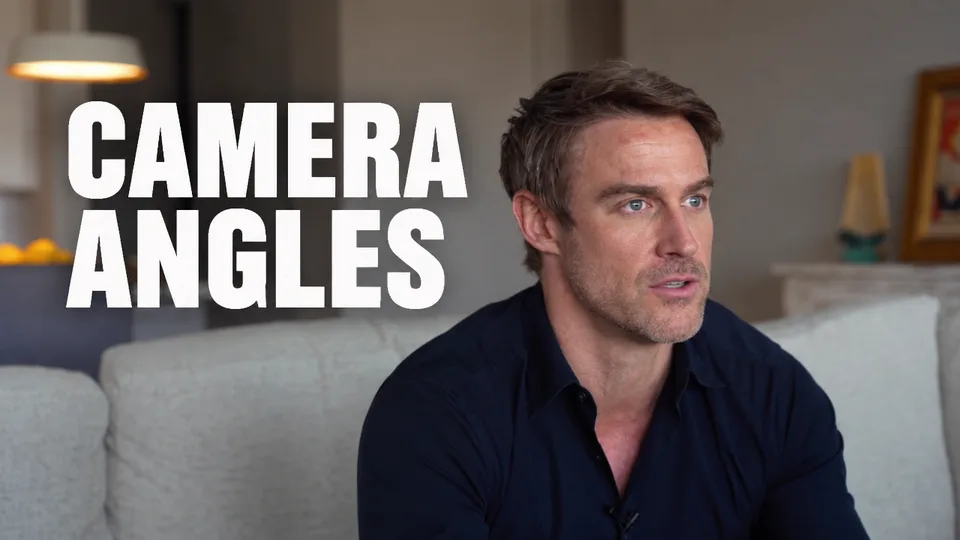
A Creative Commons interview demo reel from GriffynCo. Its link went into the form above, which filled in the title. Both of the critique's fixes stayed ticked, and nothing was typed. Both thumbnails are shown unedited, in a YouTube feed card with the video's real details.
Original
0:33
Interview Demo Reel - Talking Heads Camera Angles
GriffynCo
2.6K views • 3 years ago
AI variant
0:33
Interview Demo Reel - Talking Heads Camera Angles
GriffynCo
2.6K views • 3 years ago
ThumbnailPeak Score: 78 → 87+9
The example uses “Interview Demo Reel - Talking Heads Camera Angles” by GriffynCo, published under the Creative Commons Attribution licence (CC BY 3.0). The original thumbnail is shown as published. The improved version is an adaptation made by ThumbnailPeak's AI Improve on 29 September 2026 and is shown unedited; GriffynCo did not make or endorse it.
How AI Improve works
1
Paste a link or upload
A YouTube link brings in the thumbnail and the video's title; an upload works for a thumbnail that isn't published yet. With a title, the critique also judges how well the two fit.
2
An AI critique scores it
A 0–100 score, the evidence behind each dimension, and up to three concrete fixes — the same AI critique you can run on its own.
3
Pick how far to go
Keep my design makes the critique's fixes to your design, each one the way the critique wrote it, and you can untick any of them. Bigger changes plans new words, a new layout or even a new idea, and you approve each change before we make it.
4
Get it back, scored
AI edits your image at 1280×720, then the new version is critiqued again on the same scale, so you see the score move before you download, compare or improve again.
You decide how much changes
Improve edits the image you give it. In Keep my design, each fix you tick becomes one numbered, bounded change. In Bigger changes, you see the plan first — the exact words, sizes and places — and only the changes you tick are made. Either way you can add one request of your own, up to 200 characters, which is split into changes of the same kind, and the image model is told to leave everything else as it was:
People stay the same people — same identity, same face — with the same expression and pose, unless your own request asks to change them. In Bigger changes, a change you tick may move, enlarge or remove a person; Improve never suggests a new expression or pose.
In Keep my design, the composition, camera angle, lighting and color mood stay, unless a fix you ticked or your own request is about one of them. When your request moves, enlarges or adds something, other things may be moved or resized to make room, but never recolored, relit or restyled. In Bigger changes, a change you tick may give the thumbnail a new layout or a new idea, and anything no change names stays as it is.
In Keep my design, a fix may change the words it is about — shorter or clearer words, a stronger headline, a caption taken out — and once Improve's plan is ready, the exact new words show under that fix before you press. Your own request can change text too. Every other word, logo and number stays as it is, except that one can be moved clear of the duration badge or the frame edge, or a misleading one removed. In Bigger changes, new or reworded words, anything added or removed, a new idea and a change to your branding are marked “Your call” and stay off until you tick them.
Faces, text and logos that are fully in the picture stay inside the frame, unless a change you ticked removes one; none gets cut off.
The result is a full-bleed 16:9 thumbnail at 1280×720, with no borders, frames or watermarks added unless your request or a change you ticked asks for one.
Trying again from the before image starts from your image, not from the last result, so a second attempt is a fresh take rather than an edit of an edit. Improve again does the opposite: it builds on the new version. If you'd rather start fresh from your video, Generate makes new thumbnails from it instead. If you already know the change you want, the AI thumbnail editor takes it in your own words, with no critique first and no fixes to pick.
When the score doesn't go up
It can happen. A fix can cost something somewhere else, or the edit can miss — which is why the result is scored instead of assumed. Keep your original, try other fixes or Bigger changes, or put the two head to head or in a real YouTube feed and decide for yourself.
The image model's safety filter sometimes declines an edit, usually because of a well-known character, logo or person in the frame. When it does, your 3 credits are returned.
What it costs
An improve uses 3 credits, spent when you press Improve. The critique that picks the fixes, the plan and the score of the improved version are all included. A free account comes with 12 credits, and Pro adds 300 every month. Free downloads carry a small ThumbnailPeak mark in the corner. Get clean downloads with Pro or a credit pack.