Disclosure: we make ThumbnailPeak, a thumbnail tester. The steps come from X's help pages as of 5 November 2026, and every size was measured that day on X's website and in X posts embedded on a web page, as a signed-out visitor. How we measured is at the end.
On X, there's one place to choose a video's thumbnail:
- Media Studio (studio.x.com), on a computer. You can pick a frame from the video or upload your own picture, the same shape as the video. X's help page says Media Studio is for verified subscribers only.
- Not when you post. X's help pages for posting a video from the app or x.com mention trimming and a download setting, but no thumbnail. X then shows the video's first frame.
We measured how X draws video thumbnails on its website and in posts embedded on other sites. Here's what we found:
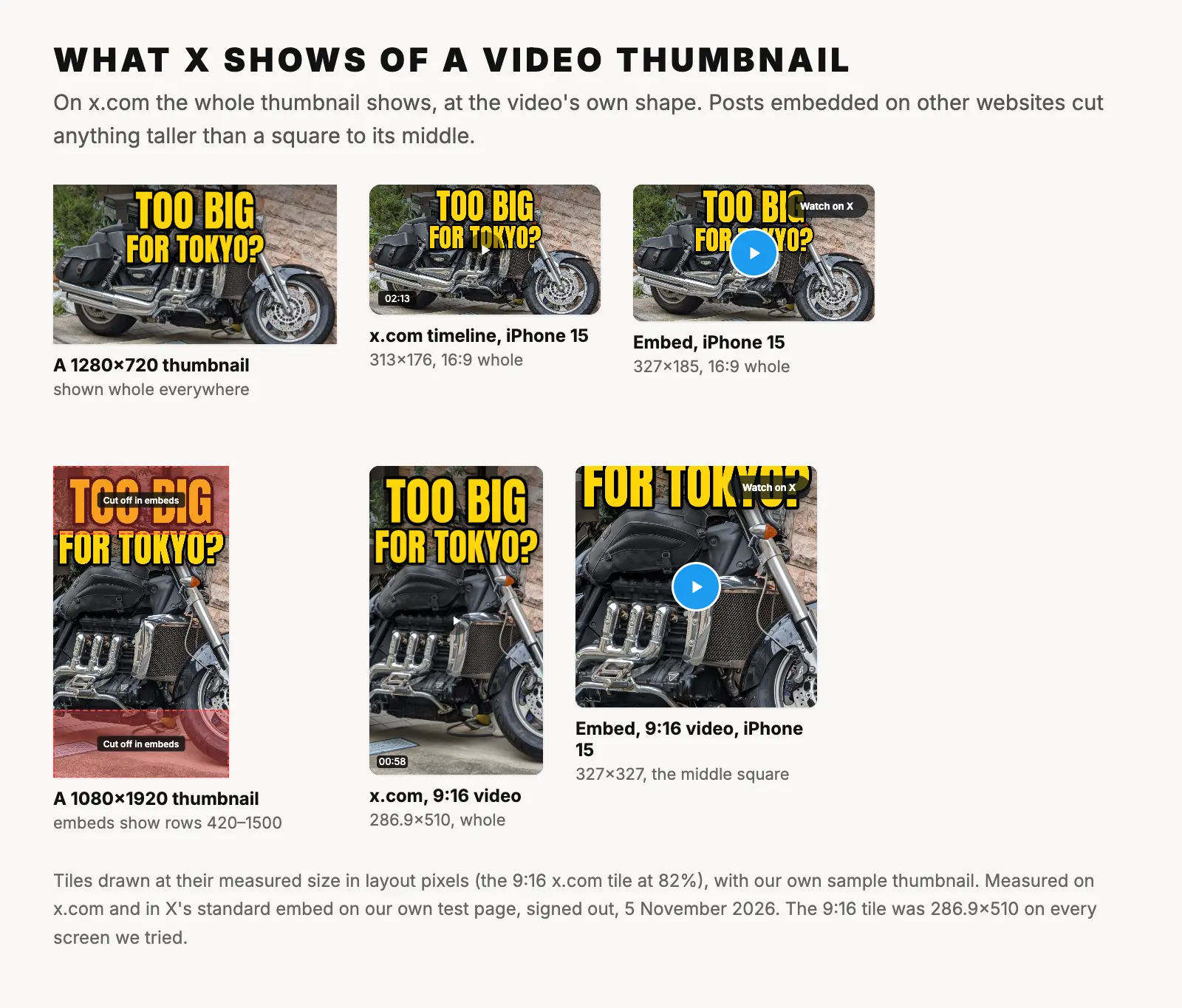
- On x.com, the whole thumbnail shows, at the video's own shape: 16:9, square, 4:5 or 9:16. A time label sits in the bottom-left corner.
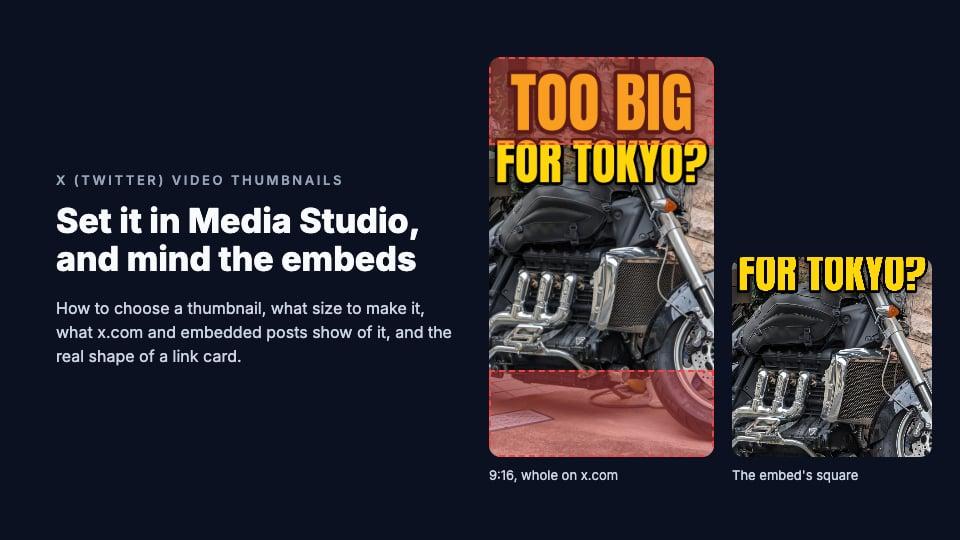
- Embedded posts crop anything taller than a square. A 9:16 thumbnail is cut to its middle square: only rows 420 to 1500 of a 1080×1920 picture show.
- Link previews are 1.91:1, not the 2:1 that X's old developer documentation gave. A 1200×628 image fits exactly.
Our guide to thumbnail sizes on every platform has the rest.
How to add a custom thumbnail to a video on X
These steps are from X's help pages for Media Studio and its Library, as of 5 November 2026. We don't have an X account, so we haven't seen these screens ourselves.
- On a computer, go to studio.x.com and sign in with your X account. Or, on x.com, click More in the side menu, then Media Studio.
- Click Upload at the top right and choose your video, or drag it in. Videos you've already posted also appear in your Library.
- Click the video in your Library, then Select thumbnail. (The next answer on the same help page calls the button Change thumbnail.)
- Choose a frame from the video, or upload a picture from your computer. X asks for the same aspect ratio as the video: "Using a custom thumbnail that is a different size can cause issues with playback on X."
- To post it, click the post button under the video, write your post (up to 280 characters), and post it or click Schedule.
A few things to know:
- Uploading a picture doesn't work in Safari. X's help page: "Safari is supported, except for uploading VOD custom thumbnails." Use Chrome, Firefox or Edge.
- Media Studio needs a subscription. "Access to Media Studio will be given to verified subscribers only."
- Set it before you post. X's help lists what changes on posts already published (subtitles, country restrictions) and what doesn't (title, description, call to action). The thumbnail is in neither list, so X doesn't say whether a new one reaches a live post.
Can you choose a thumbnail in the X app or on x.com?
Not according to X's help page for sharing videos. On x.com, its steps are: open the compose box, click the gallery button, choose your video file and post. In the app, it covers trimming the video and whether others may download it. None of the steps chooses a thumbnail.
So what do viewers see? We compared five public videos' thumbnails with every frame of the videos. Three were the video's first frame. The other two had been chosen: a frame from 27 seconds in, and, on a NASA Webb Telescope post, a designed title card that appears nowhere in the video. X's documentation for ads states the rule: "If not specified, the first frame will be used."
So without Media Studio, the first frame is your thumbnail. Trim the opening so the video starts on a strong frame, or open with a still title card for a moment.
What size should an X video thumbnail be?
X doesn't publish a thumbnail size. Its pages give only the shape: "the same as your video content" in Media Studio, and "matching sizing of the video" in its ad specs. So match your video:
- Horizontal (16:9) video: 1280×720, the video size X recommends, or 1920×1080, Media Studio's largest.
- Vertical (9:16) video: 720×1280 or 1080×1920.
- Square video: 720×720 or 1080×1080.
- Format: JPG or PNG. Media Studio takes images up to 20 MB; X's ad specs allow 5 MB for a thumbnail.
For the video itself, X's help page for posting from the web allows aspect ratios from 1:2.39 to 2.39:1. Without a subscription, videos can run 140 seconds; X Premium allows up to 4 hours. X's other pages give different limits, so trust the upload screen.
Where viewers see your video's thumbnail
- In timelines and on the post's page. On a computer, the video in view started playing by itself, muted, so the thumbnail showed only until then. At phone size it waited for a tap.
- In posts embedded on other websites, where videos didn't start by themselves, so the thumbnail stays up.
- In quoted posts.
X also shows videos in a profile's Media tab and in search, but sends signed-out visitors to its sign-in page there, so we couldn't measure them.
What X shows of your thumbnail
On x.com, the whole picture. Every video was drawn at its own shape and filled with its thumbnail, so a thumbnail the same shape as its video loses nothing. The sizes, in layout pixels:
- 16:9: 568×319.5 on a post's page on a computer, 520×292.5 in a timeline. In a timeline on phones, 313×176 on an iPhone 15 and 332×187 on a Pixel 7.
- Square: 568×568 on a post's page and 520×520 in a timeline on a computer, 313×313 on an iPhone 15.
- 4:5 and 3:4: 408×510 and 382.5×510 on a computer.
- 9:16: 286.9×510 on every screen we tried. X never drew a video taller than 510 pixels.
X draws three things over a video:
- A time label in the bottom-left corner, 12 pixels from the left and bottom edges: the video's length before it plays, the time left while it plays.
- A Play button, a 48-pixel dark circle in the middle, whenever the video isn't playing.
- The original account's name, in a label beside the time, when the video was first posted by someone else.
On a phone, x.com also covers the post with a "See this post in the app" box for signed-out visitors.
One case did crop. When a post with its own video quoted another video, X showed the quoted one as a 96×96 square beside its text, cut to the middle. A 16:9 thumbnail would lose 44% of its width that way.
What an embedded post cuts off
Websites embed X posts with code from X's publish.x.com, and embeds draw videos differently. We embedded six posts on a test page:
- 16:9 thumbnails show whole: 516×291 on a computer, 327×185 on an iPhone 15 and 346×196 on a Pixel 7.
- Square, 4:5 and 9:16 thumbnails all show as a square, cut to the middle: 516×516 on a computer, 327×327 on an iPhone 15. A 1080×1920 thumbnail loses its top and bottom 420 pixels. A 4:5 one at 1080×1350 loses 135 pixels from each end.
- Over the picture: a blue Play button, 67 pixels wide, in the middle, and a "Watch on X" label in the top-right corner. A quoted video gets a "View video on X" button instead.
We checked the crop against the real thumbnail of a 9:16 video: the iPhone embed showed exactly its middle square.
A safe area for X video thumbnails
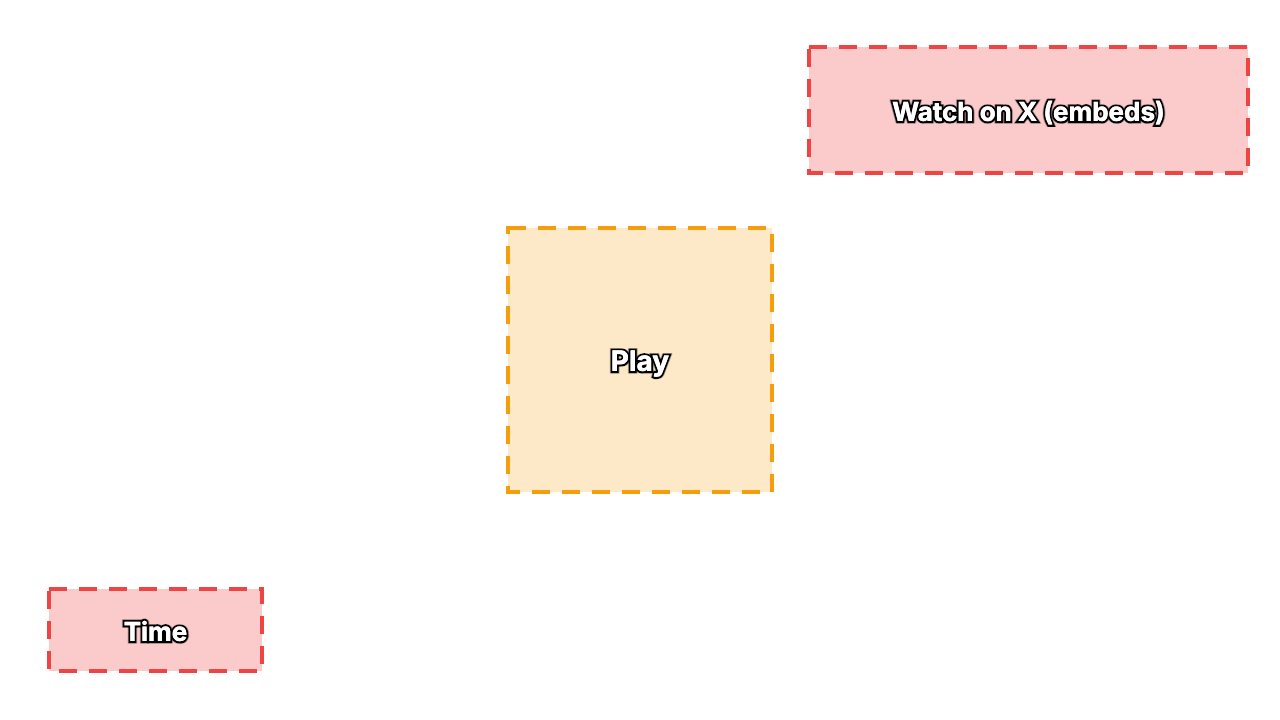
Nothing is cut off a 16:9 thumbnail, on x.com or in embeds. But three things sit on top of it. On a 1280×720 thumbnail, at their largest:
- The bottom-left corner, up to 262 pixels across and from row 589 down, is under the time label on phones.
- The top-right corner, from 809 pixels across and down to row 173, is under "Watch on X" in embeds on phones.
- The middle, roughly 508 to 772 across and rows 228 to 492, is under the Play button. X's own is a little smaller than the embed's.
Keep words out of those three boxes, and don't put a small face dead center.
Download the X video thumbnail safe area template (PNG, 1280×720, transparent). Put it on the top layer of your design, check that no word sits in a red box, then hide it before you export. For a 1920×1080 design, scale it to 150%.
For a vertical thumbnail at 1080×1920, keep faces and words in rows 420 to 1500, the square that embeds show, and away from that square's top-right corner (down to row 566) and its middle.
Using your YouTube thumbnail on X
A YouTube thumbnail is 16:9 at 1280×720, the video size X recommends. If the video you post on X is 16:9 too, you can upload the same picture in Media Studio. Check one corner first: YouTube puts its time stamp in the bottom-right, X puts its own in the bottom-left.
If you post a vertical cut, make a vertical thumbnail. The thumbnail resizer crops or fits any image in your browser: the YouTube Thumbnail 1280×720 or X (Twitter) Post 1600×900 preset for 16:9, and TikTok Video 1080×1920 for 9:16. In crop mode, keep the subject inside the middle square.
ThumbnailPeak's critique judges a picture as a YouTube thumbnail, so it only helps here if the same 16:9 picture also goes on YouTube.
The image X shows for a shared link
When you post a link, X shows a card with a picture from the page's twitter:image tag, or its og:image if there's none. Pages that set twitter:card to summary_large_image get a full-width picture.
X no longer publishes its documentation for these cards: its developer site's Cards pages now redirect to the documentation home page. The last version, from early 2026, asked for "an aspect ratio of 2:1 with minimum dimensions of 300x157 or maximum of 4096x4096 pixels", under 5 MB, as JPG, PNG, WEBP or GIF, not SVG. The small summary card's image was square, at least 144×144.
What X draws today is 1.91:1, not 2:1. Every large card we measured had that shape: 518×271 in a timeline on a computer, 311×163 on an iPhone 15, and 325×171 in an embed on an iPhone 15. X fills the card with the picture and cuts off what doesn't fit, evenly from both sides. So:
- 1200×628 fits exactly, and 1200×630 loses about a pixel.
- A 16:9 image loses a strip top and bottom: 25 pixels each from 1280×720.
- A 2:1 image loses its sides: 27 pixels each from 1200×600.
- A square image loses 286 pixels from the top and bottom of 1200×1200.
On x.com, the page's title sits on the bottom of the picture, in a dark label 12 pixels from the left and bottom edges that can run nearly the card's full width, so keep words out of the bottom strip. In embeds, the title sits under the picture. The resizer's LinkedIn Link post 1200×627 preset is within a pixel of X's card shape.
Frequently asked questions
Can you add a custom thumbnail to a video on X?
Yes, in Media Studio on a computer: open the video in your Library, click Select thumbnail, and pick a frame or upload a picture the same shape as the video. X's help page says Media Studio is for verified subscribers only. Posted from the app or x.com, a video shows its first frame.
What size should an X video thumbnail be?
The same shape and size as your video. X doesn't publish a thumbnail size, but it recommends 1280×720 for horizontal video, 720×1280 for vertical and 720×720 for square. Use a JPG or PNG.
Why is my video's thumbnail cropped in an embedded post?
Embeds show any video taller than a square as a square, cut to the middle. A 1080×1920 thumbnail keeps only rows 420 to 1500. On x.com, the whole thumbnail shows.
What size is the X link preview image?
X draws it at 1.91:1, so 1200×628 fits exactly. A 16:9 or 2:1 image loses a thin strip; a square one loses most of its top and bottom. X's last published rules asked for under 5 MB and at least 300×157.
How we measured: on 5 November 2026 we opened X in an automated Chrome browser, signed out, in US English, and measured video and link-card tiles in layout pixels (CSS pixels): posts' pages and four large public accounts' timelines, on a computer at 1920×1080 and 1366×768, and at the screen size and settings of an iPhone 15 and a Pixel 7. We held the video streams back so each thumbnail stayed on screen, and recorded what X drew over it. For embeds, we put X's standard embed code from publish.x.com on our own test page with 16-pixel margins and measured inside it at the same sizes. To see which thumbnails had been chosen, we compared five videos' thumbnails with every frame. We did not measure the X apps, signed-in views, Media Studio, or the Media tab, search and Explore, which ask signed-out visitors to sign in. The steps come from X's help pages; the card rules come from X's developer documentation as archived in early 2026, since it is no longer published. The sample thumbnail is ours, made from "Big motorcycle in Tokyo" by Syced (CC0).