Disclosure: we make ThumbnailPeak, a thumbnail tester. The measurements in this post were taken on YouTube itself. How we did it is at the end.
YouTube never shows your thumbnail exactly as you made it. It draws things on top: the video's length, a label for new videos, a bar for viewers who started watching. Whatever sits under them is hidden. A thumbnail's safe zone is the part nothing covers.
To find it, we opened YouTube on 21 October 2026, signed out, and measured everything drawn over a thumbnail: on a computer at several window sizes, on YouTube's mobile site and in the TV app. Here is what we found:
- The video's length sits in the bottom-right corner, and the badge doesn't shrink. It's 20 pixels tall on a computer and on the phone site, however small the thumbnail is. So it covers the bottom-right 12% of a Home thumbnail, 27% of one on a phone's channel page, and 43% of one in the playlist panel beside a video.
- In a 1280×720 design, keep the bottom-right 350×200 clear. Then the length badge covers nothing you care about anywhere we measured, except the tiny playlist panel.
- Beside a video, new uploads get a “New” label in the top-left corner.
- Viewers who have started a video see a thin bar along the bottom of its thumbnail.
- The top-right corner had nothing on it in any view we measured. It's the place for a logo.
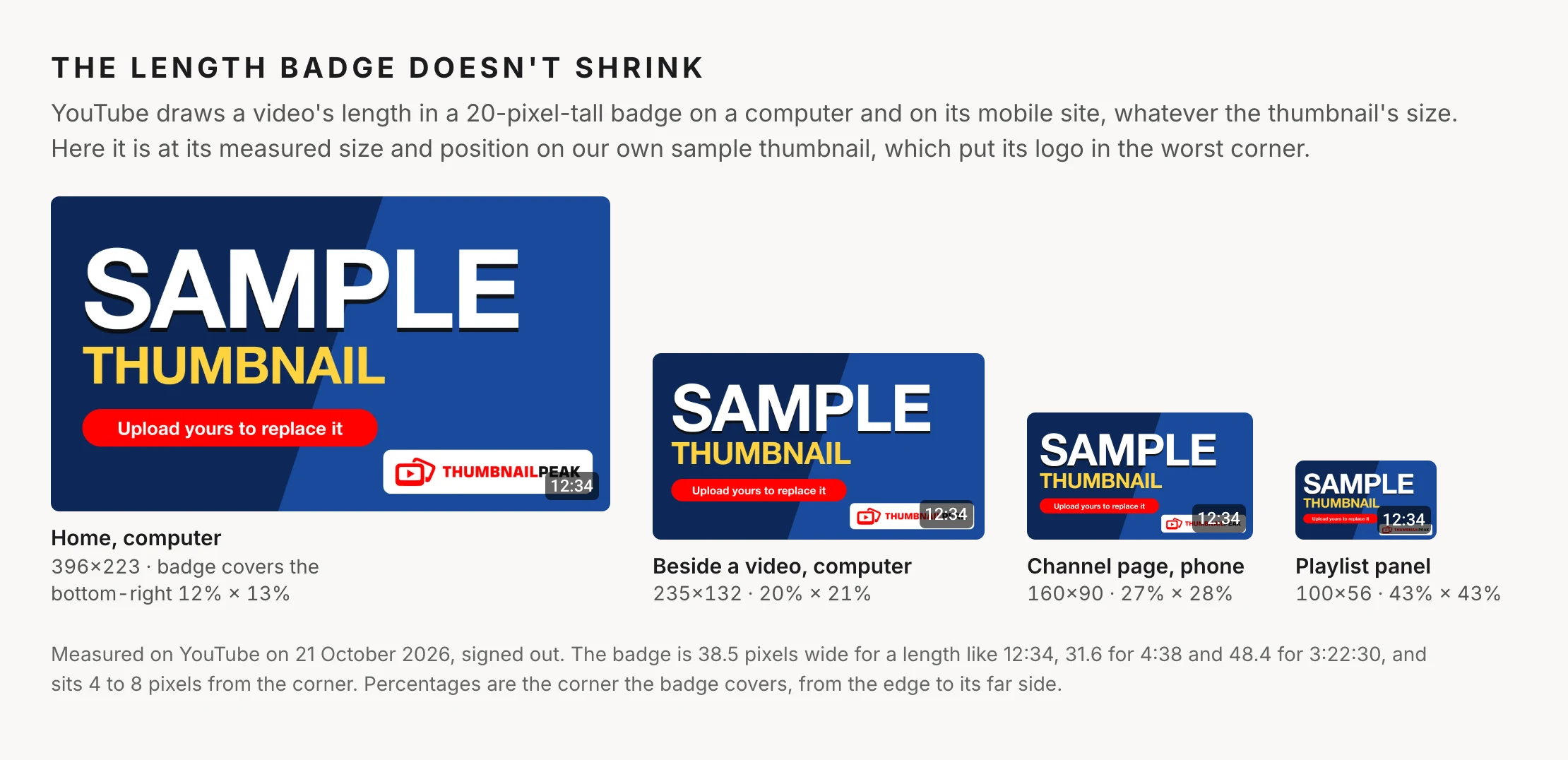
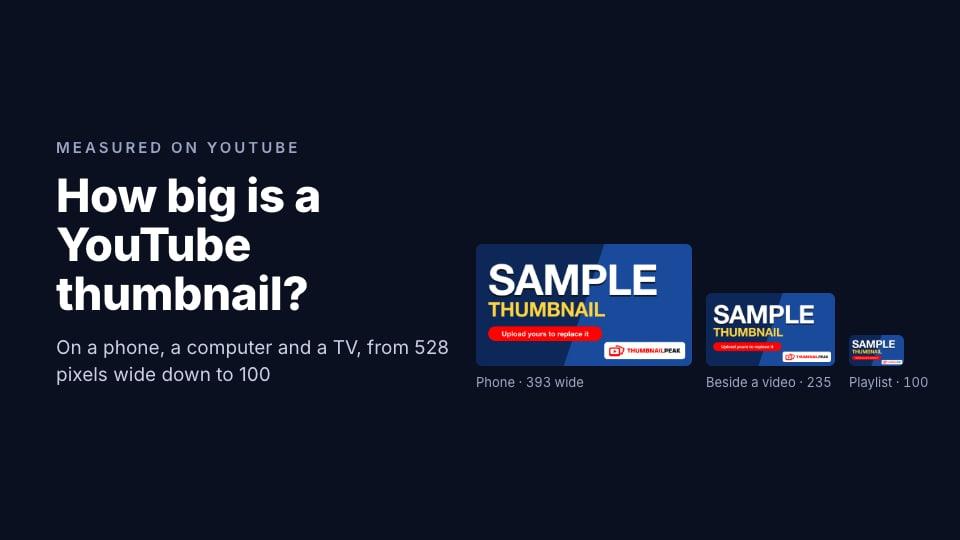
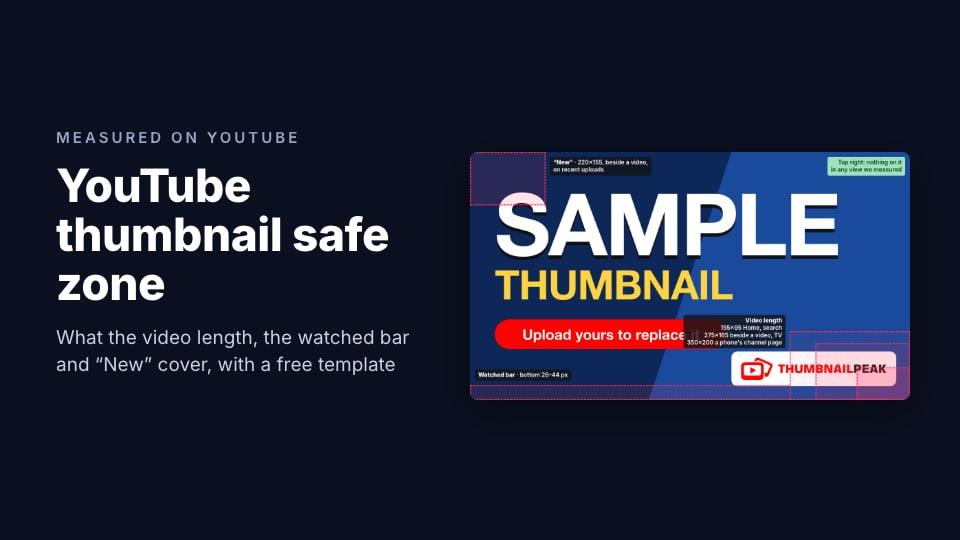
That's our own sample thumbnail, the one our thumbnail tester shows before you upload yours. We put the ThumbnailPeak logo in the bottom-right corner, which is exactly where YouTube puts the video's length.
The video length: bottom-right corner
Every regular video's thumbnail carries its length in a dark, see-through badge in the bottom-right corner. On a computer and on the phone site, the badge is:
- 20 pixels tall, with white text 12 pixels high
- 31.6 pixels wide for a length like 4:38, 38.5 for 12:34, and 48.4 for 3:22:30
- 4 to 8 pixels from the corner: 8 on most thumbnails, 5 on a phone's channel page, 4 in the playlist panel
In the TV app the badge is bigger, 74×33 for a length like 16:31, 12 pixels from the corner, on a 528×297 thumbnail. A live stream shows a red “LIVE” badge in the same corner instead.
Because the badge stays the same size while the thumbnail shrinks, the smaller the thumbnail, the more of it the badge covers. Here is how much of a 1280×720 design falls under it, measured from the corner to the badge's far edge, for a video under an hour long:
- Search results on a computer: the bottom-right 119×72
- Home on a computer (1920-wide window) and Home or search on a phone: 150×90
- Home on a computer, 1366-wide window: 171×103
- TV app: 208×109
- Beside a video on a computer: 253×153 in a 1366-wide window, 271×163 in a 1280-wide one
- A channel's Videos tab on a phone: 348×200
- The playlist panel beside a video: 544×309
For a video an hour or longer, the badge is about a quarter wider. On a phone's channel page, that's the bottom-right 427×200.
The playlist panel is the one place you can't design around. Its thumbnails are 100×56, and the badge covers 43% of the width and height. Treat it as lost, and make sure the thumbnail still works in the other places.
The “New” label: top-left corner
In the column of videos beside the one you're watching, YouTube marks recent uploads with a white “New” label in the top-left corner. We saw it on videos uploaded between 3 hours and 6 days earlier.
The label is 32×20 pixels, 8 pixels from the corner. Beside a video in a 1366-wide window, that's about the top-left 220×155 of a 1280×720 design, and 133×93 in a 1920-wide window, where the thumbnails are bigger.
It only lasts a few days, but those are the days your video is new. Keep a face or a key word out of that corner too.
The watched bar: bottom edge
When a viewer has watched part of a video, YouTube draws a progress bar along the bottom of its thumbnail, so they can see how far they got. On 21 October, YouTube's own stylesheet set it at 4 pixels tall, 4 pixels above the bottom edge, running across the thumbnail in red fading to pink.
In a 1280×720 design, that's about the bottom 26 pixels on a Home-size thumbnail and the bottom 44 pixels on a thumbnail beside a video. It's thin, but it runs across the whole width, so it can cut through a line of small text along the bottom edge.
We read the bar's size from YouTube's stylesheet. Our signed-out test sessions didn't show one on screen.
On a computer, the video replaces the thumbnail
On a computer, resting the pointer on a thumbnail on Home or in search starts the video playing in its place, without sound. When we checked 2.5 seconds after the pointer arrived, the video was playing. In search results, sound and captions buttons had appeared in its top-right corner.
So the thumbnail has to win the pointer before that happens. Once someone hovers, the first seconds of your video are what they see.
The safe zone template
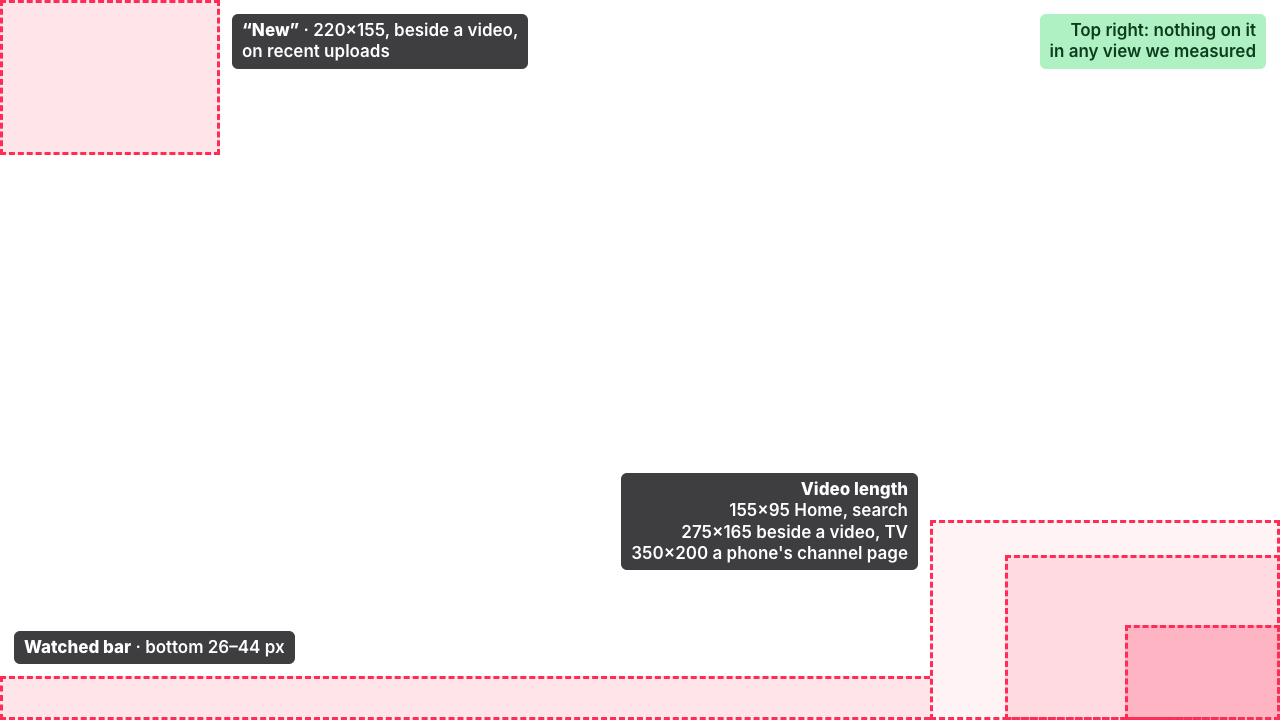
Here are all of those zones at once, scaled to a 1280×720 thumbnail and laid over our sample:
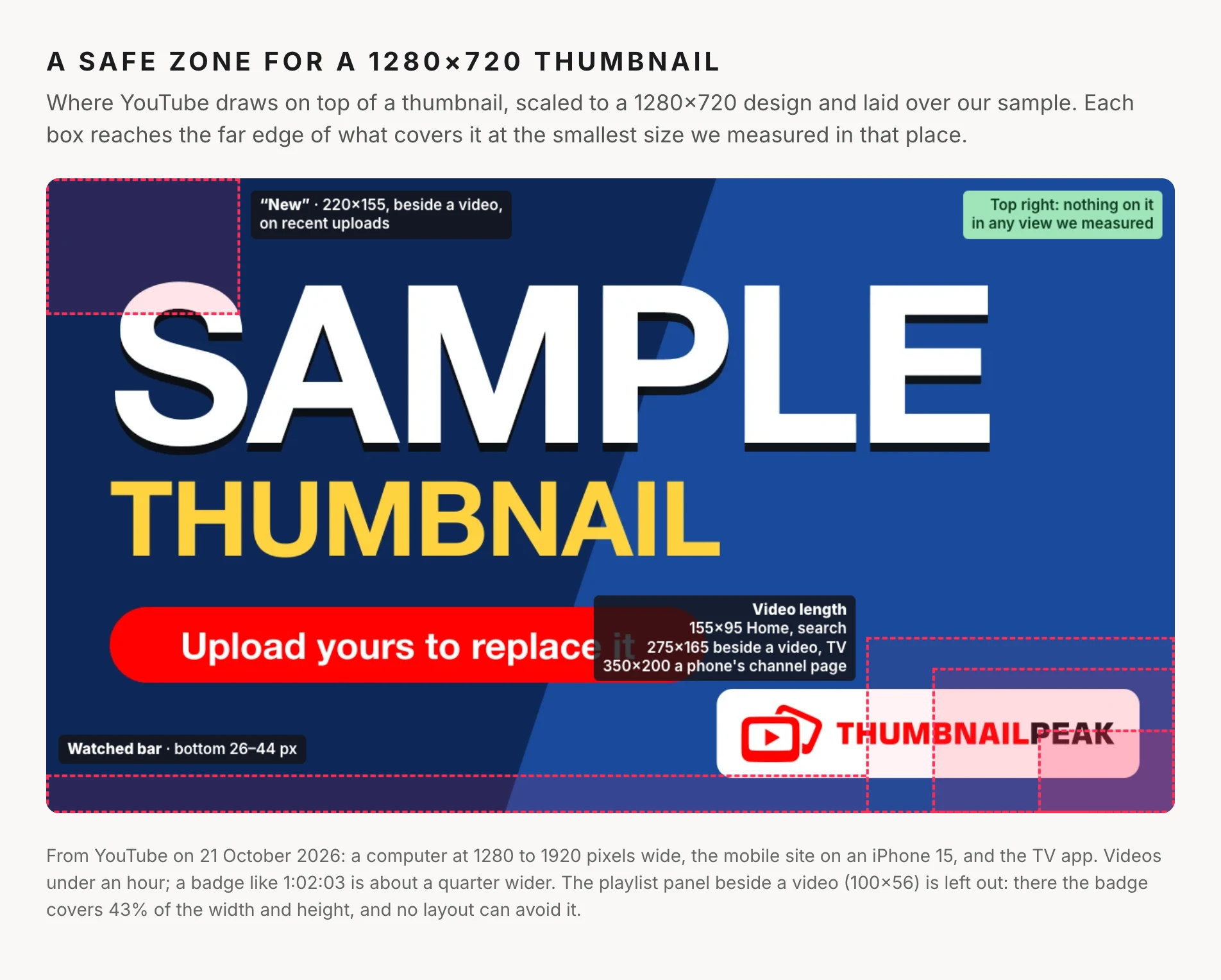
Download the safe zone template (PNG, 1280×720, transparent). To use it:
- Put it on the top layer of your thumbnail in Canva, Photoshop, Figma or any editor, stretched to fill the canvas. It works at 1920×1080 and 3840×2160 too, since those are the same shape.
- Move anything that matters out of the shaded boxes.
- Hide or delete the layer before you export.
The box sizes are rounded up a little from the measurements above. In a 1920×1080 design, the bottom-right zone is 525×300. In a 3840×2160 design, it's 1050×600.
What to keep out of the corners
Your logo or channel mark. Put it in the top-right corner, the one corner nothing covered in any view we measured. In the bottom-right, the length badge covers it from Home size down. Ours shows how.
Words. Keep every word out of the bottom-right 350×200. A price, a score or a date tucked into that corner is the first thing the badge hides.
Faces and eyes. Keep them out of the bottom-right, and out of the top-left 220×155 if you want them clear in the days after you publish.
A line of text along the bottom edge. The watched bar runs right across it for anyone who has started the video.
If your thumbnail is already made, you don't have to rebuild it. ThumbnailPeak's Edit lets you type a change, like “move the logo to the top-right corner”, and AI edits the image, keeping every version so you can go back.
Check it with the real length
The most reliable check is to look at your thumbnail with the badge on it, at the sizes viewers see. In ThumbnailPeak's thumbnail tester, open Card details on the form and type your video's real length. The home page, search, sidebar and mobile views then draw it on your thumbnail, in the bottom-right corner, and so does Search preview, which puts your thumbnail among the real YouTube results for your title. It's free, and you don't need an account.
For how big your thumbnail is in each of those places, see how big a YouTube thumbnail is on a phone, a computer and a TV.
Frequently asked questions
What is the YouTube thumbnail safe zone?
It's the part of the thumbnail that YouTube doesn't cover with anything. YouTube draws the video's length in the bottom-right corner, a “New” label in the top-left beside a video, and a progress bar along the bottom for viewers who started the video. In a 1280×720 design, keeping the bottom-right 350×200 and the bottom edge clear covers every view we measured except the playlist panel.
Where does YouTube put the timestamp on a thumbnail?
In the bottom-right corner, 4 to 8 pixels from the edges. On a computer and on YouTube's mobile site it's 20 pixels tall and about 32 to 48 pixels wide, depending on the length. In the TV app it's 33 pixels tall.
Does the video length cover more of the thumbnail on a phone?
On Home and in search, no: a phone shows the thumbnail across the full screen width, and the badge covers about the same share as on a computer's Home page. On a channel's Videos tab, where the phone site shows 160×90 thumbnails, it covers about 27% of the width and 28% of the height.
Can I hide or remove the duration on my thumbnail?
No. YouTube adds it to every regular video's thumbnail. All you can control is what's underneath.
What size is the safe zone for a 1920×1080 thumbnail?
Keep the bottom-right 525×300 clear for the video's length, the top-left 330×233 for the “New” label beside a video, and the bottom 66 pixels for the watched bar. That's the 1280×720 template scaled by one and a half.
How we measured: on 21 October 2026 we loaded YouTube in an automated Chrome browser, signed out, in US English, and measured the size and position of everything drawn over each thumbnail, in layout pixels. On a computer we measured the length badge and the “New” label in 1920- and 1366-wide windows, and worked out how much the badge covers in a 1280-wide window from the size of the thumbnails there, since the badge itself doesn't change size; on a phone, YouTube's mobile website with the screen size of an iPhone 15; for the TV, YouTube's TV app at 1920×1080 with a TV's browser settings, as a guest. The watched bar's size comes from YouTube's stylesheet on the same day, since our signed-out sessions didn't display one. We did not measure the YouTube apps for phones and tablets, or what signed-in viewers see, and YouTube changes its layout from time to time. The sample thumbnail is ThumbnailPeak's own.