Disclosure: we make ThumbnailPeak, and these videos come from its free Breakouts tool. The thumbnails belong to their creators, who had nothing to do with this post, and are shown here for commentary.
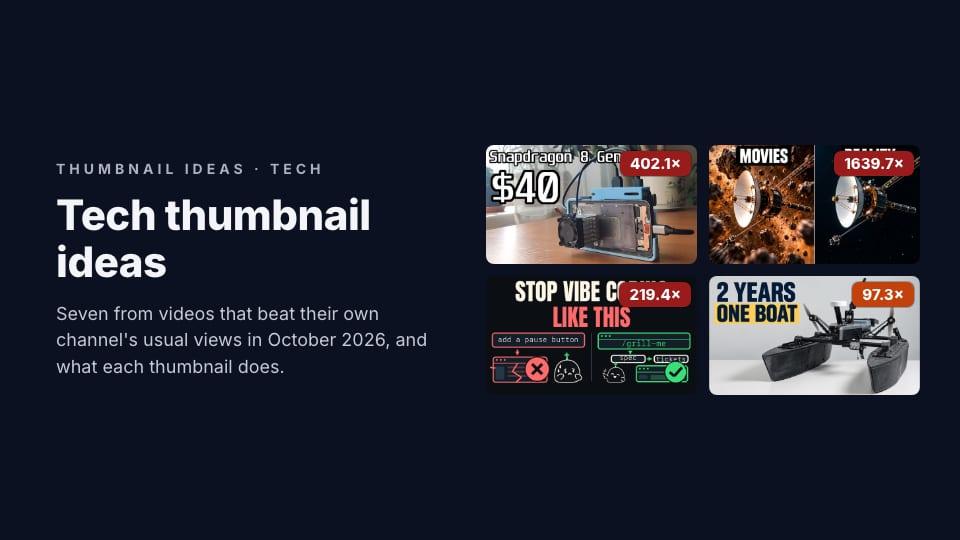
LastComputer's videos usually get about 2,400 views. In October, one got 976,056: "$40 Flagship Phone Turned into a Gaming PC". Its thumbnail is the phone's bare board in a case with a fan bolted on, the chip's name across the top, and "$40" in letters bigger than the phone.
That's a breakout: a video that does many times better than its own channel usually does. For a channel with 4,720 subscribers, almost a million views means the video reached people who had never heard of it. Something in the idea and its packaging carried it.
On 22 October 2026, the Science & Technology grid in ThumbnailPeak's Breakouts held 1,238 videos published between 4 and 18 October that beat their channel's typical video. 571 did it by three times or more. We read the 60 biggest with at least 30,000 views, one per channel, and picked seven ideas for tech, science and maker channels:
- Movies against reality. What people expect, next to what's true.
- A price too small for the job. $40 and a gaming PC don't belong together.
- Circle the detail. One red circle on the thing nobody noticed.
- From this to that. A device, an arrow, and what it became.
- The wrong way and the right way. A mistake and its fix, side by side.
- The build on a plain background. Let the thing you made fill the frame.
- Ask what the buyer is asking. The question in their head, in your words.
We checked each example against the frames YouTube saves from the video, so every thumbnail below shows what the video is about.
What tech thumbnails usually look like
Half of them have a face. In our study of 17,609 recent thumbnails, 50% of Science & Technology thumbnails had one, a little under the 55% average, and 82% had a headline, usually around three words.
Among the 60 biggest tech breakouts, 29 had a face, only 10 had no headline, 14 put a price or another number in big letters, and 9 asked a question. Tech viewers want to know what a thing is and whether it's worth it, so words do more of the work here than in most niches. The ideas below are mostly about which few words, and which one picture.
1. Movies against reality
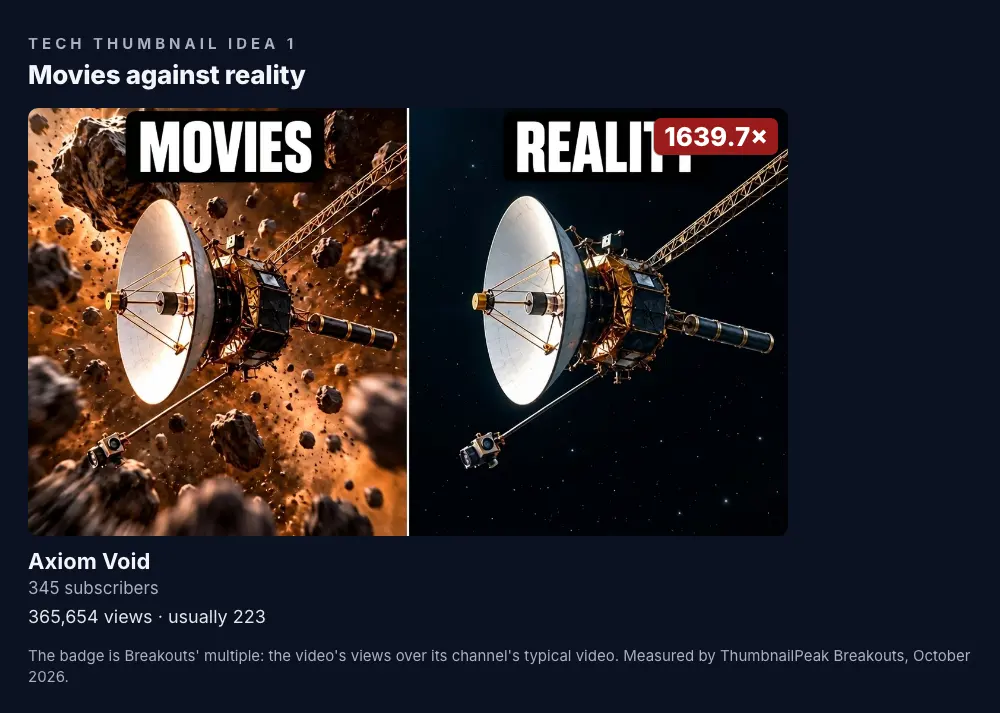
Axiom Void had 345 subscribers when its "Voyager 1 Has Flown for 49 Years Without Hitting a Thing. Here's Why" passed 365,000 views, 1,640 times its usual. The thumbnail is the whole argument in two panels. On the left, "MOVIES": the probe dodging a crowded asteroid field. On the right, "REALITY": the same probe alone in black, empty space.
Everybody has seen the movie version. The right half tells you it's wrong before you've read the title, and the title tells you why it matters.
How to use it: if your video corrects something most people believe, show the belief and the truth in the same frame, labelled with one word each. It works for physics, history, health and gadgets: "what the ad shows" against "what you get".
2. A price too small for the job
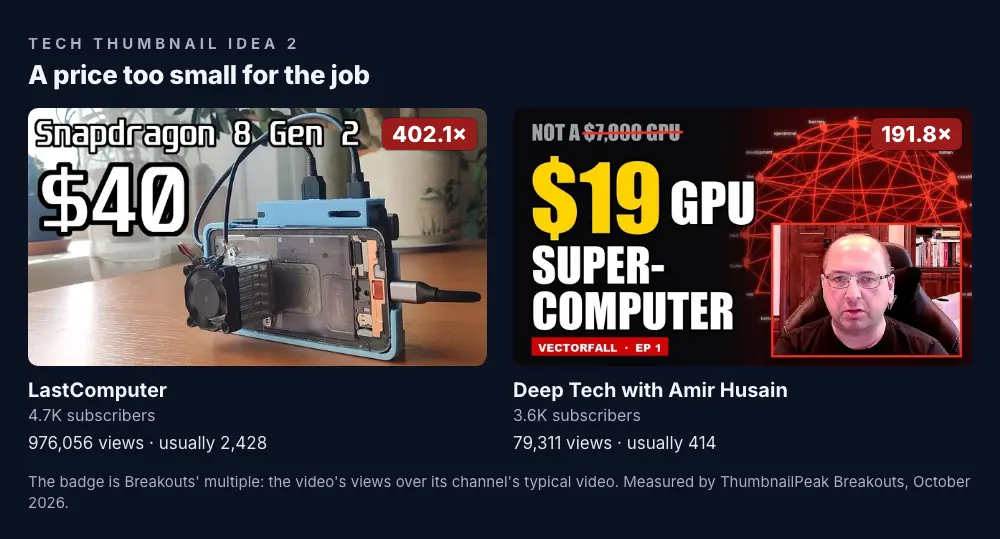
The biggest tech idea of the month was a small price. LastComputer's $40 gaming PC is above. Deep Tech with Amir Husain's "Forget the $7,000 RTX 5090: Real AI and Text Analysis on a $19 GPU" does it twice: "NOT A $7,000 GPU" with the price crossed out, then "$19 GPU SUPER-COMPUTER". His videos usually get about 400 views. This one got 79,311.
A price that's far too low for what it does is a puzzle, and a puzzle is a reason to click.
How to use it: if your video gets a lot out of a cheap part, make the price the biggest thing on the thumbnail and name the job it's doing. Crossing out the expensive alternative shows what it's up against.
3. Circle the detail
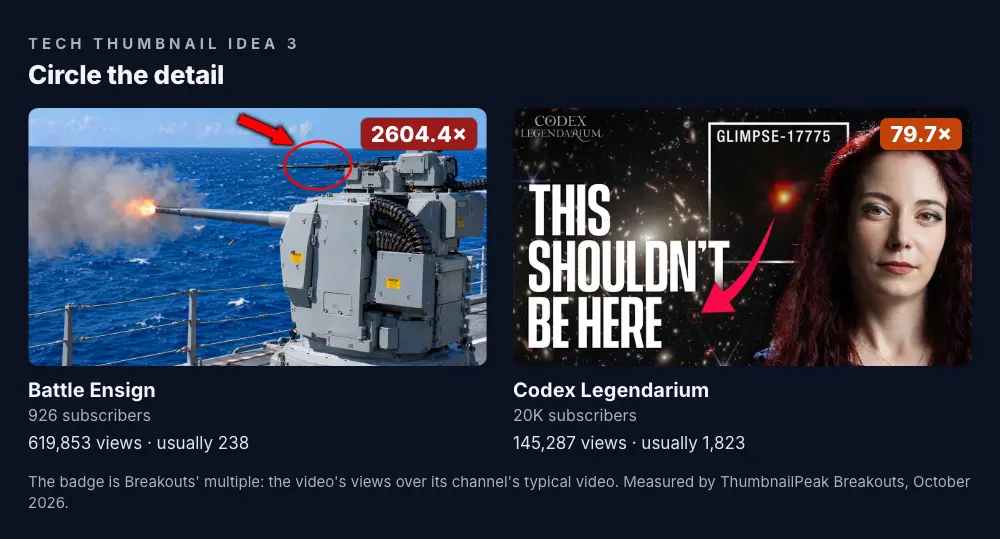
Battle Ensign's "Only ONE US Destroyer Has This Gun. The Navy Just Ordered 22 More." had the biggest multiple of the 60: 619,853 views, 2,604 times its usual. It's a young channel, so its "usual" comes from only three earlier videos, but even so, it's a lot. The thumbnail is a ship's big gun firing, and a red circle around something much smaller on top of it. The title says that's the gun.
Codex Legendarium uses the same move in space. A deep-field telescope image, one red dot with an arrow on it, and "THIS SHOULDN'T BE HERE".
The circle tells you where to look. The title tells you why. Neither works as well alone.
How to use it: when your video is about one detail inside a busy picture, circle it, in one strong colour, and put the reason in the title or in three words on the thumbnail. One circle. Two circles is a puzzle with no answer.
4. From this to that
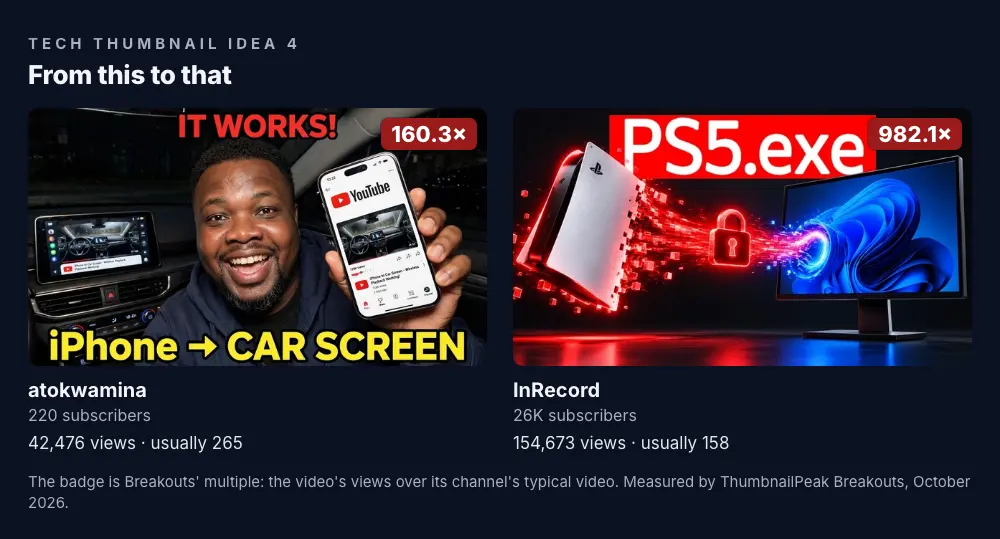
A lot of tech videos are about making one thing do another thing's job. atokwamina, a channel with 220 subscribers, put that in three words and an arrow: "iPhone → CAR SCREEN", above "IT WORKS!" and a big grin. His "Apple Blocks This on CarPlay... Here's the Fix!!" got 42,476 views, 160 times his usual.
InRecord drew the same idea instead of writing it. In "How Modders Used AI to Turn the PS5 Into a PC App", a PS5 streams into a computer monitor through a padlock, under "PS5.exe". That one label says "the PlayStation, as a Windows program" faster than a sentence could.
How to use it: for hacks, ports, adapters and conversions, show the starting thing, an arrow or a stream, and where it ends up. If words are clearer, write it as "A → B".
5. The wrong way and the right way
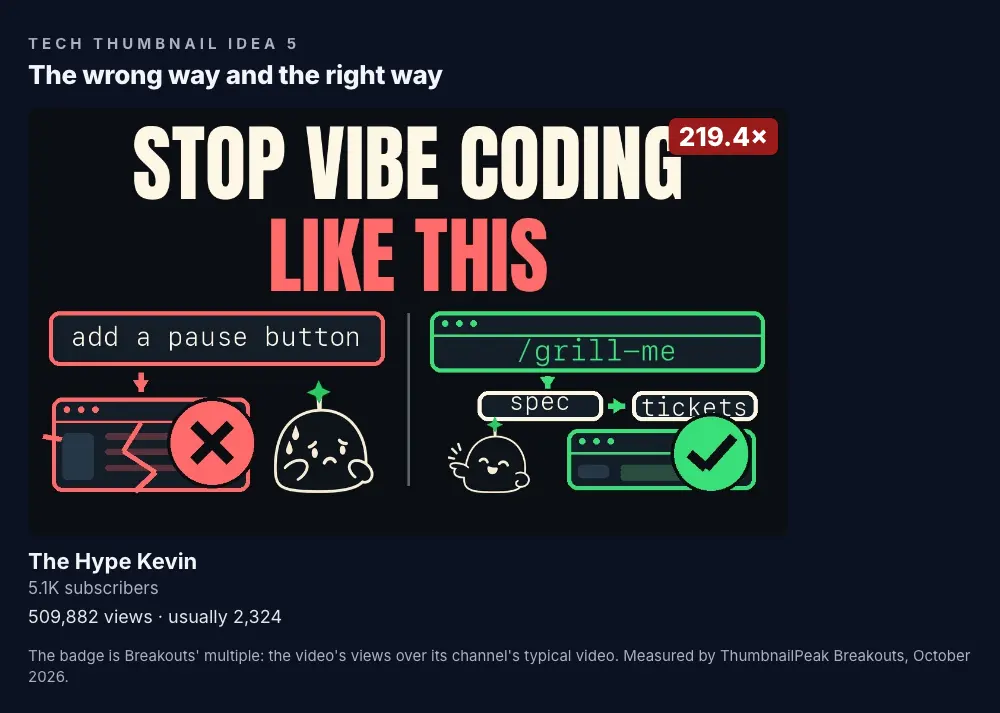
The Hype Kevin's "Ship like the best engineers: Matt Pocock's AI workflow" got 509,882 views, 219 times its usual. The thumbnail is two little diagrams. On the left, a one-line request ends in a broken window, a red X and a sad face. On the right, the same work goes through a plan first and ends in a green tick and a happy face. Above it: "STOP VIBE CODING LIKE THIS".
There's no photo and no presenter. It works because anyone who has had an AI tool break their code recognises the left side, and wants the right side.
How to use it: for tutorials, show the mistake and the fix next to each other, red against green, with a cross and a tick. Keep each side to a picture a viewer can read in a second.
6. The build on a plain background
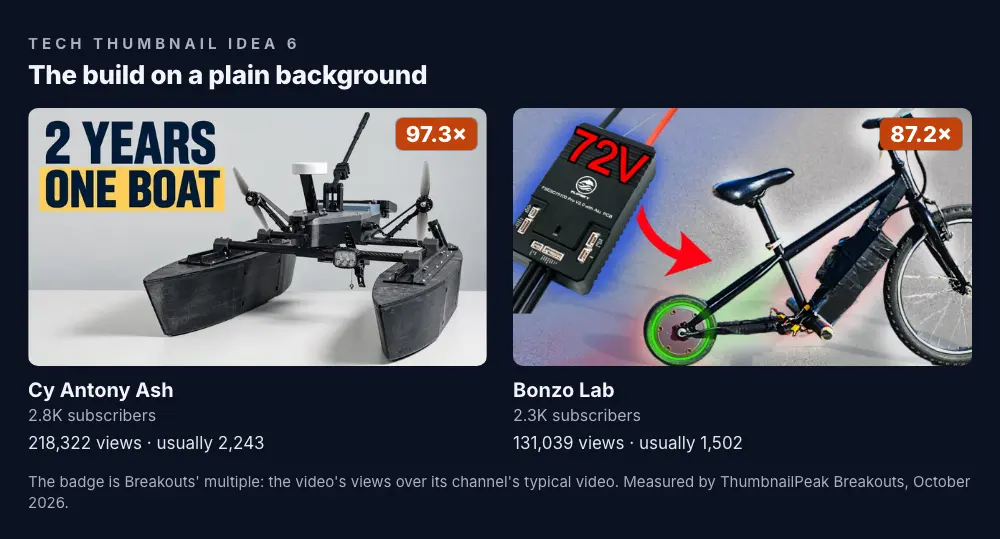
Maker channels have it easy in one way: the thing they built is the thumbnail. Cy Antony Ash's "I Built an Autonomous Boat to Map a Lakebed" shows the boat on a plain white surface, like a product photo, under "2 YEARS ONE BOAT". The plain background makes every part of the build readable, and the two numbers tell you how much went into it.
Bonzo Lab's "I Built a 72V VESC Mini Bike (2000W)" adds an arrow from the part to the build: a "72V" controller board, then a bicycle with a glowing motor in the wheel. Both channels have under 3,000 subscribers, and both videos got around 100 times their usual.
How to use it: photograph the finished build on a clean background, and let it fill the frame. If one part is the story, like the 72-volt controller, show it with an arrow to where it went.
7. Ask what the buyer is asking
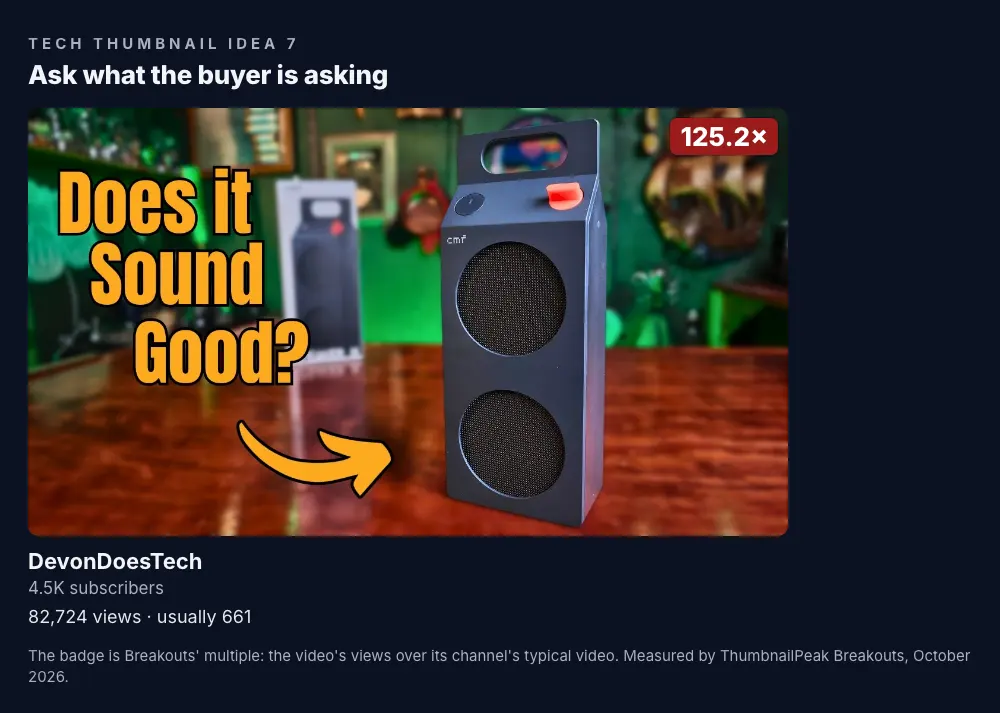
DevonDoesTech's "CMF Speaker M: Does the Milk Carton Speaker Actually Sound Good?" got 82,724 views, 125 times its usual. The speaker looks like a milk carton. The thumbnail shows it, and asks the one thing anyone looking at it would wonder: "Does it Sound Good?".
That's the whole of a good review thumbnail. It shows the product clearly and asks the question the buyer already has. It doesn't need "REVIEW", a score, or a shocked face.
How to use it: for reviews, write down the one question a buyer would ask about this product, and put it next to a clean shot of it. Keep the verdict for the video.
What a thumbnail can't do
Thumbnails like these didn't make their videos break out on their own. When we compared 3,523 channels' breakouts with the same channels' ordinary videos, the breakouts looked just like the rest: the same number of words, the same faces, the same colours. The details are in what a thumbnail can and can't do.
The difference was the idea: a $40 gaming PC, a probe that never hit an asteroid, a speaker shaped like a milk carton. Each thumbnail makes that idea clear at phone size, in one picture and a few words. That's the part you can borrow. Copying the image itself only puts you in a race with the original for the same click.
Find this month's tech breakouts
These seven will be replaced by new ones within weeks. Open the Categories tab on Breakouts and pick Science & Tech. It's free and doesn't need an account. Each category is swept once a week and keeps about a month of videos, biggest breakout first, with the date each one was measured.
The filters help you find videos like yours: 10×+, your channel size, the last 30 days, and a Language filter for titles in the alphabet you read. For one topic, like "budget GPU" or "home lab", the Search tab measures YouTube's top results for it. It needs a free account, which comes with 12 credits; a search uses 1.
Every card has a Critique this thumbnail button that sends it for an AI critique, which says what's doing the work and what isn't. When your own thumbnail is ready, put it in a real YouTube feed with the free thumbnail tester, next to the videos it will compete with.
Key takeaways
- Tech thumbnails carry words. Only 10 of the 60 biggest tech breakouts had no headline. Make the few words count: a price, a question, "A → B".
- A low price is a puzzle. $40 and $19 were the biggest things on their thumbnails, and both videos did around 200 to 400 times their usual.
- Circle one thing. One red circle and a reason beats a busy screenshot.
- Show the belief and the truth. "Movies / Reality" corrects a myth in two panels.
- Borrow the idea, not the image.
How we picked these: the videos come from the Science & Technology grid in ThumbnailPeak's Breakouts on 22 October 2026, published 4 to 18 October. Each video's "usual" is the median views of its channel's 10 most recent uploads that were at least two weeks old, or as many as a young channel has, down to three, and the badge is its views divided by that. We read the 60 biggest breakouts with at least 30,000 views, one per channel, and checked each example against the three frames YouTube saves from the video. Faces and headline words were counted with Apple's Vision framework on our own computer, as in our posts on faces and text. View counts are Breakouts' measurement on 20 October 2026 and keep changing. Thumbnails and channel names belong to their creators and are shown for commentary and education.