The most-viewed videos are the wrong ones to study
Before you design a thumbnail, you look at what is already working for your topic. That is the right instinct, and a results page quietly ruins it. The videos with the most views mostly belong to the channels with the most subscribers, and a channel with ten million subscribers gets millions of views whether a given thumbnail was brilliant or merely fine. You end up crediting a picture with what an audience did.
Here is one search, "home gym setup", with the same 88 results sorted two ways.
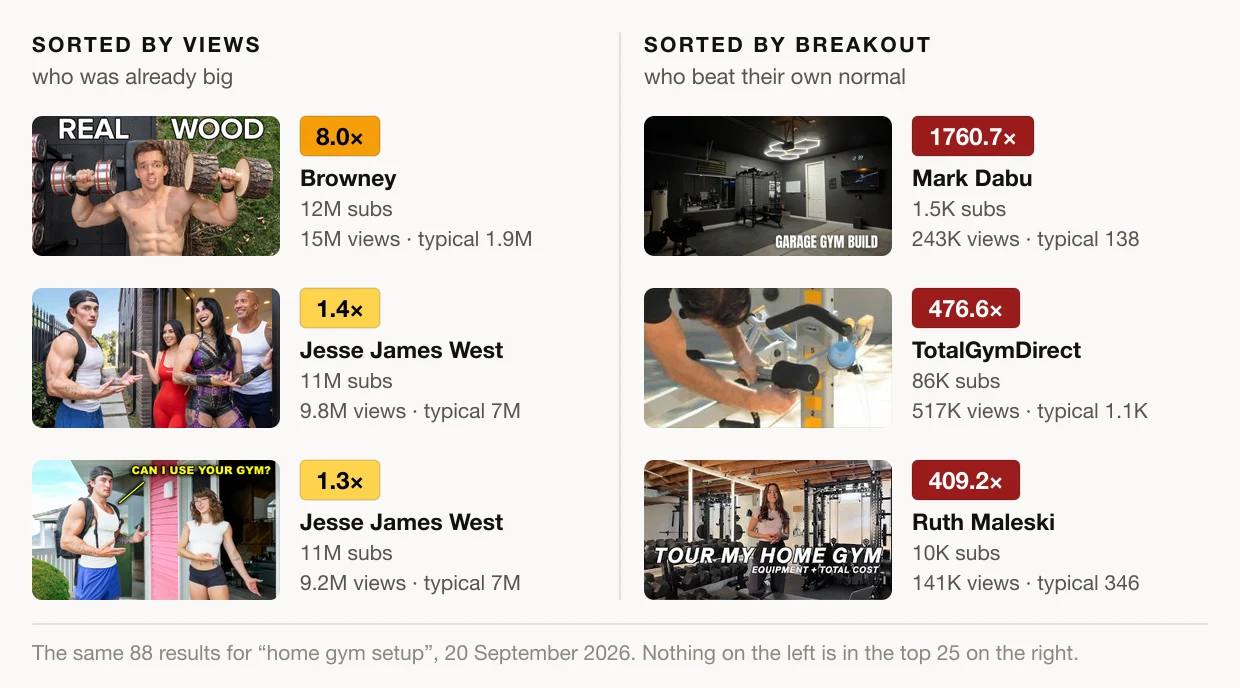
On the left are the three most-viewed videos. Browney's has nearly 15 million views, on a channel with 12 million subscribers whose typical upload gets 1.9 million. The two from Jesse James West passed 9 million each, which for that channel is 1.4× and 1.3× a normal video. Nothing unusual happened in either case. That is what those channels do every week, and borrowing their thumbnail style will not bring their subscribers with it.
On the right, the same videos are sorted by breakout factor: each video's views divided by what its own channel typically gets. First place is Mark Dabu's garage gym build, from a channel with 1,500 subscribers whose typical video gets 138 views. This one got 243,000. None of the three most-viewed videos makes the top 25 of this list.
Creators call these outlier videos, and they are the ones worth studying, because "the channel is huge" is not available as an explanation. Almost nobody was subscribed. The idea, the title and the thumbnail had to carry the video to strangers, and they did.
Finding them takes one search
Breakouts is the ThumbnailPeak tool that builds the right-hand list. Open its Search tab and type the topic you are making a video about. It needs a free Google sign-in.
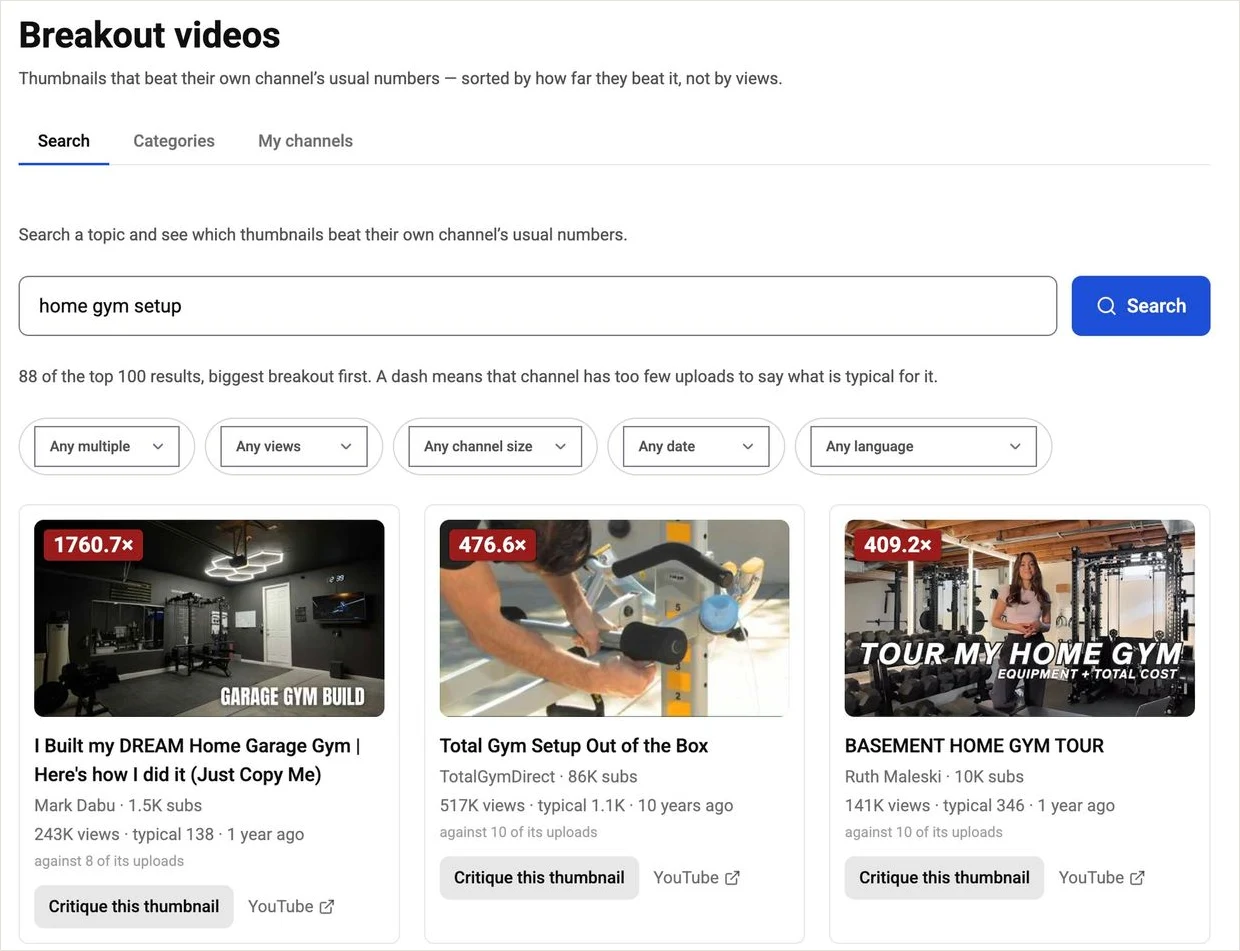
Behind that one click, it reads up to the top 100 results YouTube returns for the phrase, leaves out Shorts and live broadcasts, works out what is typical for every channel in the list, and sorts by the multiple. "Typical" is the median of a channel's ten most recent uploads that are at least two weeks old. It is a median so that one earlier viral hit does not inflate it, and the two-week rule keeps a video that is still collecting views from dragging it down.
How to read a card
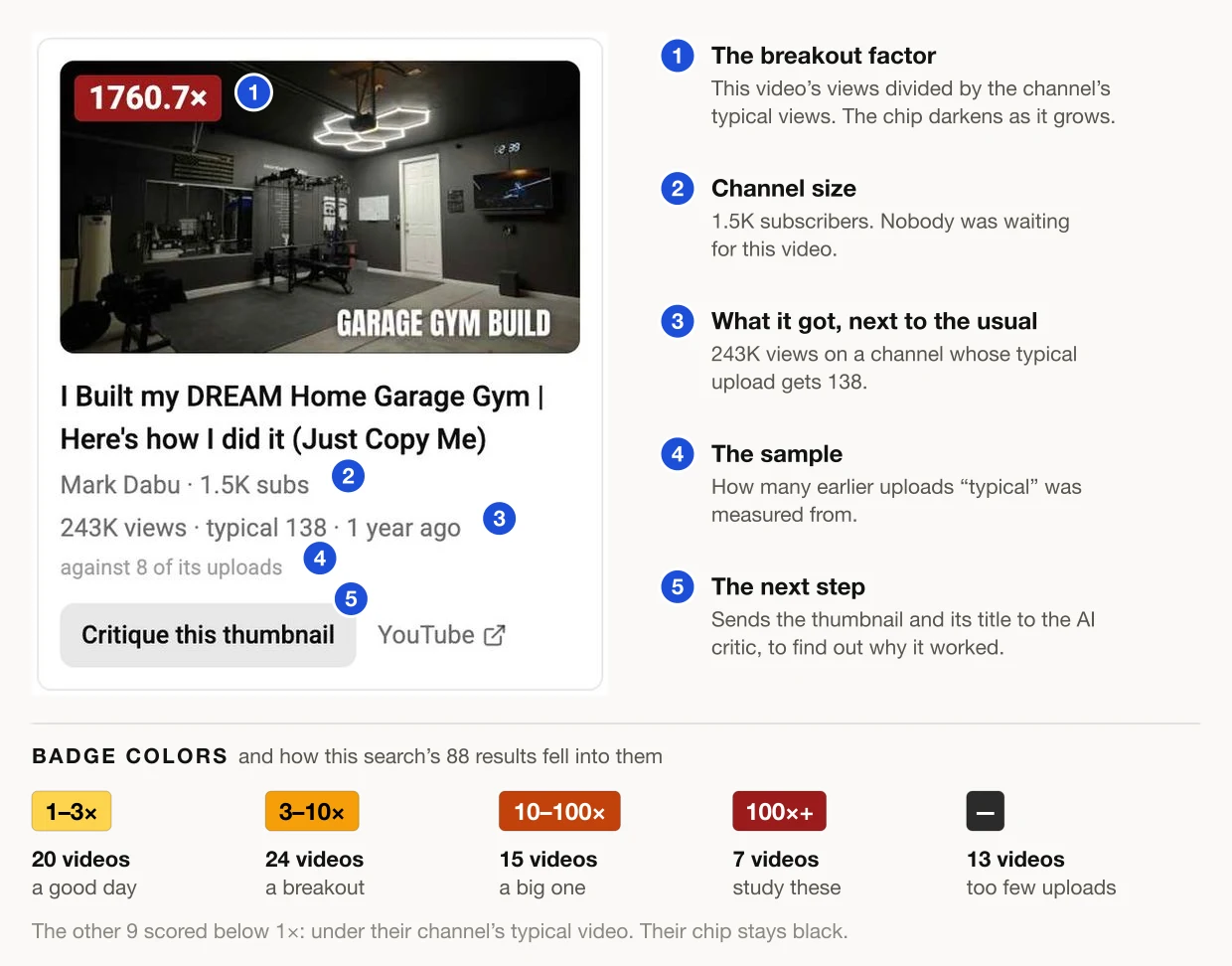
The number in the corner is the headline, and its color tells you the scale before you read it: light amber for a good day, darker amber from 3×, orange from 10×, deep red from 100×. In this search, 46 of the 88 videos cleared 3× and 7 cleared 100×.
Three smaller details keep that number honest:
- Read "typical" next to the multiple. A 1,760× on a channel whose typical video gets 138 views and a 46× on Garage Gym Reviews, whose typical video gets 107,000, are different kinds of event. The first is a video escaping a tiny channel entirely. The second is an established channel beating itself 46 times over, which took 4.9 million views. Both are worth a look, for different reasons.
- A dash means we won't guess. Thirteen videos here came from channels with too few measurable uploads to say what is typical. They are listed last, with a dash where the number would be, instead of being given a made-up score.
- A "~" means the video is still climbing. A video under two days old has not collected its views yet, so its badge is a projection, marked with a tilde, and the card prints what the video has actually done so far underneath.
Narrow the board before you trust it
The top of this particular list has a catch you would want to see before copying anything from it: the biggest multiples are old. The 476× is a ten-year-old setup guide from the manufacturer of one specific machine, and its views most likely come from people who bought that machine and searched for instructions. A breakout factor tells you that a video overperformed. It does not tell you why, and sometimes the answer is not the packaging.
The filter bar is how you get to the rows that answer your actual question. It works on the results already loaded, so it costs nothing and re-sorts instantly.
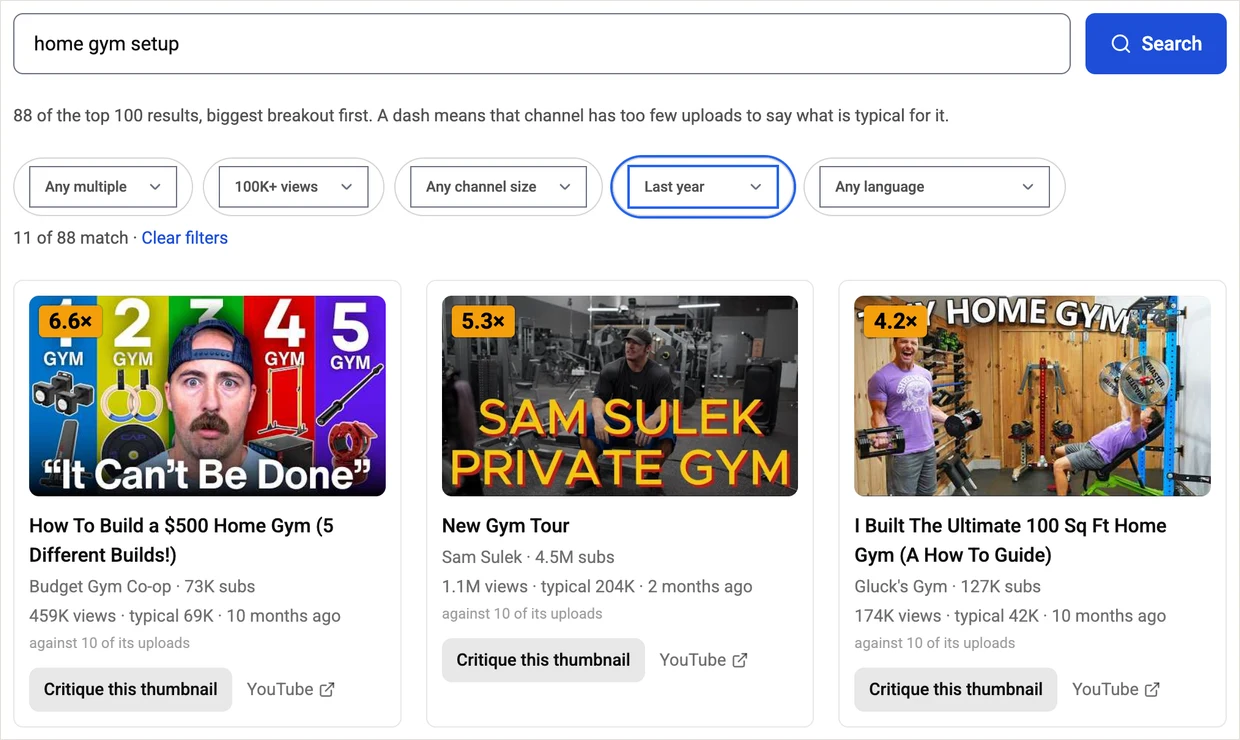
Set Published to the last year and Views to 100K+, and 88 videos become 11. The top of the board is now 6.6×, not 1,760×. That is a more realistic picture of what strong packaging is doing in this niche right now, and these are the thumbnails your video will actually sit next to.
Two other settings are worth knowing:
- Channel size → Under 10K subs. The small end is the informative one. A 10× on a channel with 5,000 subscribers says more about the thumbnail than a 10× on a channel with a built-in audience. In this search, that filter plus 10×+ leaves five videos, every one from a channel under 2,000 subscribers.
- Language. This goes by the script the title is written in, so a board full of titles you cannot read narrows to the ones you can.
What a board lets you notice
Six videos in this search have nearly the same title, some version of "I Built My Dream Home Gym". That makes them a small natural experiment: the promise is held constant, and the result ranges from 1,760× down to 0.5×.
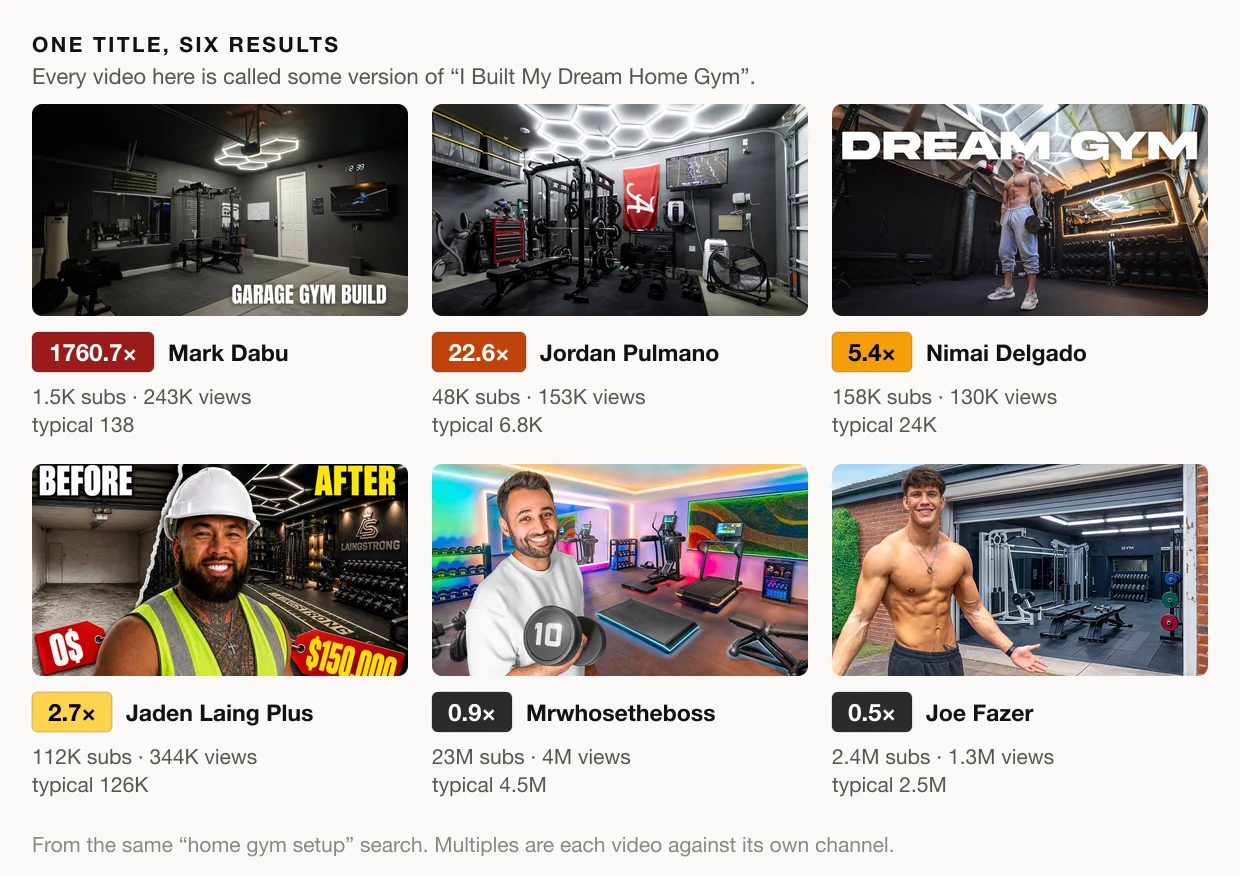
The two biggest breakouts both show the room and nothing else: dark walls, hexagon lights, no person, almost no text. The four versions with the creator standing in front of the gym sit between 5.4× and 0.5×.
Be careful about what that does and does not show. Mrwhosetheboss at 0.9× is not a failed thumbnail. It is 4 million views, roughly a normal upload for a tech channel with 23 million subscribers, and a familiar face is part of why subscribers click. For a channel nobody knows yet, a face carries no such weight. Someone searching "home gym setup" wants to see a gym, and the two smaller channels that broke out showed them the gym. That is a hypothesis from six thumbnails, not a law. It is also a hypothesis you could never have formed from the most-viewed list, where every thumbnail is a famous person.
From a breakout to your own thumbnail
Testing a hypothesis like that is what Critique this thumbnail is for. The button on every card sends that thumbnail and its title for an AI critique, which scores it and says specifically what is doing the work: the focal point, the contrast, how the image and the title split the promise between them. Then run your own draft through the same critique and put the two reports side by side.
The aim is to borrow the technique, not the image. A copied thumbnail competes with the original for the same click, and the original got there first. If you want the image itself for a reference folder, the YouTube thumbnail downloader saves any of them at full size.
Two more ways to ask the same question
Search answers "what broke out for this topic". The other two tabs ask it differently: Categories needs no account, and My channels, like Search, needs a free one.
Categories is for when you don't have a topic yet. It holds breakouts from the last few weeks across twelve YouTube categories, from Gaming to Pets & Animals, hundreds of videos each, and you pick as many as you make.
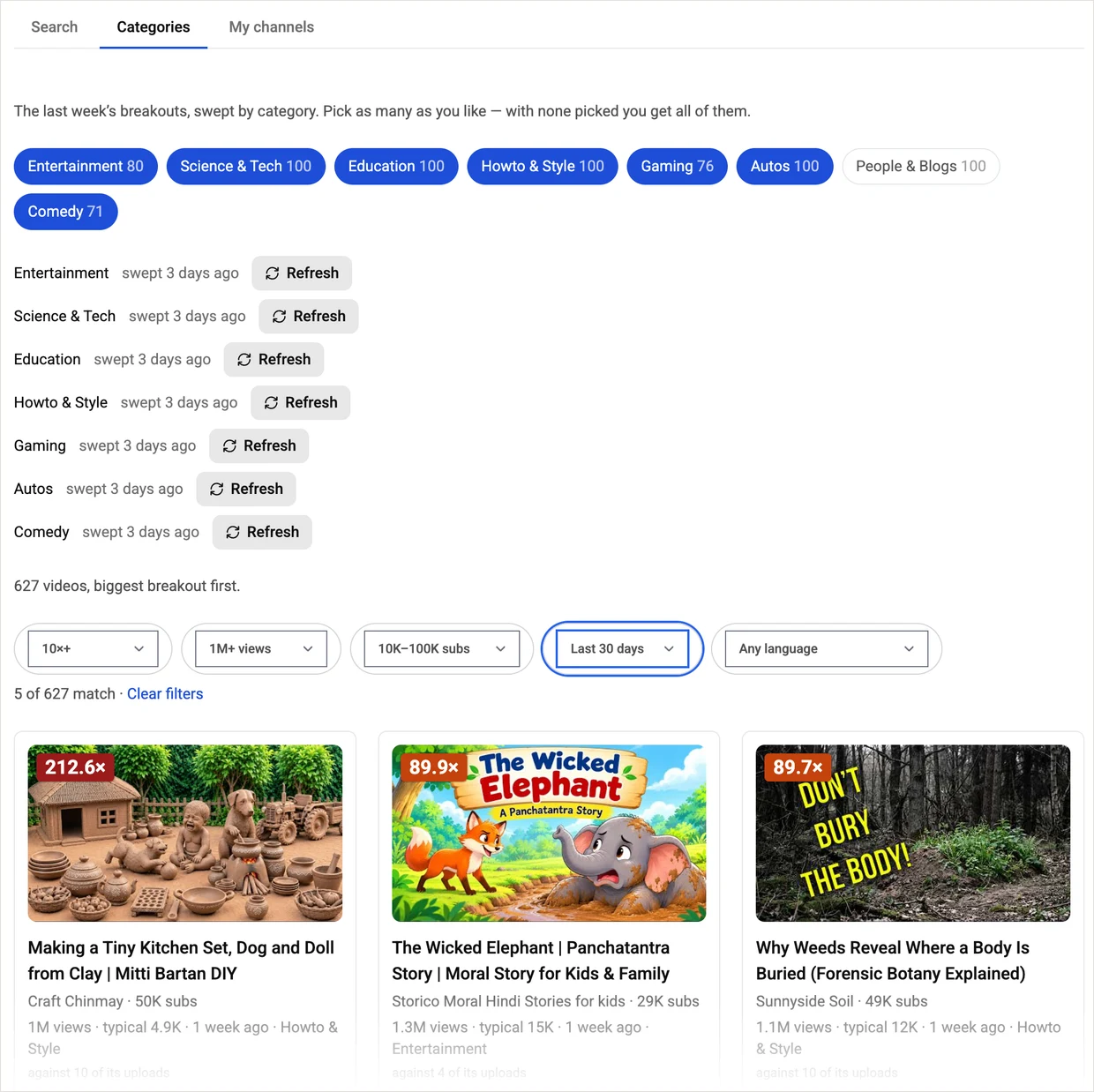
Three categories are picked here, Science & Tech, Education and Autos, 3,966 videos in all, and the filters ask a pointed question: which channels with under 10,000 subscribers had a video pass 100,000 views at 10× or more in the last 30 days? 168 did. The top one is a warships channel with 926 subscribers, whose video about one small gun did 2,604 times its usual. Each category updates itself once a week, so there is nothing to refresh.
We've taken this month's breakouts apart in six of these categories, with what each thumbnail does that you can borrow: cars, travel, tech, pets and animals, sports and education.
My channels turns the same measurement on channels you choose: your own, and the ones you measure yourself against, up to 30, added by @handle — or, signed in, brought over from your Settings in one click.
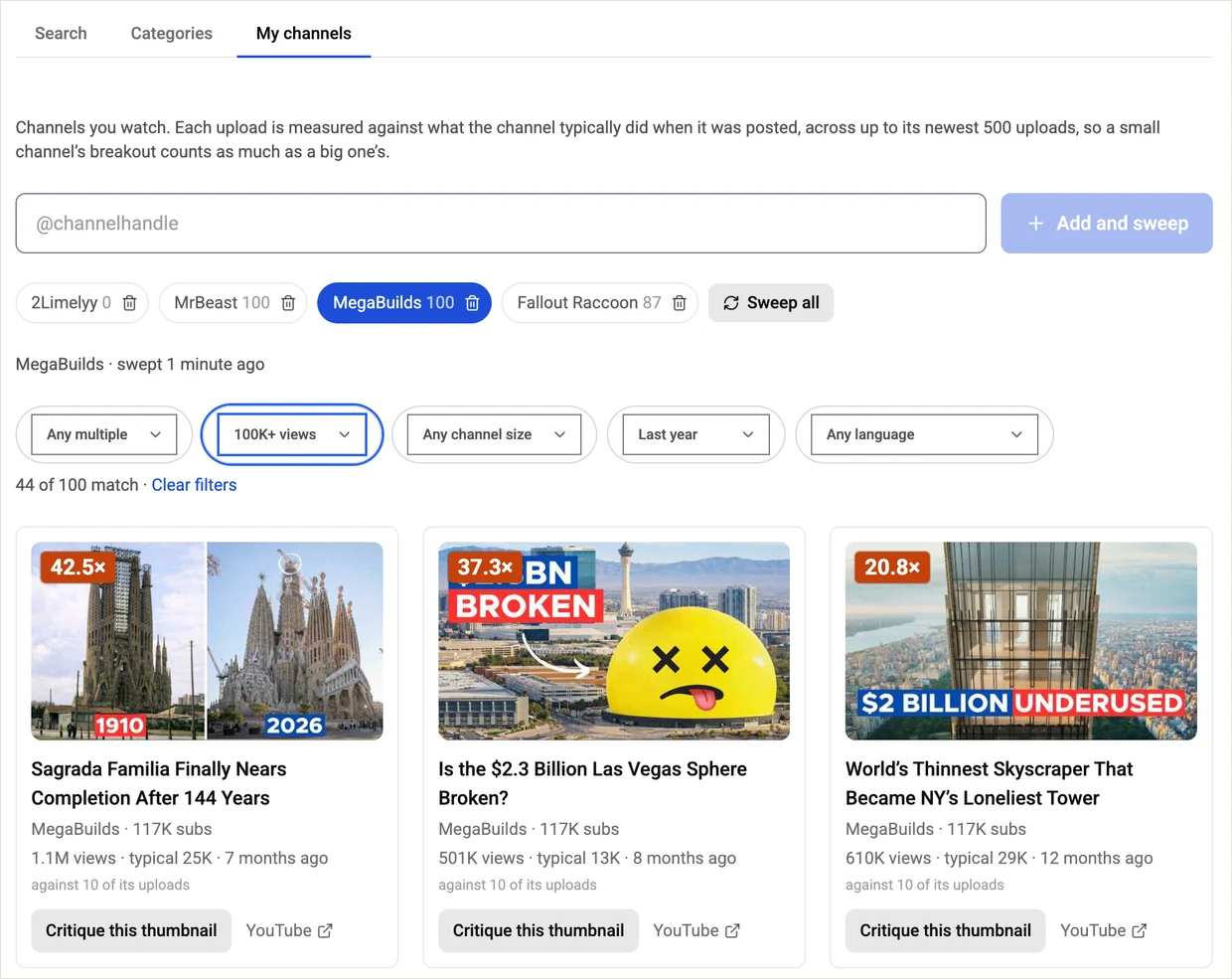
This is MegaBuilds, a construction channel with 117,000 subscribers, filtered to the last year. Its best video of the year is the Sagrada Familia one at 42.5×, and the thumbnail is a plain split: the same cathedral in 1910 and in 2026.
Notice that "typical" changes from card to card: 25K, 13K, 29K. Each upload is measured against what the channel was doing when that video was posted, using the uploads before it, so a channel that has grown is not graded against the smaller channel it used to be. Point this tab at your own channel and you get a ranked list of which of your thumbnails and titles actually beat your normal, which is the most relevant research there is.
What it costs
Every new search and every channel sweep uses 1 credit. Browsing categories is free, and a free account comes with 12 credits. Repeating a search from the last 24 hours is free, and so is everything you do with the filter bar, so one credit goes a long way: search once, then slice the results as many ways as you like.
What to take away
- Views measure the channel. The multiple measures the video. Sort by views and you study famous people. Sort by breakout and you study packaging.
- Read "typical" beside the badge. 1,760× off a base of 138 views and 46× off a base of 107,000 are both real, and they mean different things.
- Filter before you conclude. Last year, your channel size, 100K+ views: the board that remains is the one your video will compete on.
- A breakout is a question, not an answer. The number says a video overperformed. Finding out why takes looking, and the critique button is the fast way to look.
- Borrow the technique, not the image.
Search your next video's topic on Breakouts — it's the Search tab — before you open your editor. It takes a few seconds, and the first thing it usually shows is that the thumbnails you were about to imitate were never the ones doing the work.
Thumbnails and channel names belong to their creators and are shown here for commentary and education. The figures come from a ThumbnailPeak Breakouts search for "home gym setup" run on 20 September 2026. View counts move, so the same search today will differ.