Disclosure: we make ThumbnailPeak, and the new thumbnails and scores in this post come from its Generate, Critique and Compare tools. The four videos are Creative Commons videos, and their creators had nothing to do with this post. Every run was made on 2 November 2026.
Most channels have old videos that people still find, especially how-tos. Their thumbnails were made years ago, often in a hurry, and often in a style the channel has since left behind. Should you give them new ones? Here's the short answer:
- You can change the thumbnail on any video, at any time. The video keeps its views, comments and watch time. Only the picture changes.
- YouTube says a new thumbnail can bring more views, but "don't change what's working." The change itself is neither rewarded nor punished. What counts is how viewers react to the new picture.
- Pick videos that YouTube still shows to people, but that few of them click. A video that nobody is shown can't be helped by a new picture.
- When a video is doing well, test instead of swapping. YouTube's own A/B test shows up to three thumbnails to real viewers and keeps the one that earns the most watch time.
We tried this on four how-to videos from 2019 to 2021. An AI made new thumbnails for each one from its link alone, and our Compare tool preferred a new thumbnail on all four. One of those four videos has 2.67 million views, which is why this post ends with testing.
Can you change a thumbnail after uploading?
Yes. In YouTube Studio, open the video's details, and under Thumbnail choose Upload file, then press Save. The new picture replaces the old one wherever the video appears. It works on a video you uploaded yesterday or ten years ago, as often as you like.
You can also do it from your phone in the YouTube app. Our guide to making a thumbnail on your phone has those steps. If the Upload file button isn't there, or YouTube refuses the file, here's why that happens.
Does changing a thumbnail affect views?
It can, through what viewers do. YouTube answers this question in its own performance FAQ, under "Does changing a video's title or thumbnail re-rank the video in the algorithm?" The answer starts: "Maybe, but it's because our systems are responding to how viewers are interacting with your video differently." In other words, there is no bonus for changing a thumbnail and no penalty for it either. If more of the people YouTube shows the video to click it and keep watching, YouTube can show it to more people. If fewer do, it can show it to fewer.
The same answer ends with the advice that matters most here: "Changing your video title and thumbnail can be an effective way to get more views, but don't change what's working."
Old videos are worth the question because they keep getting watched. As the same FAQ puts it, "It's common for viewers to start showing more interest in old videos." A how-to video from 2019 can still turn up in search every day, wearing a thumbnail made in 2019.
Which old videos are worth a new thumbnail
You can't change a thumbnail into views if nobody sees it. So start in YouTube Studio's Analytics, not in a design tool.
- YouTube still shows it to people. Open the video's Analytics and look at its impressions: how many times its thumbnail was shown in the last 28 days. If they're close to zero, a new picture has nobody to show it to.
- Few of those people click. Look at the impressions click-through rate beside it. Compare it with your own channel's other videos, not with a number from someone else's channel: click-through rates vary a lot from one kind of video to the next (see what a good CTR on YouTube is).
- The thumbnail has aged. A date or a "new" label, an old channel logo or web address, small text, or a headline that repeats the title word for word.
- It isn't one of your best performers. If a video is doing well, that's YouTube's "don't change what's working". You can still try new thumbnails on it, but test them rather than swapping (more on that below).
We made new thumbnails for four old videos
We picked four how-to videos that their creators published under the Creative Commons Attribution licence, from 2019 to 2021. They range from 29,000 to 2.67 million views. For each one we did three things, the same way anyone with an account can:
- Critique scored the current thumbnail, with the video's real title.
- Generate, ThumbnailPeak's AI thumbnail generator, made three new thumbnails from the video's link alone, with no other instructions. From a link, it reads the video's title and description, the stills YouTube takes from the video, and the current thumbnail.
- Compare put the current thumbnail against the highest-scoring new one, with the title, and picked a winner.
Every score in this post is our critique's opinion of the picture, out of 100, judged with the video's title. It is not a count of clicks: only YouTube knows those.
Concrete floor cracks, 2019
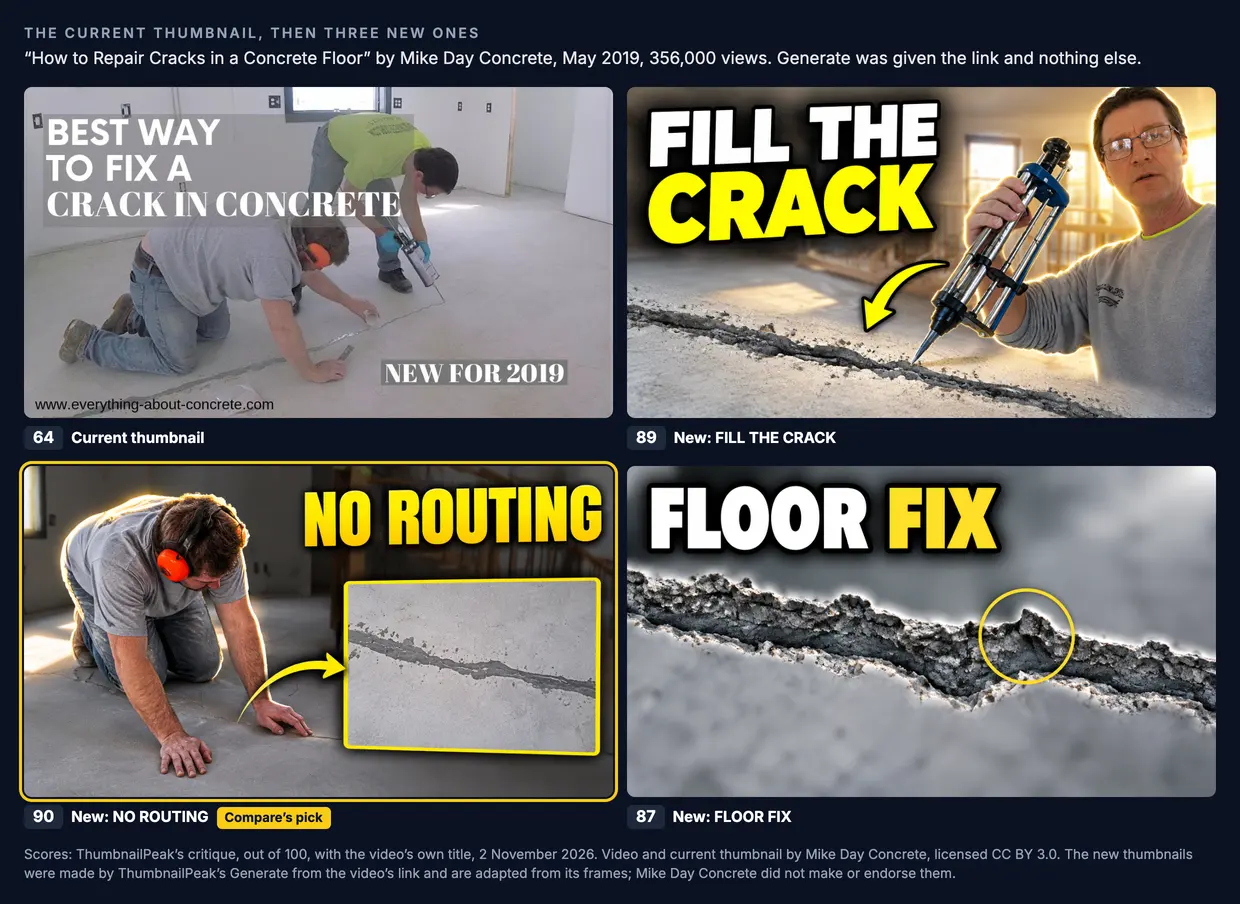
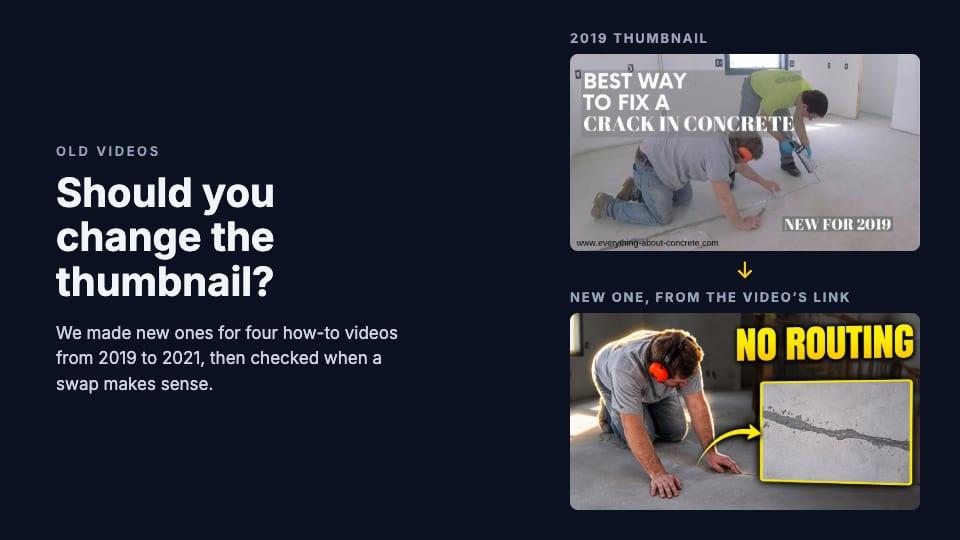
The current thumbnail scored 64. Our critique found two things that make it look its age. Its headline repeats the title. And there's a "NEW FOR 2019" label in the corner, which the critique flagged as "now an outdated date claim". A date that sold the video in 2019 tells a viewer in 2026 that it's old.
The new thumbnails took their words from the video, not the title. The description says "You don't need to rout it out", meaning you don't have to cut the crack wider before you fill it, and that became "NO ROUTING", a reason to pick this video over other crack repairs. Compare chose it over the current thumbnail, saying the current one's "long headline and small 'NEW FOR 2019' text compete with the scene and shrink at 168×94", the size of a thumbnail in YouTube's sidebar.
Workbench restoration, 2019

The current thumbnail scored 68. Its red banner repeats the title in small serif letters that are hard to read at feed size.
Everything on the new ones came from the creator's own description, written in 2019: the bench is "from the late 1800s early 1900s", the restoration took "10 months", and new legs were made from birch because beech was hard to find. That's the most useful thing an old video gives you: the description you wrote back then is full of details the thumbnail never used.
Not every new thumbnail was good, though. "BEECH → BIRCH" scored 77, because the workbench, the subject of the video, isn't in it. Even the winner needs a careful read: the critique noticed that "LATE 1800s" doesn't match the title's "100 Year Old". The description says "late 1800s early 1900s", so the safer wording is the one in the title. Read every word on a new thumbnail before you upload it.
Cast iron Dutch oven, 2020
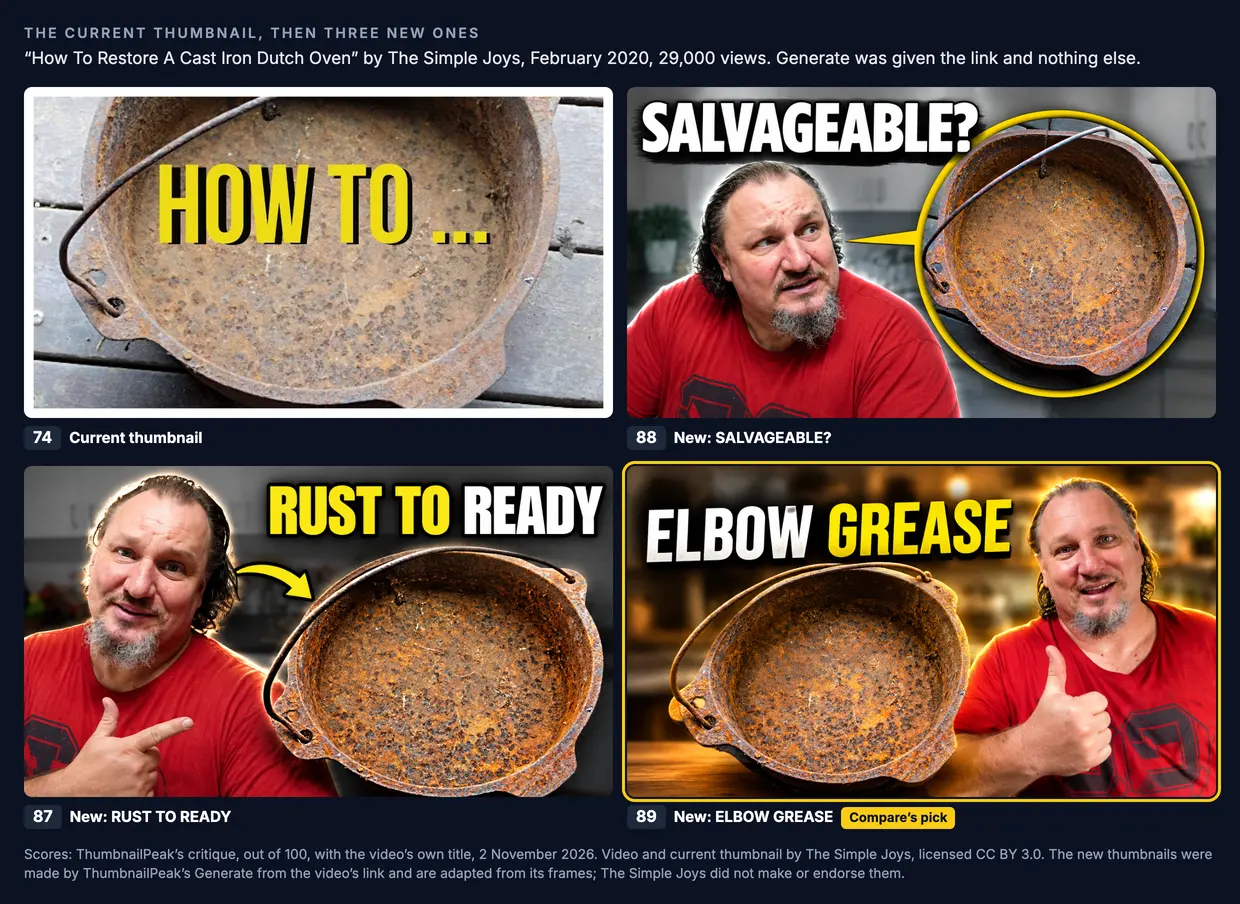
The current thumbnail scored 74. Its "HOW TO ..." gives no hint of what the video teaches, and the critique's one fix was to replace it with something that does, such as "REMOVE THE RUST".
The current thumbnail has no person in it. All three new ones put the creator in, drawn from YouTube's stills of the video, where he talks to the camera in a red T-shirt. "ELBOW GREASE" comes from his description ("Bit of hard work and elbow grease restores this beauty"), and Compare picked it. If a new thumbnail puts you in the picture, check that the face still looks like you: it is drawn by an AI from small stills, not copied from a photo.
Stuck sink plug, 2021
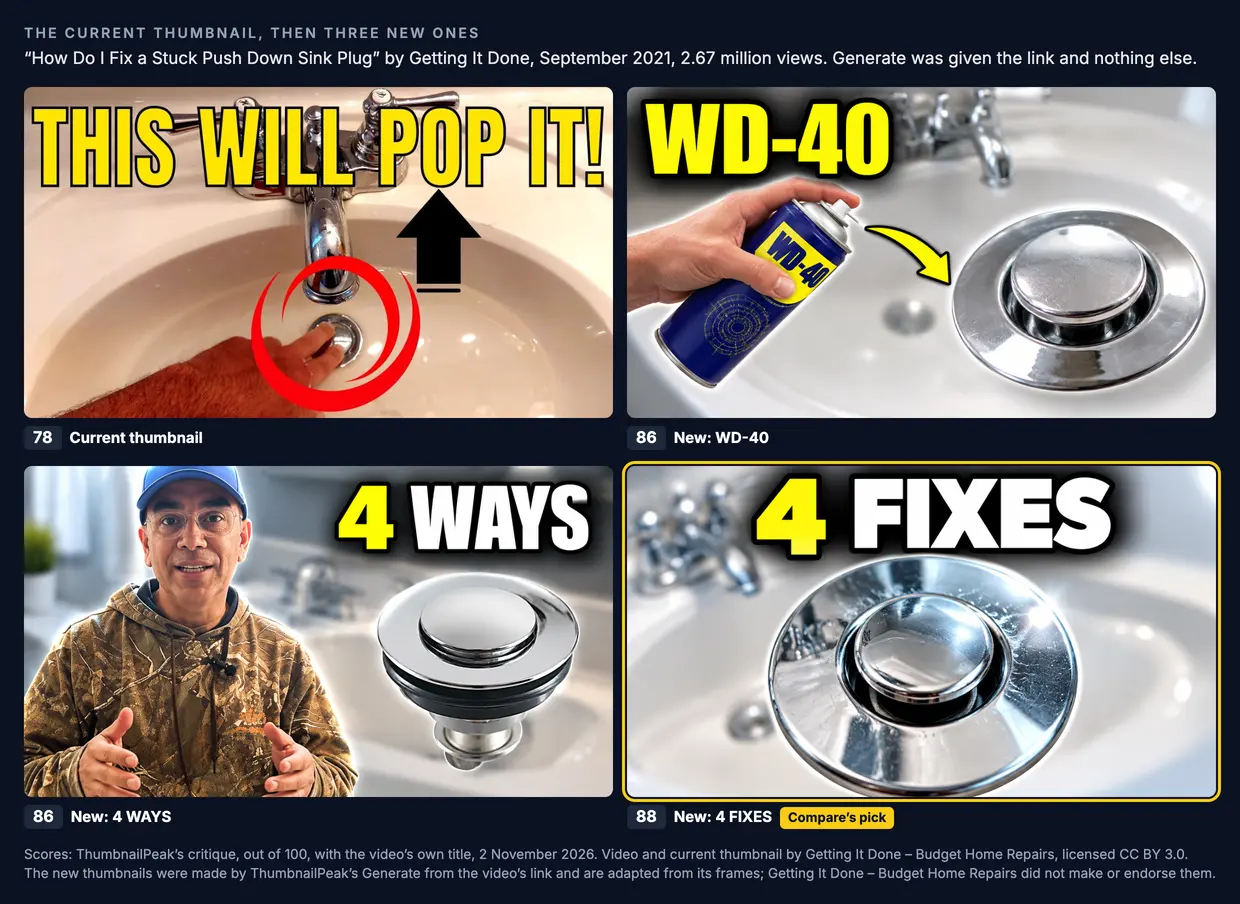
This was the strongest of the four current thumbnails, at 78. The headline is big and easy to read, and the critique had only one fix: the black arrow points up at the faucet, while the thing to look at is the plug.
The new thumbnails used the title's "4 Ways" and one of YouTube's stills, which shows WD-40 being sprayed around the plug. Compare preferred "4 FIXES", saying it "matches the video's four methods".
But this thumbnail sits on a video with 2.67 million views. It may be one of the main reasons for them. Our critique can judge the picture, but it can't see who clicked. This is the video YouTube's advice is about.
What the four have in common
- The headline repeated the title. On three of the four, the critique's first fix was the same: the thumbnail says what the title already says.
- The new words came from the video. "NO ROUTING", "LATE 1800s", "10 MONTHS" and "ELBOW GREASE" came from the creators' own descriptions, "WD-40" from a still of the video, and "4 FIXES" from the number in the title. So for an old video, the most useful material is often something you wrote years ago.
- New isn't automatically right. One new thumbnail left out the subject of the video, and one claimed a date the title disagrees with. You still have to read every one against the video.
- Our critique preferred a new thumbnail every time, including on the video with 2.67 million views. A score can tell you a picture is clearer. It can't tell you the old one wasn't working. Only your viewers can, which is what YouTube's test is for.
When the old thumbnail is working, test instead of swapping
For the sink plug video, we tried a middle path. We ran Generate once more on the same link, this time with one line in the guidance box: keep the thumbnail's idea and its words, and fix the one thing the critique pointed out.
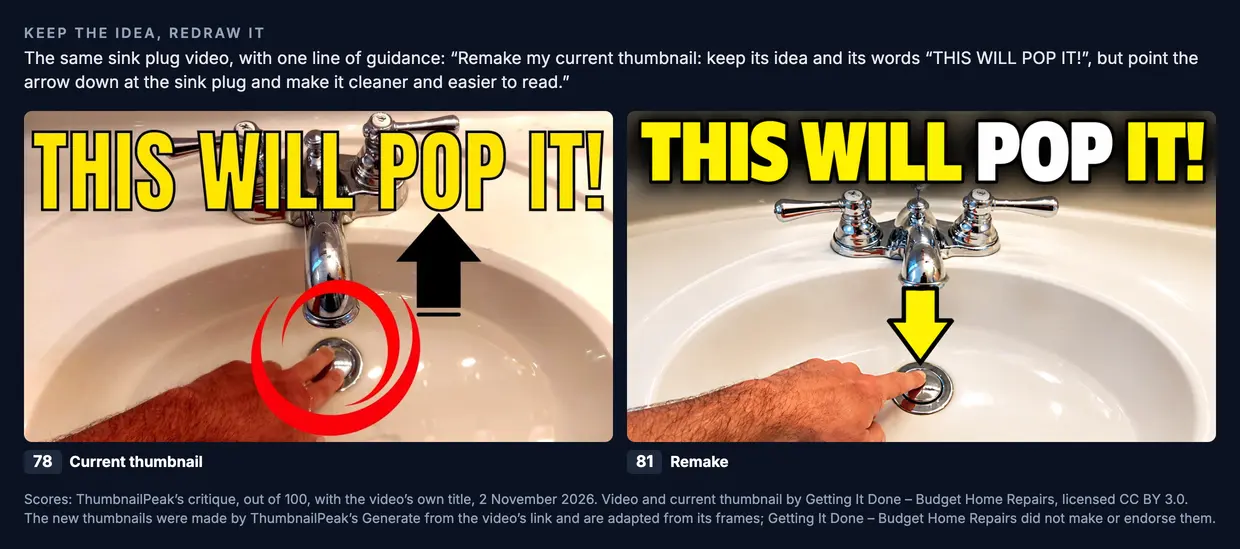
The remake keeps everything that might be working: the same promise, the same words, the same hand on the plug. The arrow now points at the plug, and the picture is cleaner. It scored 81 against the current 78. That's too small a difference to call the remake better.
So for a video like this, we wouldn't pick a winner ourselves. We'd hand the choice to YouTube's own A/B test (it started as Test & Compare, and in YouTube Studio the button now says A/B Testing), with three options: the current thumbnail, the remake, and "4 FIXES". Here's what YouTube's help page says about it:
- Older videos are the recommended place to start. "We recommend testing older videos first to reduce the impact to your channel's overall views."
- The winner is chosen by watch time, not by clicks alone. A thumbnail that gets clicks from people who leave right away doesn't win.
- It takes up to two weeks. "Your test should be completed within two weeks", though some finish in a few days.
- It runs only on a computer, in YouTube Studio. You can't test Shorts.
- Every option should be at least 1280×720. If even one is smaller, YouTube shows all of them at 480p.
When the test ends, YouTube keeps the winner on the video. If nothing clearly wins, the first option you added stays, so add the current thumbnail first: then nothing changes unless a new one clearly does better. Our A/B testing guide covers the setup and how to read the result.
If your channel can't run a test, keep the old file before you swap, so you can put it back. Then compare the video's impressions and click-through rate for the two weeks after the change with the two weeks before. Other things change from one fortnight to the next, such as the season and what people are searching for, so treat the result as a hint, not proof.
How to do it for one of your videos
- Find a candidate in YouTube Studio's Analytics: an old video with steady impressions and a click-through rate below your channel's usual.
- Critique the current thumbnail with the video's title at Critique. It tells you what has aged, such as a date, small text or a headline that repeats the title.
- Paste the link into Generate and ask for three. If you'd rather keep your idea and just redraw it, say so in the guidance box, as we did for the sink plug.
- Press Compare vs current thumbnail under the new one you like best. You get both critiques and a verdict. The same check is at Compare for any two thumbnails.
- Read every word, and check every face, against the video.
- Download it at 1280×720, the size YouTube's A/B test needs. Then test it, or swap it if the video wasn't getting clicks anyway.
What it costs
ThumbnailPeak needs a free account, which comes with 12 credits. A critique uses 1 credit, a batch of three uses 6 credits, and a comparison uses 2 credits. So the whole thing for one old video uses 9 credits, and a free account can do one video start to finish. Free downloads carry a small ThumbnailPeak mark in the corner, so for a thumbnail you'll actually upload you'll want a clean file. A credit pack adds 100 credits for $10, enough for about 11 videos, and they never expire. Pro is $20 a month and adds 300 credits every month. Either one makes downloads clean.
What to take away
- Changing a thumbnail costs the video nothing. Its views and history stay, and YouTube neither rewards nor punishes the change.
- Pick by impressions and click-through rate. A new picture only helps a video that YouTube still shows to people.
- Look for what has aged: dates, "new" labels, small text, a headline that repeats the title.
- Mine your old description. The details a viewer cares about are often already written there.
- Read every new thumbnail against the video. A score can't tell you a new thumbnail claims something the video doesn't say.
- Don't swap a thumbnail that's working. Test it against the new ones, and let YouTube's viewers decide.
Open Generate, paste the link to one of your old videos, and see whether you'd click any of the three.
Every new thumbnail in this post was made by ThumbnailPeak's Generate from the video's link on 2 November 2026, and is shown unedited. Scores are ThumbnailPeak's critique, an AI's opinion of the picture judged with the video's title, not a measure of clicks. View counts were read the same day.
The four videos were published by their creators under the Creative Commons Attribution licence (CC BY 3.0): "How to Repair Cracks in a Concrete Floor | A Step by Step Guide" by Mike Day Concrete, "Vintage Workbench Restoration // 100 Year Old Cabinet Makers Workbench" by Komar Project, "How To Restore A Cast Iron Dutch Oven" by The Simple Joys, and "How Do I Fix a Stuck Push Down Sink Plug | 4 Ways To Free Pop Up Plug" by Getting It Done – Budget Home Repairs. Their current thumbnails are shown as published. The new thumbnails are adaptations made from frames of those videos, and the creators did not make or endorse them.