

What it made
Every thumbnail in this post came out of ThumbnailPeak's Generate and is shown unedited. Some started from a YouTube link. Others started from a few sentences about a video that was never filmed. Some have a face in them from the face library, and some follow a style template.
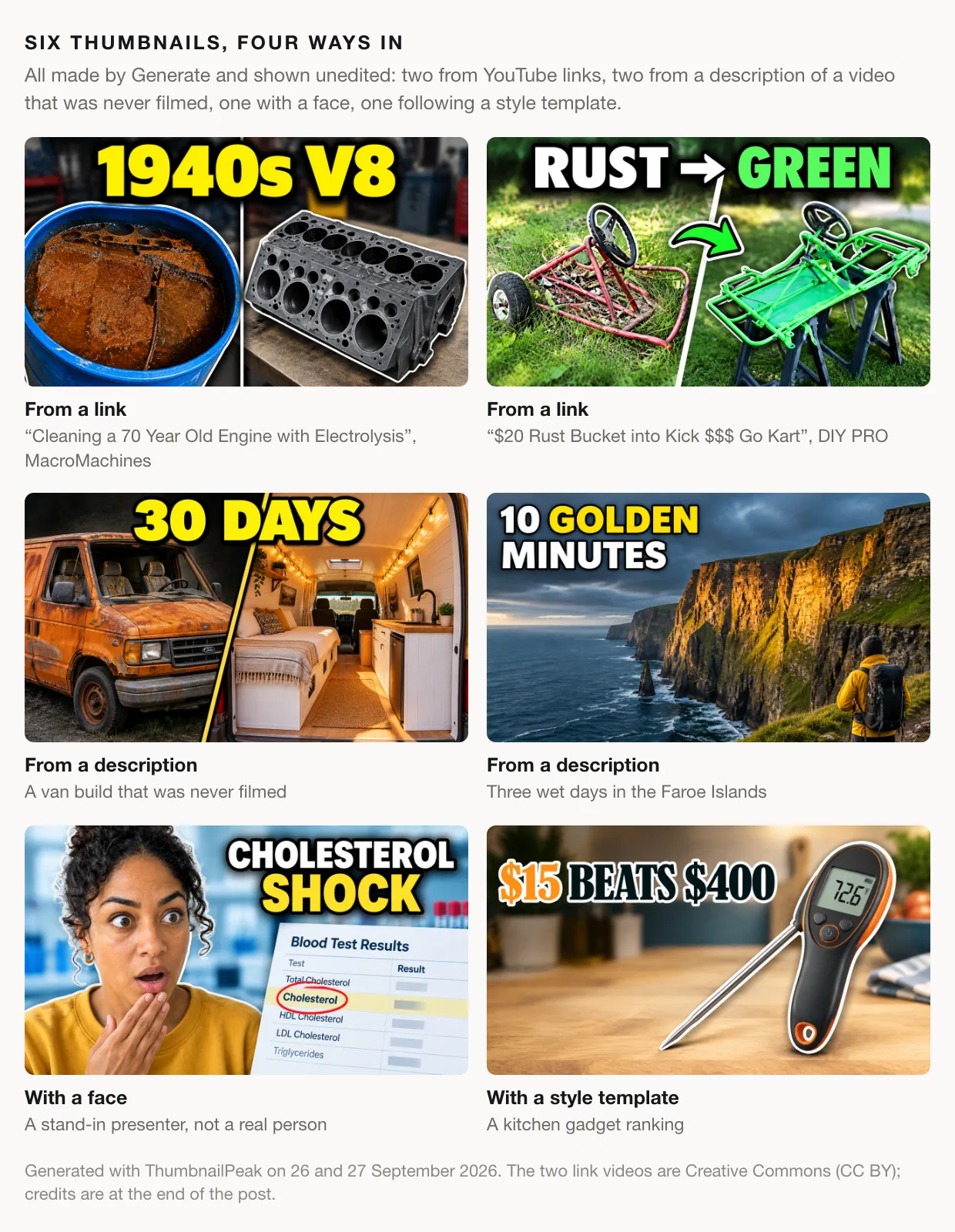
The rest of this post takes each way in: what you give it, what comes back, and how to get good results for your own video.
Start from a link
Paste a YouTube link, public or unlisted. Generate reads the video's title and description and looks through the footage for what can carry a thumbnail, so what it draws is something the video actually shows. An unlisted upload works exactly like a public one, which means the thumbnail can be ready before you publish.
We tried it on three Creative Commons videos from maker channels. Each figure below shows the thumbnail the video has now, followed by the batch of three Generate made from the link alone.
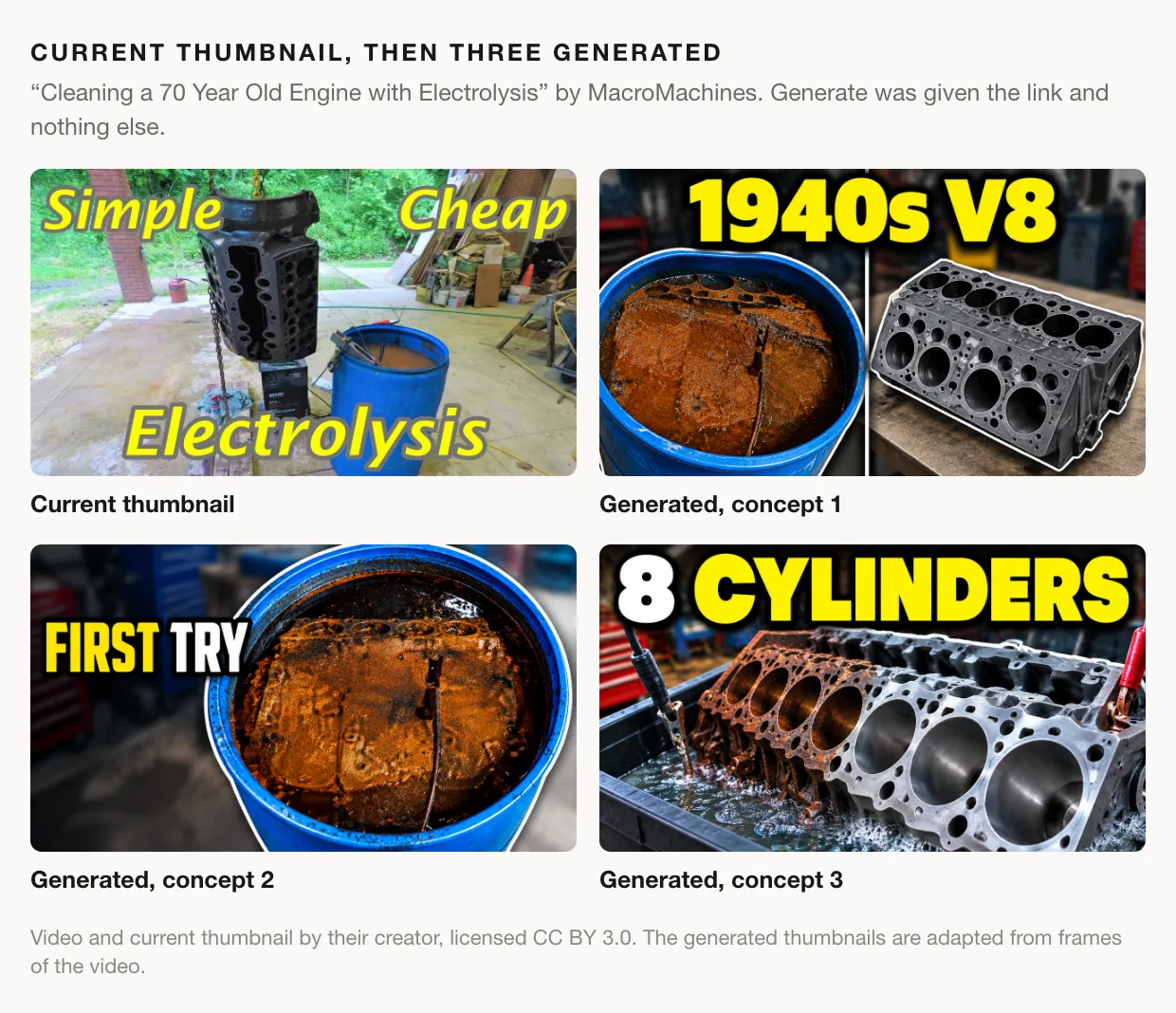
The title only says "70 year old engine". The description says it's a flathead V8 from the 1940s, and that became the headline of the first concept. "First try" comes from the line "I've never used electrolysis before", and the third concept shows what the whole video is about: half the block still rusted, half clean.
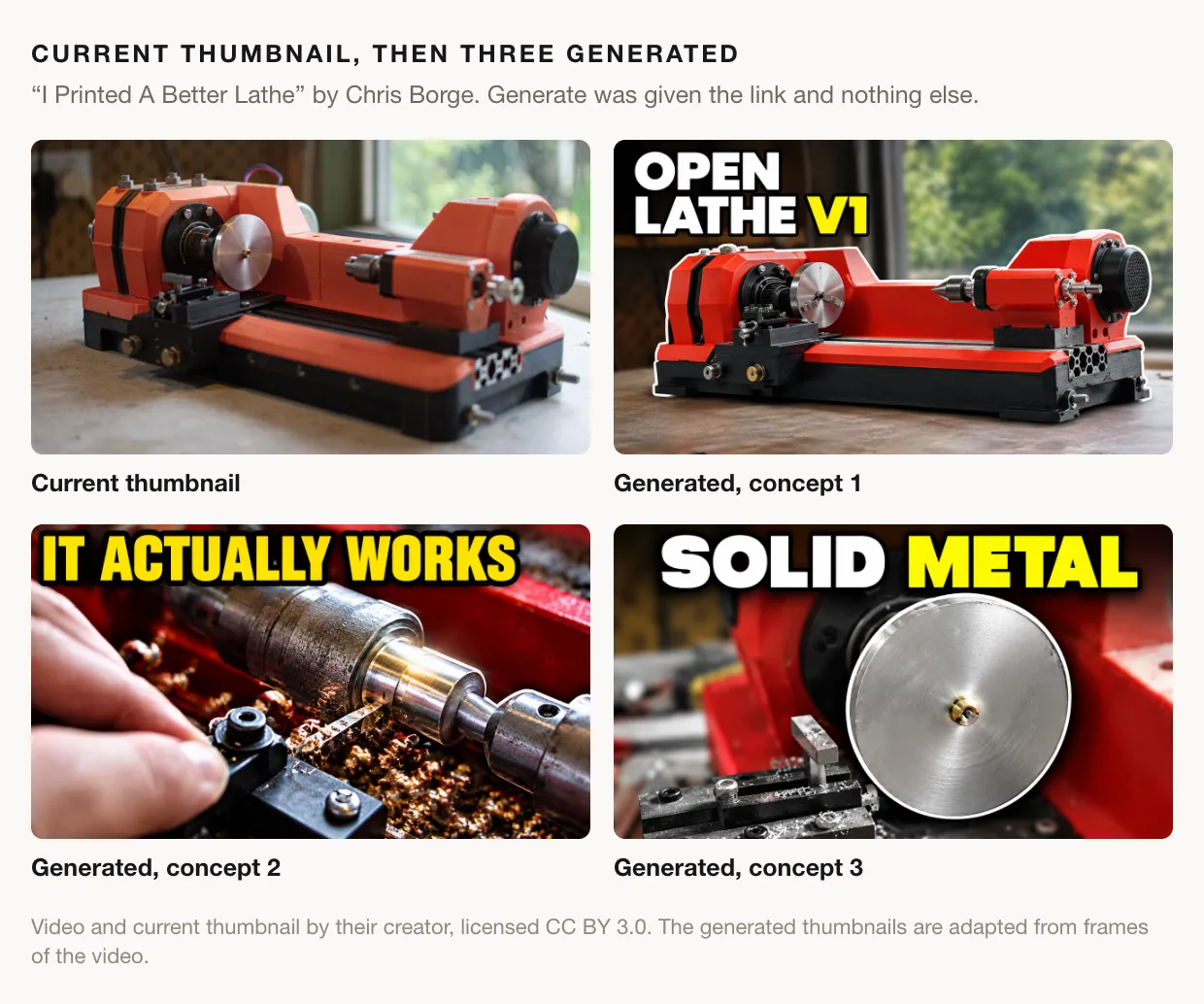
Chris Borge's own thumbnail is already a clean product shot. The first concept keeps that and adds the project's name, "Open Lathe V1", taken from the parts link in the description. The other two go after the doubt anyone has about a 3D-printed lathe, which is whether it can really cut metal.
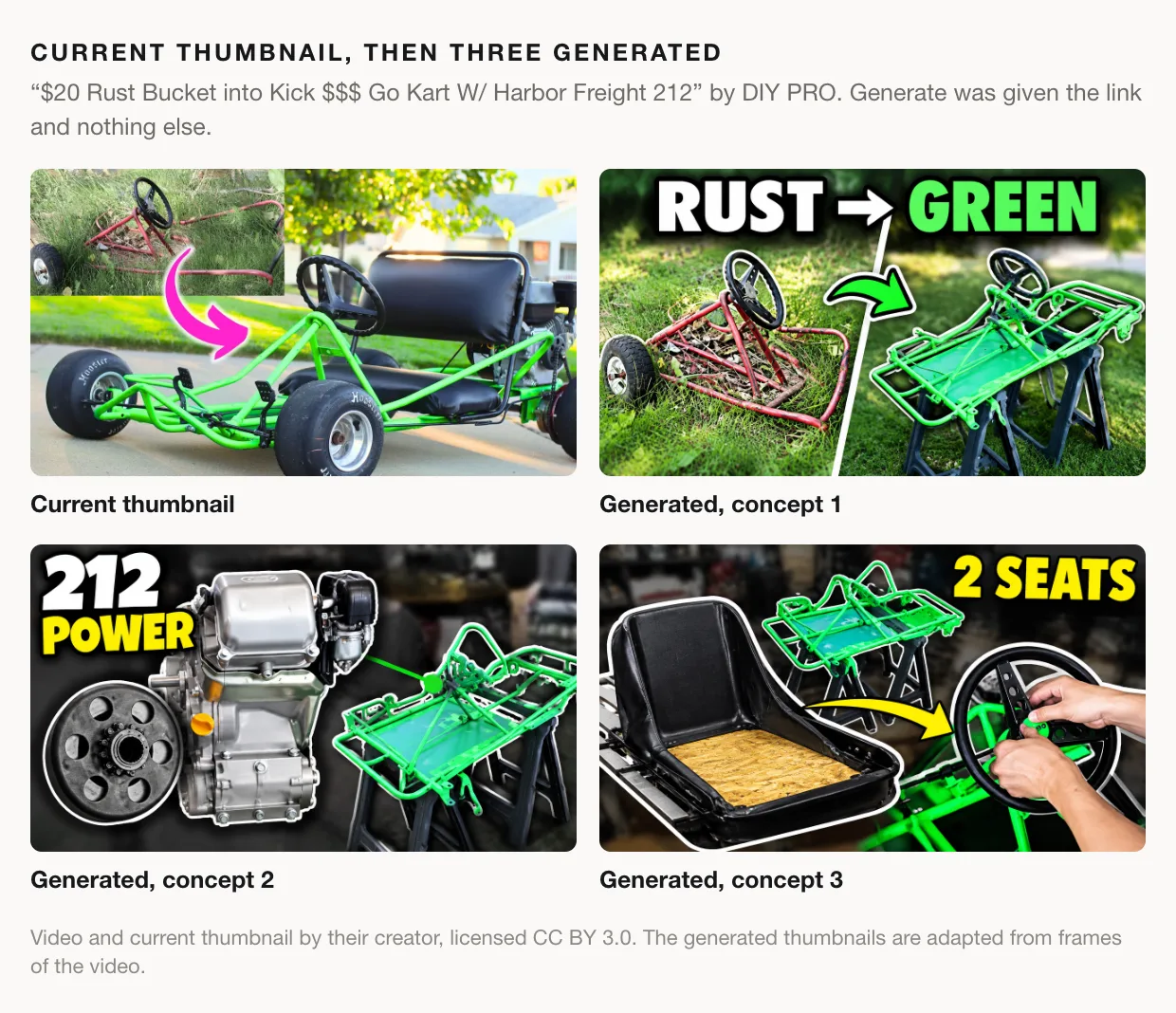
DIY PRO had already found the strongest idea, rust to finished, and Generate found it too. The other two come from the description: the Predator 212 engine and the two-seat build. The third is the weakest of the nine, since it says two seats and shows one. Read every concept against your own video before you ship it.
On a link run, Compare vs current thumbnail puts any of the three head to head with the thumbnail the video has now.
Or start from a description
Choose Describe your video when the video isn't uploaded anywhere yet, which is usually when you need a thumbnail most. Write a few sentences about what happens, who and what is on screen, and the payoff. Add a working title if you have one. If you leave it blank, the thumbnail won't lean on a title that doesn't exist yet.
Every example in this post that isn't from a link came through this door, because those videos don't exist. We wrote six short descriptions: a van build, a gas-station food challenge, a wet weekend in the Faroe Islands, a street interview about rent, a kitchen gadget ranking and a camera comparison.
Ask for three
Whichever way you start, you choose one concept or three. One uses a generation from your allowance. Three use two, because they share a single read of your video. They are also built to be three different ideas rather than three takes on one idea. Here is the description we wrote for the camera comparison:
I bought both cameras with my own money and shot the same week of vlogs on each. Side-by-side tests: autofocus on a walking shot, low light in my kitchen, the flip screens, and battery life on a full day out. The Sony wins autofocus and battery, the Canon wins colour straight out of camera and price. Both cameras sit on the desk in front of me for most of the video, and I end by handing one to my brother: the one I'm not keeping.
And the three thumbnails it produced:
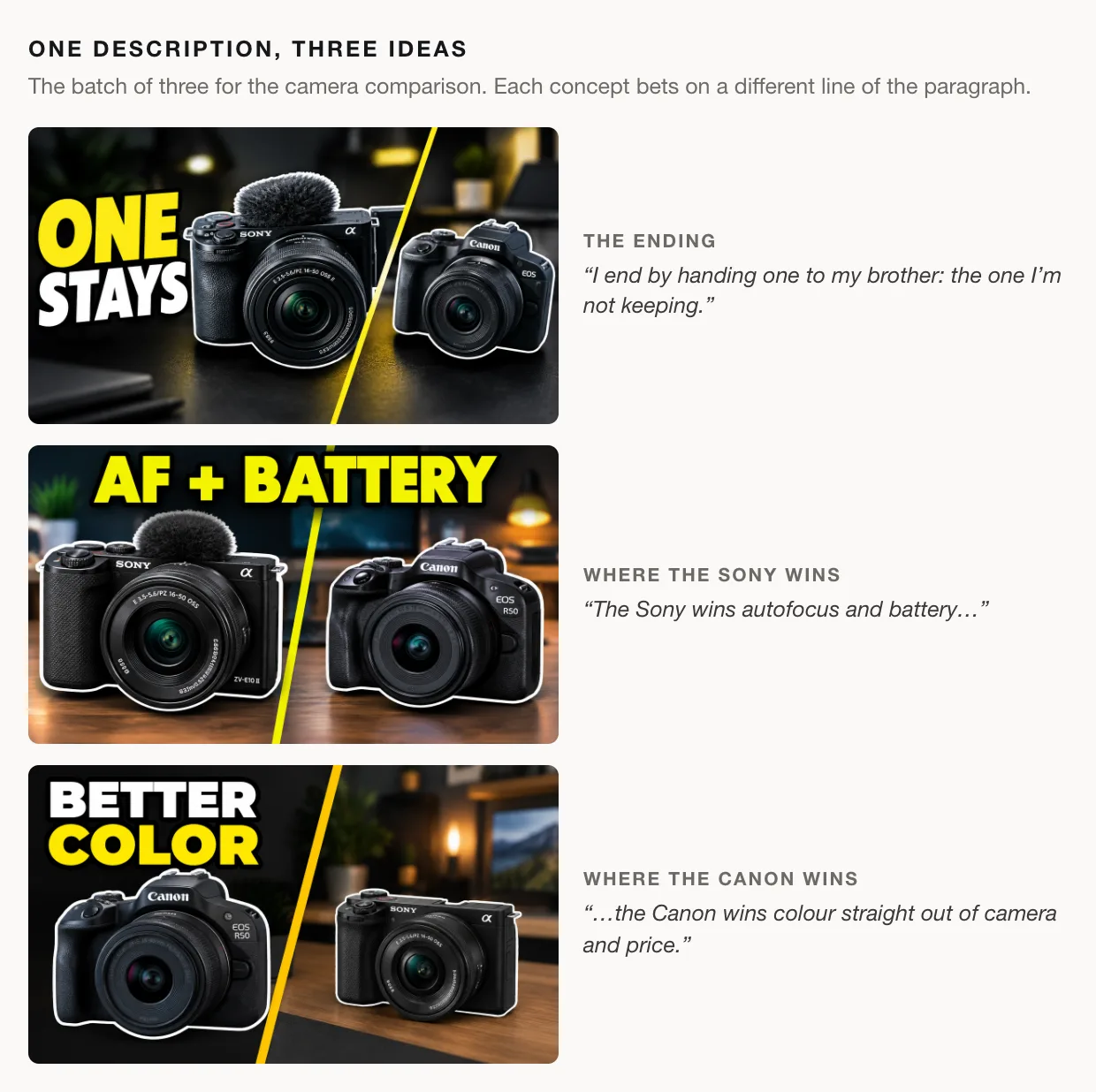
Each one bets on a different reason to click. "One stays" sells the ending and leaves the viewer to guess which camera. The other two each pick a winner and dare the viewer to disagree. Which of those is the real hook of your video is your call. Seeing all three side by side is often how you find out which one you believe.
Put yourself in it
Most thumbnails that work have a person in them, and on most channels that person is you. Sign in, open Faces from the account menu, and add up to six photos of yourself (an account can hold up to three people). Then pick yourself in the Face slot on the Generate form.
We didn't want to put anyone's real face in this post, so we made one up: four photos of a person who doesn't exist, added to the face library the same way you'd add your own.
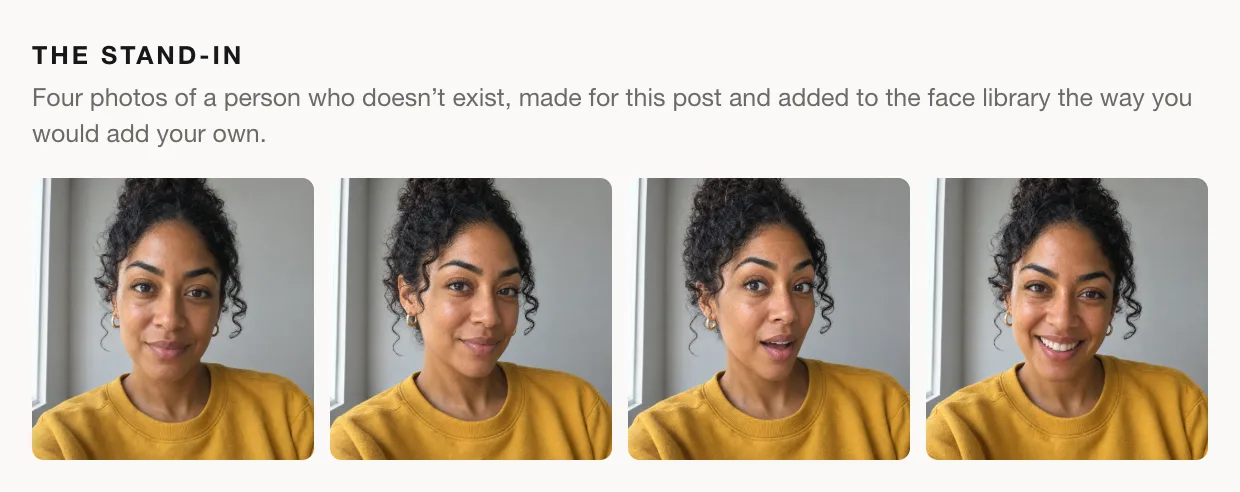
Then we ran the same descriptions again with her picked:
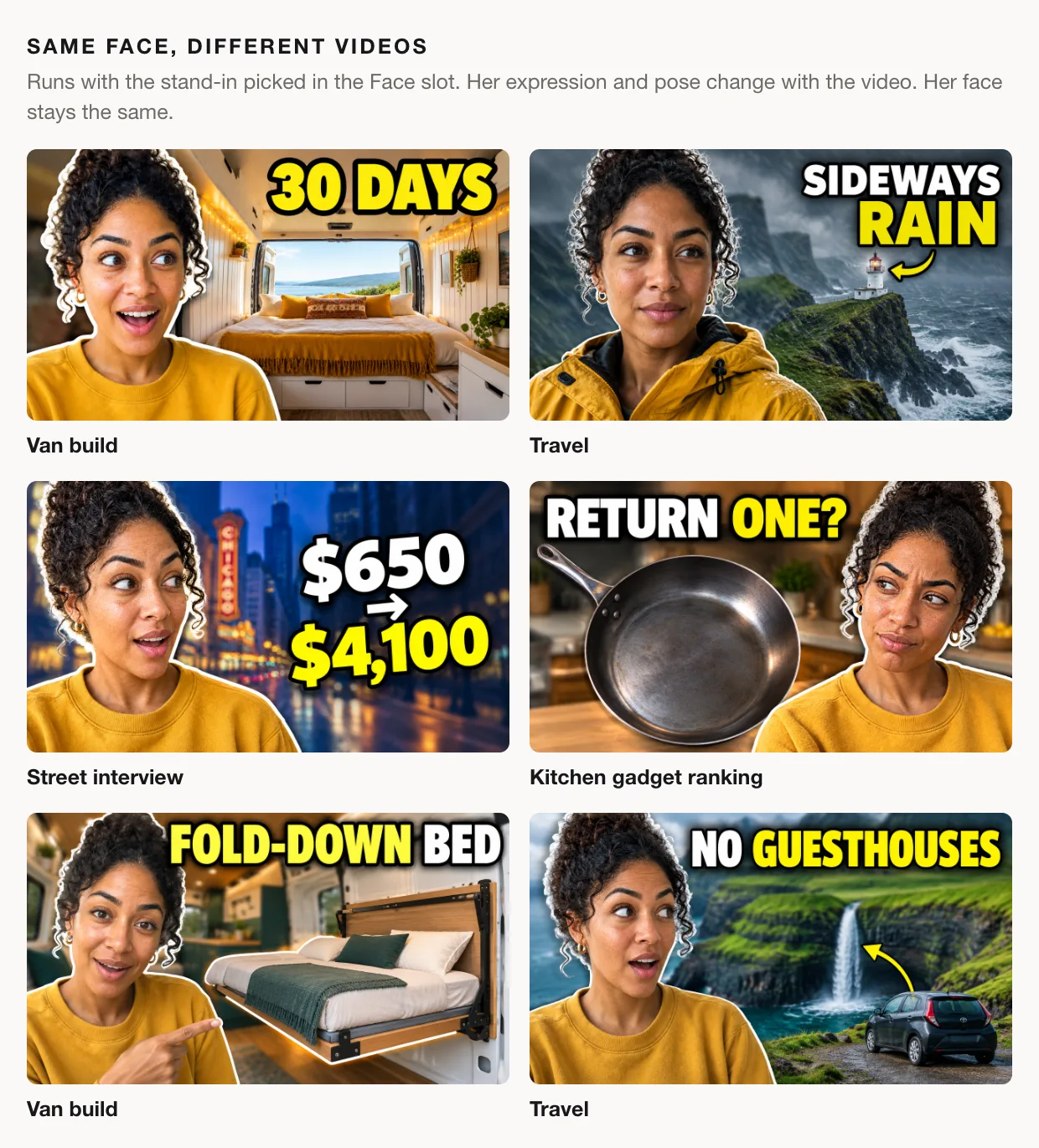
Two things are worth noticing. First, she stays the same person from one video to the next. Second, most of those expressions aren't in her photos. There is no photo of her looking skeptical, pointing or soaked in a rain jacket. Your photos tell Generate who you are, and the video decides what you're doing in each shot. So you don't need a folder of shocked faces. Photos from a few different head angles help more than several from the same one.
Match your channel's look
Three strong thumbnails in someone else's style don't help a channel that has a look of its own. For that, attach a style template: a thumbnail whose look you want. Then tick what to borrow from it: layout and composition, color tone and grade, text style and placement, lighting and mood. Generate takes the look and never the template's words or pixels. What's in the picture still comes from your video.
To show it, we made a template in a style nothing like the defaults above: cream paper, a black serif headline, a terracotta accent and one cut-out object. Then we ran three of the descriptions again with it attached and every property ticked.
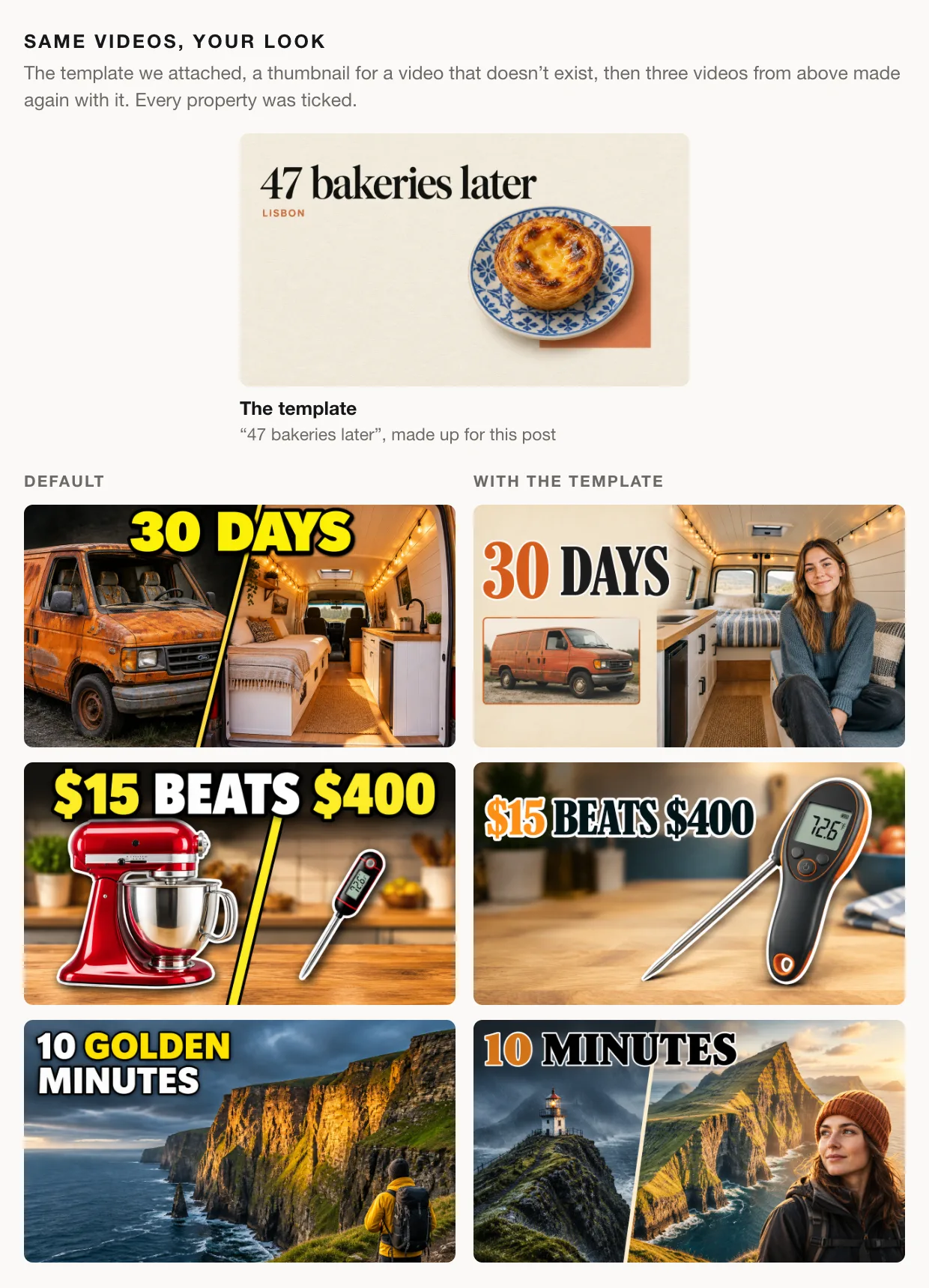
The ideas came out the same (30 days, $15 beats $400, ten minutes of gold light), so the difference is the look. The serif type and the terracotta accent came from the template, and the colours calmed down. The backgrounds stayed the video's own places (the van, the kitchen counter, the cliffs), because those are what each video is about. If your channel has a recurring look, this is how every new video gets it. Pro accounts can keep templates in a library and pick one from the form, so the look is set up once.
Write a paragraph it can draw
A link brings its own material. A description is all the material there is, so it's worth writing well. The strongest thumbnails from our six descriptions each grew from one specific phrase:
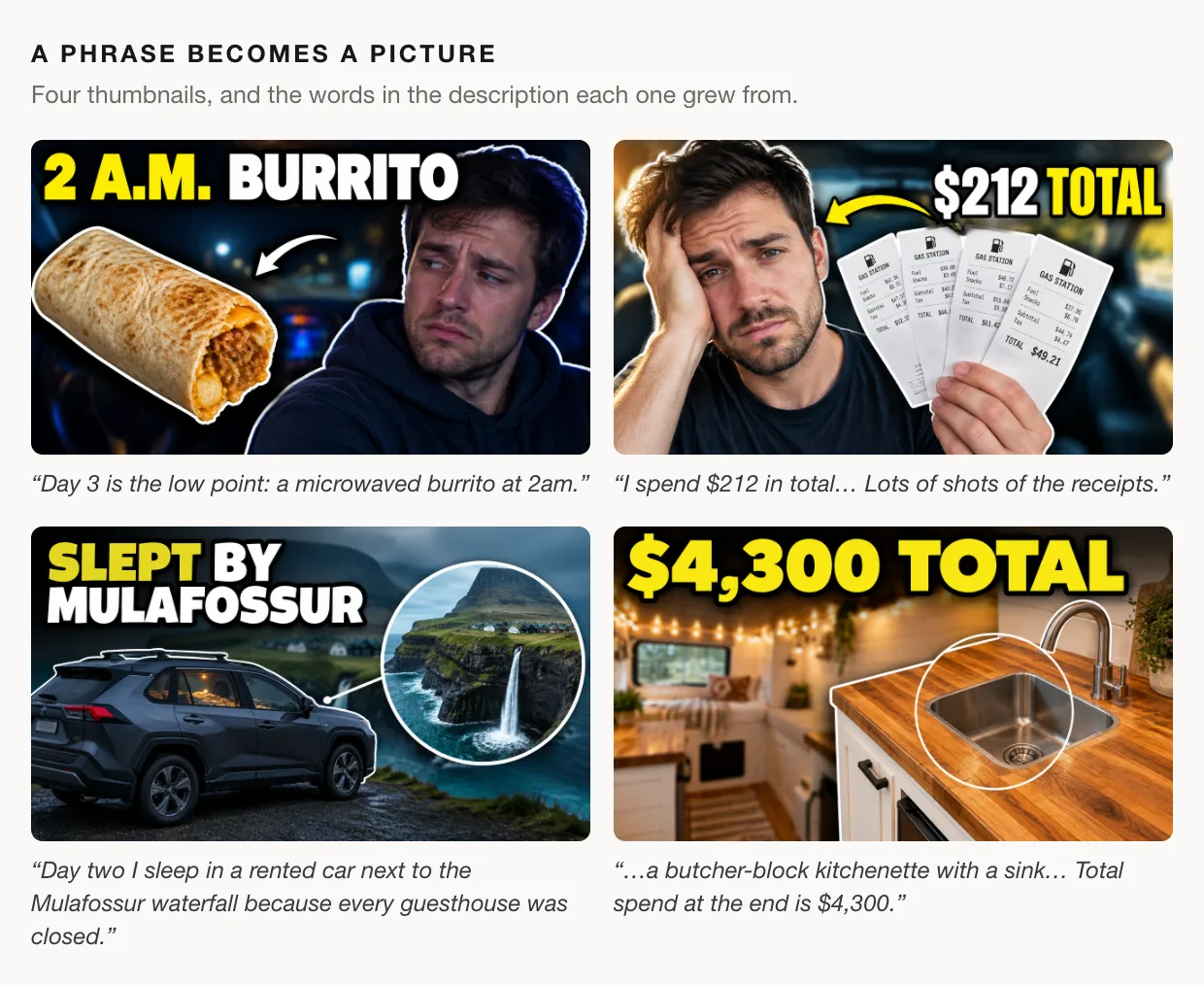
Here is what those phrases have in common.
- They name things you can see. "A microwaved burrito at 2am" is a picture. "I ate pretty badly that week" is not.
- They carry numbers. $212, $4,300, 30 days, ten minutes of gold light. A number is often the whole headline.
- They say what the payoff is. "My doctor reads the results on camera at the end and the cholesterol number is the shock." A thumbnail that promises the moment people stay for beats one that describes the setup.
- They say who is on screen. "Just me at my desk", "my doctor", "a bike courier", "a retired couple". With no face picked, people are drawn as generic people who fit the role.
- They include the surprise. "The courier pays more than the lawyer" became a thumbnail almost word for word.
One thing to leave out is anyone else's name. Generate never draws a real person you name, so "my reaction to [famous creator]'s announcement" won't put that creator in the picture. Describe what's on screen instead.
The same advice applies to a link run, just earlier. The video's description is part of what Generate reads, so a description that names the engine, the price and the payoff is doing double duty.
Steer it
The form has two more optional controls, and each result has a third.
- Guidance. One line of direction, such as "make it look like a heist thriller". It steers the concept without you having to write a prompt.
- Component. An image of something that has to appear, like your product, your logo or a prop from the video. Its main subject is placed in the thumbnail.
- Generate another. Under a result, add a line of guidance for the next concept if you like, and Generate plans a fresh idea instead of repeating the angles you've already seen.
When you have one you like
Every result comes with the rest of the toolkit underneath it.
- Critique this one scores the thumbnail and lists what to fix, exactly as it would for a thumbnail you made yourself. When we critiqued the 54 thumbnails made for this post, the median score was 93 out of 100.
- Preview in real results drops it into real YouTube search results for your title, next to the videos it will compete with.
- Compare vs current thumbnail (on a link run) puts it head to head with the thumbnail the video has now.
- Download gives you the full 1280×720 image.
- Share gives you a link to the run, for runs you made while signed in.
Read every word before you upload. Generated text is usually right, but a misspelled word in a thumbnail is yours, not the tool's. And if you can't choose between two concepts, you may not have to: if your channel has YouTube's Test & Compare, it will test up to three thumbnails on the live video and pick the one that earns the most watch time.
What it costs
Generate works without an account. The free plan includes 3 generations a month: one concept uses 1 and a batch of three uses 2. Faces need a free account, because the photos have to live somewhere private to you. Free downloads carry a small ThumbnailPeak mark in the corner. Pro raises the allowance to 50 a month, adds the template library, and downloads come clean.
What to take away
- Start from whatever you have. A link if the video is uploaded (unlisted works), a paragraph if it isn't.
- Ask for three. It costs less than three separate runs, and three different bets tell you more than one polished guess.
- Write what can be seen. Objects, numbers, the payoff and who's on screen. In a description, or in your video's own description, that paragraph is the design brief.
- Add your face once. A few photos from different angles, and every run after that can put you in the frame.
- Give it your look. A style template carries your channel's type and colour to every new video.
- Check it where it will live. Preview it in a real results page before you ship it.
Open Generate, paste a link or write three sentences about your next video, and see which of the three you'd click.
Every thumbnail in this post was generated by ThumbnailPeak on 26 and 27 September 2026 and is shown unedited. The six described videos were never made. The woman in some of the thumbnails is a stand-in created for this post, not a real person, and the bakery template was made up for it too. Sony and Canon appear because one described video compares their cameras; ThumbnailPeak is not affiliated with either.
The link examples use three videos their creators published under the Creative Commons Attribution licence (CC BY 3.0): "Cleaning a 70 Year Old Engine with Electrolysis" by MacroMachines, "I Printed A Better Lathe" by Chris Borge, and "$20 Rust Bucket into Kick $$$ Go Kart W/ Harbor Freight 212" by DIY PRO. Their current thumbnails are shown as published. The generated thumbnails are adaptations made from frames of those videos, and the creators did not make or endorse them.