Disclosure: we make ThumbnailPeak, a thumbnail tester. YouTube's rules below are from its help pages as of 22 October 2026. The file sizes are from our own test, described at the end.
When YouTube won't take a custom thumbnail, the reason is almost always one of these. Start with the one that matches what you see:
- There's no Upload file button, only suggestions: your account isn't verified.
- The upload fails on your phone but would work on a computer: the file is over 2 MB.
- The file is a HEIC, WebP or GIF: YouTube takes only JPG and PNG.
- YouTube says the image is too small: it's under 640 pixels wide.
- "Daily custom thumbnail limit reached": wait 24 hours.
- Custom thumbnails stopped working on your channel: check for a strike.
- It's a Short: use a computer.
- A test you were running stopped: changing the thumbnail ends it.
Your account isn't verified
YouTube's help page puts it plainly: you can choose from the auto-generated suggestions, "or upload your own if your account is verified". Without verification, there is no button for your own image.
The fix: verify with a phone number at youtube.com/verify. YouTube sends a code by text or voice call. Once it's accepted, the Upload file option appears under Thumbnail in YouTube Studio.
The file is too big for where you're uploading from
YouTube's limit depends on where you upload:
- From a computer: up to 50 MB.
- From the YouTube or YouTube Studio app on a phone: up to 2 MB for a video thumbnail (10 MB for a podcast).
So a thumbnail that uploads fine from a laptop can fail from your phone. And YouTube now recommends 3840×2160 thumbnails, which are easily over 2 MB.
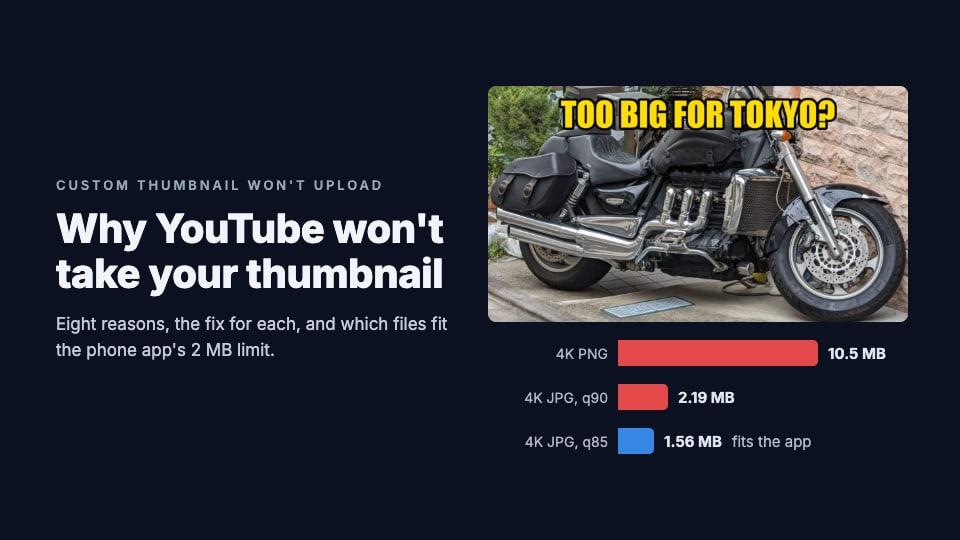
We saved one thumbnail several ways to see which files the phone app would take. It's a photo of a motorcycle with a headline, made from a 4080×3072 camera photo, and a flat graphic with shapes and words for comparison:
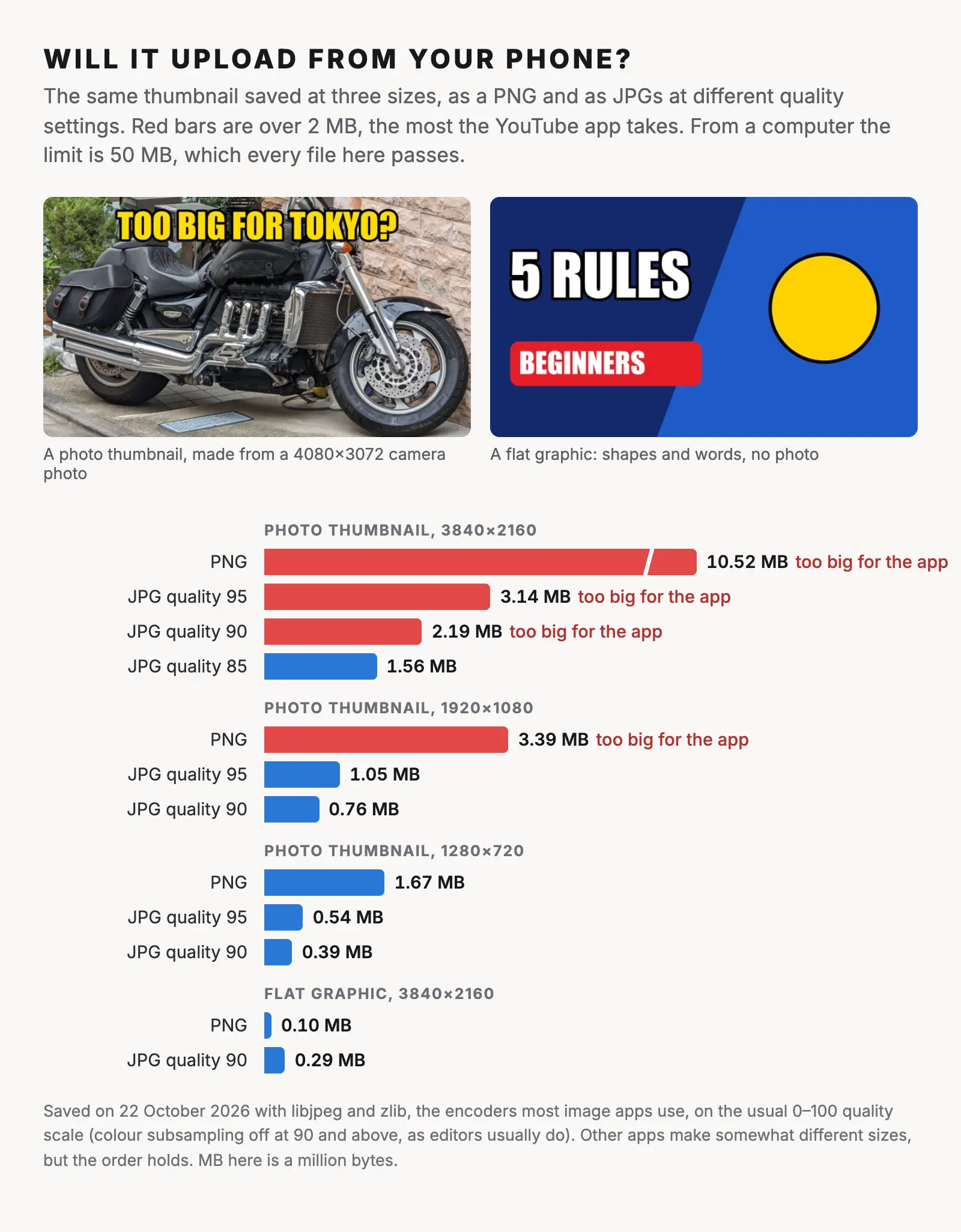
- A detailed 4K thumbnail only fit as a JPG at quality 85 or lower. As a PNG it was 10.5 MB, five times the limit. Even at JPG quality 90 it was 2.19 MB.
- At 1920×1080, a JPG fit at quality 95 or lower. The PNG didn't, at 3.39 MB.
- At 1280×720, everything fit, even the PNG.
- A flat graphic fit at any size, even a 4K PNG, at 0.1 MB. Photos and fine detail are what make files big.
The fix: upload from a computer, where the limit is 50 MB. If you have to use your phone, export a 1920×1080 JPG at quality 85 to 90. ThumbnailPeak's thumbnail resizer saves a 1280×720 JPG in your browser and warns you when the result is over 2 MB.
The file isn't a JPG or PNG
YouTube's help page names two formats: JPG and PNG. Three common files aren't either:
- iPhone photos are saved as HEIC by default.
- Images saved from a website are often WebP.
- Screenshots and old exports can be GIF, BMP or TIFF.
The fix: export or convert the image to JPG. On an iPhone, you can set the camera to "Most Compatible" (Settings, Camera, Formats) so new photos are JPGs. On a Mac, open the file in Preview and use File, Export, JPEG. On Windows, open it in Paint and use Save as, JPEG. Any image editor's export works too.
The image is under 640 pixels wide
YouTube's minimum is 640 pixels wide for a video thumbnail and 640 pixels tall for a Short. A screenshot or an image saved from somewhere can easily be smaller.
The fix: go back to a bigger source. Don't just enlarge the small image: YouTube will take it, but it will look blurry, especially on phones and TVs, where thumbnails are drawn big. We tested exactly that in why a thumbnail looks blurry. For the full size rules, see the YouTube thumbnail size guide.
You hit the daily limit
If you see "Daily custom thumbnail limit reached", you've uploaded as many custom thumbnails as your channel may in a day. YouTube's help page says: "There's a limit to how many custom thumbnails a channel can upload each day." It doesn't give the number, and adds that limits "may vary by country/region or channel history".
The fix: try again in 24 hours. If you're testing several versions, test them before you upload, so you aren't spending uploads on the ones you'll throw away. ThumbnailPeak's thumbnail tester shows up to nine candidates in a YouTube feed, free.
Your channel has a strike
YouTube's help page says: "Community Guidelines strikes will affect how many custom thumbnails you can upload." A thumbnail itself can also be removed, and earn a strike, if it breaks YouTube's rules, and "repeat offenses may lead to the removal of your custom thumbnail privileges for 30 days or even account termination". Copyright strikes can affect your "channel history", which the daily limit depends on.
The fix: check Channel Settings and your email for a strike notice. You can appeal a strike you think is wrong; if the appeal succeeds, YouTube may restore the thumbnail. Otherwise, custom thumbnails come back when the restriction ends.
It's a Short
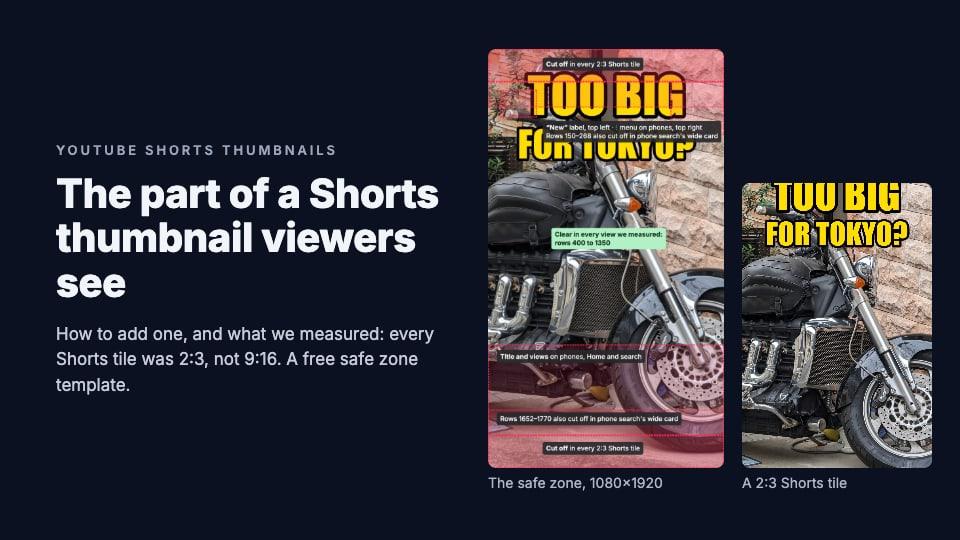
Custom thumbnails for Shorts can only be added in YouTube Studio on a computer. On your phone, you can only pick a frame from the video. And they're new: YouTube began rolling them out in July 2026, starting with channels in the YouTube Partner Program, so your channel may not have the option yet.
The fix: open YouTube Studio on a computer, go to Content, then the Shorts tab, and upload the thumbnail from the Short's details. Our guide to YouTube Shorts thumbnails has the steps, and the part of the picture viewers actually see.
A test is running
If you're running an A/B test on the video, YouTube's help page says: "If a video's title or thumbnail is changed during the test, the test will automatically stop." The upload works, but the test ends early.
The fix: let the test finish, which takes up to two weeks, or stop it yourself first: in YouTube Studio, open the video's Analytics, then Reach, and choose Manage test. Our guide to YouTube's thumbnail A/B test explains how it picks a winner.
It uploaded, but something's wrong
Two more problems look like upload failures but aren't:
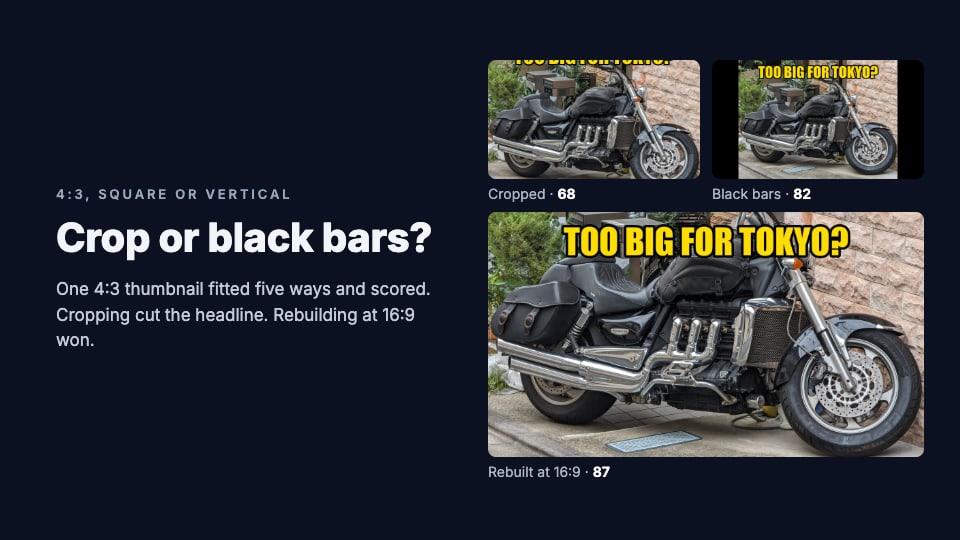
- The picture isn't 16:9. YouTube accepts a 4:3, square or vertical image and shows it with black bars, or on a phone's channel page, crops it. Nothing is refused, so nothing warns you. We tested which fix works best in crop or black bars?
- YouTube still shows the old thumbnail. It can take a while to appear everywhere. YouTube lets browsers and apps keep a thumbnail they've already loaded for up to two hours, so check in a private window or on another device.
Before your next upload, check the file against YouTube's rules. ThumbnailPeak's thumbnail tester flags an image under 640 pixels wide, a file over 50 MB, a resolution under the recommended 1280×720 and a shape that isn't 16:9, before you get to YouTube. Then it shows the thumbnail in a feed beside the real videos for your title.
Frequently asked questions
Why can't I upload a custom thumbnail on YouTube?
Usually because your account isn't verified, the file is over 2 MB and you're uploading from your phone, or the file isn't a JPG or PNG. Verify at youtube.com/verify, upload from a computer, and export the image as a JPG.
Why is there no option to upload a thumbnail?
Your account isn't verified. Without verification, YouTube offers only its auto-generated suggestions. For a Short, the option exists only in YouTube Studio on a computer, and may not have reached your channel yet.
How do I make my thumbnail under 2 MB?
Save it as a JPG rather than a PNG, at quality 85 to 90, and at 1920×1080 or 1280×720 rather than 4K. In our test, a detailed 1920×1080 thumbnail was 0.76 MB as a JPG at quality 90. Or upload from a computer, where the limit is 50 MB.
Can I upload a thumbnail from my phone?
Yes, in the YouTube or YouTube Studio app, if the file is 2 MB or smaller and your account is verified. Shorts are the exception: their custom thumbnails need a computer.
How many custom thumbnails can I upload per day?
YouTube doesn't publish the number. It says the limit varies by country or region and channel history, and that strikes reduce it. If you reach it, try again in 24 hours.
How we tested file sizes: on 22 October 2026 we made a 3840×2160 thumbnail from "Big motorcycle in Tokyo" by Syced (CC0, 4080×3072), with our own headline, and a flat graphic of our own. We scaled each to 1920×1080 and 1280×720 and saved them with libjpeg and zlib, the encoders most image apps use: JPG on the usual 0–100 quality scale, with colour subsampling off at quality 90 and above, and PNG at maximum compression. Other apps produce somewhat different sizes. MB means a million bytes. YouTube's rules are quoted from its help pages for custom thumbnails and A/B tests as of 22 October 2026; the July 2026 Shorts rollout is from YouTube's announcement.