Disclosure: we make ThumbnailPeak, a set of tools for testing thumbnails before you publish. What this post says about YouTube's A/B test comes from YouTube's own help pages, which we read on 21 October 2026. They are listed at the end.
YouTube has its own A/B test for thumbnails and titles. You give it up to three versions. It shows them to different viewers at the same time, and after a few days it keeps the one that earned the most watch time. YouTube called it Test & Compare when it started trying it out with creators in 2023. In YouTube Studio, the button now says A/B Testing.
Here is the short version:
- You can test up to three options: three thumbnails, three titles, or three title-and-thumbnail pairs.
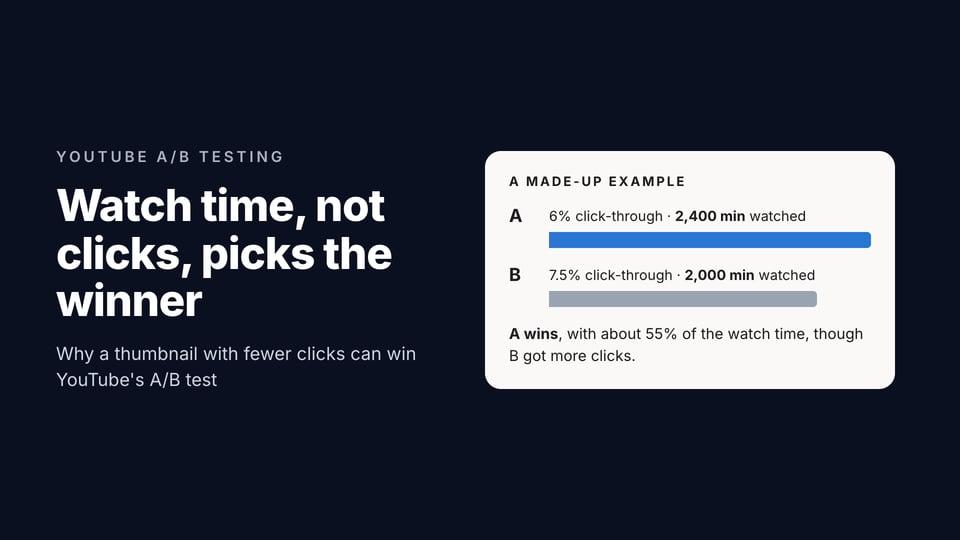
- The winner is picked by watch time, not by clicks. A thumbnail that gets more clicks can still lose. Here is why YouTube does it that way.
- You need YouTube's advanced features turned on, and a computer. It doesn't work on Shorts, on scheduled live streams, on Premieres before they've aired, or on videos that are private, made for kids or age-restricted.
- A test takes a few days to two weeks. If no option clearly wins, YouTube keeps the first one you uploaded.
- Test options that are really different. YouTube says options that are too similar make a test run longer and end without a winner. In our data, most pairs of thumbnails people compare are very close.
What the A/B test does
You upload two or three thumbnails, titles, or both, for one video. While the test runs, YouTube shows each option to a share of the people who would have seen the video anyway, all at the same time.
YouTube may keep a small group of viewers out of the test. That group sees only the video's default thumbnail and title, and YouTube leaves their viewing out of the results.
When the test ends, YouTube adds up the watch time that came from each option and reports one of three results:
- Winner: one option clearly did better on watch time, and YouTube is sure the difference is real. It becomes the video's thumbnail (or title) for everyone.
- Performed Same: the options did about the same. YouTube's advice is to pick the one you prefer.
- Inconclusive: there was no clear difference. The first option you uploaded stays on the video.
Either way, you can change the thumbnail or title by hand afterwards. The test is free.
Who can use it
Three things decide whether you see the A/B Testing button.
Advanced features. YouTube lists A/B testing among its advanced features. It isn't tied to the Partner Program, so you don't need to be monetised. If your channel has enough history, YouTube usually turns advanced features on by itself. If not, you can unlock them straight away by verifying your identity with an ID or a short video. To check, open YouTube Studio on a computer and go to Settings, then Channel, then Feature eligibility.
A computer. The test is only in YouTube Studio on a computer, not in the YouTube Studio app.
The right kind of video. You can't test:
- Shorts. YouTube treats any upload up to three minutes long that is square or taller as a Short.
- Scheduled live streams. A finished stream's recording can be tested.
- Premieres, until the Premiere has ended and become a regular video.
- Videos that are private, made for kids, or for mature audiences. If you test content that should be age-restricted without marking it, YouTube can take the feature away from you.
How to run a test, step by step
- Sign in to YouTube Studio on a computer.
- Open the video. For a new video, click Create, then Upload videos, and upload it. For a video that's already up, click Content in the left menu, then click the video.
- In the Title box or under Thumbnail, click A/B Testing.
- Choose Title only, Thumbnail only, or Title and thumbnail.
- Upload up to three thumbnails, or type up to three titles. The first one you add is the one YouTube keeps if nothing clearly wins.
- Click Done.
While it runs, you can see how it's going: open the video's Analytics, go to the Reach tab, and under "How your A/B test is going" click Manage test. You can stop it there at any time.
Don't change the title or the thumbnail while the test runs. YouTube stops the test as soon as you do, and you have to start again.
How YouTube picks the winner
YouTube judges the options by watch time share: how much of the test's total watch time came from each one. Clicks only count if the people who clicked went on to watch. In YouTube's words, "we optimize tests for overall watch time over other metrics, like click-through-rate."
That's deliberate. A thumbnail that promises something the video doesn't deliver can win the click and lose the viewer a few seconds later. YouTube would rather show the version that leads to watching. We explain what that means for your thumbnails, with an example, in why YouTube's A/B test picks by watch time, not CTR.
Two more things YouTube says about results:
- The same test can come out differently if you run it again. Part of it is chance, like flipping a coin. Part of it is that a video's audience changes: early impressions are more likely to go to people who already know your channel, and later ones to people who don't.
- Other testing tools can disagree with it. YouTube shows all the options at the same time. Many other tools swap the thumbnail on a schedule and compare click-through rates, which can name a different winner.
Why so many tests end without a winner
YouTube's help page says it plainly: "It's normal not to receive a 'Winner' test result." It gives two reasons. The options may not be different enough to change how people watch. Or the video may not get enough impressions for a clear result: the more views, the more likely a winner.
The first reason is the one you control, and the thumbnails people bring to ThumbnailPeak suggest it is common. We looked at the 1,696 comparisons people ran on ThumbnailPeak between 15 August and 21 October 2026, leaving out our own. Each one scores two thumbnails out of 100 and names the stronger one.
- In 3 of every 5, the two thumbnails scored within 5 points of each other. In 3 of every 10, they were within 2 points.
- Half the verdicts were a slight win or a tie. Only 1 in 20 was decisive.
- The closer the scores, the less sure the verdict. When the two scored within 2 points, 79% of verdicts were a slight win or a tie.
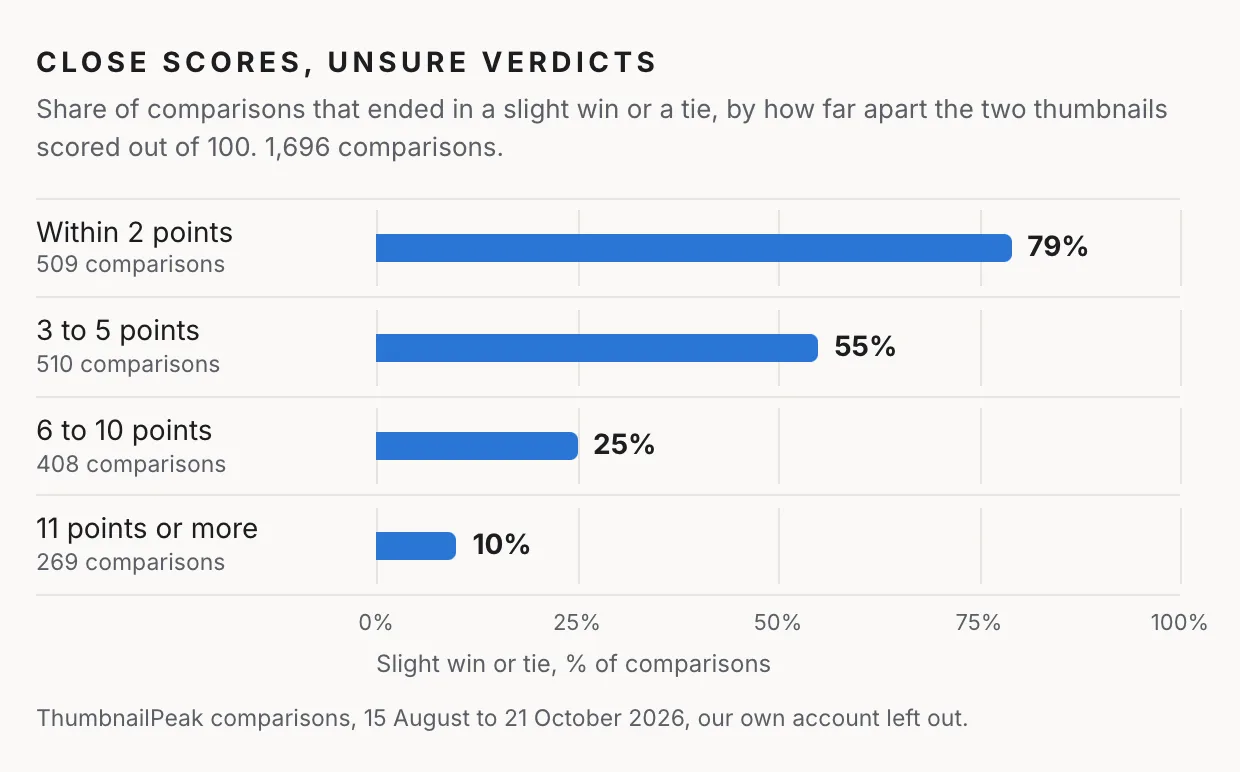
We can't see what YouTube's test would have said about those pairs. But two thumbnails that an AI judge, looking at them side by side, can barely separate are the kind YouTube warns about: too alike to change how people watch.
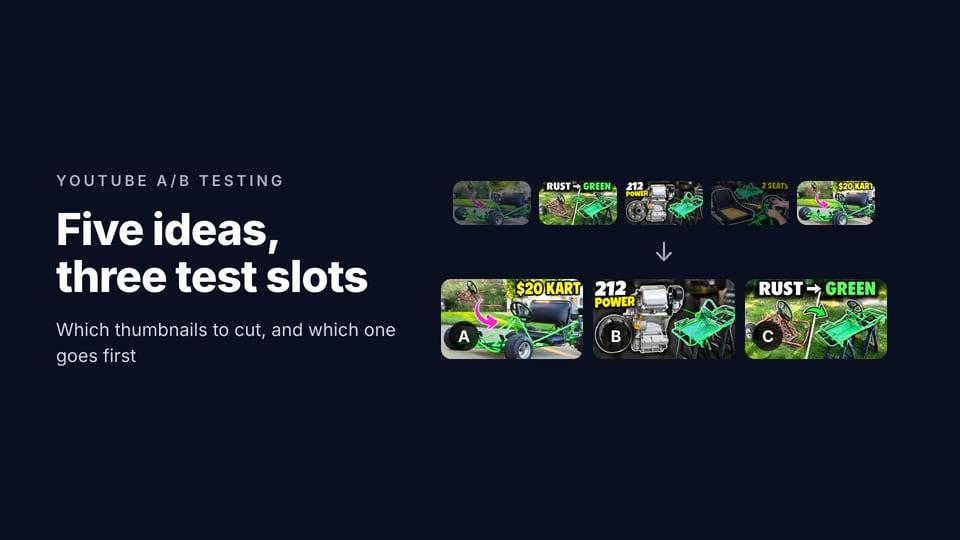
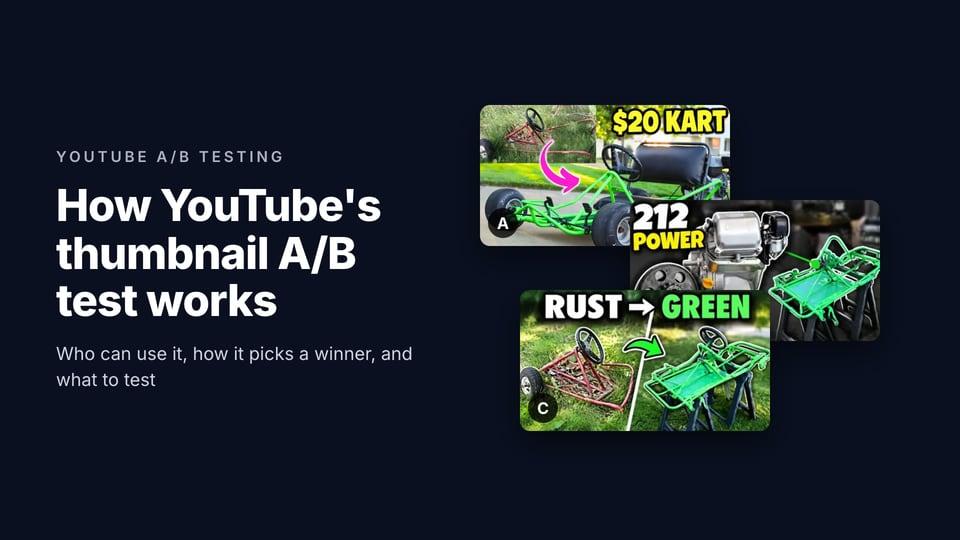
We saw the same thing with our own example, a go-kart build by DIY PRO. Its own thumbnail and two of the concepts ThumbnailPeak's generator made for the same video scored 92, 92 and 93. Compare called every pair "by a hair", with low confidence. Then we added the price to DIY PRO's own picture as two words, "$20 KART". That version scored 97 and beat all three clearly. The full example is in how to choose which thumbnails go into a test.
What to test
Test options that would make a viewer expect something different, or notice something different first. A few kinds of difference that tend to be big enough:
- Words or no words, or different words. "$20 KART" is a different promise from a picture with no words. So is "RUST → GREEN".
- A different main subject. The engine, or the finished kart. Your face, or the thing you made.
- A different story. Before and after, or only the result. The problem, or the fix.
- A different title, when you're unsure which angle of the video people want. Title-only tests leave the thumbnail alone.
Differences that are usually too small to be worth a test slot: the colour of an arrow, a different font, text that is 10% bigger, a slightly brighter background. We tried an arrow colour change on the go-kart thumbnail, and Compare preferred the original by a hair. See changing one thing between test thumbnails.
YouTube also suggests starting with older videos. A losing option costs a published video some views while the test runs, and an older video has less to lose than a new upload in its first days.
Before you start a test
Three checks that cost nothing and protect the test:
- Every thumbnail at least 1280×720. If any option is smaller, YouTube shrinks all the test's thumbnails to 854×480. One small file lowers the quality of all three. The thumbnail size guide has the details.
- Nothing important in the corner YouTube covers. The video's length sits on the bottom-right of every thumbnail. See the thumbnail safe zone.
- Your safest bet first. If no option wins, YouTube keeps the first one. On a video that's already up, that can be the current thumbnail, so nothing changes unless a new one clearly does better.
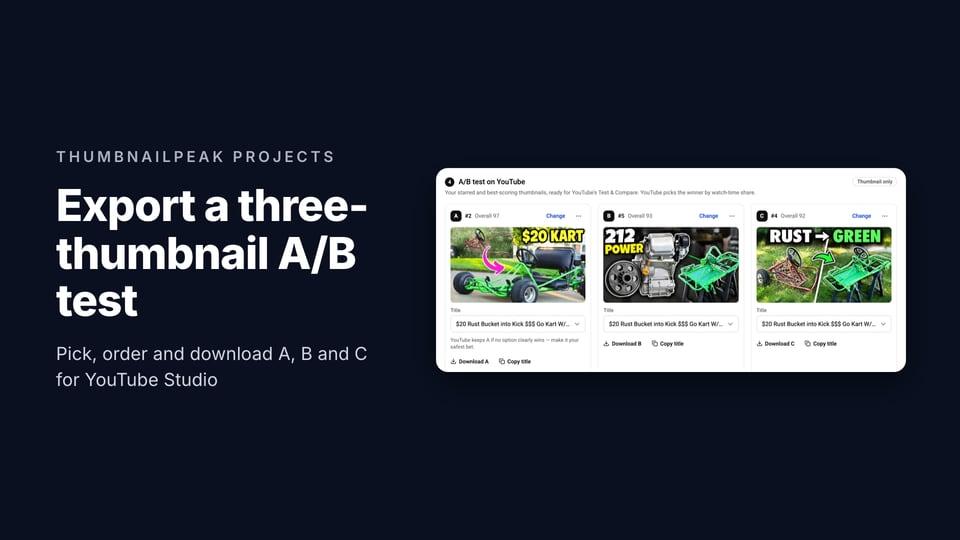
If you have more than three ideas, cut them down before the test, not during it. ThumbnailPeak's Compare critiques two thumbnails and tells you which is stronger and how sure it is. It's a prediction, not a measurement of your viewers, but it's quick at spotting the idea that's broken and the two that are the same picture. On Pro, a project can also export the three you pick as a ready-to-upload test.
Reading your result
- Winner. Keep it. If you test other videos, note what the winning option did differently. That's what tells you about your audience.
- Performed Same. Pick the one you like, or the one that fits the rest of your channel. Your next test should change something bigger.
- Inconclusive. Your first option stays. If the video still gets plenty of impressions, you can test again with options that differ more.
Don't judge the options by click-through rate while the test runs. A higher CTR doesn't mean an option is winning, because YouTube isn't judging by clicks. And don't read too much into one test. YouTube itself says the same test can come out differently a second time.
If you can't use YouTube's test
Shorts, new channels without advanced features and anything you want to check before it goes live can't use YouTube's A/B test. Don't replace it by swapping the thumbnail every few days and comparing click-through rates. YouTube's own help page advises against it: different days bring different viewers from different places, so a change in CTR might come from where the views came from, not from the thumbnail. More on reading CTR in what a good CTR on YouTube is.
What you can do before publishing is look at the thumbnail the way viewers will. ThumbnailPeak's thumbnail tester puts it in a YouTube feed beside the real videos that rank for your title, on a computer, a phone and a TV. It's free and needs no account. Then the AI tools can score it, or compare two versions. That won't tell you what your viewers will do. It will tell you whether a thumbnail is clear at the size people see it, and whether two options are really different.
Frequently asked questions
Is YouTube's thumbnail A/B test free?
Yes. It's part of YouTube Studio, for any channel with advanced features turned on.
How long does a YouTube A/B test take?
YouTube says a few days to two weeks. It depends on how many impressions the video gets and how recently it was published.
Can I A/B test thumbnails on my phone?
No. The test is only in YouTube Studio on a computer. You can upload the video from your phone and start the test later from a computer.
Can I A/B test a Short?
No. YouTube's A/B test doesn't work on Shorts, and a video that turns into a Short loses any tests it had.
Do I need to be in the YouTube Partner Program?
No. You need advanced features, which YouTube turns on for channels with enough history, or after you verify your identity with an ID or a video.
Why didn't my test pick a winner?
Usually because the options were too similar to change how people watched, or because the video didn't get enough impressions during the test. Try options that differ in what they promise, on a video that's still getting impressions.
Can I test titles as well as thumbnails?
Yes. You can test up to three titles on their own, or up to three title-and-thumbnail pairs. Title testing began rolling out to every creator with advanced features in December 2025, Search Engine Journal reported.
What happens to the thumbnails that lose?
Nothing. YouTube stops showing them, and the winner (or your first option) becomes the video's thumbnail. You can switch to another one by hand at any time.
Sources, all read on 21 October 2026: YouTube Help, A/B test titles & thumbnails, Learn about feature access for YouTube Creators and Impressions & click-through-rate FAQs; Search Engine Journal, YouTube Title A/B Testing Rolls Out Globally To Creators (4 December 2025). The comparison figures count every comparison run on ThumbnailPeak between 15 August and 21 October 2026 on the current comparison prompt, 1,696 in all, leaving out our own account's. We read only the scores and verdicts, never the images or titles. The go-kart video is "$20 Rust Bucket into Kick $$$ Go Kart W/ Harbor Freight 212" by DIY PRO, published under CC BY 3.0; the generated concepts and the "$20 KART" version are our adaptations of its frames and thumbnail, and DIY PRO did not make or endorse them.