Disclosure: we make ThumbnailPeak. We didn't sign in to Adobe Express for this post. Everything about Adobe below comes from its own public pages, read signed out on 1 November 2026, and may have changed since. The ThumbnailPeak examples are from our own account on the same day.
Search for an AI thumbnail generator and Adobe Express is usually near the top. ThumbnailPeak's AI thumbnail maker, Generate, does a different job. The short version:
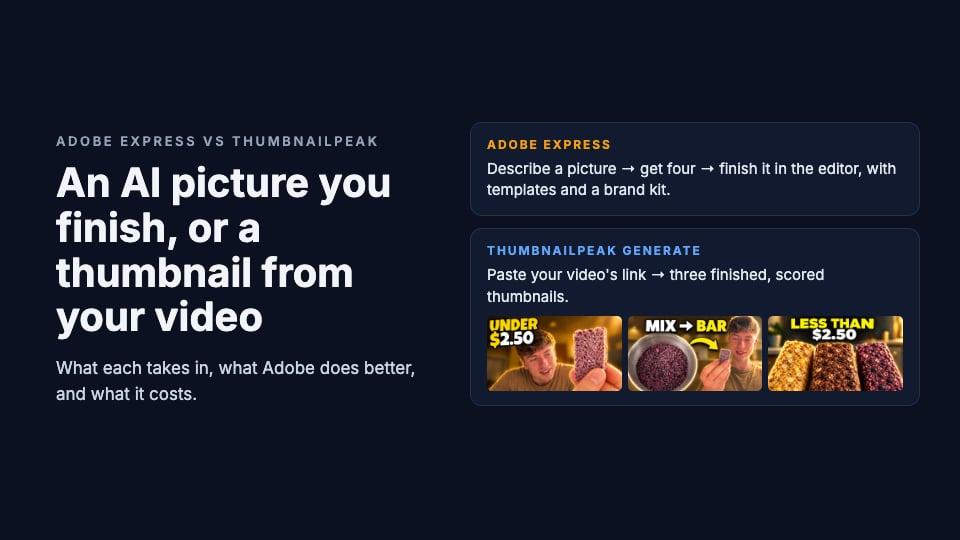
- Adobe's AI thumbnail generator is a picture maker plus an editor. You describe a picture, get four, and finish the thumbnail yourself in Adobe Express.
- Generate starts from your video. You paste its link and get one finished thumbnail, or three different ones, each with a score.
- None of Adobe's pages we read mention starting from a YouTube link. Its YouTube page asks you to upload a still from your video yourself.
- Adobe is the better editor. Templates, fonts, a brand kit and control over every pixel, on the web and on your phone.
- Adobe's YouTube thumbnail page gives one tip you should ignore: it says the duration badge is in the bottom-left corner. YouTube puts it bottom-right.
How each one works
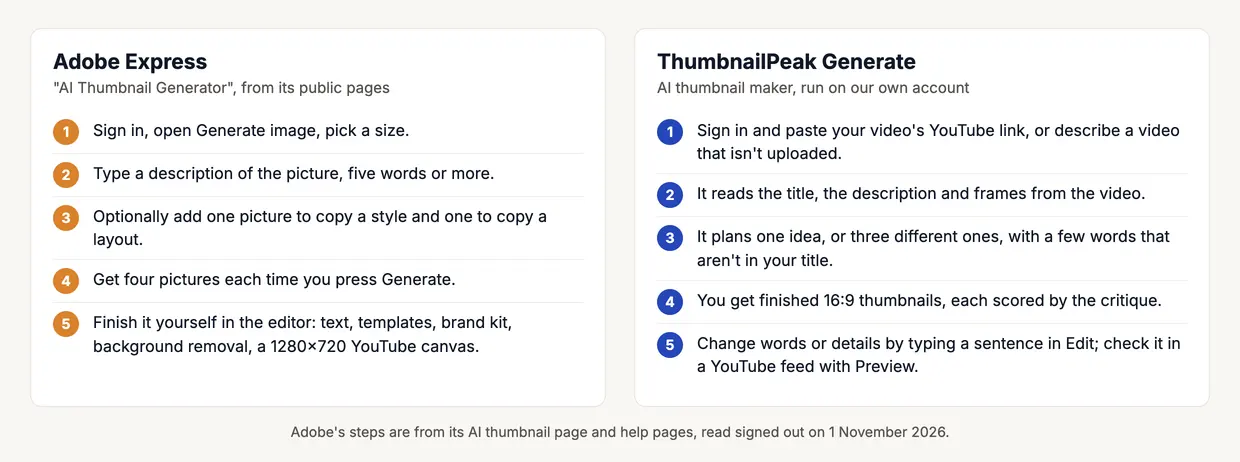
Adobe's AI thumbnail generator is its general image tool. Its page says: "Just describe what you want your thumbnail to look like and get audience-grabbing results quickly." The steps it lists are Express's ordinary image generator: "Navigate to the Media tab, click Generate image, then select your image size." You can "upload one or two reference images — one to guide the style, and another to inform the layout or composition", and "Each prompt generates four results." What comes back is a picture. You turn it into a thumbnail in the editor, where "Adobe Express sets your canvas to 1280x720px by default".
Generate's input is the video. It reads the title, the description and frames from the footage, decides the idea, the layout and the few words on it, and asks for a 16:9 picture. If the video isn't uploaded yet, you describe it in a few sentences instead.
So the work is split differently. With Adobe you write the description and do the finishing. With Generate, the video is the description, and the finishing is done before you see it.
One video, from its link
We couldn't run Adobe's generator without an account, so there's no Adobe picture in this post. Here's what Generate made for Ethan Paff's "I Finally Made the PERFECT Protein Bar" from the link alone, as a batch of three, in about a minute and a half:
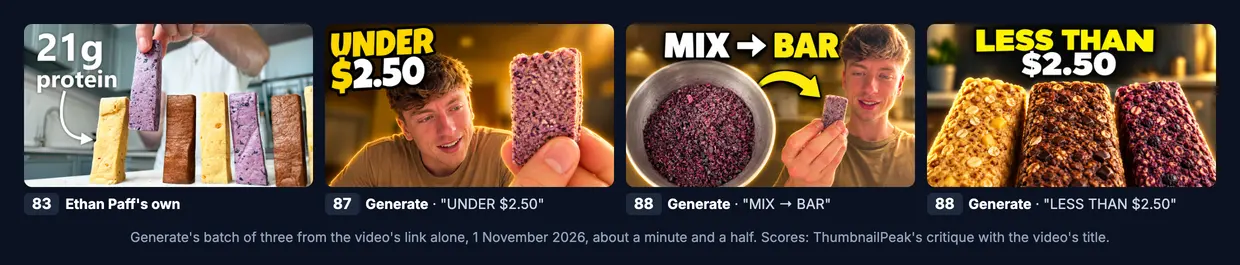
All three show what's in the video: the host, drawn from its frames, and the bars from the recipe. They scored 87 and 88 in our thumbnail analyzer, against 83 for the creator's own. That's our own tool scoring our own tool's pictures, so read it as a sanity check rather than a verdict; the critique's notes were useful either way. On "LESS THAN $2.50" it said "nothing visible identifies them as protein bars", which is fair.
To get something like this in Adobe Express, you'd write a description of the bars and the host, upload a still for the layout, pick one of the four results, and add the words yourself. That's more steps, and also more control.
Adobe's tip about the duration badge
Adobe's YouTube thumbnail page gives good general advice, but one tip is wrong. It says twice to keep text away from the bottom-left corner. Once as "avoid the bottom-left corner where YouTube's duration badge appears", and once as "If you're including text, avoid the bottom-left corner of the canvas, where YouTube overlays the video duration."
YouTube draws the video's length in the bottom-right corner:
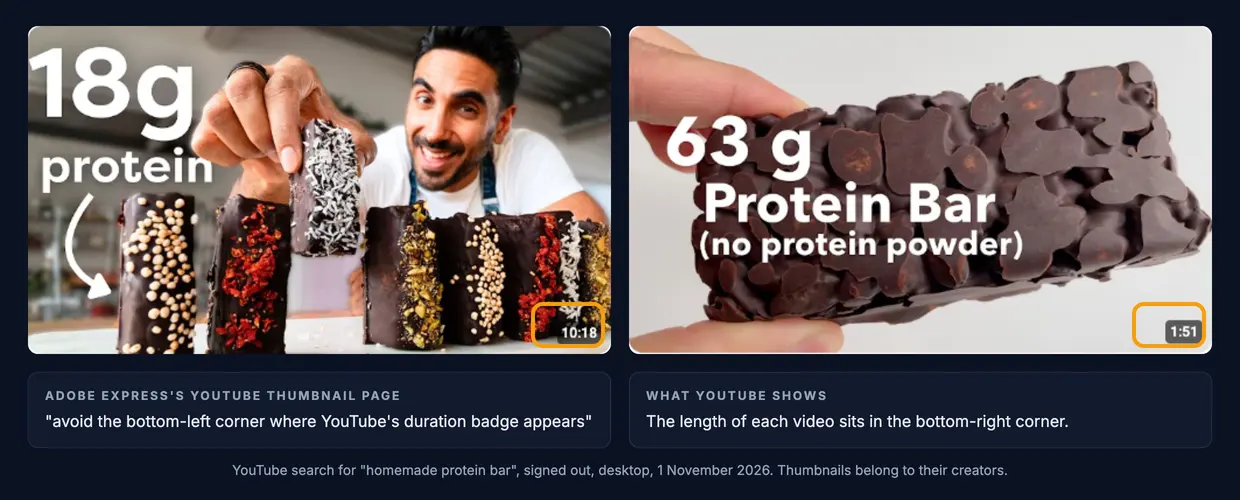
So keep your words, faces and anything important out of the bottom-right corner. Our safe zone guide shows how big that corner is, and what else YouTube draws over a thumbnail.
What Adobe Express is better at
- A real editor. Layers, text, fonts, background removal, resizing and a brand kit. You can finish every pixel yourself instead of accepting what the AI made.
- Templates. Its pricing page lists 100,000+ static and video templates on the Free plan in one place and 345,000+ in another, and 730,000+ on paid plans. You can make a thumbnail with no AI at all.
- Free, with no card. The Free plan costs US$0 and includes a daily allowance of AI generations.
- Phone apps. Adobe Express runs on iPhone and Android, rated 4.8 on the App Store and 4.6 on Google Play the day we looked.
- Everything else around a video. Video editing, captions, a content scheduler, and resizing for other platforms.
- Training it can explain. Adobe says its Firefly models are "commercially safe" because they're "trained on licensed content from Adobe Stock and public domain content where copyright has expired".
What Generate is better at
- It reads your video. You don't describe the subject; Generate finds it in your frames. That's the difference between drawing your real protein bars and drawing someone's idea of one. Our tests of ChatGPT and Nano Banana show what image models invent when all they get is a title.
- You get a thumbnail, not a starting picture. The words are chosen, placed and sized for a phone screen, and kept out of the corner YouTube covers.
- Three different ideas at once. A batch is three ideas, not four versions of one prompt.
- A score and a check. Every picture comes with a critique score, and Preview puts it in a real YouTube feed beside the videos it'll compete with. None of Adobe's pages we read mention checking a thumbnail.
- Your face, every time. A face library of up to six photos of you, free to set up.
- Changes by typing. "Make the price bigger" or "change the words to …" in Edit, without a design file.
Labels and rights
Both tools mark their AI pictures. Adobe says "C2PA metadata will be automatically attached to the file" when its AI tools are used, and that "this metadata cannot be disabled". ThumbnailPeak's pictures come from OpenAI's image model and carry OpenAI's Content Credentials too. Our post on whether AI thumbnails are allowed on YouTube explains what that label is, and what YouTube does with it.
Adobe offers IP indemnification for Firefly pictures only on some Enterprise plans. Its pricing table shows it as not included on Free, Premium or Firefly Pro.
What they cost
Adobe Express, from its pricing and help pages:
- Free: US$0, "No credit card required", with "a limited number of free daily generations". Adobe doesn't say how many, and says the number is "subject to change".
- Premium: US$9.99 a month, billed monthly, with 250 generative credits a month. Adobe's AI thumbnail page says "Each generation costs 1 generative credit per use."
- Firefly Pro: US$19.99 a month, with 4,000 credits for premium AI features.
- Teams: US$4.99 a month per seat for the first year, then US$7.99, with at least 2 seats.
- Credits don't roll over to the next month.
ThumbnailPeak: Generate needs a free account, which comes with 12 credits: one thumbnail uses 3 credits, a batch of three 6, a critique 1 and an edit 3. Free downloads carry a small ThumbnailPeak mark, and Preview needs no account at all. Pro is $20 a month for 300 credits a month, a $10 credit pack adds 100 credits that never expire, and either one removes the mark.
Which to choose
Adobe Express suits you if you like designing, you want a template to start from, you need the same tool for posts, flyers and videos, or you make thumbnails on your phone.
Generate suits you if you'd rather not design or write prompts, the thumbnail has to show what's really in your video, you want a few different ideas to pick from, or you want your face in it without a photo shoot.
You can use both: make a picture in one, finish it in the other. Whichever made it, preview it in a real YouTube feed and check it with a critique before you upload, and keep the bottom-right corner clear.
Key takeaways
- Adobe's AI thumbnail generator is its general image tool: a description in, four pictures out, finished by you.
- Generate starts from your video's link and returns finished, scored thumbnails.
- Adobe is the better editor, with templates, a brand kit and phone apps.
- Generate reads your footage, so it shows your real subject without a prompt.
- The duration badge is bottom-right, not bottom-left as Adobe's page says.
Adobe's pages were read signed out on 1 November 2026: the AI thumbnail generator, the YouTube thumbnail maker, the pricing page, the generative credits FAQ and the AI content labeling FAQ. The YouTube screenshot is a search for "homemade protein bar", signed out on desktop, the same day. ThumbnailPeak is not affiliated with Adobe. Adobe, Adobe Express and Adobe Firefly are Adobe's trademarks.
The example uses "I Finally Made the PERFECT Protein Bar" by Ethan Paff, published under the Creative Commons Attribution licence (CC BY 3.0). Ethan Paff's own thumbnail is shown as published. Generate's thumbnails are adaptations made from the video's title, description and frames, shown unedited, and Ethan Paff did not make or endorse them.