Disclosure: we make ThumbnailPeak, and this post tests its Generate. Every thumbnail and score below is what it returned on 21 October 2026, on our own account. The man in them doesn't exist: we made him for this post.
Most thumbnails that work have a person in them, and on most channels that person is the creator. An AI thumbnail with a stranger's face in it doesn't help you. One with yours does.
ThumbnailPeak's AI thumbnail generator does this with a face library: you add a few photos of yourself once, pick yourself on the form, and you appear in every concept it makes. We wanted to know which photos to add, so we tested it:
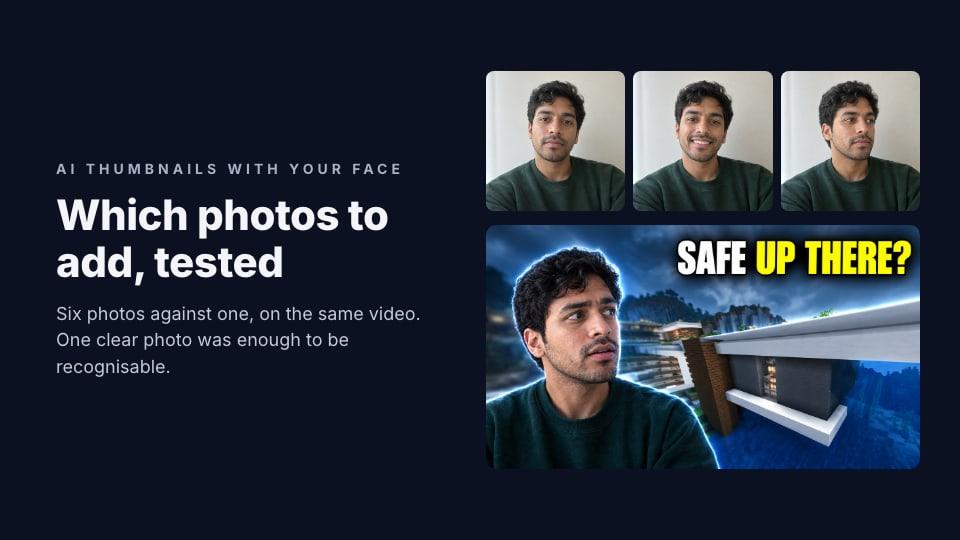
- One clear photo was enough to make thumbnails that are recognisably the same man.
- Six photos from different angles gave more poses. With six, Generate turned his head to look at the thing in the picture. With one, he faced the camera every time.
- Expressions came from the video, not the photos. He cheers, winces and frowns in thumbnails, though every photo shows a calm face.
Meet the stand-in
We didn't want to use a real person's face, so we made one up. We asked an image model for a phone photo of a man who doesn't exist, then for five more of the same man: smiling, facing right, facing left, in profile and with his chin raised. We added all six to the face library, exactly as you'd add yours.
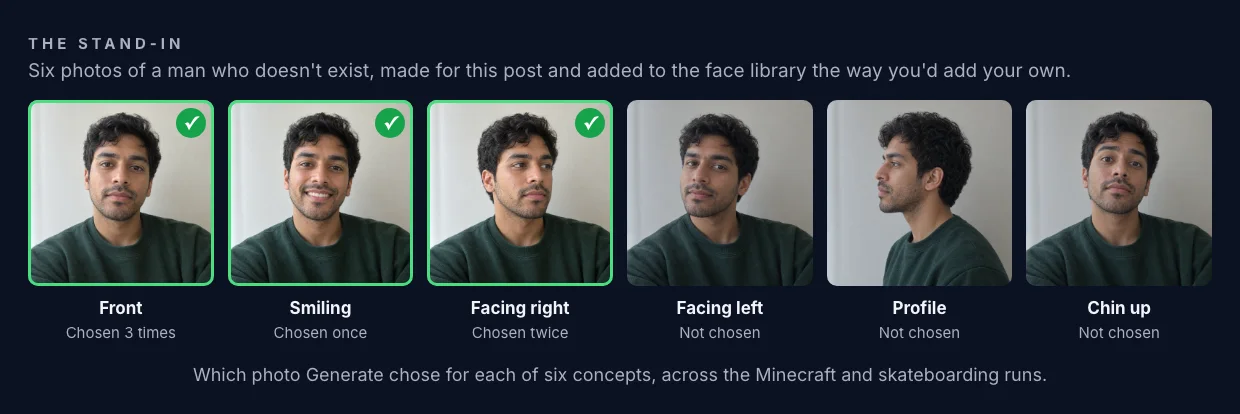
Then we made a second person in the library with only the first photo, the plain front-facing one, so we could run the same video both ways.
Six photos against one
We used Luka Andrews' Minecraft video "$1 vs $1,000,000 Tornado Shelter in Minecraft", which is under a Creative Commons licence. Gaming is where a creator's face reacting to the game is the classic thumbnail, and the video has no face of its own for Generate to use instead. (Here's what Generate made from it without a face.)
We pasted the link, picked the stand-in, asked for three concepts, and ran it twice: once with all six photos and once with only the front-facing one.
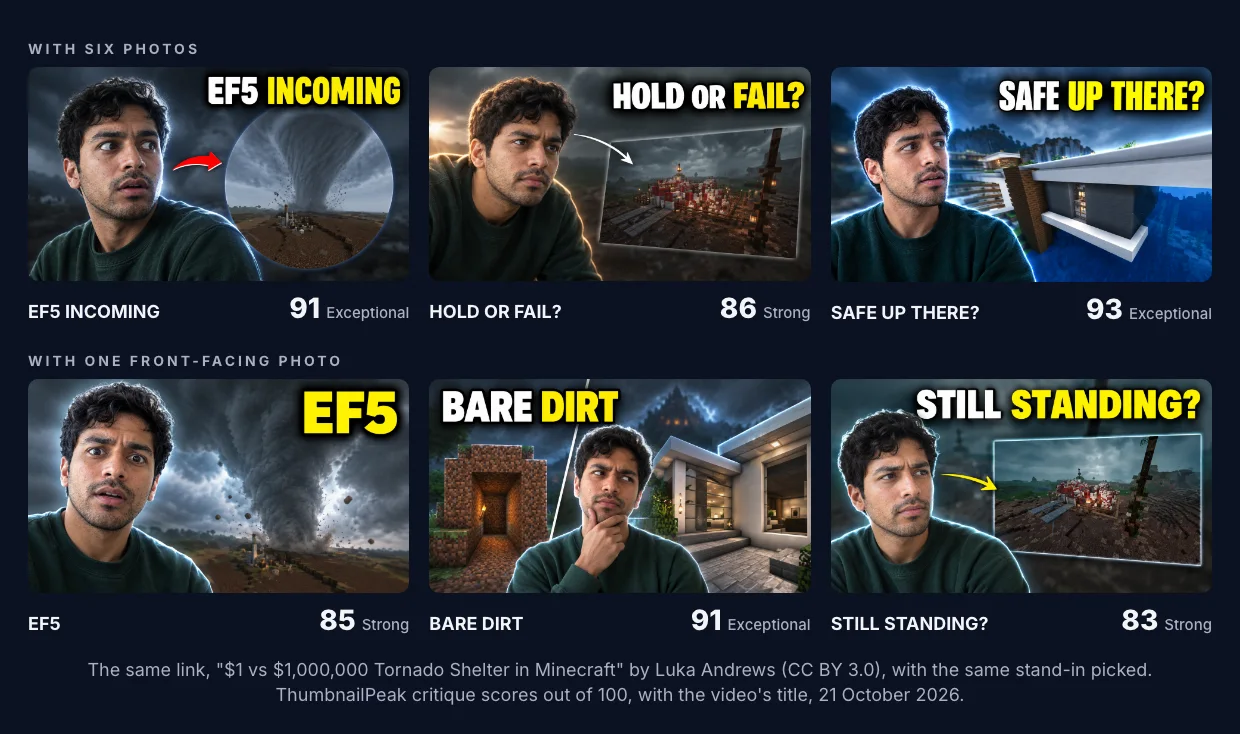
Three things stand out.
He's recognisable in all six. Same hair, same stubble, same face shape, whichever run he came from. One clear, well-lit photo was enough for a likeness.
Six photos gave more poses. Generate picks one photo per concept, the one whose head angle suits the pose it has planned. For "SAFE UP THERE?" it chose the photo of him facing right, and drew him looking across at the mansion on the right. With only a front-facing photo, every concept kept his face toward the camera, and he looks at the builds with his eyes, not his head.
It didn't use every photo. Across six concepts with the full set, it chose the front-facing photo three times, the smile once and the right-facing photo twice (the skateboarding run below included). It never chose the profile, the left-facing photo or the raised chin. Near-frontal photos did most of the work.
The scores sit between 83 and 93 in both runs, and the gap between the two runs is inside the critique's normal variation. They tell you the thumbnails are good, not which photo set made better ones.
Expressions you don't have photos of
Every one of the six photos shows a calm man in a green sweatshirt. So we gave Generate a video that needs more than calm: a described video, one that hasn't been filmed. It was about learning to kickflip at 29, with falls, a cracked deck on day 18 and a first clean landing on day 30.
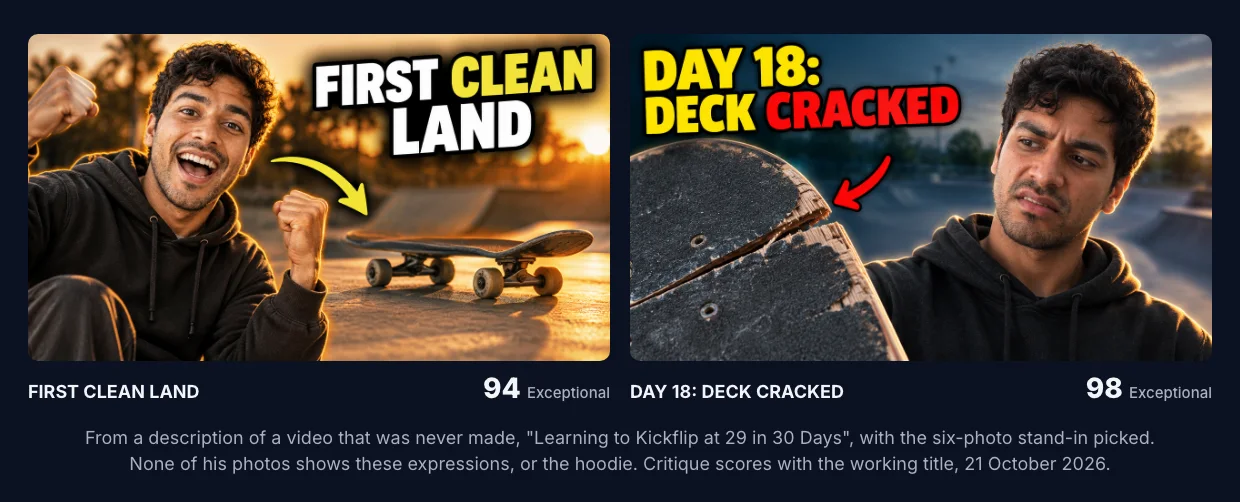
He cheers in one and looks fed up in the other. Neither expression is in his photos, and neither is the hoodie: Generate dressed him for a skate park. Your photos tell it who you are. The video decides what you're doing and what you're wearing.
The run made a third concept, about the chalk tally of attempts, which got no score: the critique's automatic content check declined to rate it.
Which photos to add
From these runs and from how the face library works, here's what to upload. You can add up to six photos per person.
- Start with one clear, front-facing photo. Good light on your face, eyes to the camera, nothing covering your face. This is the photo Generate leaned on most.
- Add your head turned left and right. About 45 degrees each way. Generate used a turned photo in two of six concepts, and we can't tell from three runs whether it prefers one side. These let Generate draw you looking at something in the thumbnail, which is how most reaction thumbnails point the viewer's eye.
- Add one where you smile. It chose the smiling photo for the celebration shot.
- Skip the ones it didn't use. A side profile and a tilted head were never chosen. You don't need a folder of shocked faces either: expressions are drawn from the video.
- Look like you look now. Same haircut, same beard, same glasses you wear on camera. Generate keeps what's in the photos.
- One person per photo. If you have a co-host, give them their own person in the library. An account holds up to three people.
What happens to your photos
- They're checked before they're kept. Each photo goes through an automated content check when you upload it, and only photos that pass are stored.
- They stay private to your account until you remove the photo or the person.
- A run uses them. When you pick a person on Generate, their photos go to our AI provider so it can choose one per concept. A copy of each photo it uses is kept with that run for up to 60 days.
- Only add yourself, or people who agreed to it.
How to do it
- Sign in, open Library from the account menu, and stay on the Faces tab.
- Add a person and upload your photos.
- On Generate, paste a YouTube link or describe your video, and pick yourself in the Face slot.
- Ask for one concept or three.
You'll be in every concept of the run. Once you have a concept you like, preview it in a real YouTube feed at the sizes people will see it, where a face has to work at a few hundred pixels wide.
The face library is free for any signed-in account. Generate itself includes 1 generation a month on the free plan, which makes one concept.
Key takeaways
- One clear front-facing photo is enough to be recognisable.
- Add left and right turns so Generate can draw you looking at something.
- Don't upload expressions. The video decides how you react; your photos only say who you are.
- Profiles and tilted heads went unused in our runs.
- Keep the photos current, because Generate copies what it sees.
The man in this post doesn't exist. His six photos were made with an image model for this post on 21 October 2026, and the second person in the library held only the first photo. The Minecraft video is "$1 vs $1,000,000 Tornado Shelter in Minecraft" by Luka Andrews, published under the Creative Commons Attribution licence (CC BY 3.0); the generated thumbnails are adaptations made from frames of that video, shown unedited, and Luka Andrews did not make or endorse them. The kickflip video was never made. Minecraft is a trademark of Mojang; ThumbnailPeak is not affiliated with it.