Disclosure: we make ThumbnailPeak. We didn't sign up for ThumbnailCreator for this post. Everything about it below comes from its own public pages, read signed out on 1 November 2026, and may have changed since. The ThumbnailPeak examples are from our own account on the same day.
ThumbnailCreator (thumbnailcreator.com) is one of the first results for "thumbnail generator", and it does much of what ThumbnailPeak does. Its headline: "Paste your video link and get scroll-stopping thumbnails built from your actual video — your face, your style — in under 30 seconds." The short version:
- Both start from your YouTube link, and both can work from a description before the video exists.
- They read different things. ThumbnailCreator's own FAQ says it fetches "the video title, description, and if available, the transcript". ThumbnailPeak's Generate reads the title, the description and frames from the video.
- ThumbnailCreator has more tools around the thumbnail: up to 10 at once, editing by painting over an area, uploading straight to YouTube, a title generator and a channel-wide redesign.
- ThumbnailPeak goes further on checking: a critique with fixes, Compare for two versions, and Preview in a feed of the real videos that rank for your title.
- They're paid for differently. ThumbnailCreator is a subscription from US$29 a month. ThumbnailPeak has a free account with 12 credits, a $10 pack that never expires, or Pro.
How each one works
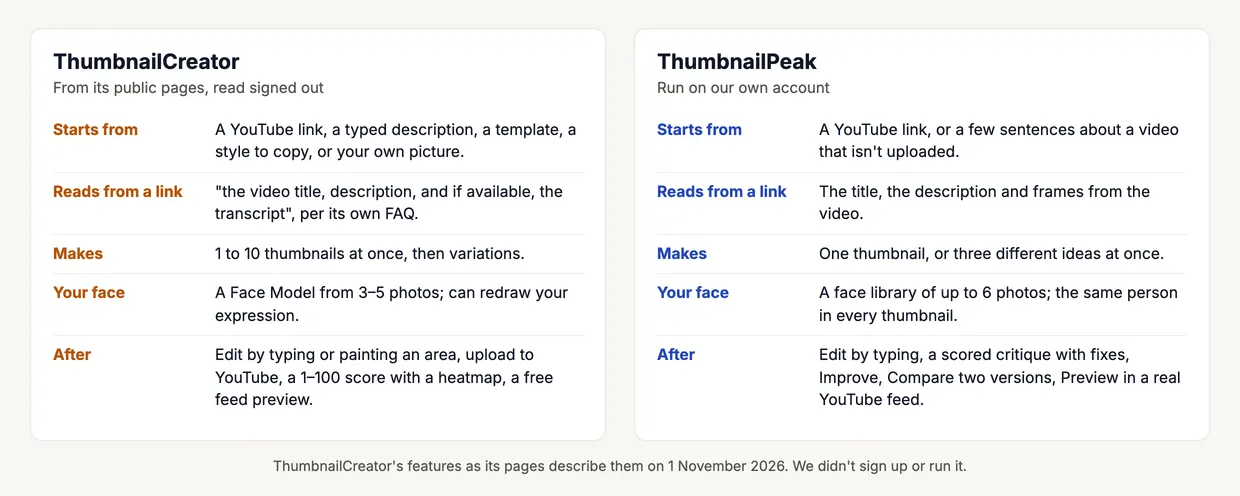
ThumbnailCreator gives you many ways in. A link, a typed description, a template, "any thumbnail or … a YouTube link to instantly extract its visual style", or your own picture. You can make "1-10 thumbnails at once", put yourself in them with a Face Model made from "3-5 photos", and "Generate different facial expressions - shocked, happy, curious". Its terms say the pictures come from "third-party AI services including OpenAI, Google Generative AI, and Replicate".
What it reads from a link isn't entirely clear from its pages. The home page says: "Our AI watches every frame, reads the transcript". Its YouTube integration FAQ says: "When you paste a YouTube URL, we fetch the video title, description, and if available, the transcript." A separate tool, Extract Stills, "extracts key frames from the video" for you to use.
ThumbnailPeak's Generate looks at the footage. From the link it reads the title and description and looks through frames from the video for what can carry a thumbnail: the subject, the moment, the setting. Then it plans one idea or three different ones and draws them in YouTube's 16:9 shape.
One video, from its link
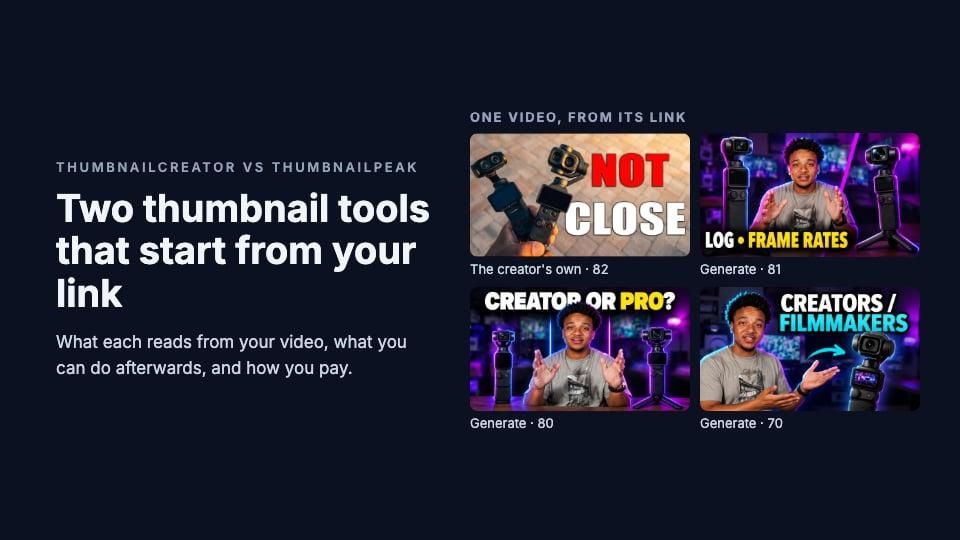
Here's what Generate made for RJBTS's camera comparison, "DJI Pocket 4p vs Luna Ultra: EASY Choice.", from the link alone, as a batch of three:
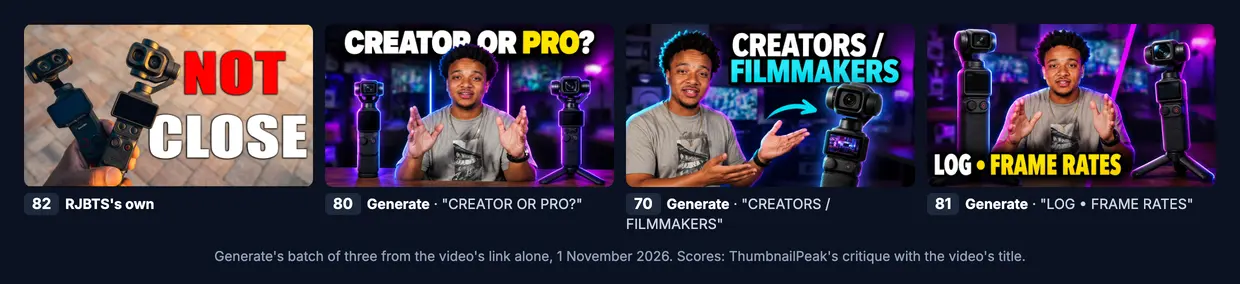
This one is a fair test, because Generate didn't win it. The creator's own "NOT CLOSE" scored 82 in our thumbnail analyzer, and Generate's three scored 80, 70 and 81. The critique's notes say why:
- "CREATORS / FILMMAKERS" (70): "The title names two cameras, but only one camera is visible."
- "LOG • FRAME RATES" (81): "The thumbnail shows comparison criteria but does not indicate which camera is the easy choice."
- The creator's own (82): two cameras in hand and a verdict, "NOT CLOSE", which is the promise of an "EASY Choice" title.
So a strong thumbnail you already have can be hard to beat, and our score said so about our own tool. That's what a check is for.
What ThumbnailCreator does that Generate doesn't
- Many ways in. A template, a style copied from another thumbnail, or your own picture, as well as a link or a description.
- More at once. Up to 10 thumbnails from one prompt, plus variations of one you like.
- Editing by painting. "Paint over specific areas to edit and let AI regenerate just that region." ThumbnailPeak's Edit changes things by typing only.
- Publishing. It can "publish a selected thumbnail with one explicit confirmation" to your video on YouTube, and redesign "every thumbnail on your channel at once".
- More tools in one subscription: a title generator, a Shorts converter, a clip cutter, trending thumbnails, an API, and use through ChatGPT or Claude.
- Expressions on demand. It will redraw your face shocked or happy. ThumbnailPeak's face library keeps you the same person; Generate chooses the expression that fits each idea.
What ThumbnailPeak does that ThumbnailCreator doesn't
- It reads the video's frames from the link, so a thumbnail shows the camera, the dish or the build that's actually in your video.
- A critique you can act on. Ten checks, each with what it saw, and fixes in plain words, scored with your title. ThumbnailCreator's analyzer also scores out of 100, with "seven individual dimension scores, and an attention heatmap"; we haven't tried it.
- Improve and Compare. Improve applies the critique's fixes to your thumbnail, and Compare tells you which of two versions should do better and why.
- Preview among real videos. Preview puts your thumbnail and title in a YouTube feed beside the videos that actually rank for your title, on phone, desktop and TV, free and with no account.
- Research tools. Breakouts finds videos that beat their channel's usual views, by category, by search or by channel.
- No subscription needed. A free account comes with 12 credits, and a $10 pack never expires.
Before you sign up for ThumbnailCreator
Its pages disagree with each other in a few places, so check these in the app:
- The free option. The pricing page offers a "7-day free trial · 10 thumbnails to start" where "Your card is saved but not charged until day 8". Other pages say "No credit card required. Free credits included."
- The size. Its help says "Your thumbnail is saved at 1280x720"; its generator page says thumbnails are "automatically generated at a YouTube's recommended 3840x2160 resolution".
- "Unlimited". One FAQ says paid plans come "with unlimited AI generations"; the pricing page gives 50, 100 or 250 thumbnails a month.
- Refunds. The home page offers "a 7-day money-back guarantee on all paid plans"; the refund policy says "Refunds are available for first-time subscriptions only" and renewals are excluded.
- Results claims. The home page shows a "72%" "Higher CTR" "vs DIY thumbnails", and its FAQ says users "see an average 73% increase in click-through rates". Neither says how that was measured. Its own analyzer page is more careful: "no tool can guarantee results".
If you're searching for reviews: on 1 November we found almost no hands-on discussion of it on Reddit.
What they cost
ThumbnailCreator, from its pricing page: every AI action costs 1 credit, "1 credit = 1 thumbnail", and an edit, a variation or an analysis is 1 credit too.
- Starter: US$29 a month for 50 thumbnails, or US$174 a year for 600, all up front.
- Creator: US$49 a month for 100, or US$294 a year for 1,200.
- Teams: US$99 a month for 250, or US$594 a year for 3,000.
- Faces you can save, "Person Swap & Expression Morphing" start on Creator.
That works out to about US$0.58 a thumbnail on Starter month to month, and about US$0.29 billed yearly.
ThumbnailPeak: Generate needs a free account, which comes with 12 credits: one thumbnail uses 3 credits, a batch of three 6, a critique 1 and an edit 3. Preview is free with no account. A $10 credit pack adds 100 credits that never expire, about 30 cents a thumbnail, and Pro is $20 a month for 300 credits a month. Free downloads carry a small ThumbnailPeak mark, which a pack or Pro removes.
Which to choose
ThumbnailCreator suits you if you make thumbnails every week and want many options per video, you like to start from a template or another thumbnail's style, you want to paint over parts of a picture, or you want to publish straight to YouTube.
ThumbnailPeak suits you if you want thumbnails drawn from what's in your footage, you want to know what to fix and which of two versions to use, you'd rather not subscribe, or you want to see your thumbnail among the videos it'll really compete with.
Whichever you use, preview it in a real YouTube feed before you upload.
Key takeaways
- Both start from your link, and both score thumbnails out of 100.
- ThumbnailCreator's FAQ says it reads the title, description and transcript; Generate reads the frames too.
- ThumbnailCreator has more making and publishing tools; ThumbnailPeak has more checking tools.
- ThumbnailCreator is a subscription from US$29 a month; ThumbnailPeak starts free and sells a pack that never expires.
- Check its free trial, size and refund terms in the app: its pages disagree.
ThumbnailCreator's pages were read signed out on 1 November 2026: the home page, pricing, features, help pages, refund policy and terms of use. Search position: Brave, 31 October 2026. ThumbnailPeak is not affiliated with ThumbnailCreator.
The example uses "DJI Pocket 4p vs Luna Ultra: EASY Choice." by RJBTS, published under the Creative Commons Attribution licence (CC BY 3.0). The creator's own thumbnail is shown as published. Generate's thumbnails are adaptations made from the video's title, description and frames, shown unedited, and RJBTS did not make or endorse them. DJI is DJI's trademark.