Disclosure: we make ThumbnailPeak, and this post uses its Generate. Every thumbnail and score below is what it returned on 21 October 2026, on our own account. The video is DIY PRO's, published under a Creative Commons licence; the "before filming" descriptions are ours, written as if it hadn't been made yet.
Most creators make the thumbnail last, after the edit, from whatever frames they happen to have. By then it's too late to film the one shot the thumbnail needed.
Doing it the other way round has two benefits. The thumbnail forces you to decide what the video promises, while you can still change the video. And it tells you which shots to get. A before-and-after thumbnail needs a "before" photo, and you can't take that once the work has started.
We tested how well this works with ThumbnailPeak's AI thumbnail generator, which can start from a description of a video that isn't filmed yet:
- A vague sentence gave a generic thumbnail, three times. All three showed a made-up man beside a made-up red kart.
- A specific paragraph gave three different, usable ideas. They were the same three ideas Generate later found in the finished video's footage.
- Each of those ideas comes with a shot list. The best one needed a photo of the rusty frame in the grass on the day it was bought.
Three ways to get a thumbnail before a video is public
- Describe it. On Generate, choose Describe your video and write a few sentences about what will happen, who and what will be on screen, and the payoff. Add a working title if you have one. Nothing needs to exist yet.
- Upload it as Unlisted. Once the video is uploaded, an unlisted link works just like a public one, so Generate can read the real footage before anyone sees it. A private video won't work: YouTube doesn't show private videos to other apps. If the video is scheduled, switching it to Unlisted cancels the schedule, so set the schedule again afterwards.
- Sketch it yourself. A rough drawing on paper does the most important part, which is deciding the idea before you film.
Plenty of creators already work this way. In the 30 days to 14 October 2026, 11% of the videos people brought to Generate weren't public yet.
The test: a go-kart build, before filming
We used DIY PRO's "$20 Rust Bucket into Kick $$$ Go Kart W/ Harbor Freight 212", because it's finished and we know what the footage holds. Then we pretended it wasn't, and wrote two descriptions a builder might write the week before starting.
The vague one:
A video where I fix up an old go-kart I bought cheap and get it running again.
The specific one, with the video's real title as the working title:
I bought a rusted go-kart frame for $20 off Marketplace. It has no engine, flat tyres and rust everywhere, and it's sitting in long grass when I pick it up. The plan: strip it, sand it, paint the frame bright green, fit a brand-new Harbor Freight Predator 212 engine, and add a second seat so two people fit. It ends with the first test drive down my street. Shots I'll have: the rusty frame in the grass, the engine still in its box, before-and-after of the frame, and the finished green kart.
We asked for three concepts from each.
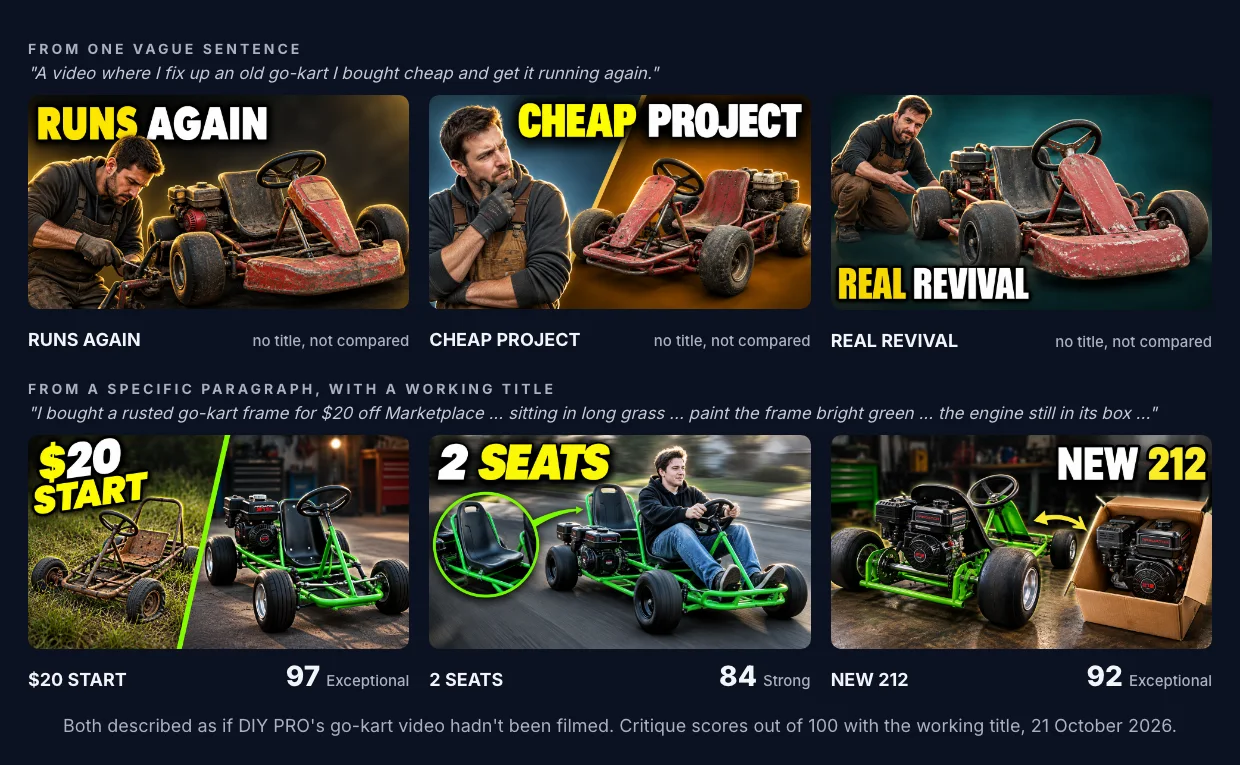
The vague sentence gave one idea three times. Each concept is a man beside an old kart. The man was invented because the sentence didn't say who's on screen. The kart is red because nothing said what colour it would be. And none of the three says "$20", because the sentence only said "cheap". They're well made, but they could be any restoration video.
The specific paragraph gave three different bets. "$20 START" sells the transformation and the price. "NEW 212" sells the engine. "2 SEATS" sells the finished kart being driven. Every detail in them came from a phrase in the paragraph: "long grass", "bright green", "still in its box", "a second seat", "down my street".
The scores are for the three made with a working title. The vague run had no title, so its scores rate the picture alone and can't be compared, and we've left them out.
How close did it get to the real thing?
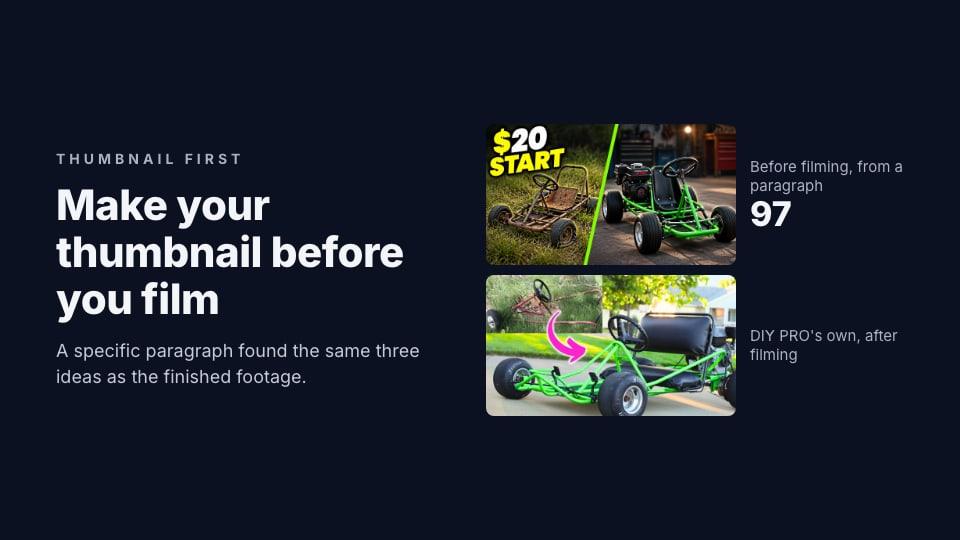
Here's the specific paragraph's best concept beside the thumbnail DIY PRO actually made after filming, and beside what Generate made from the finished video's link the same day.
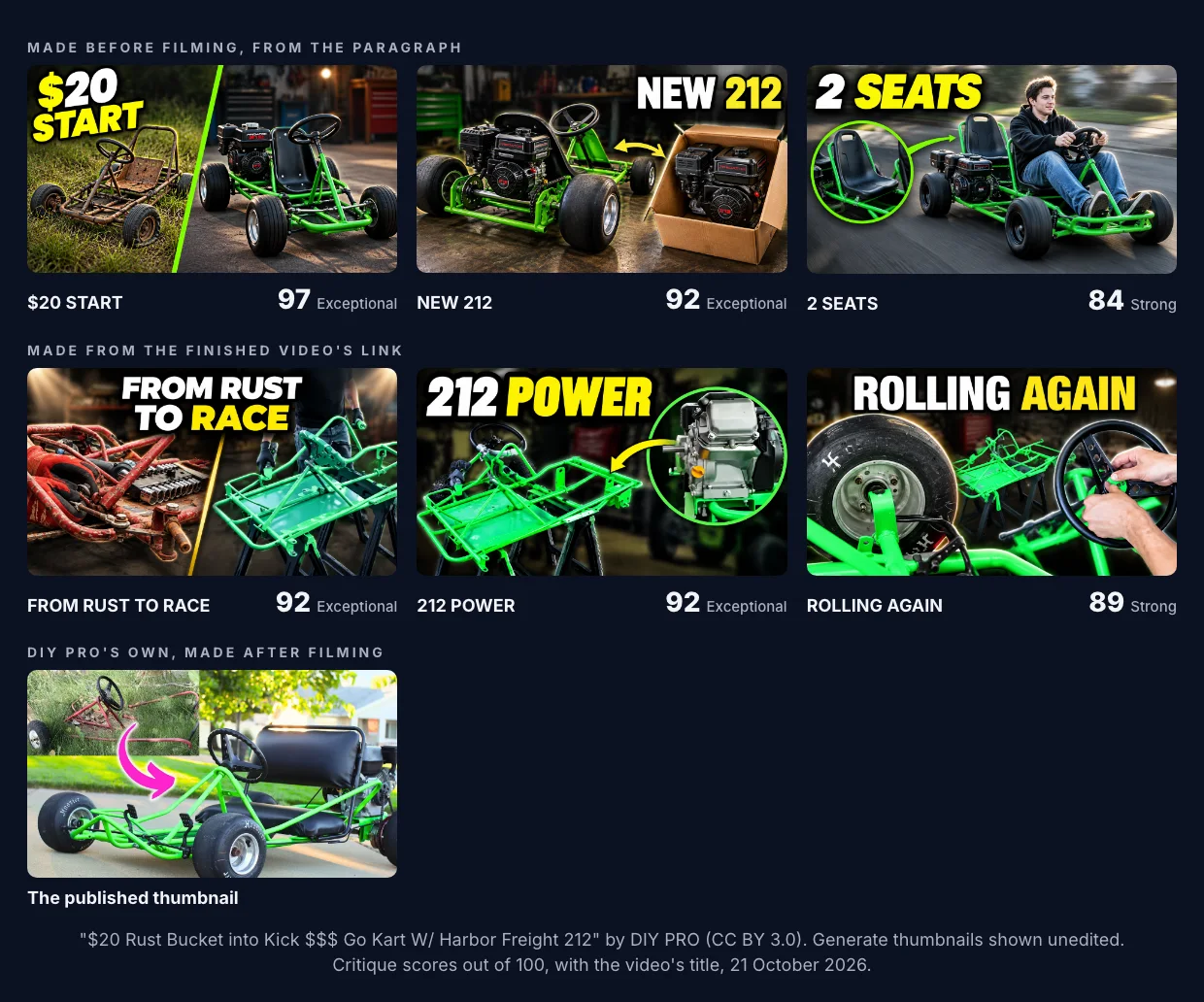
The ideas match. Rust to green, the 212 engine, the kart finished and running: the paragraph found all three before a single frame existed. DIY PRO's own thumbnail is the first one, the rusty frame in the grass beside the finished kart.
The difference is in the details. The concepts from the link show the video's actual frame on sawhorses and DIY PRO's own garage. The ones from the paragraph are a believable guess at them. That's fine for a plan. Once the video is filmed, you can make the real thumbnail from the real shots, or run Generate again on the unlisted link.
Turn the thumbnail into a shot list
A thumbnail made before filming is most useful as a list of shots to get. Here's what each of the three concepts would have asked DIY PRO to film:
- "$20 START" needs the rusty frame in the long grass, photographed on the day it's picked up, before anything is touched. Then the finished kart from the same angle, so the two halves line up.
- "NEW 212" needs the engine in its box. Keep the box until it's photographed.
- "2 SEATS" needs the finished kart on the street with both seats in view and someone driving it. A close-up of the second seat, like the circle in the concept, is worth a shot of its own.
The "before" shots are the ones to worry about. You can always film the finished kart again. You can't go back to the day it arrived. If you already know your thumbnail is a before-and-after, take that before photo first, at the angle you'll use for the after.
What to put in the description
The vague and specific runs differ in five ways. Each one is something to put in yours:
- Colours and materials. "Bright green" gave a green kart. Saying nothing gave a red one.
- The numbers. "$20" became the headline of the best concept. "Cheap" became "CHEAP PROJECT".
- The objects, in their state. "The engine still in its box" is a picture. "A new engine" isn't yet.
- Who's on screen. Leave it out and you get a generic person. If it'll be you, add your face from the face library and you'll be in every concept.
- The shots you plan to have. Listing them steered Generate toward pictures you'll be able to make for real.
For more on writing a description Generate can draw from, see our walkthrough of Generate.
When the video is ready
- Upload it as Unlisted and run Generate from the link. Now it reads your real frames.
- Use Compare vs current thumbnail. On a link run, this puts any new concept head to head with the thumbnail the video has, such as the one you made before filming.
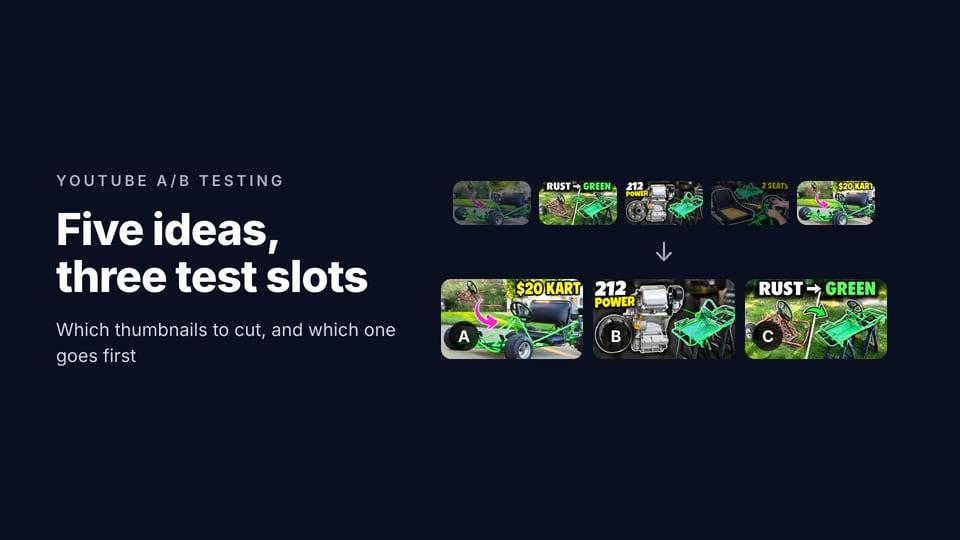
- Narrow it down. If you have more ideas than you need, cut them to the best three with Compare.
- See it in a feed. Preview your thumbnail next to the real videos it'll compete with before you publish.
Generate needs a free account, and the free plan includes 1 generation a month, which makes one concept.
Key takeaways
- Make the thumbnail first and you'll know which shots to get, while you can still get them.
- Be specific. A vague sentence gave three versions of one generic idea; a specific paragraph gave three different ones.
- A good description finds the same ideas as the footage. Ours matched the finished video's three.
- Film the "before" first, from the angle you'll use for the "after".
- Private won't work; Unlisted will. But Unlisted cancels a schedule.
The "before filming" descriptions were written by us on 21 October 2026, as if the video hadn't been made; DIY PRO didn't write them. The figure of 11% counts the videos Generate read in the 30 days to 14 October 2026 that weren't public yet.
The video is "$20 Rust Bucket into Kick $$$ Go Kart W/ Harbor Freight 212" by DIY PRO, published under the Creative Commons Attribution licence (CC BY 3.0). Its current thumbnail is shown as published. The thumbnails from the link are adaptations made from its frames; the ones from the descriptions were drawn from our text alone. All are shown unedited, and DIY PRO did not make or endorse them.