Disclosure: we make ThumbnailPeak, and this post mentions its Generate and Channel preview. Outer Range's thumbnails are published under a Creative Commons licence.
A thumbnail template is a design you reuse: the same font, colours, layout and graphics, with a new photo and new words each time. Most creators who post every week end up with one, whether they planned it or not.
Templates are good at two things: speed, and making your videos recognisable. They're bad at one: telling a viewer why this video is worth clicking. Here's what we found:
- One template, a 70-fold range of views. Outer Range, an exploration channel, built every recent thumbnail the same way: a landscape, a red arrow or circle, and a few big words. Its 21 recent videos got from 22,000 to 1.6 million views each.
- The same design did well again and again, and badly too. Outer Range used one "caught it on camera" design four times. Three of those videos passed 600,000 views; the fourth got 203,000.
- Breakouts didn't break their template. Across 3,523 channels, the video that broke out looked as much like the channel's usual thumbnails as they looked like each other.
- The risk is a template everyone uses. Looking like the rest of your genre is where creators' thumbnails lost points most often in our critique: only 12% got the top grade for standing out.
One template, 21 videos
Outer Range explores remote places in Alaska and the American Southwest: canyons, cliff dwellings, abandoned towns, islands. Its thumbnails follow a template you can spot from across the room:
- A dramatic landscape shot from a drone or a cliff edge, warm and saturated.
- A red arrow or a red circle pointing at something small: a cave, a hut, a hole in a rock.
- A few big words, often "I FOUND", "WE CAUGHT IT ON CAMERA" or a question.
- Sometimes a trail camera inset in a corner, for the hidden-camera videos.
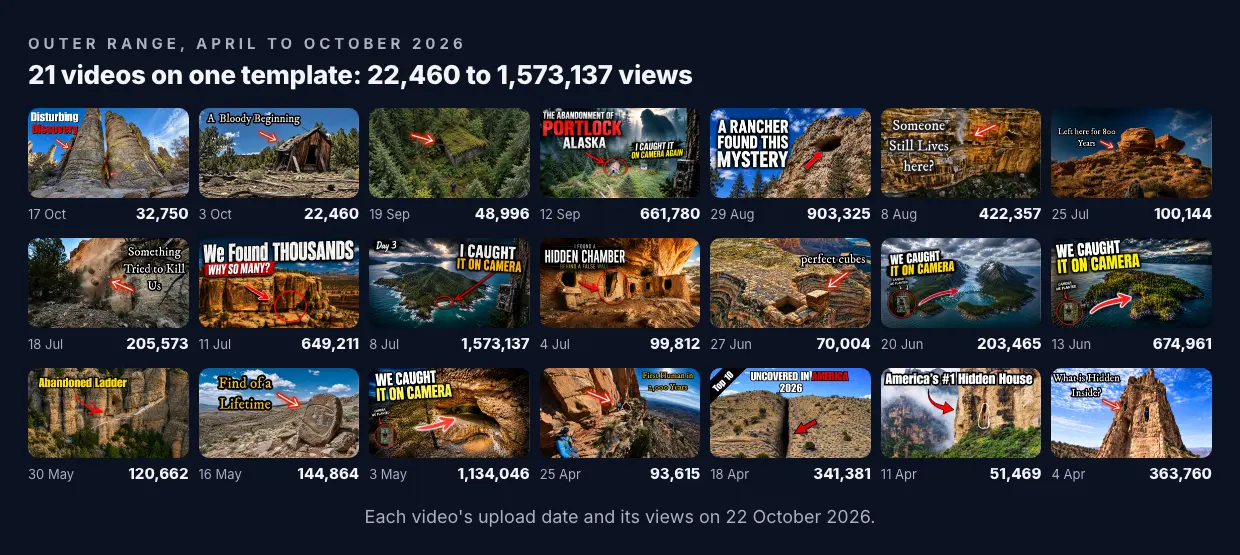
Every one of those 21 thumbnails uses the template. Their views on 22 October 2026 ran from 22,460 to 1,573,137: a 70-fold range. Leaving out the two videos less than three weeks old, the lowest was 48,996. The template was the same every time, so the template isn't what decided which video took off.
The same design, four times
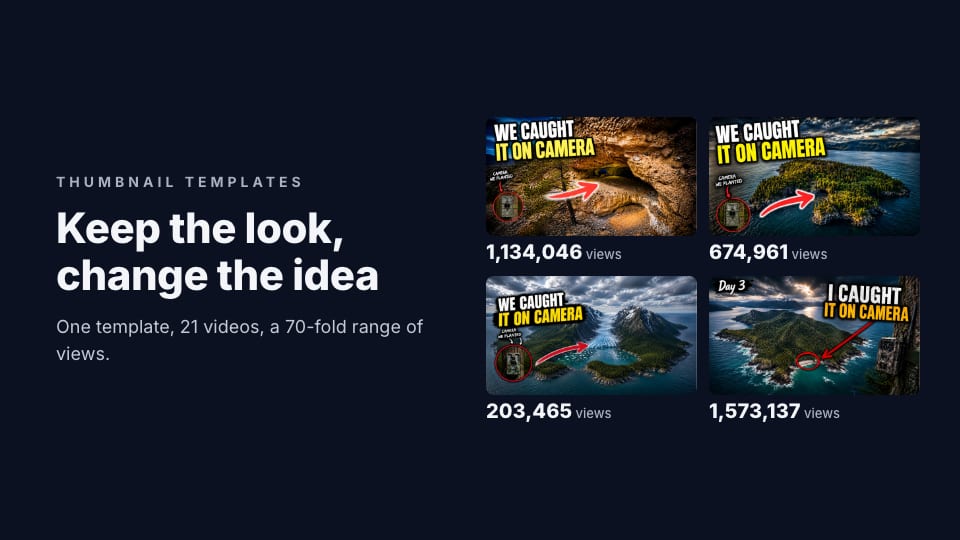
The clearest case is Outer Range's hidden-camera series. Four videos, from May to July 2026, use nearly the same thumbnail: a landscape seen from above, "WE CAUGHT IT ON CAMERA" or "I CAUGHT IT ON CAMERA" in big yellow and white letters, a red arrow and a trail camera in a red circle.
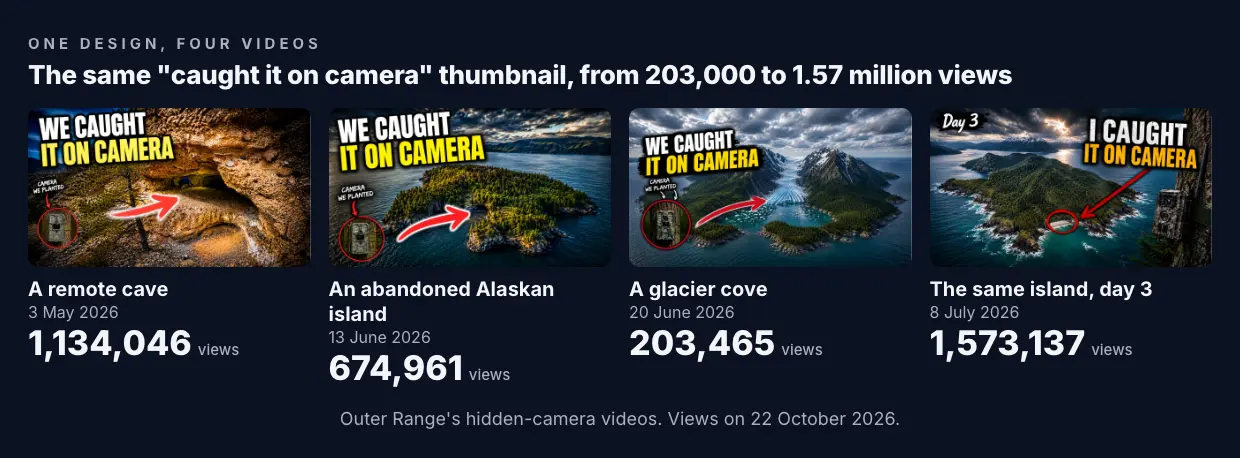
- A remote cave, 3 May: 1.13 million views.
- An abandoned Alaskan island, 13 June: 675,000.
- A glacier cove, 20 June: 203,000.
- The same island, day 3, 8 July: 1.57 million.
Reusing a design that worked is a fair bet: a viewer who enjoyed the cave video will spot the next one at once. And it mostly paid off. But the glacier video, a week after the island, got under a third of the island's views with the same design. The design brought the series' viewers back. What it showed, an island or a cave or a glacier, decided how many new viewers came.
Breakouts kept their template
Outer Range is one channel. To see whether the pattern holds, we looked at 3,523 channels in ThumbnailPeak's Breakouts sample on 22 October 2026, each with a recent video that got at least three times the channel's usual views.
Thumbnails from the same channel look alike: two of them were more alike than 95% of random pairs of thumbnails 79% of the time. And the breakouts didn't break that habit. A breakout was further from its channel's usual thumbnails than they were from each other in 51% of channels, and closer in 49%. It had the same number of words, the same faces and the same colours.
So a template doesn't stop a video breaking out. Most breakouts used their channel's template. What they changed was what went inside it.
The risk: a template everyone uses
There's one kind of template that does work against you: one that many other channels also use.
A free template from a design tool's gallery is designed to suit anyone, and that's the problem. Canva's gallery alone showed 20,123 YouTube thumbnail templates when we looked on 21 October 2026, and a popular one can turn up on many channels at once. In a feed of similar videos, a thumbnail that looks like the genre's usual one gives the viewer no reason to pick it.
That's the check creators lose most often in ThumbnailPeak's AI critique. Of 4,925 thumbnails critiqued from 15 August to 22 October 2026, only 12% got the top grade for distinctiveness, the lowest of the seven checks on the picture. 15% got a fix telling them to stand out from what the genre usually looks like.
A template you made yourself, from your own photos and your own choices, doesn't have that problem. It looks like you, not like the gallery.
What to put in a template, and what to leave out
Put in the things that make your channel recognisable:
- One or two fonts, and their size, outline and shadow. Our font test shows which survive small sizes.
- Two or three colours: for the words, a label or an arrow.
- Where the words go, and how big the main line is. Keep them out of the bottom-right corner, where YouTube shows the video's length.
- A recurring graphic, if you have one: Outer Range's red arrow, Walk With Wallace's torn paper label.
Leave out the things that make each video different:
- The photo. Start from a new picture every time. A template that keeps the same background makes every video look like a rerun.
- The words. A template's placeholder headline is the worst headline for your video.
- The layout, sometimes. If every thumbnail puts you on the left and words on the right, a subscriber's eye skips over them. Change it when the idea needs it.
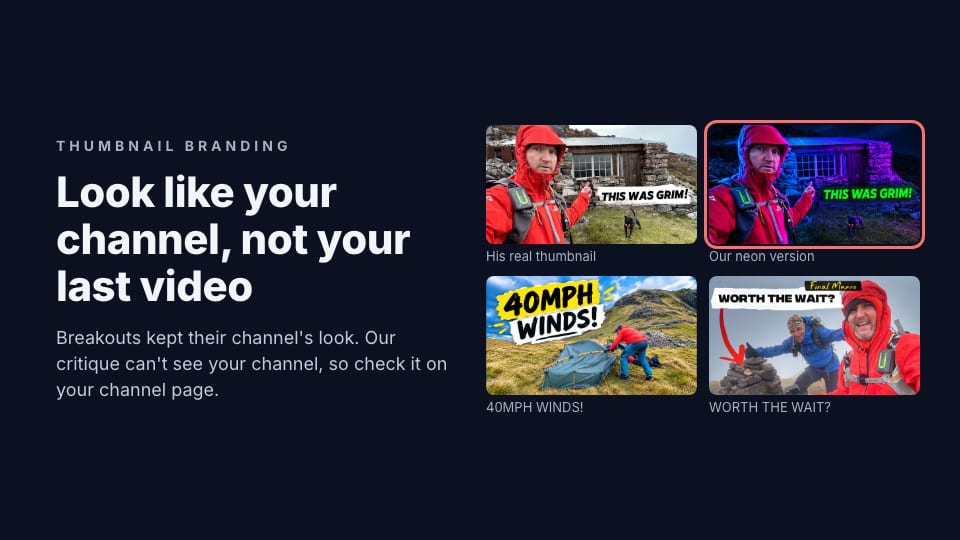
Then check the new thumbnail beside your old ones. ThumbnailPeak's free Channel preview puts it on your real channel page, at the top of your Videos tab, and Shuffle moves it in among your real uploads. Our guide to thumbnail branding shows what that looks like.
Use a template with AI
ThumbnailPeak's AI thumbnail generator can use one of your own thumbnails as a style template. Attach it, tick what to borrow (layout and composition, colour, text style and placement, lighting and mood) and it designs a new thumbnail for your video in that look. It takes the look only, never the template's words or picture. Any account can keep templates in its Library and pick one from the form. We showed one in action in our Generate guide.
Frequently asked questions
Should I use a template for my YouTube thumbnails?
Yes, if it's your own: it saves time and makes your videos recognisable. Keep the font, colours and label style the same, and use a new photo and new words every time. Avoid a template many other channels also use.
Do thumbnail templates hurt views?
Not in what we measured. Most breakouts used the same look as their channel's other videos. What a template can't do is make a video break out on its own. One channel's 21 videos on the same template ranged from 22,000 to 1.6 million views.
Where can I find YouTube thumbnail templates?
Design tools such as Canva have thousands. The best one to use is your own: take your best-performing thumbnail and keep its font, colours and layout for the next video.
How we did it: Outer Range's videos and view counts are from YouTube on 22 October 2026: the channel's 21 most recent videos longer than a minute, published 4 April to 17 October 2026, all under CC BY 3.0. The 3,523 channels are those in ThumbnailPeak's Breakouts sample that day with a video published 2 to 20 October at three times or more its usual views, compared with four recent ordinary uploads each (0.5 to 1.5 times its usual views), using Apple's Vision image feature prints at 640×360 on our own computer. The ThumbnailPeak counts cover thumbnails critiqued from 15 August to 22 October 2026, each picture once, with our own account's critiques left out.