Disclosure: we make ThumbnailPeak, and this post uses its Edit and Compare. Every score and verdict below is what the tools returned on 21 October 2026, on our own account. The thumbnail we changed is DIY PRO's, published under a Creative Commons licence.
Ask anyone how to A/B test and they'll say: change one thing at a time. If two thumbnails differ in five ways and one wins, you don't know which of the five did it.
YouTube's help page for its A/B test says something that sounds like the opposite: "Testing titles and thumbnails that are too similar to each other can cause tests to run for longer. This is because there may not be enough of a difference between them to decide on a 'winner.'"
Both are right, and together they make one rule: change one thing, and make it a thing people notice in a second, at the size they see it.
We tried two single changes on one real thumbnail. Here's what happened:
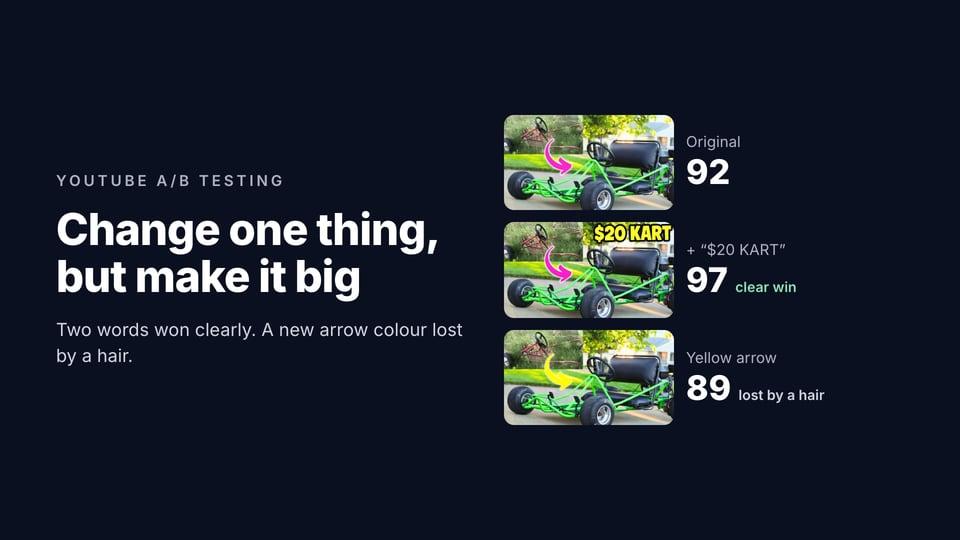
- Adding two words, "$20 KART", won clearly. The score went from 92 to 97, and Compare picked the new version with medium confidence.
- Recolouring the arrow from pink to yellow lost by a hair. 92 to 89, and Compare preferred the original, saying the yellow "blends more with the bright grass".
- Across 1,696 comparisons on ThumbnailPeak, small differences rarely produced a clear verdict. When two thumbnails got the same grade on every check, 78% of verdicts were a slight win or a tie.
The test: two single changes
We started from DIY PRO's own thumbnail for "$20 Rust Bucket into Kick $$$ Go Kart W/ Harbor Freight 212": the rusty frame in an inset, a pink arrow, the finished green kart, and no words. Its critique scored it 92 out of 100 with the video's title.
We made two versions with ThumbnailPeak's Edit, which changes an image from a sentence you type. Each request asked for one change and ended "Change nothing else":
- "Add the words "$20 KART" in big, bold yellow letters with a thick black outline across the top of the picture."
- "Make the pink arrow bright yellow."
Then we compared each with the original in ThumbnailPeak's Compare, with the video's title.
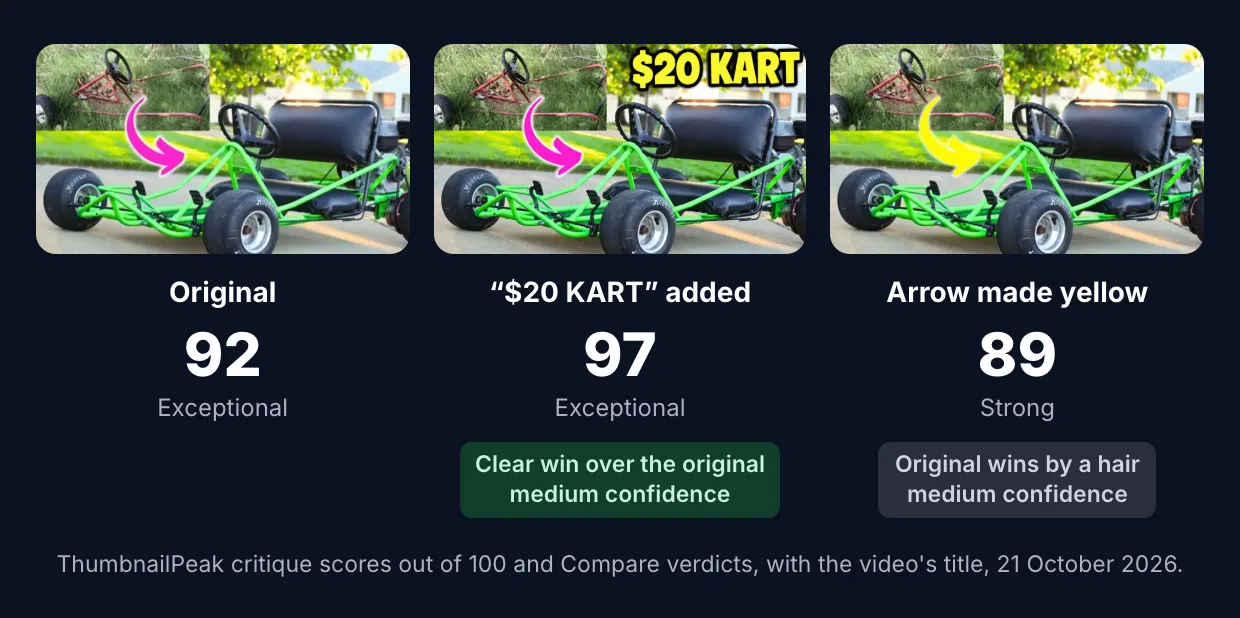
The words won clearly. Compare: "Its bold '$20 KART' headline remains readable at 168×94 and immediately communicates the cheap-build hook from the title. A shows the transformation clearly, but viewers must infer the $20 angle from the image and title." Three of the critique's ten checks went up a grade: curiosity, promise consistency and title complementarity.
The arrow lost by a hair. Compare: "The magenta arrow separates more clearly from the green kart and grass at 168×94, making the before-to-after transformation easier to notice. The images and framing are otherwise effectively the same." The score difference was 3 points. ThumbnailPeak's own Improve calls a drop of 5 points or less "About the same", because in our measurements a move that small sits inside the critique's normal variation.
There's a sign of that variation in the arrow test itself. The critique graded the yellow-arrow version's title fit one step higher than the original's, though nothing about its words had changed.
Why the words mattered and the arrow didn't
Both were one change. The difference is what each one changed for a viewer.
The words changed what the thumbnail says. Before, a viewer had to read the title to learn the kart cost $20. After, the thumbnail says it in two words you can read at feed size. That's a different promise, and a promise is what makes people click and keep watching.
The arrow changed a detail of how the same thing is said. Both versions show the same before, the same after and the same direction. At the sizes people see thumbnails, a few hundred pixels wide and as small as 160, the arrow is a small part of the picture. And here the change made it slightly worse, because yellow stands out less against bright green grass than pink does.
What the data says about small differences
We looked at the 1,696 comparisons people ran on ThumbnailPeak between 15 August and 21 October 2026, leaving out our own, and counted how many of the critique's checks the two thumbnails were graded differently on.
- Same grade on every check: 9% of comparisons. 78% of those ended in a slight win or a tie.
- Different on one check: 21%. 70% slight or tie.
- Different on two checks: 21%. 54% slight or tie.
- Different on three or more: 48%. Only 29% slight or tie. The other 71% were clear or decisive wins.
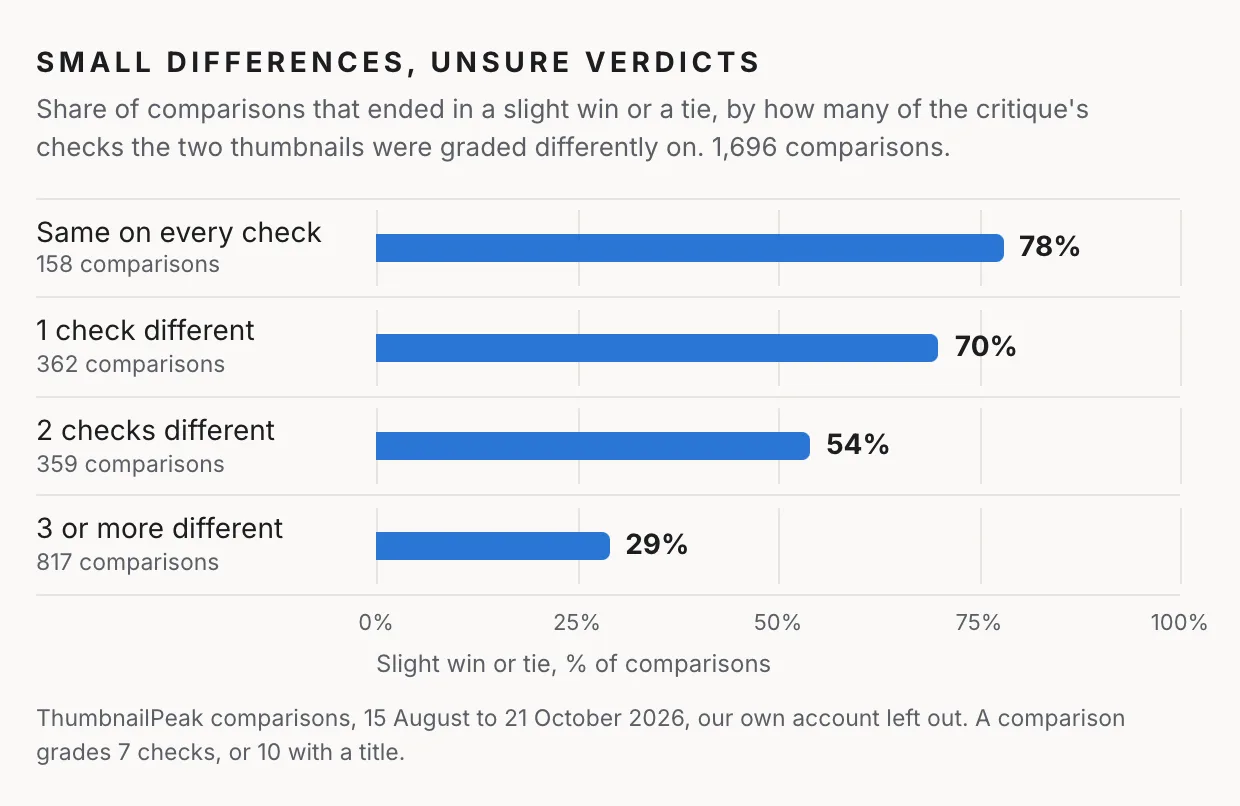
An AI judge isn't your audience, and we can't see what YouTube's test would have said about these pairs. But the pattern matches YouTube's warning: when two thumbnails are alike in every way a judge can name, neither one gives viewers a reason to act differently.
"$20 KART" changed three checks, and won clearly. The yellow arrow changed two, in opposite directions, and lost by a hair.
One change worth testing
Single changes that usually change what a viewer understands, or sees first:
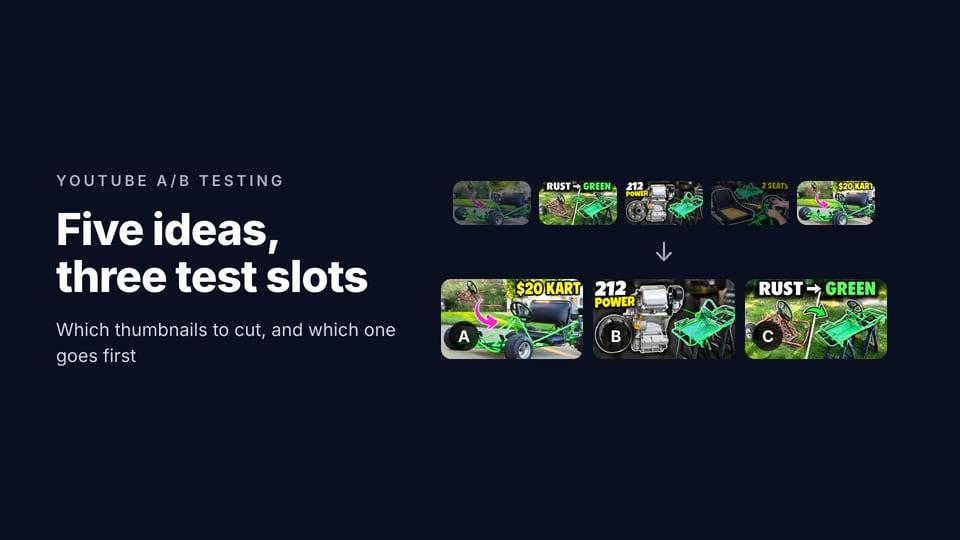
- Words, or different words. Adding a short headline, or swapping it for one that makes a different promise: "$20 KART" against "RUST → GREEN".
- The main subject. The engine or the finished kart. Your face or the thing you made. A person, or no person.
- The story. Before and after, or only the result. The problem, or the fix.
- The emotion, when there's a face. Surprised, or calm and confident.
- What's in focus. One big subject, or the scene around it.
Single changes that are usually too small to be worth one of your three slots:
- the colour of an arrow, an outline or a highlight
- a different font, or text 10% bigger
- a slightly brighter or more saturated picture
- moving an element a little
These aren't pointless. A colour that clashes with the background, or text you can't read on a phone, is a real problem, and fixing it is worth doing. It's just worth doing before the test, not as one of the options in it. ThumbnailPeak's thumbnail tester shows you the thumbnail in a YouTube feed at real sizes, free, so you can catch those first.
How to make a one-change version
You don't need to rebuild the thumbnail in your design tool. In ThumbnailPeak's Edit, you upload the thumbnail and type the change, like "add the words $20 KART at the top" or "replace the background with the garage". AI edits that image, and every version stays in a strip so you can go back, or make the next edit from any of them. One or two changes per edit work best. A free account includes 1 edit a month.
Then put the versions side by side in Compare. If it calls the difference "by a hair", consider a bigger change before you spend a YouTube test on it. Our guide to YouTube thumbnail A/B testing covers the test itself, and how to choose which thumbnails go in shows the whole selection with five ideas.
Frequently asked questions
Should I only change one thing between A/B test thumbnails?
One idea per option is a good rule, because then you know what made the difference. But the change has to be big enough for viewers to notice in a second, at feed size. A different promise, subject or story is; a colour or font tweak usually isn't.
Why did my YouTube A/B test say "Performed Same"?
Usually because the options were too similar to change how people watched. YouTube says tests of very similar thumbnails run longer and often end without a winner.
Can I test small changes like colour on YouTube?
You can, but the test is unlikely to find a winner unless the change makes a big difference to how readable or clear the thumbnail is. It's usually better to fix those details before the test and use the test for bigger questions.
How do I make two versions of a thumbnail quickly?
Edit a copy of your thumbnail with the one change: in your design tool, or with ThumbnailPeak's Edit by typing the change. Keep everything else identical, so the test is about that one thing.
The two edits were made and compared on ThumbnailPeak on 21 October 2026, with the video's title and no description. The video is "$20 Rust Bucket into Kick $$$ Go Kart W/ Harbor Freight 212" by DIY PRO, published under CC BY 3.0. The original thumbnail is shown as published; the two edited versions are our adaptations, and DIY PRO did not make or endorse them. The figures across all comparisons count those run on ThumbnailPeak's current comparison prompt, leaving out our own account's; we read only the grades and verdicts, never the images or titles.