Disclosure: we make ThumbnailPeak. We didn't run vidIQ's Outliers: it needs an account. Everything about vidIQ below comes from its public feature page, help article and pricing page, read signed out on 22 October 2026, which may have changed since. The Breakouts search was run on our own account the same day.
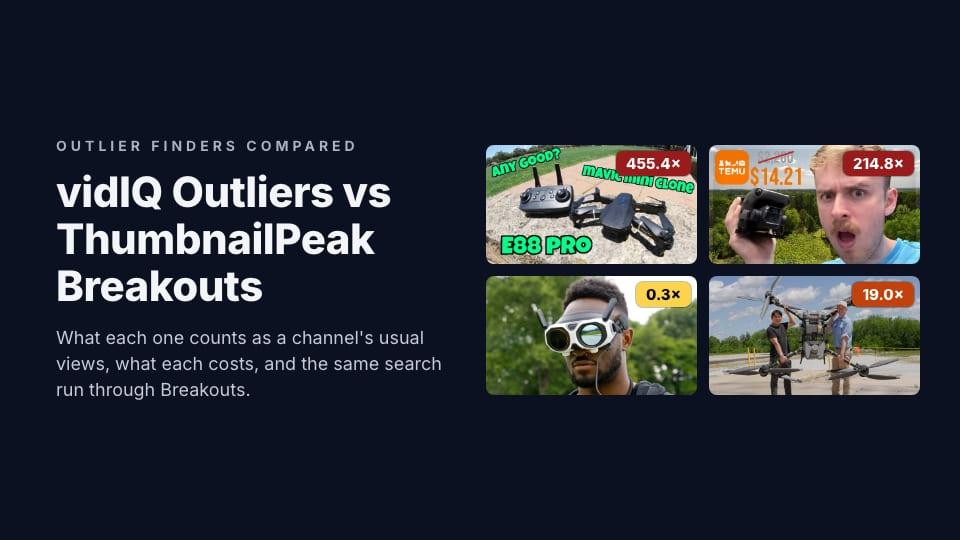
vidIQ is one of the biggest YouTube toolkits, and Outliers is one of its research features. Its page promises to show "videos that are massively overperforming compared to a channel's usual baseline". ThumbnailPeak's Breakouts does the same thing in a smaller, more focused way. We compared the two in an earlier post on vidIQ's thumbnail maker; this one is about finding outliers.
The short version:
- Both rank by a multiple, not by views. A small channel's breakout beats a big channel's ordinary video.
- vidIQ measures against the channel's average, and adds velocity. Its help article says the score compares a video with "the channel's average views within a similar timeframe". Its feature page adds "views, velocity". Breakouts uses the median of the channel's ten most recent uploads that are at least two weeks old.
- vidIQ does more around it. Shorts, a views-per-hour filter, thumbnail search by phrase or image, competitor tracking and an extension that shows the score on YouTube.
- Breakouts is free to browse. Its Categories tab works with no account. vidIQ's free plan shows a handful of results per search, and its advanced filters need a paid plan.
How vidIQ Outliers works
From vidIQ's help article: you open Research, then the Videos, Shorts, Channels or Thumbnails Outliers tab, and type a topic. It advises having "a precise topic or idea" first, and uses the example of someone "making a drone review". Each result shows the video, its views, its Outlier Score, views per hour and the channel's average views.
The filters are its strength: Outlier Score (0 to 100+), views, subscribers, views per hour, video length, publish date from "This week" to "All Time", and a switch between long videos and Shorts. vidIQ's extension also shows the Outlier Score next to videos as you browse YouTube.
vidIQ is candid about one thing. Its help article answers "Why do I see irrelevant videos?" with: "Frequently, irrelevant videos may appear when using the Outlier tool because the set filters are too specific or narrow."
How Breakouts works
Breakouts is one page with three tabs:
- Categories: breakout videos from twelve YouTube categories, each swept once a week and kept for about a month. No account needed.
- Search: YouTube's top results for any phrase, up to 150, without Shorts or live broadcasts, ranked by the multiple.
- My channels: up to 30 channels you choose, measured across each one's newest 500 uploads, every upload against the ones before it.
A badge on each card shows the multiple, coloured from amber to deep red as it grows, and the card shows the "usual" number it divided by. Each card also has a Critique this thumbnail button that sends it for an AI critique. Our Breakouts guide walks through it.
vidIQ's example topic, in Breakouts
We took the topic from vidIQ's help article, "drone review", and ran it through Breakouts' Search on 22 October 2026. We couldn't run it through vidIQ without an account, so this shows Breakouts' answer only.
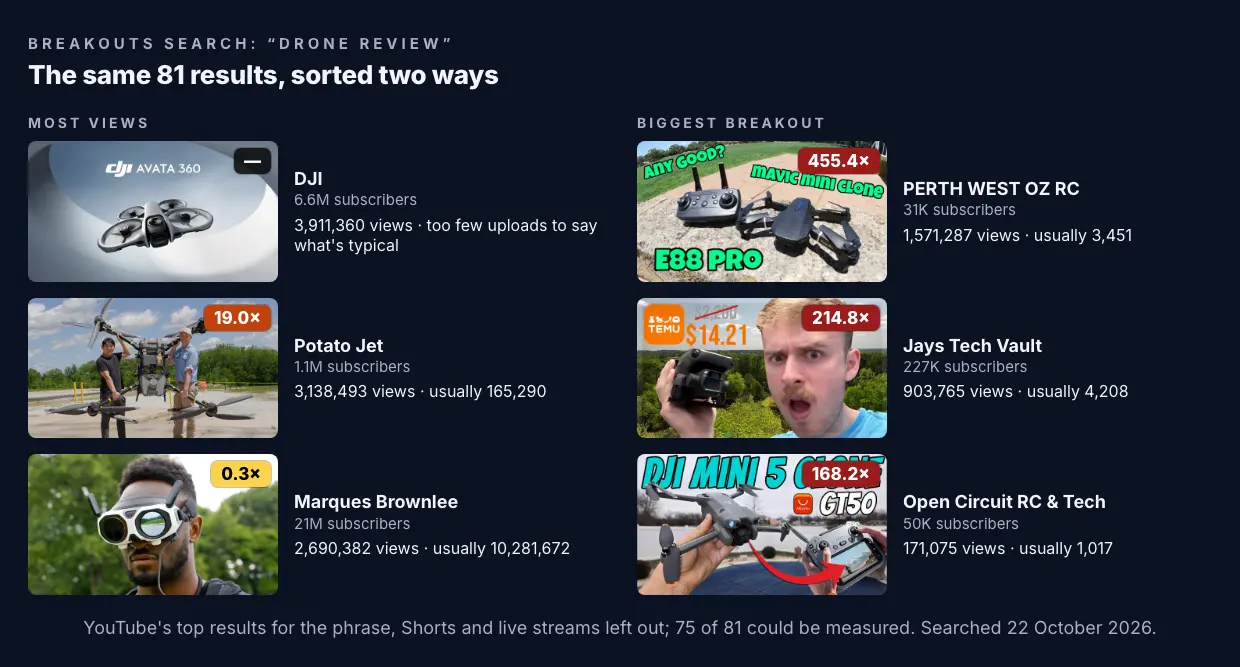
The most-viewed result is DJI's own product video. Third is Marques Brownlee's, with 2.7 million views, which is about a quarter of what his videos usually get. Big numbers, and nothing to learn from them about packaging.
The biggest breakouts tell a clearer story. The top three are all cheap drones: a clone of DJI's Mavic Mini, a $14 drone from Temu, and an AliExpress drone "better than DJI Mini 5 for $40??". Of the 20 biggest multiples in this search, more than half are about cheap, budget or beginner drones. That's an idea worth knowing before you make your own drone review: budget is what strangers clicked on.
Average or median: why it matters
Here's one channel from that search, BURST, with "$1 VS $100 DRONE !".
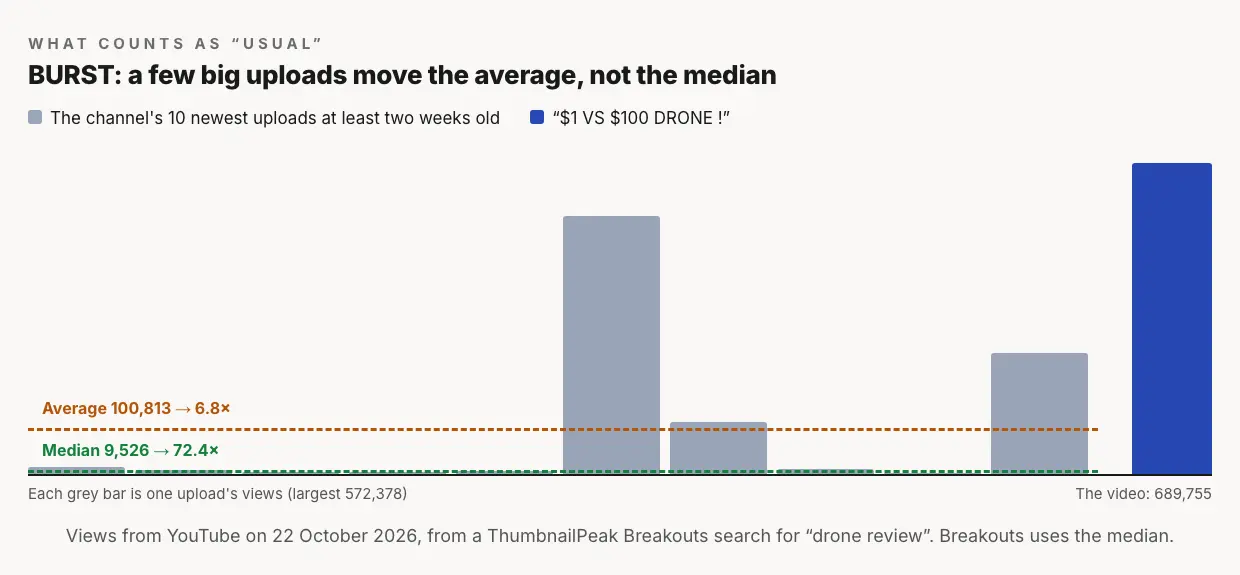
Most of BURST's recent videos get under 15,000 views. Three got far more, one of them 572,378. Against the median of those ten uploads, "$1 VS $100 DRONE !" did 72 times the channel's usual. Against the average, which the three hits pull up, it did 7 times. Both say it did well. One says it was far beyond anything the channel normally does. The other says it was a good result for a channel that has a hit now and then.
This happens a lot. In the drone search, for 33 of the 75 measured videos, the channel's average was more than one and a half times its median, and for 21 it was more than double. Counted against the median, 49 videos did three times their channel's usual or more. Against the average, 39 did.
We don't know vidIQ's exact window. "Within a similar timeframe" may mean it compares a video with the channel's other videos at the same age, which is a sensible way to treat a video that's still collecting views. Breakouts handles that differently: it only uses uploads at least two weeks old for the "usual", and a video under two days old gets a projected multiple marked with a "~".
Neither approach is wrong. An average asks how a video did against everything, hits included. A median asks how it did against a normal upload. We chose the median because a channel's one viral video shouldn't make everything after it look ordinary.
What vidIQ Outliers does that Breakouts doesn't
- Shorts. vidIQ has a Shorts tab and a long-form/Shorts switch. Breakouts leaves Shorts out.
- Views per hour. vidIQ can filter by how fast a video is gaining views right now. Breakouts doesn't measure speed.
- Thumbnail search. vidIQ lets you "search using a phrase or image" and "find thumbnails with similar visual elements". Breakouts searches by topic only.
- On YouTube and on your phone. vidIQ's extension shows the score next to videos while you browse, and Outliers is in its mobile app.
- A whole toolkit. Keywords, competitor tracking (3 channels free, 20 on Boost, 50 on Max), daily ideas, a thumbnail maker and more, under one login.
If you already use vidIQ for keywords and want outliers in the same place, it's the obvious choice.
What Breakouts does that vidIQ Outliers doesn't
- Free categories with no account. Twelve YouTube categories, measured every week, each keeping about a month of breakouts, with the date each number was measured.
- The "usual" on every card. The card shows the number the multiple was divided by, and a channel with too few uploads gets a dash instead of a guess.
- Each upload against its own past. On My channels, every video is measured against the uploads before it, so a channel that has grown isn't graded against the smaller channel it was.
- From a breakout to your own thumbnail. One click sends any card for an AI critique. Then put your own thumbnail in a real YouTube feed with the free thumbnail tester and see whether it holds up next to the breakouts.
What it costs
Prices as listed on 22 October 2026, in US dollars.
- vidIQ: a free plan, which shows up to 6 results per Outliers search on the feature page (8 in the help article's plan table), without the advanced filters. Boost is $19 a month or $199 a year, and Max is $49 a month or $468 a year, for one channel. Both paid plans get unlimited Outliers searches.
- ThumbnailPeak Breakouts: Categories is free, with no account and no limit. A search or a channel sweep uses 1 credit: a free account comes with 12, Pro is $20 a month for 300, and a $10 pack adds 100 that never expire. Repeating a search from the last 24 hours is free, and the filters cost nothing.
Which to use
Use vidIQ Outliers if you want Shorts, views per hour, thumbnail search and outliers inside the toolkit you use for keywords, with the score showing on YouTube itself.
Use Breakouts if you want to browse this month's breakouts in your category without signing up, want to see how every number was worked out, or want to go straight from a breakout to a critique of its thumbnail and a preview of your own.
Whichever finds it, a breakout is a question, not an answer. Our niche guides take real ones apart and say what each thumbnail is doing: tech, cars, travel and more.
Key takeaways
- Both tools rank by how far a video beat its own channel. On "drone review", the most-viewed results came from DJI and Marques Brownlee; the biggest breakouts were three cheap drones from channels with 31,000 to 227,000 subscribers.
- vidIQ uses the average and velocity; Breakouts uses the median. On one search, 49 videos were 3× or more against the median and 39 against the average.
- vidIQ does more. Shorts, views per hour, thumbnail search, an extension and a mobile app.
- Breakouts is open and free to browse. Twelve categories with no account, the "usual" on every card, and a critique one click away.
How we compared: vidIQ's features, quotes and prices come from its Outliers feature page, its help article on Outliers, its plan table and its pricing page, read signed out on 22 October 2026. We didn't sign up or run vidIQ. The Breakouts search for "drone review" was run on 22 October 2026; the average and median use each channel's ten most recent uploads that were at least two weeks old. View counts are YouTube's on that day. Thumbnails and channel names belong to their creators and are shown for commentary.