
We gave vidIQ's AI thumbnail maker a video of Pokémon card fans opening packs on the streets of Tokyo. It gave us back a thumbnail that says "JAPAN'S CRAZY SNACKS?".
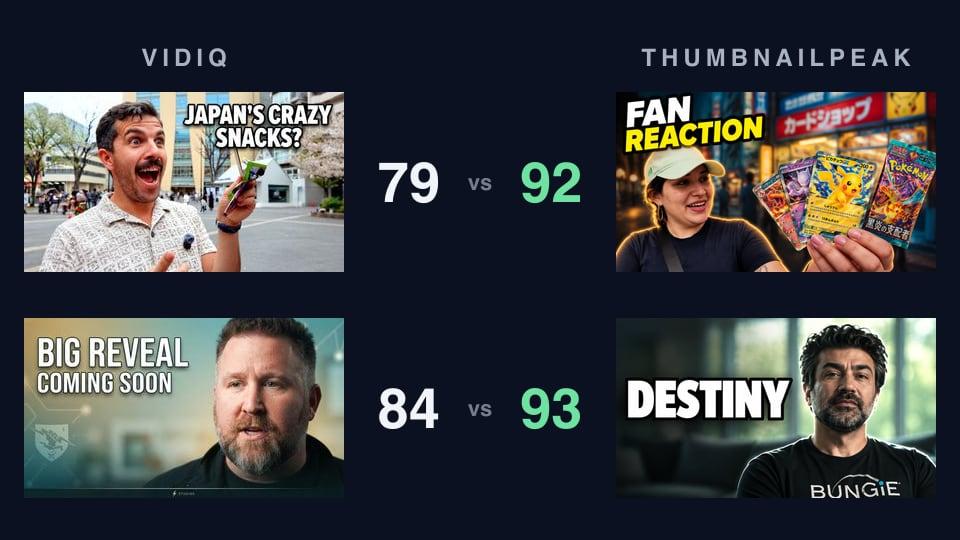
That was the first of two videos we ran through vidIQ and through Generate, ThumbnailPeak's AI thumbnail generator. Generate won both:
- Test 1, a Pokémon street interview in Tokyo: Generate 92, vidIQ 79.
- Test 2, Bungie's studio update: Generate 93, vidIQ 84.
Below are all four thumbnails, where each one gained and lost its points, and how the two tools compare feature by feature.
How we tested
The rules were the same for both videos. We pasted the YouTube link into each tool, added no prompt, no face and no reference image, and ran each tool once. The vidIQ account we used allowed two generations in all, so nothing here was picked: these are the only two thumbnails vidIQ made for us, and the first Generate made for each video. Then we scored each pair with ThumbnailPeak's Compare, giving it the video's title.
Test 1: Pokémon cards, not snacks
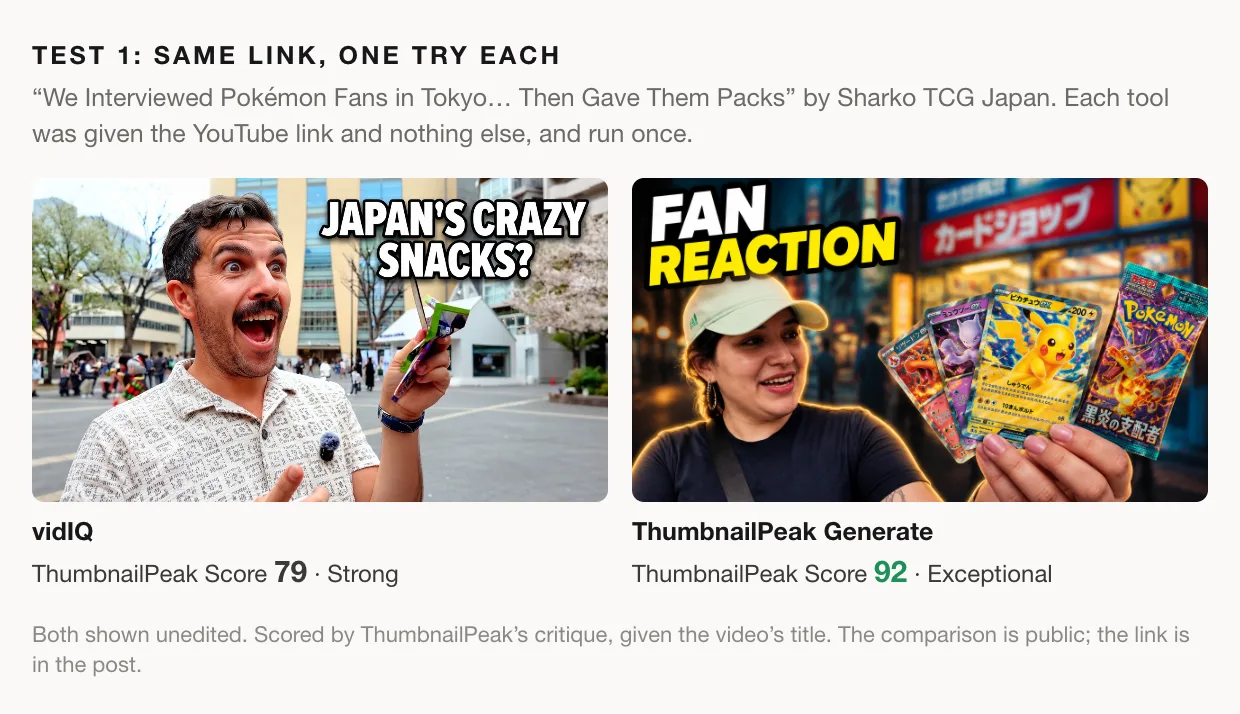
Both are well made. Only one of them is a thumbnail for this video.
What the video is about
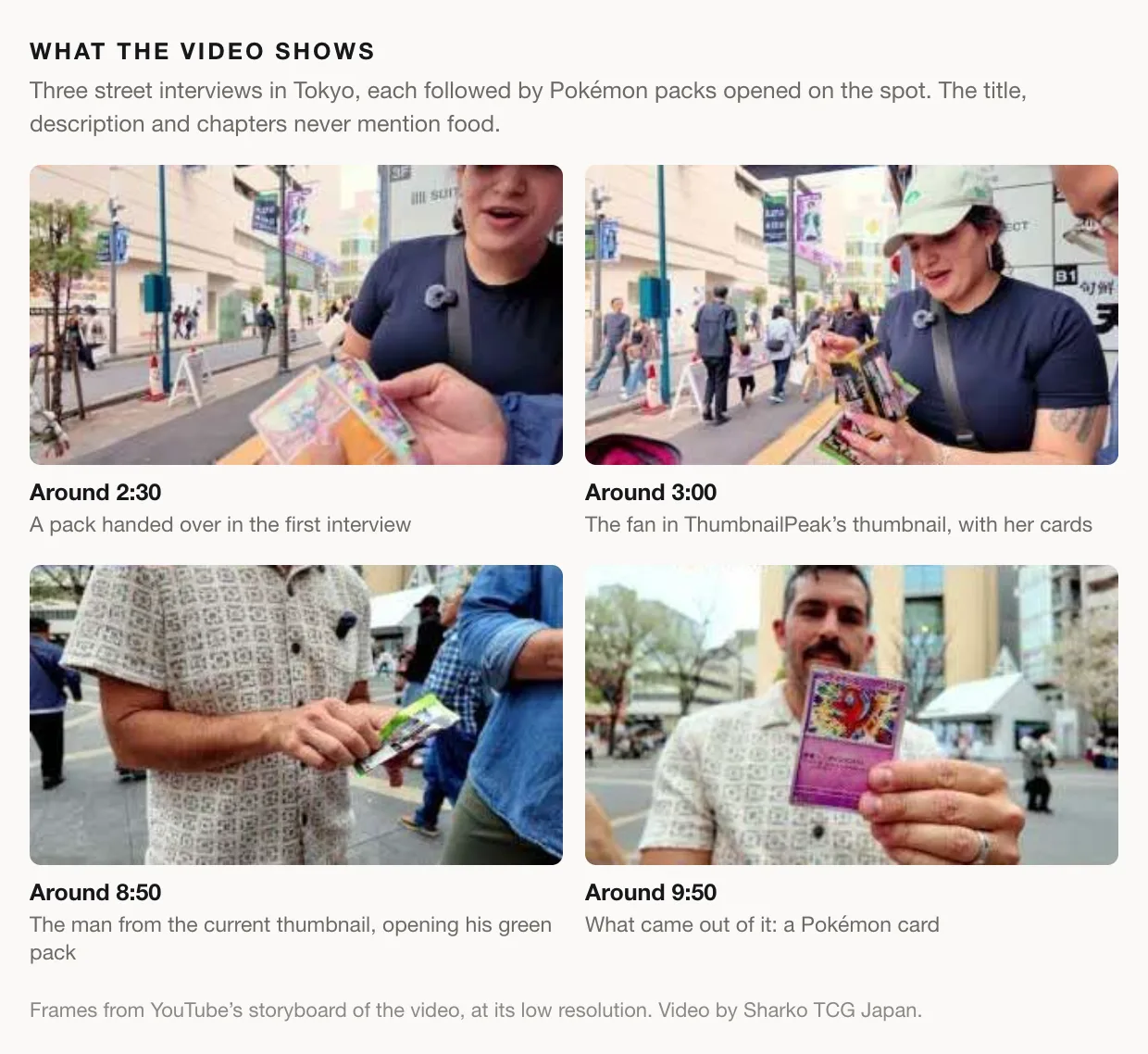
Sharko TCG Japan published "We Interviewed Pokémon Fans in Tokyo… Then Gave Them Packs" on 29 September 2026. It runs just under sixteen minutes: three street interviews with Pokémon card fans, each followed by packs handed over and opened on camera. The chapter list says exactly that: "Interview 1 – Couple", "Pack Opening", "Interview 2 – Brothers", "Pack Opening", "Interview 3 – Solo Fan", "Pack Opening".
What vidIQ made
vidIQ came back with a man in a patterned shirt, mouth wide open, holding up a small green packet under the headline "JAPAN'S CRAZY SNACKS?". Put it next to the thumbnail the video already has and you can see where it came from.
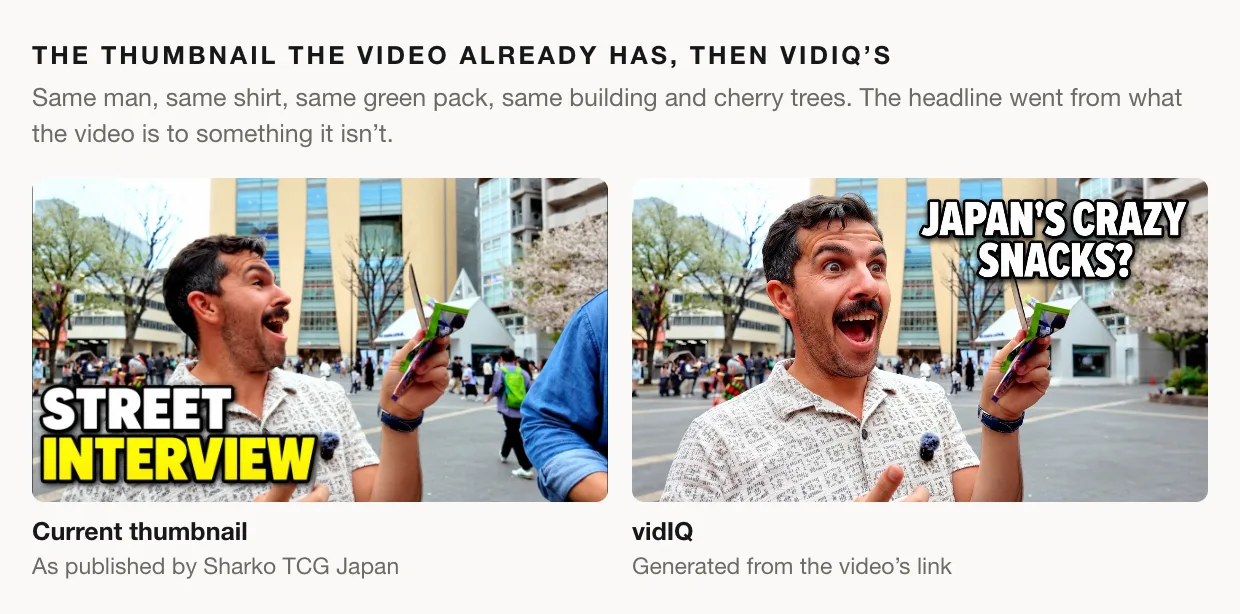
It's the video's own thumbnail, redrawn. The man is one of the interviewees, and the green packet is the Pokémon pack he opens a few minutes into his interview. That fits vidIQ's help article, which says faces and objects "may automatically be suggested based on your existing video thumbnails". The original headline, "STREET INTERVIEW", was accurate. vidIQ replaced it with a claim the video never makes.
The same article promises that once you give it a video, "the AI will analyze the visuals to ensure your thumbnails represent your content effectively". Our guess is that it read the foil pack as a bag of snacks. Whatever the reason, the result is a thumbnail for a food video sitting on top of a title about Pokémon fans. (The article also says uploading the video file "gives the most accurate results". We used the link because it's the input both tools take.)
What Generate made
Generate put a fan from the first interview in front, in the green cap she wears in the video, holding three Pokémon cards and a sealed Japanese booster pack. The headline is "FAN REACTION", and behind her is a card-shop street at night.
It shows what the title promises: a Pokémon fan, and packs. It doesn't repeat the title either. "Fan reaction" points at the moment people will watch for, which is the look on someone's face when the pack opens.
The scores
Compare's verdict was decisive: Generate's thumbnail scored 92 (Exceptional) and vidIQ's 79 (Strong). Here is its reason, word for word, where A is Generate's thumbnail and B is vidIQ's:
A is the clear choice because it shows the video's actual payoff: a fan reaction, a Tokyo card-shop setting, and Pokémon packs held close to camera. B presents the subject as Japanese snacks, which conflicts with the title and makes the video promise unclear.
The interesting part is where the 13 points went.
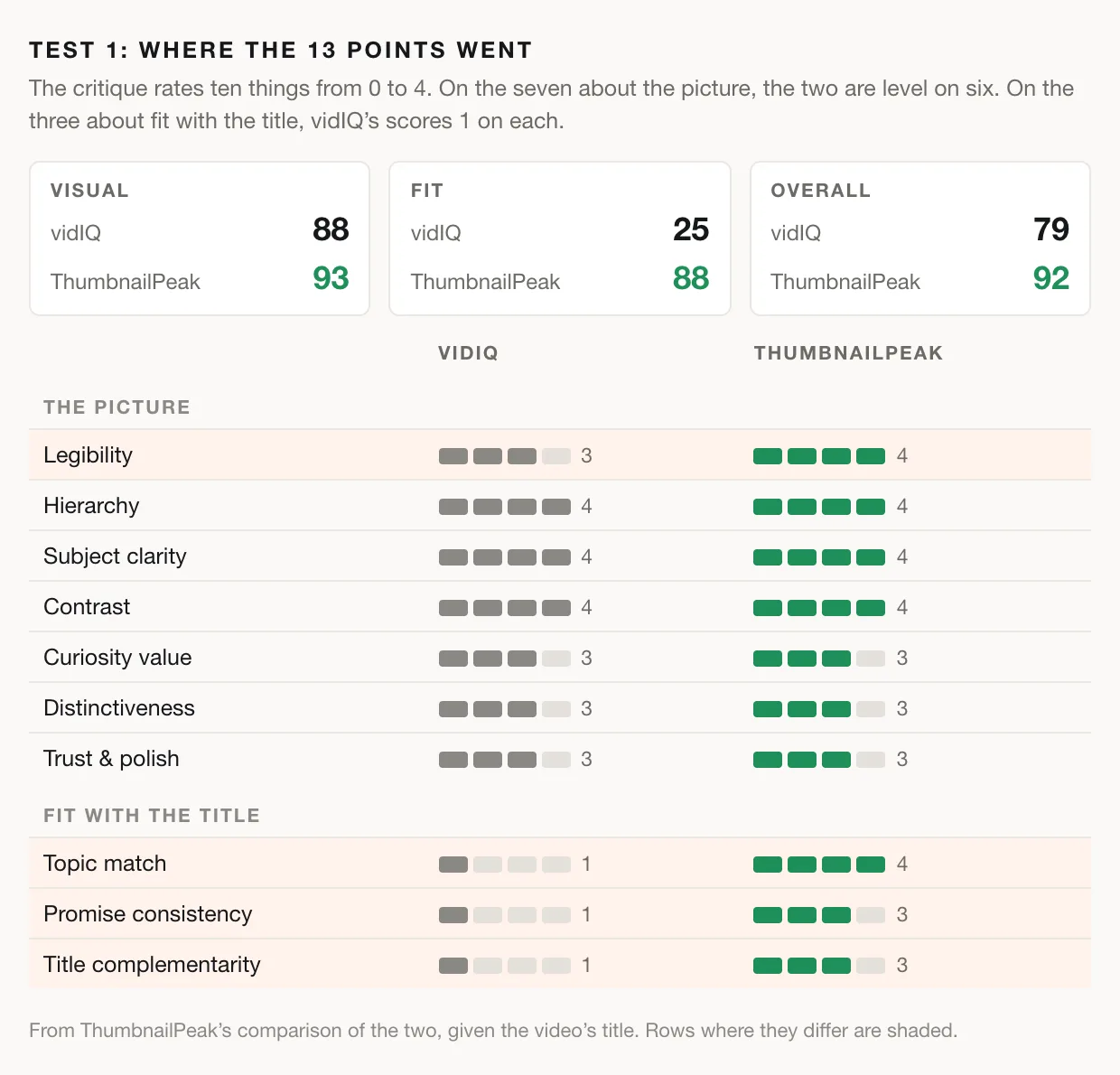
Judged on the picture alone, the two are close: 93 against 88, and level on six of seven measures. vidIQ's thumbnail looks good, with a big expressive face, strong contrast and clean text. Nearly every point it lost came from three questions about the title. Does the thumbnail match the topic? Does it promise only what the video delivers? Does it work alongside the title? vidIQ's scored 1 out of 4 on all three. Generate's scored 4, 3 and 3.
That's the gap that matters, because a thumbnail is never seen on its own. It always sits next to its title, and here the two contradict each other.
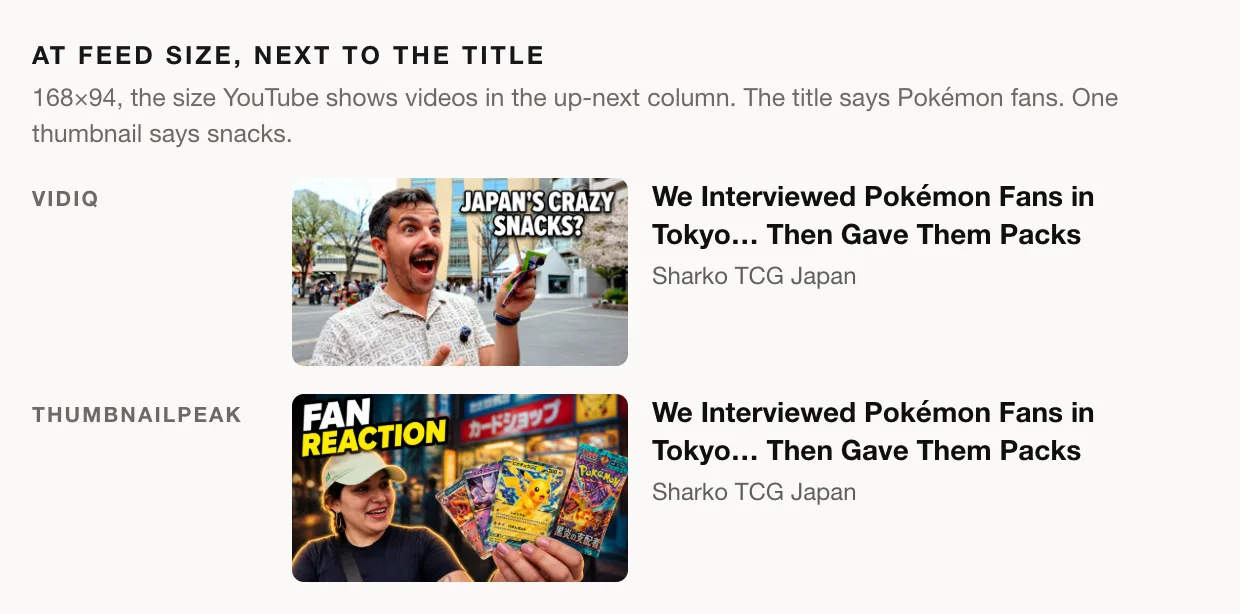
Someone who clicks expecting crazy Japanese snacks gets sixteen minutes of Pokémon card interviews and is likely to leave. A Pokémon fan scrolling past may never realise the video is for them.
Test 2: Bungie's next chapter
What the video is about
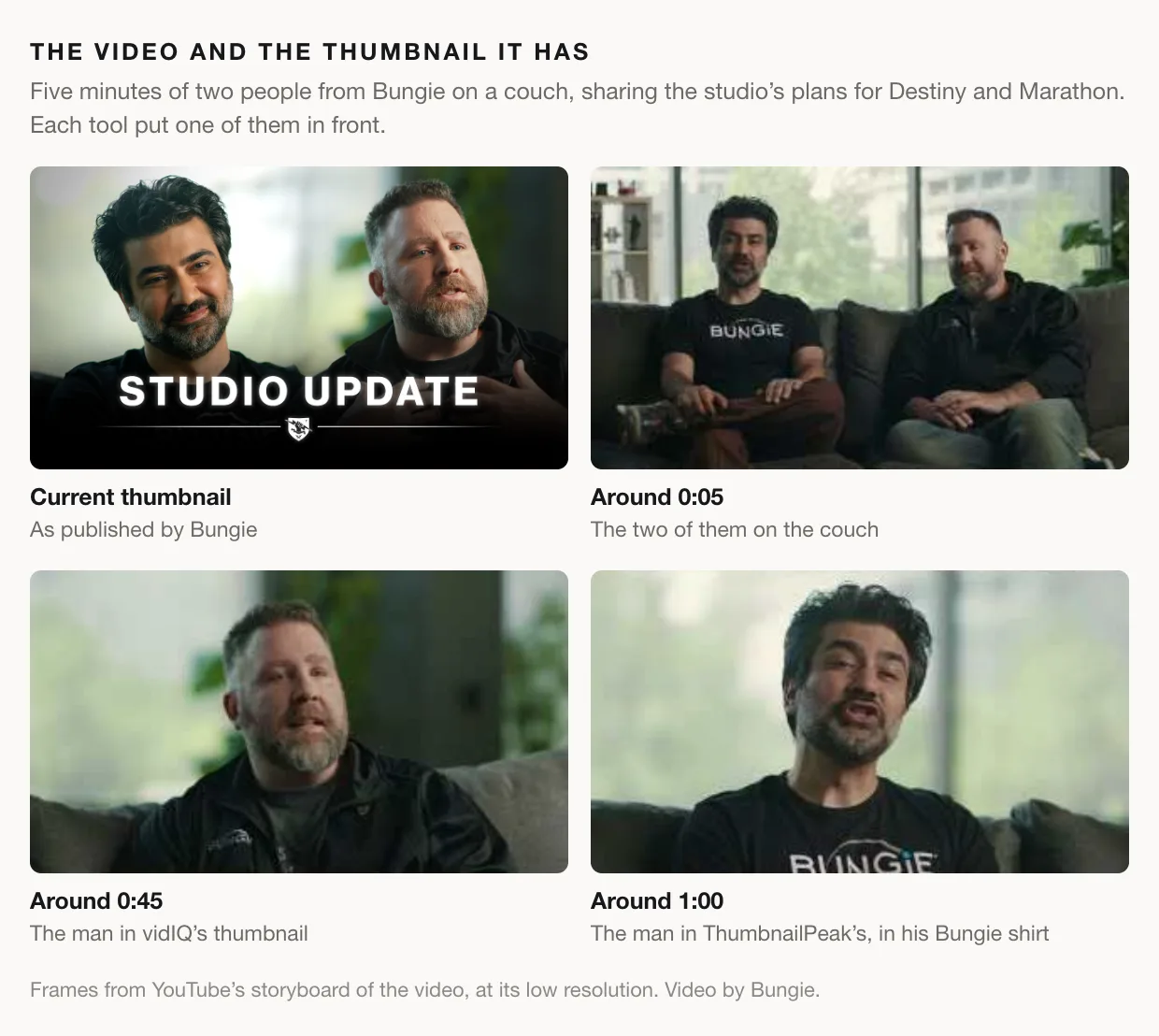
"The Next Chapter for Bungie" is a five-minute video from Bungie's own channel. Two people from the studio sit on a couch and talk through what comes next. The description opens: "Today, we're sharing more about the future of Bungie, including our plans for Destiny, Marathon, and how we're changing the way we work."
What each tool made
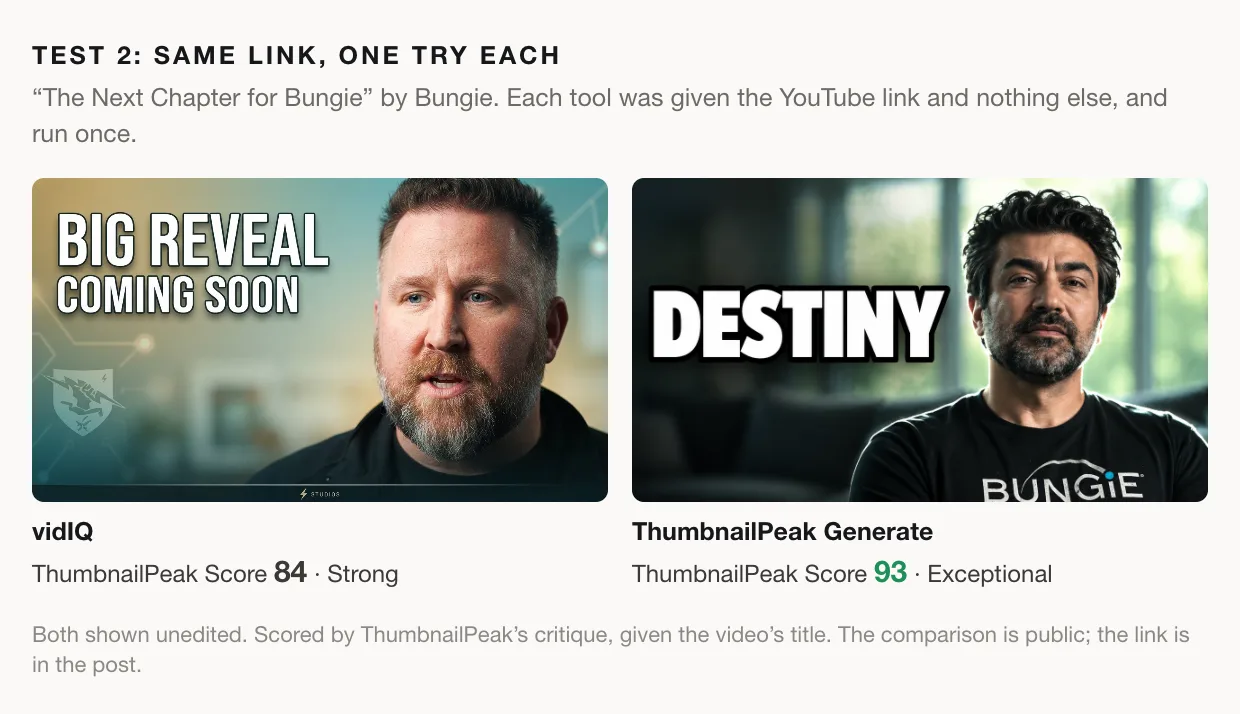
vidIQ did better this time. It stayed on Bungie and put one of the two people from the video in front. Again it borrowed from the thumbnail the video already has: the man on the right of Bungie's "STUDIO UPDATE" thumbnail, a faded shield emblem modelled on Bungie's logo, and a "STUDIOS" strip along the bottom. Its headline is "BIG REVEAL COMING SOON".
The trouble is that headline. "Coming soon" says the news is still on its way, but the video's own description says the sharing is happening today. And it's a line that would fit almost any announcement from any studio.
Generate went the other way: one word, "DESTINY", next to the other person in the video, in the Bungie T-shirt he wears on camera. The title says Bungie. The thumbnail adds the game the description names first, and the shirt says who is talking before you read a word.
The scores
Compare called this one a clear win for Generate, with high confidence: 93 (Exceptional) to 84 (Strong). Again, A is Generate's thumbnail and B is vidIQ's:
A is the stronger match for "The Next Chapter for Bungie." At feed size, its single-word "DESTINY" headline stays instantly readable, and the Bungie shirt reinforces the subject. B's "BIG REVEAL COMING SOON" is still readable, but it is generic hype and makes a stronger reveal claim than the title supports.
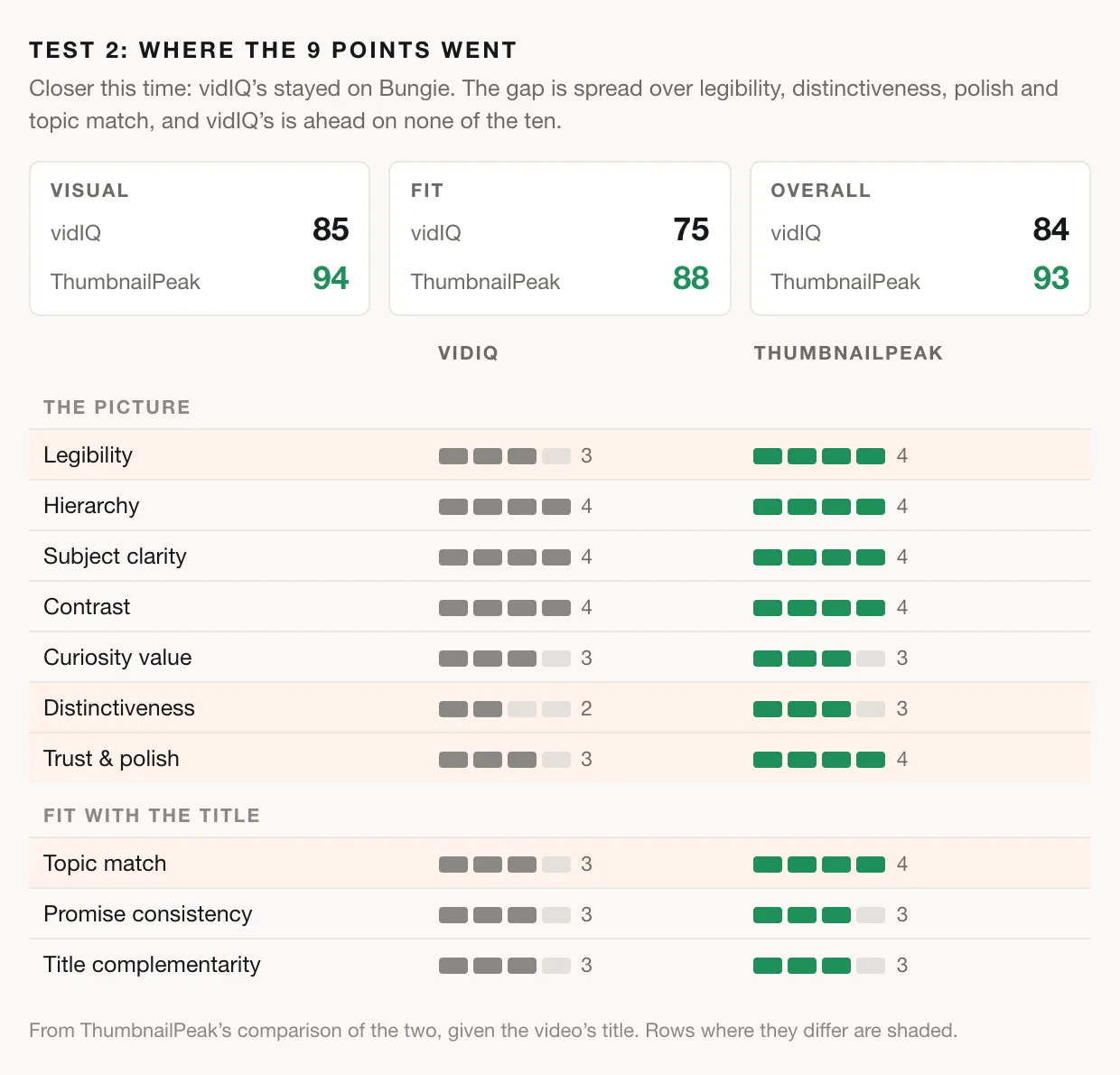
This is the closer of the two tests, and vidIQ's thumbnail is a reasonable one. It ties on six of the ten measures. But it's ahead on none, and Generate's is ahead on four:
- Legibility. At feed size, one huge word reads faster than a two-line sentence.
- Distinctiveness. The critique calls vidIQ's "a common announcement-thumbnail pattern".
- Trust and polish. It finds that vidIQ's "vague teaser wording gives the image a promotional feel".
- Topic match. A faint emblem says Bungie less clearly than a Bungie shirt and the word Destiny.
A word about the judge
These scores come from ThumbnailPeak's own critique, so you shouldn't just take our word for them. Both comparisons are public, with every rating behind them: test 1 and test 2.
They aren't all praise for our thumbnails, either. In test 1 the critique marks Generate's down for a "heavy glow around the woman and cards" that "gives it a strongly composited look". It also notes that it shows one woman holding products rather than an interview or a pack being handed over. In test 2 it says "DESTINY" "does not visibly communicate the promised next chapter", and suggests adding a smaller "NEXT CHAPTER" line beneath it.
Some of it isn't a matter of taste, though. The first video is about Pokémon cards, not snacks.
Feature by feature
Here is what each tool offers as of this writing. vidIQ's side comes from its Help Center article on thumbnails.
- Where you start. Both take a YouTube link, public or unlisted. vidIQ also takes an uploaded video file, or a text description of the thumbnail you want. Generate's other way in is a description of the video: a few sentences about what happens and who is on screen, for a video you haven't uploaded anywhere yet. You describe the video, and Generate works out the picture.
- Ideas per run. vidIQ's help article says it "will generate one thumbnail based on your input". Generate makes one, or a batch of three that are built as three different ideas rather than three takes on one. A batch costs two generations, not three.
- Your direction. Both take a line of direction. On Generate it goes on the form ("make it look like a heist thriller"), and Generate another takes a new line for each fresh concept.
- Your face. vidIQ lets you attach your own photo to a run, and has a face-swap tool for putting a face into a finished thumbnail. Generate keeps a face library of up to six photos of you, and up to three people per account. For each concept it picks the photo whose head angle fits and decides the expression from the video, so you don't need a folder of shocked faces.
- Your channel's look. vidIQ takes reference videos and thumbnails as inspiration. Generate takes a style template and lets you tick what to borrow from it: layout, colour grade, text style and lighting. Pro accounts keep a library of templates.
- Changing a result. vidIQ gives you a hand editor for text, logos, stickers and faces, plus Smart Commands for typed changes. On ThumbnailPeak, Improve this one lists the critique's fixes as checkboxes and takes a fix of your own in plain words, such as "make the background sunset orange". It then scores the new version, so you can see whether the change helped, and Improve again carries on from there.
- A score for every result. Every thumbnail Generate makes is scored by the same critique that judged these tests, and the score shows on the result. Critique this one opens the full report, with what to fix.
- A test against what you have. On a link run, Compare vs current thumbnail puts any result head to head with the video's current thumbnail.
- A preview in the real feed. Preview in real results drops the thumbnail into real YouTube search results for your title, next to the videos it will compete with.
- Price. Generate works without an account. The free plan includes 1 generation a month, and free downloads carry a small ThumbnailPeak mark in the corner. Pro is $9.99 a month for 50 generations, with batches of three, the template library and unmarked downloads. vidIQ's article says free plans include "a limited number of thumbnails per month" without giving a number, so check vidIQ's pricing page for its current plans.
vidIQ's help article doesn't describe a score, a comparison with your current thumbnail, or a preview in real results. If it adds them, we'll update this post.
Run the same test on your own video
- Paste your link into Generate. You don't need an account to make one concept.
- Press Compare vs current thumbnail on the result to see whether it beats the thumbnail you have now.
- Bring the other tool's result too. If you already have a thumbnail from vidIQ or anywhere else, upload it to Compare along with Generate's, and add your title. Compare takes any two images and uses two of your monthly critiques.
- Read the headline against your title and description before you ship anything. In these tests, that one check would have caught the snacks and the "coming soon".
For a fuller tour of Generate, including faces, style templates and how to write a description it can draw, see How to Get Good AI YouTube Thumbnails From a Link or a Paragraph.
The takeaway
A thumbnail generator's first job is to know what the video is about. Both times, vidIQ's thumbnail borrowed from the one the video already had. On the first video, that produced a good-looking thumbnail for the wrong video. On the second, it stayed on topic but reached for a teaser line that could sit on any studio's announcement. Generate built from the video itself and won both, 92 to 79 and 93 to 84.
Try it on your next upload: open Generate, paste the link, and press Compare vs current thumbnail on what comes back.
All four thumbnails were generated from the videos' YouTube links, with one run on each tool per video, and are shown unedited. vidIQ's features are as described in its Help Center article on thumbnails, read on 1 October 2026. The videos and their current thumbnails are by Sharko TCG Japan and Bungie, and are shown here for comparison and commentary. The generated thumbnails were made from those videos, and their creators did not make or endorse them. Pokémon is a trademark of Nintendo. Bungie, Destiny and Marathon are trademarks of Bungie, Inc. ThumbnailPeak is not affiliated with vidIQ, Sharko TCG Japan, Bungie, Nintendo or The Pokémon Company.