Disclosure: we make ThumbnailPeak. We didn't run 1of10: we described it from its own public pages, read signed out on 22 October 2026, which may have changed since. The Breakouts search below was run on our own account the same day.
1of10 is one of the best-known tools for finding outlier videos on YouTube. Its home page says more than 100,000 creators use it. ThumbnailPeak's Breakouts does the same basic job: it finds videos that did far better than their own channel usually does, so you study what worked rather than who's famous.
They're built differently. The short version:
- 1of10 is a full research suite. Outlier search across its own database, Shorts outliers, a search engine for thumbnails, similar titles, tracked channels with alerts, and a free Chrome extension that scores videos on YouTube itself.
- Breakouts is narrower and more open about its maths. A video's multiple is its views over the median of its channel's ten most recent uploads that are at least two weeks old. Our Breakouts guide shows how to read the numbers.
- 1of10's pages describe its score two ways. One FAQ says it compares a video with the channel's median; the same page's feature list, and the home page, say average. On one search, that choice changed which videos counted as outliers.
- Breakouts' Categories tab is free with no account. Twelve YouTube categories, measured every week. Searching a topic needs a free account, which comes with 12 credits; a search uses 1. 1of10's free plan shows 5 results per outlier search, and its research tools don't use credits.
What each one is
1of10, in its own words, helps you "find the top-performing videos in any niche and reverse-engineer what's working". Its Outlier Finder page says it will "discover videos performing above their channel's average, across any niche on YouTube", and that "1of10 has scored millions of YouTube videos this way". Around it sit a thumbnail generator, a title and idea generator, an optimiser, and research tools for thumbnails, titles and channels.
Breakouts is one page with three tabs, and one feature of a larger tool for testing and critiquing thumbnails:
- Categories holds breakout videos from twelve YouTube categories, from Gaming to Pets & Animals. Each one is swept once a week and keeps about a month of videos. It needs no account.
- Search reads YouTube's top results for any phrase, up to 150 of them, leaves out Shorts and live broadcasts, and ranks what's left by the multiple.
- My channels measures up to 30 channels you choose, your own included, across each channel's newest 500 uploads.
Every card has a button that sends its thumbnail and title for an AI critique, which says what the thumbnail is doing.
The same search, sorted two ways
1of10's page about its filters uses "productivity tips" as its example: a search that "might return 50,000 results", most of them irrelevant to you. We ran it through Breakouts' Search on 22 October 2026. We couldn't run it through 1of10 without an account, so this shows only what Breakouts does with it.
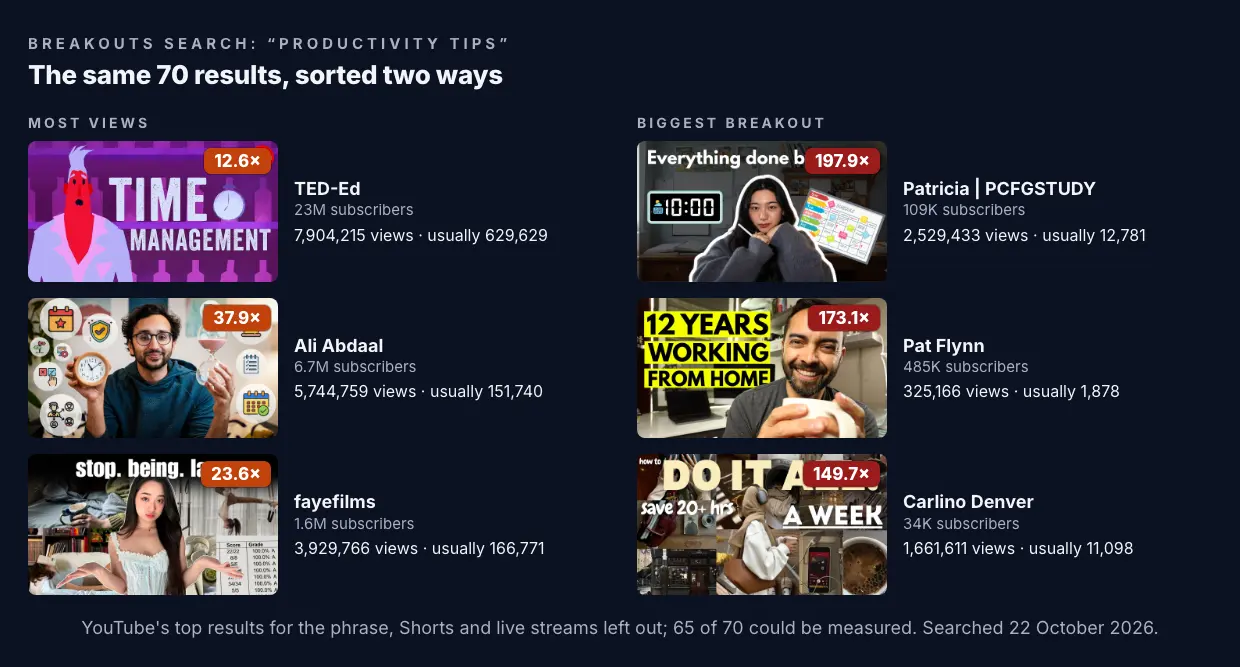
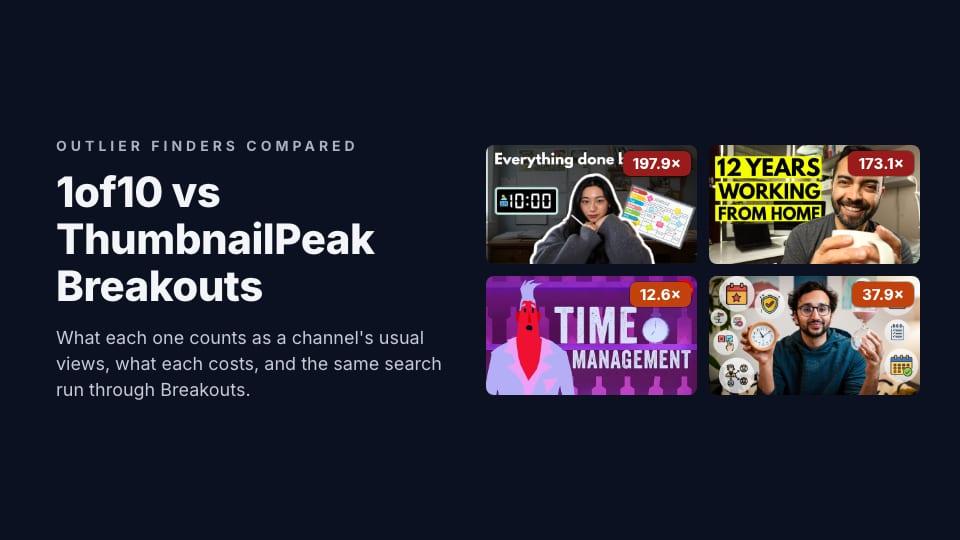
Sorted by views, the top three come from channels with 23 million, 6.7 million and 1.6 million subscribers. Sorted by the multiple, the top three come from channels with 109,000, 485,000 and 34,000. Patricia's "I'm begging you to manage your time" got 2.5 million views on a channel whose videos usually get about 12,800, so it did nearly 200 times its usual.
That's the point of an outlier finder, and both tools agree on it. Big channels get big numbers whatever their thumbnail looks like. A small channel's breakout tells you something about the idea and the packaging.
Two honest notes on this search. First, it only covers what YouTube returns for the phrase, at most 150 videos, and 70 were left after Shorts and live streams came out. 1of10 says it searches its own database of millions. Second, many of the top multiples here are old: Pat Flynn's video is from 2020. Breakouts' Published filter fixes that in one click. Set it to the last year and 20 of the 65 measured videos remain.
What counts as "usual"
Every outlier tool divides a video's views by something. What that something is decides which videos come out on top.
Breakouts uses the median of the channel's ten most recent uploads that are at least two weeks old. The two-week rule keeps a video that's still collecting views from dragging the number down. The median keeps one old hit from dragging it up.
1of10 describes its score in two ways on the same page. Its Chrome extension FAQ says: "An outlier score shows how a video performs compared to the channel's median." The feature list above it says each video gets "a score showing how it performed compared to the channel's average", and the home page FAQ says outliers "perform 10x to 100x better than a channel's average". We couldn't find a page that says which uploads go into it.
That might sound like a detail. Here's what it does on one channel from the search above.
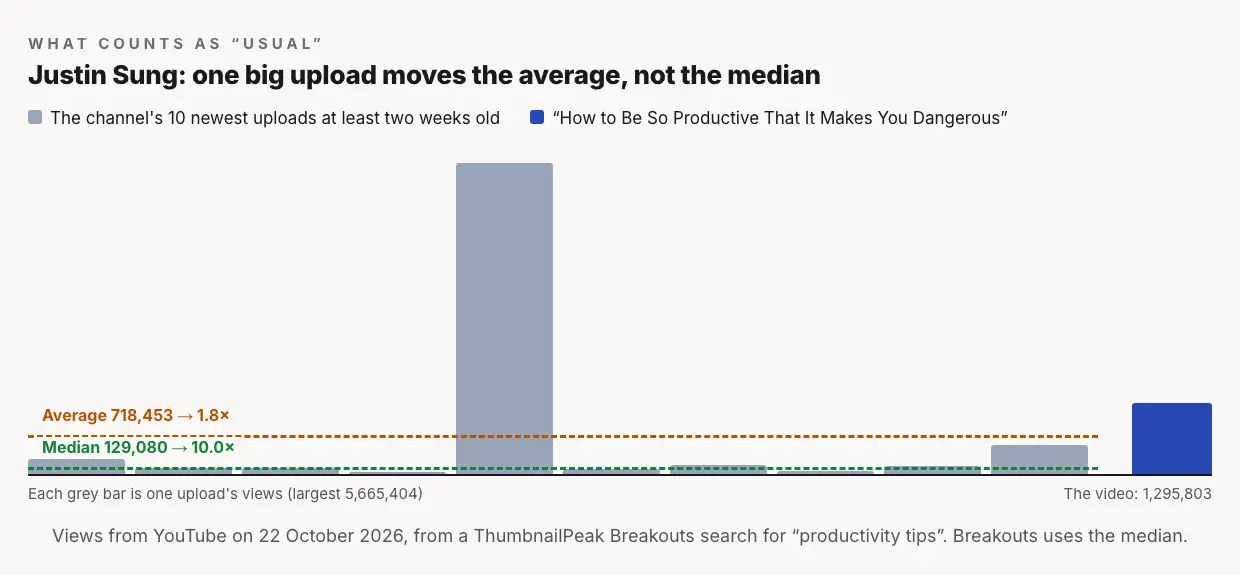
Justin Sung's "How to Be So Productive That It Makes You Dangerous" got 1.3 million views. One of the ten uploads before it got 5.7 million. Against the median, this video did 10 times the channel's usual. Against the average, which that one hit pulls up, it did 1.8 times. One method calls it a breakout. The other calls it a normal week.
Across the whole search, that kind of hit was common. For 31 of the 65 measured videos, the channel's average was more than one and a half times its median, and for 17 it was more than double. Counted against the median, 42 videos did three times their channel's usual or more. Counted against the average, 35 did.
Neither method is wrong. An average says "compared with everything, hits included". A median says "compared with a normal upload". We chose the median because the question is whether a video beat the channel's normal, and a channel that once went viral shouldn't make every later video look ordinary. Whichever tool you use, it's worth knowing which one you're reading.
What 1of10 does that Breakouts doesn't
- Shorts. 1of10 has a Shorts Outliers page. Breakouts leaves Shorts out everywhere.
- Search by what a thumbnail looks like. 1of10's Thumbnail Search lets you "describe any visual element or style", with examples like "thumbnails with a before and after split". Its Similar Thumbnails and Similar Titles find look-alikes of any video. Breakouts searches by topic, not by look.
- A bigger pool. 1of10 searches its own database of what it says are millions of scored videos. Breakouts' Search reads up to YouTube's top 150 results for a phrase, in the US.
- Alerts. 1of10's tracked channels can notify you "the moment a video in your tracked channels crosses an outlier threshold". Breakouts' My channels updates only when you sweep.
- On YouTube itself. 1of10's Chrome extension puts outlier scores on every YouTube page, free, and tracks when creators change their titles or thumbnails.
- Research without credits. On 1of10, "research tools never use credits". On a free account they're capped at 5 results per outlier search.
- Saved searches and filters for language, length and subscriber range, among others.
If you research for a living and want one tool for ideas, titles and Shorts, 1of10 covers more ground.
What Breakouts does that 1of10 doesn't
- Free categories, no account. The Categories tab works signed out: twelve YouTube categories, measured every week, each keeping about a month of videos, with the date every number was measured.
- One stated method. The multiple is a median of ten uploads, at least two weeks old, at least three of them, and the card shows the "usual" number it divided by. A channel with too few uploads gets a dash instead of a guessed score, and a video under two days old is marked as still climbing.
- Each upload against its own time. On My channels, every video is measured against the uploads that came before it, so a channel that has grown isn't graded against the smaller channel it used to be.
- A critique on every card. One click sends the thumbnail for an AI critique that says what's working and what isn't. Then the thumbnail tester shows your own version in a real YouTube feed beside the videos it will compete with, free and with no account.
What it costs
Prices as listed on 22 October 2026, in US dollars.
- 1of10: a free plan with 60 credits a month, 5 results per outlier search and 5 per thumbnail search. Basic is $19 a month, or $15 a month billed $180 yearly. Pro is $89 a month, or $69 a month billed $828 yearly. Ultra is $4,999 a year. Credits pay for the AI tools; research tools don't use them. There's a 7-day money-back guarantee.
- ThumbnailPeak Breakouts: Categories is free with no account and no limit. A search or a channel sweep uses 1 credit: a free account comes with 12, Pro is $20 a month for 300, and a $10 pack adds 100 that never expire. Repeating a search from the last 24 hours is free, and so is everything you do with the filters.
Which to use
Use 1of10 if you want a research suite in one subscription: outliers across a large database, Shorts, thumbnail and title search, alerts on channels you track, and the extension on YouTube itself.
Use Breakouts if you want to see what's breaking out in your category this month without signing up, want to know exactly how every number was worked out, or want to go from a breakout to a critique of its thumbnail and a preview of your own in one place.
They also work together. The method doesn't change what an outlier is for: a video that beat its channel's normal is worth studying, whichever tool found it. For what to do once you've found one, our niche guides take real breakouts apart, starting with car thumbnail ideas and tech thumbnail ideas.
Key takeaways
- Both tools rank by a multiple, not by views. On "productivity tips", the top three by views had 1.6 to 23 million subscribers; the top three by multiple had 34,000 to 485,000.
- Median and average give different answers. On one search, 42 videos were 3× or more against the median, and 35 against the average.
- 1of10 covers more. Shorts, thumbnail search, alerts, a larger database and a free extension.
- Breakouts is open and free to browse. A stated method, twelve categories with no account, and a critique one click from every card.
How we compared: 1of10's features, quotes and prices come from its public pages (home, Outlier Finder, Chrome extension, features, pricing, Thumbnail Search, Similar Titles, Advanced Filters and Tracked Channels), read signed out on 22 October 2026. We didn't sign up or run 1of10. The Breakouts search for "productivity tips" was run on 22 October 2026; the average and median use each channel's ten most recent uploads that were at least two weeks old. View counts are YouTube's on that day. Thumbnails and channel names belong to their creators and are shown for commentary.