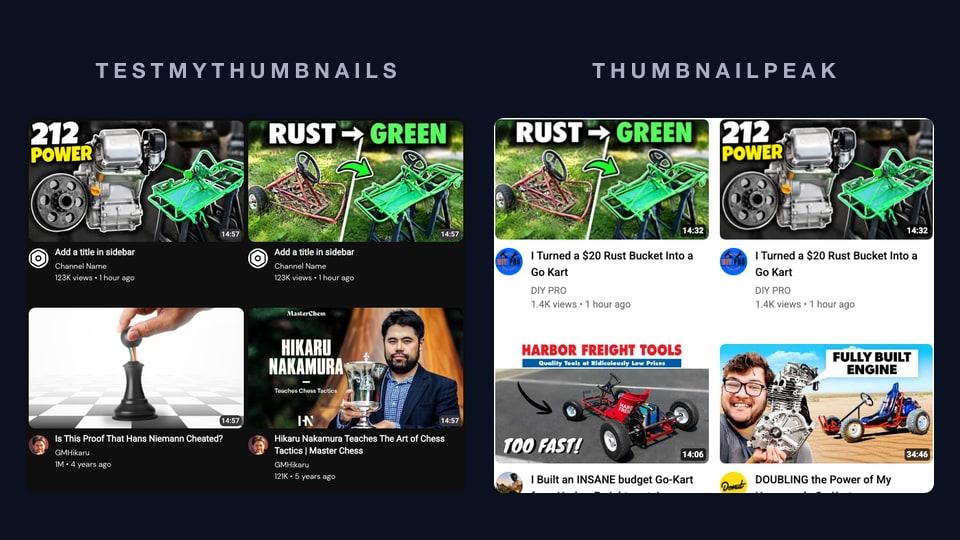
Disclosure: we make ThumbnailPeak. We describe Thumblytics as we found it on 20 October 2026, and we say where it does things we don't.
If you looked for a thumbnail tester and found Thumblytics, you found two different products under one name:
- A free mockup. You upload one thumbnail and type a title, and it shows them in three YouTube layouts, next to grey boxes marked "1280 x 720".
- A paid service, at $999 a month. Its team designs new thumbnails and titles for the published videos of established channels, then tests them against the old ones with YouTube's own A/B testing tool. It's built for monetised channels with 100K+ subscribers.
ThumbnailPeak's thumbnail tester does something else again. It puts your thumbnail among the real YouTube videos for your topic, before you publish, for free and with no account.
We tried the mockup and ThumbnailPeak with the same thumbnail on the same day, and read the service's terms on its home page. Here is what we found.
Thumblytics' free mockup
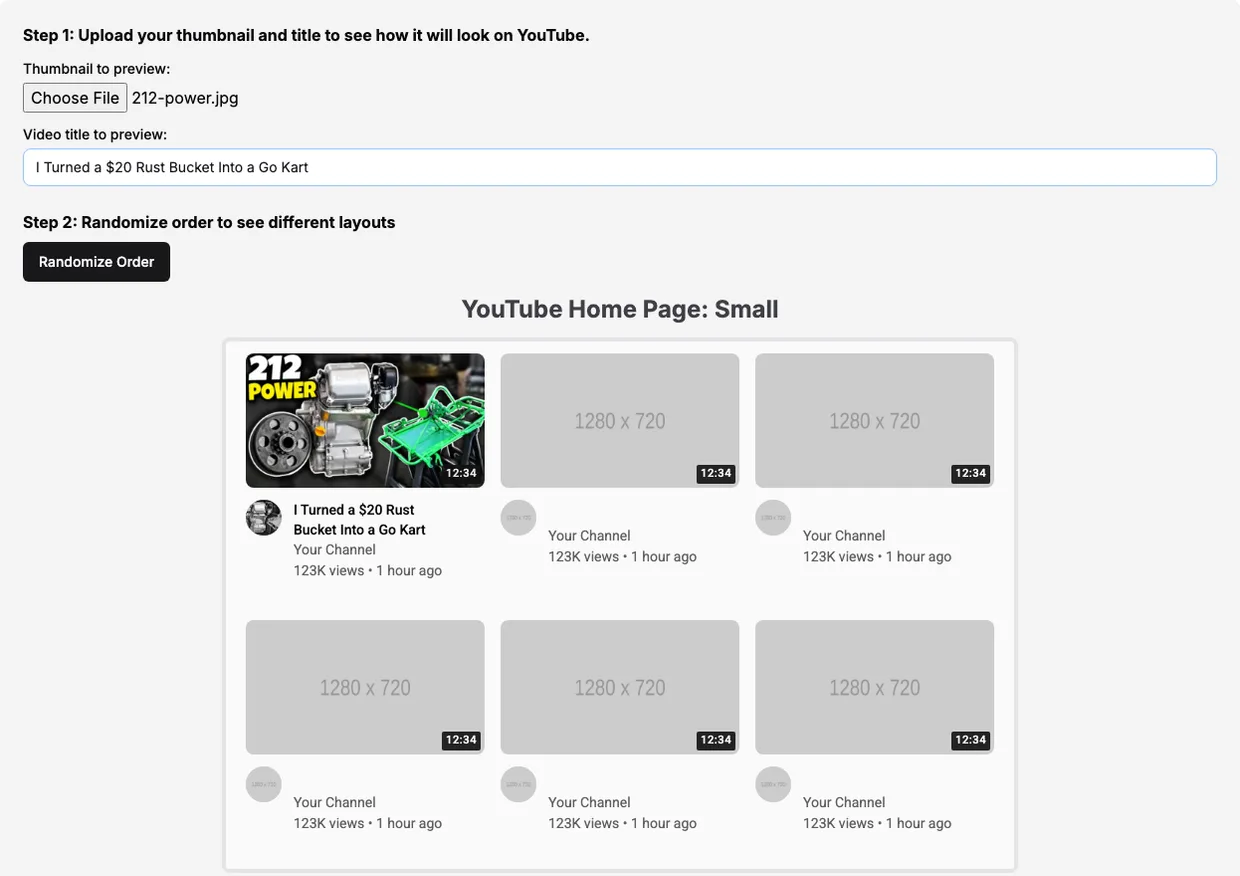
The mockup is simple and quick. You don't need an account. You pick one thumbnail, type a title, and it shows them in three layouts: "YouTube Home Page: Small", "YouTube Home Page: Large" and "Mobile". A Randomize Order button moves your tile to a different spot in the grid.
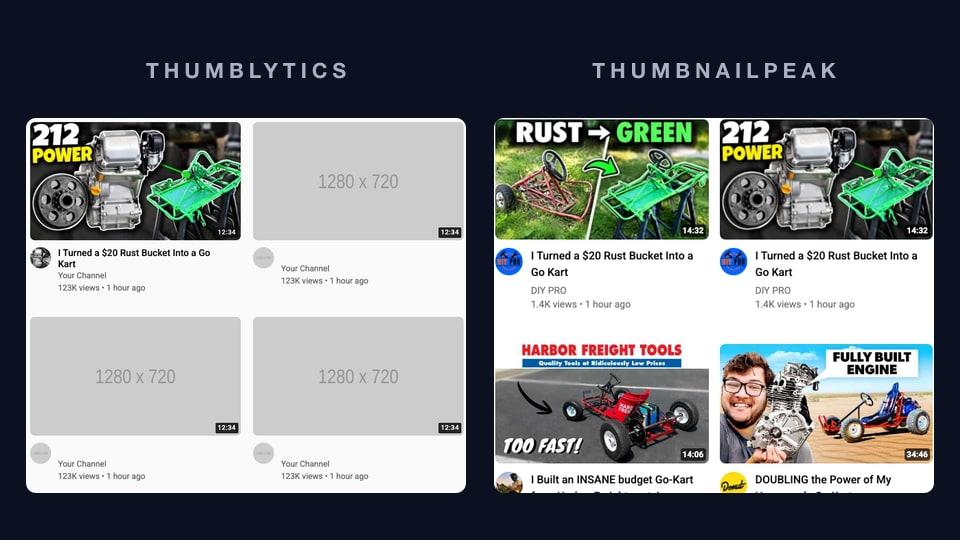
Every other tile is a grey box that says "1280 x 720", with "Your Channel", "123K views • 1 hour ago" and a length of 12:34. Your own tile shows the same channel name, views and age, and there is no field to change them. The page says you'll "see your YouTube Titles and Thumbnails in context of the current YouTube feed and layout". The layout is YouTube's. The feed is empty.
That makes it good for one thing: checking that your text is readable at feed size and that your title isn't cut off. It can't tell you whether your thumbnail stands out, because there is nothing to stand out from. Grey boxes make any picture look bold. It also takes one thumbnail at a time, so you can't see two candidates side by side, and it has no dark mode.
ThumbnailPeak with the same thumbnail
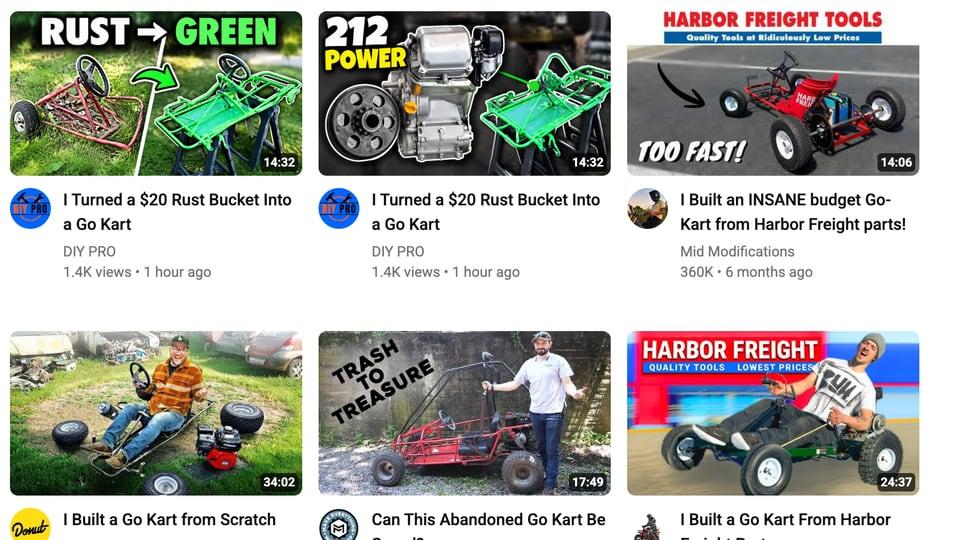
We used "212 POWER", one of two candidates ThumbnailPeak's generator made for a go-kart build video that DIY PRO published under a Creative Commons licence. ThumbnailPeak takes up to nine thumbnails and previews two side by side, so we added the other candidate, "RUST → GREEN", which shows the rusty frame turning into a green one. On the thumbnail tester we typed the same title, the handle @-diypro-, a shorter search, "junk go kart build", and card details for a fresh upload: 1.4K views, 14:32 long, uploaded 1 hour ago. Then we clicked Search preview.
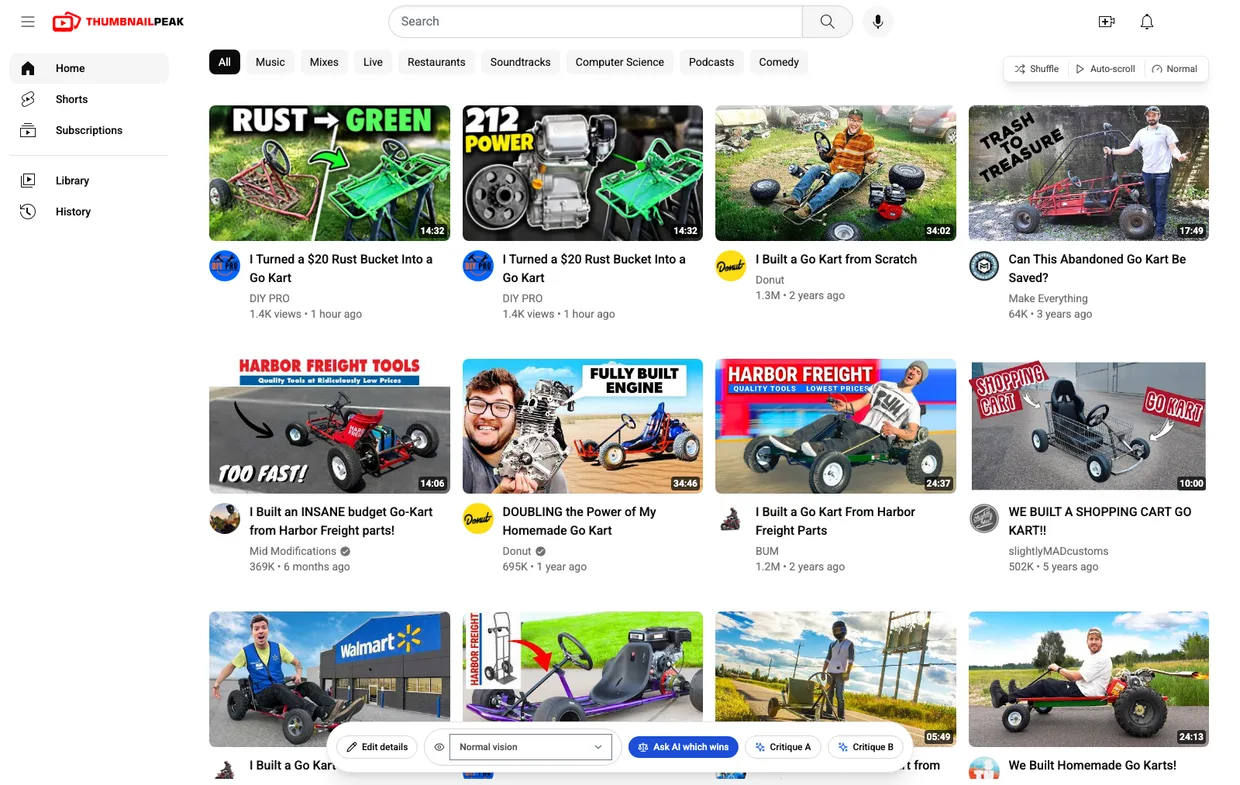
Instead of grey boxes, Search preview fills the feed with up to 27 real videos that YouTube returns for the search, with Shorts taken out. Each one has its real thumbnail, title, channel, avatar, view count, age and length. With real neighbours, the same thumbnail tells a different story:
- It stands out, but for its colours, not its idea. Nearly everything else in the first two rows is a kart out in daylight, so the dark "212 POWER" is the first thing you see. But in the second row, Donut's "DOUBLING the Power of My Homemade Go Kart", with 695K views, already shows a bare engine beside a kart under "FULLY BUILT ENGINE". Anyone who searches this topic has seen that idea before.
- "RUST → GREEN" blends in. It's one more kart on grass among karts on grass. On a grey mockup it would have looked just as bold as "212 POWER".
- The channel's own old video competes with the new one. Scroll down and DIY PRO's own "$50 Rust Bucket into a Sweet Go-KART", a year old with 126K views, ranks for the same search. The new title, "I Turned a $20 Rust Bucket Into a Go Kart", uses almost the same words, so the thumbnail has to make clear this is a different build.
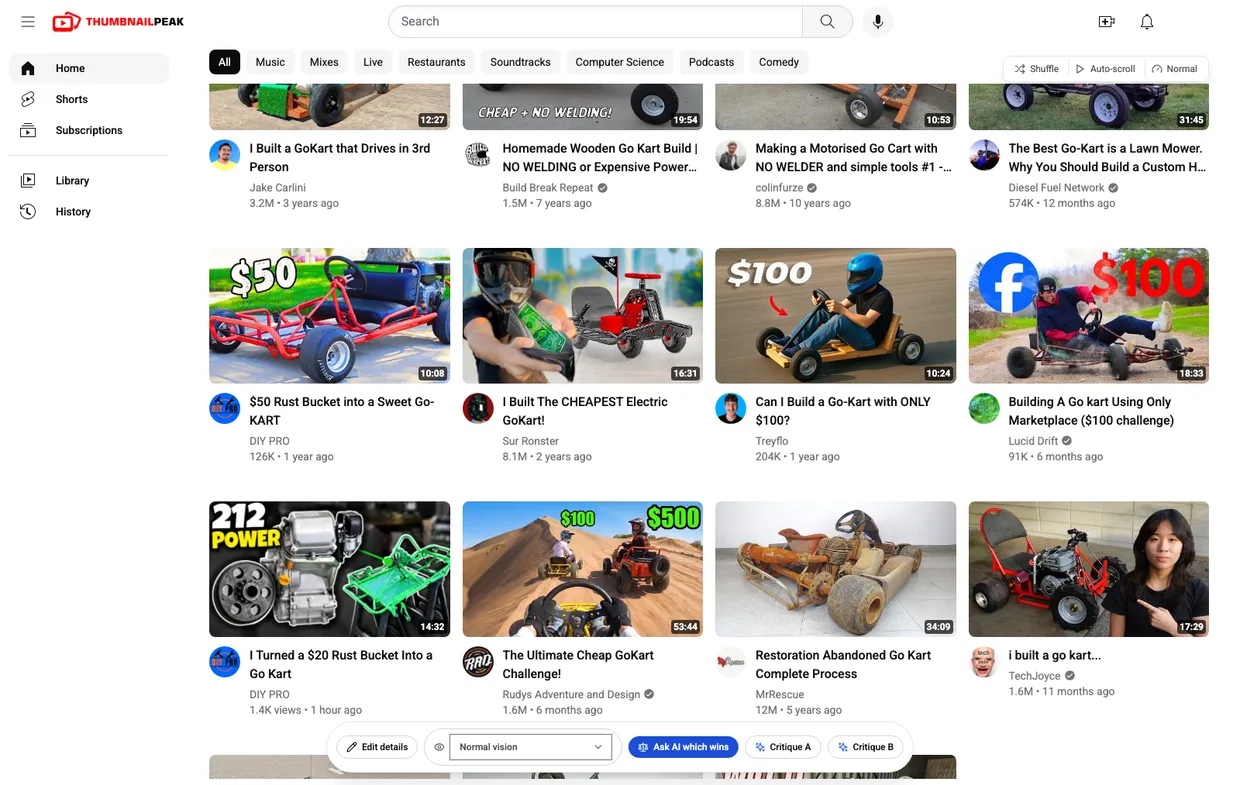
None of those three findings could come from a mockup, whatever its layout, because each one is about the neighbours.
A preview shows the problem. To decide, the bar under the feed has Critique A, Critique B and Ask AI which wins. A critique scores one thumbnail out of 100, from seven ratings of the picture and three of how well it fits your title, and lists what to fix. Ask AI which wins puts the two side by side and says which one wins and why. Those need a free account, which comes with 2 critiques and 1 comparison a month. The preview itself never needs one.
Two things to know before you trust it: Search preview shows what YouTube returns for your words, on a desktop layout, while a real viewer's home page also mixes in their subscriptions and history. And the six mockups on the thumbnail tester page itself use a fixed set of 100 real videos taken from YouTube's popular charts. Search preview is the part that brings in your own competition.
Thumblytics' $999 service does a different job
Thumblytics' home page is now almost all about its done-for-you service, which it calls Channel Repackaging. Here is how it describes it:
- What it does. It picks published videos on your channel where new packaging is "most likely to win", such as older videos still getting impressions. Its "system generates and refines new thumbnail and title variants", and "every variant is human-reviewed". Then it tests them against your current thumbnail and title with YouTube Studio's own Test & Compare. YouTube picks the winner "based on watch time share", and the winner stays on the video.
- What it costs. $999 a month for "4 tests per month on videos we select together". If a test loses or ends without a clear result, you get your money back for that test. There's no setup fee or long-term contract, and unused tests are refunded if you cancel.
- Who it's for. Monetised channels with "100K+ subscribers, or videos regularly clearing 100K views", and "at least 20 published videos with meaningful watch time". It starts with your back catalogue, and adds new uploads once tests on old videos have won.
We think that's an honest offer, and it does something ThumbnailPeak doesn't. It measures what your real viewers did, on your real channel, instead of predicting it. If you run an established channel and would rather pay someone to repackage your old videos than do it yourself, it's built for you.
But it isn't a thumbnail tester for the video you're about to upload. A test needs a published video with traffic, and the service needs a channel of a size most creators haven't reached. Thumblytics says so itself:
If your channel is earlier than that, we'd genuinely rather you not pay us yet. YouTube's Test & Compare tool is free — go run your own tests.
Before you publish, and after
The two jobs come in order:
- Before you publish, preview your candidates among your real competition on ThumbnailPeak's thumbnail tester. Drop the ones that blend in, fix what the preview shows, and let Critique or Compare settle what you can't.
- After you publish, if YouTube Studio offers Test & Compare on your channel, test the two or three that survived. That's free, and it's the real-traffic test Thumblytics' service runs for you.
- If you run a large channel with a back catalogue and want someone else to do step 2 for your old videos, that's what Thumblytics charges $999 a month for.
Feature by feature
Here is what each offers as of 20 October 2026. Thumblytics' side comes from using its mockup and reading its home page.
- What it's for. Thumblytics' mockup checks one thumbnail's layout; its service tests new packaging on videos you've already published. ThumbnailPeak checks thumbnails before you publish, against the videos they'll compete with.
- The videos around yours. Thumblytics' mockup: grey placeholder boxes. ThumbnailPeak: up to 27 real results for your title or search in Search preview, your own channel's Videos tab in Channel preview, and the newest uploads of up to 10 channels you choose in Competitor preview, which needs a free account.
- Layouts. Thumblytics: home page small and large, and mobile. ThumbnailPeak: home page, search results, sidebar, mobile app, tablet app and TV app, with Search preview on a desktop home-page layout.
- How many at once. Thumblytics: one thumbnail. ThumbnailPeak: up to nine, two side by side.
- What your tile says. Thumblytics: a title. ThumbnailPeak: a title, a second title to test two, your handle (which brings in your real channel name and avatar), the view count, length, upload date and a verified badge.
- Checking the feed. Thumblytics: Randomize Order. ThumbnailPeak: Shuffle; Auto-scroll at slow, normal or fast; scroll blur in the mobile view; five colour-blindness views besides normal vision; and light and dark mode from the site's header switch.
- An opinion before you publish. Thumblytics' mockup gives none. ThumbnailPeak's Critique scores a thumbnail out of 100 and lists fixes, and Compare picks between two, with a free account.
- A result from real viewers. Thumblytics' service runs YouTube's Test & Compare for you. ThumbnailPeak doesn't run tests on your channel.
- Price. Thumblytics: the mockup is free; the service is $999 a month. ThumbnailPeak: the thumbnail tester is free, with no account and no limit; the AI tools need a free account.
- Channel size. Thumblytics' service: 100K+ subscribers or 100K-view videos, and 20+ videos. ThumbnailPeak: any channel, including one that hasn't published its first video yet.
The takeaway
Thumblytics' free mockup shows your thumbnail in YouTube's layout, but against grey boxes, where every thumbnail looks like a winner. Its paid service is a serious offer for big channels. It measures real viewers, on old videos, for $999 a month. If what you need is a thumbnail tester, something to check the next thumbnail before you upload it, ThumbnailPeak is the better choice. It shows you the real videos you're up against, it found what was right and wrong with our two candidates in one screen, and it costs nothing.
Open the thumbnail tester and see your next thumbnail among the videos it will actually compete with.
We tested Thumblytics' mockup and ThumbnailPeak on 20 October 2026, in Chrome on a desktop, without signing in. The service's description, price and requirements are quoted from Thumblytics' home page as it read that day, and may have changed since. Thumblytics' separate /pricing page showed plans for a video-clipping tool that day; the price of its repackaging service is the one on its home page. The two candidate thumbnails were made by ThumbnailPeak's generator from "$20 Rust Bucket into Kick $$$ Go Kart W/ Harbor Freight 212" by DIY PRO, published under the Creative Commons Attribution licence (CC BY 3.0); DIY PRO did not make or approve them. Every other thumbnail, title and channel shown belongs to its creator and appears for commentary. ThumbnailPeak is not affiliated with Thumblytics, DIY PRO or any channel shown.