Disclosure: we make ThumbnailPeak. We describe TestMyThumbnails as we found it on 20 October 2026, and we say where it does things we don't.
A thumbnail tester has one job: to show you your thumbnail the way a viewer will meet it, small, next to the other videos it is competing with. So we gave TestMyThumbnails and ThumbnailPeak the same two thumbnails and the same title, on the same day, without signing in to either.
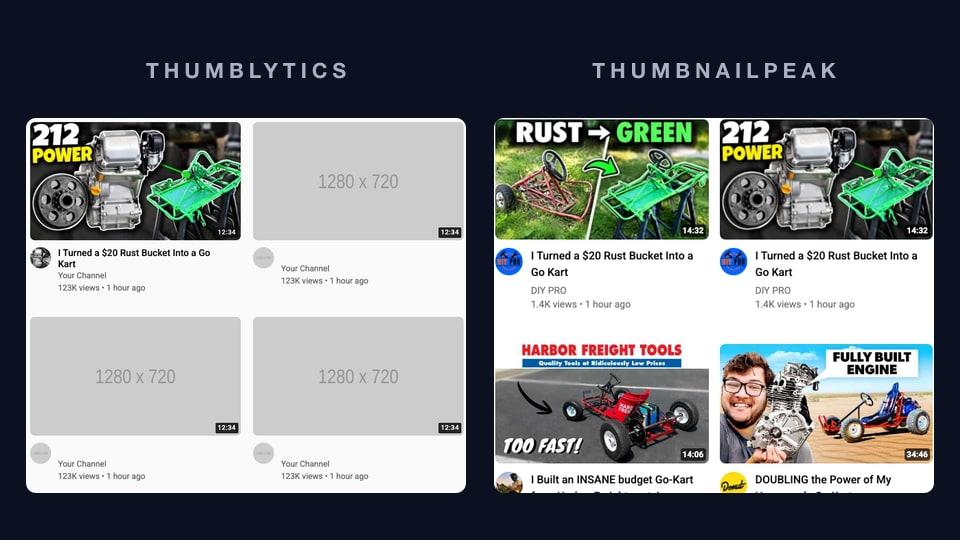
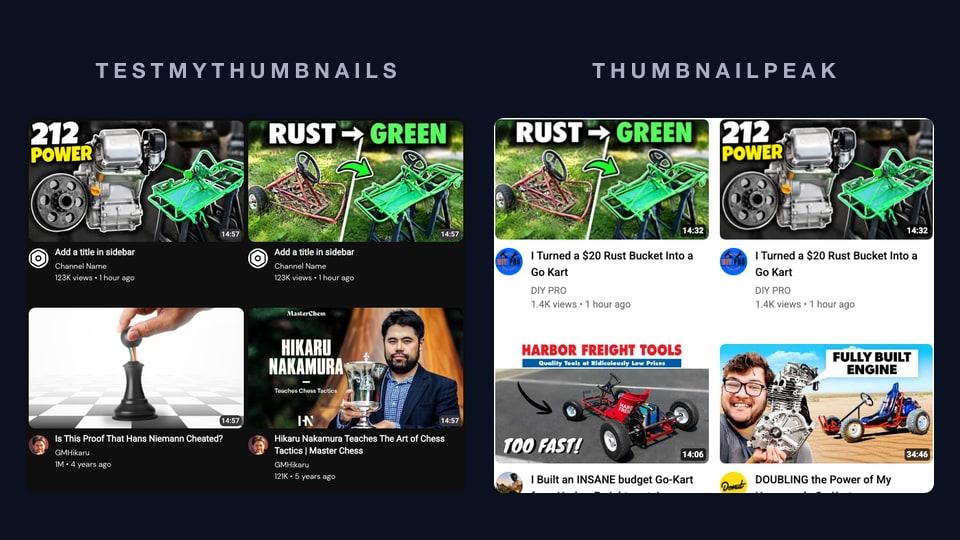
- TestMyThumbnails put them in a well-made copy of YouTube, next to chess videos and film essays from two to five years ago. Its search box, which could have brought in go-kart videos, refused us because we weren't signed in, and the fourth preview asked us to sign up.
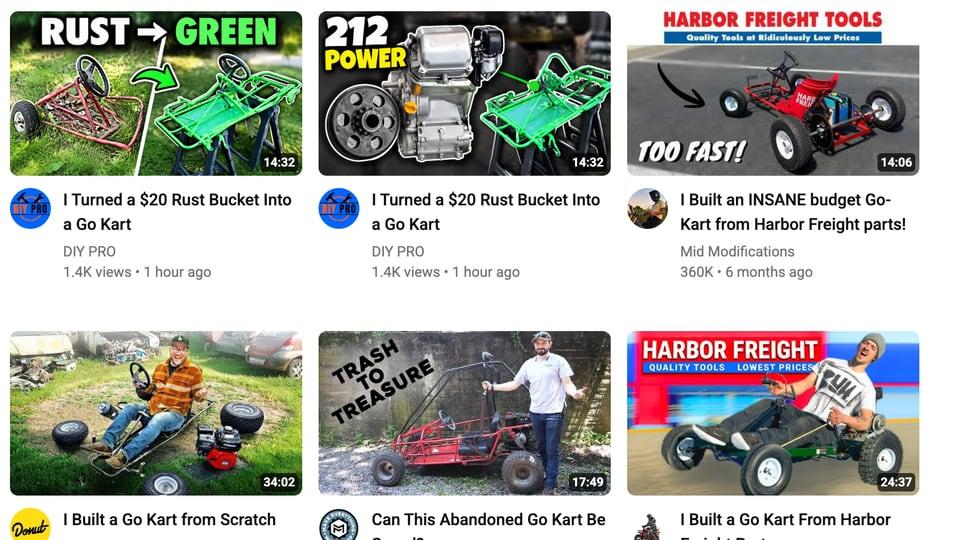
- ThumbnailPeak searched YouTube for the video's topic and put them among the real go-kart videos it found. That showed us three things about our thumbnails that a chess feed couldn't. It's free, with no account and no limit.
Here is what each tester showed, and how the two compare.
How we tested
We used the two candidate thumbnails from our Search preview guide. ThumbnailPeak's generator made them from a go-kart build video that DIY PRO published under a Creative Commons licence:
- "RUST → GREEN": the rusty frame on one side, the same frame painted bright green on the other.
- "212 POWER": the Predator 212 engine beside the green frame, on a dark background.
The title was "I Turned a $20 Rust Bucket Into a Go Kart". We used Chrome on a desktop and weren't signed in to either site. On ThumbnailPeak we also typed the handle @-diypro-, the search "junk go kart build", and card details that make the tiles look like a fresh upload: 1.4K views, 14:32 long, uploaded 1 hour ago.
What TestMyThumbnails showed
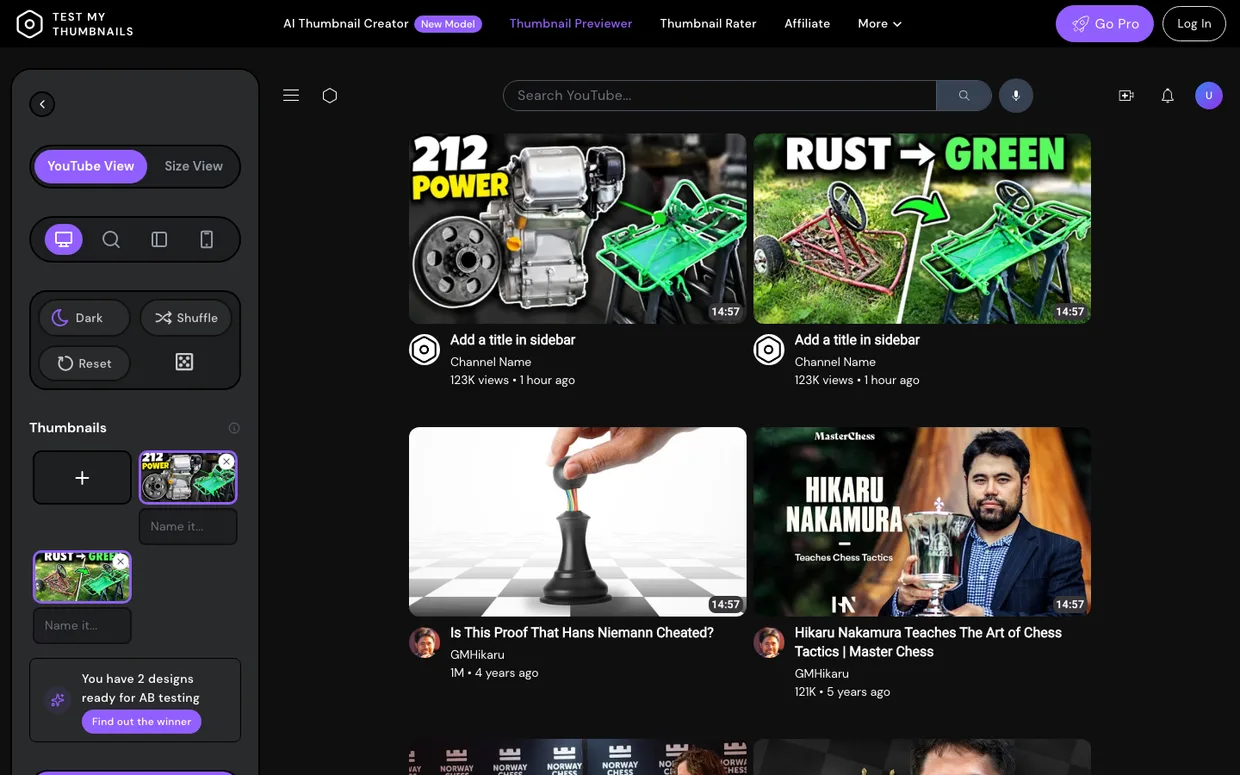
The previewer itself is nicely made. It opens in dark mode, the way many people browse YouTube at night, and has a light mode a click away. There are views for the desktop home page, search results, the suggested-videos sidebar and mobile, plus Shuffle to move your thumbnail around. Size View is a good idea we don't have: it shows your thumbnail at the exact sizes YouTube uses, labelled "Homepage Large (360x205)", "Homepage Small (240x135)" and "Sidebar Suggested Video (168x94)".
The problem is the videos around yours. Every time we opened it, it showed the same feed: chess videos from GMHikaru and video essays about actors from Dodford, two to five years old. Every tile, ours included, shows a length of 14:57, and in the search view every description reads "Lorem ipsum dolor sit amet". On our tiles the view count, age and length were fixed at 123K views, 1 hour ago and 14:57, and we found no field to change them. (Our tiles say "Add a title in sidebar" because we spent our free previews on the feed and its search box before typing a title.)
Next to a chess board and a grandmaster holding a trophy, any go-kart stands out. Both of ours did. A test that can't fail can't tell you much. It can show whether your text is readable at that size, but not whether your thumbnail stands out among the videos it will actually sit next to.
Its search box, signed out
The copy of YouTube has a "Search YouTube…" box at the top. We typed "junk go kart build" and pressed Enter. The site refused the search with a "too many requests" error, and the feed stayed on chess. The limits the site sent to our browser explain why: for a visitor who isn't signed in, they list 3 previews and 0 YouTube searches. Our fourth upload opened this:
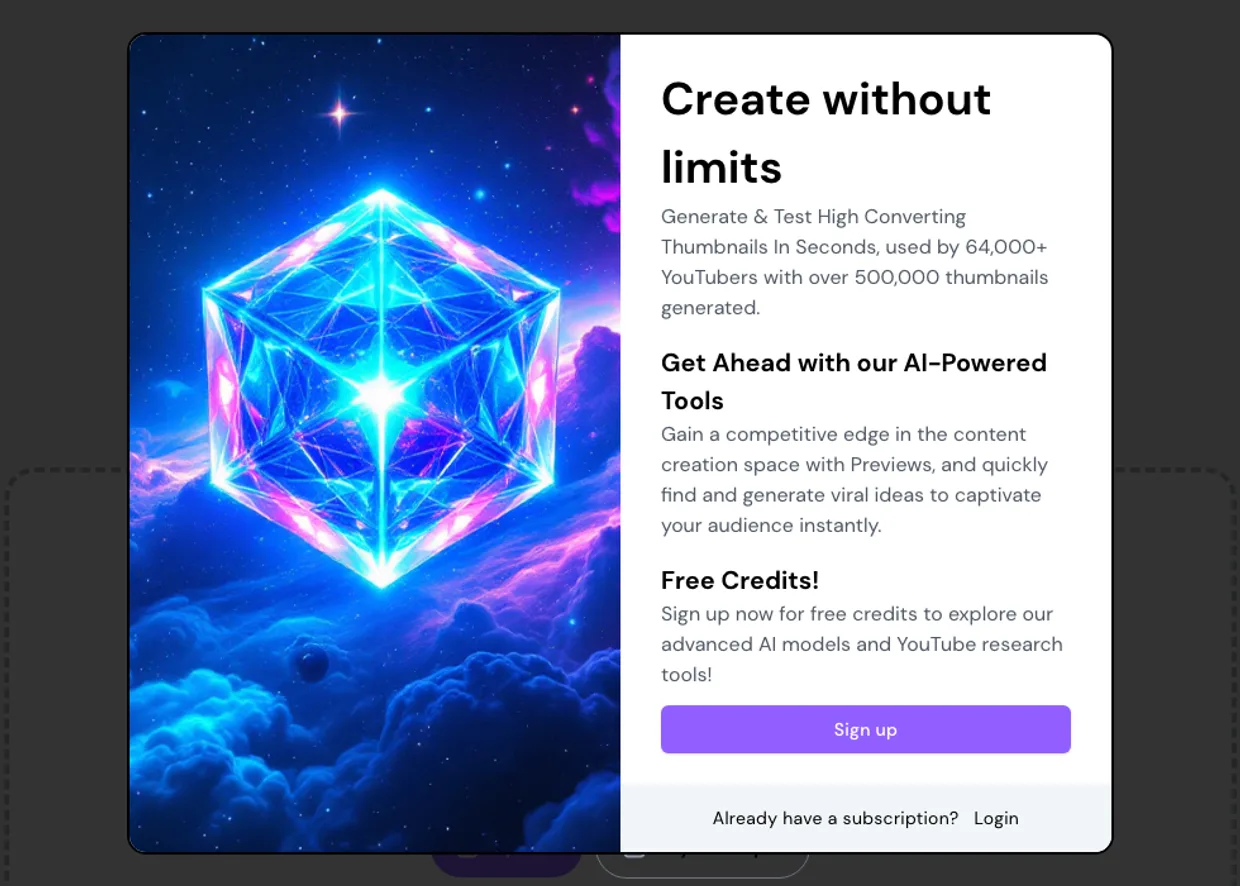
Its pricing page lists "Unlimited Thumbnail Preview" and "Unlimited Research" as features of its paid plans, which start at $16 a month. We didn't create an account, so we can't tell you how many previews or searches a free account gets.
What ThumbnailPeak showed
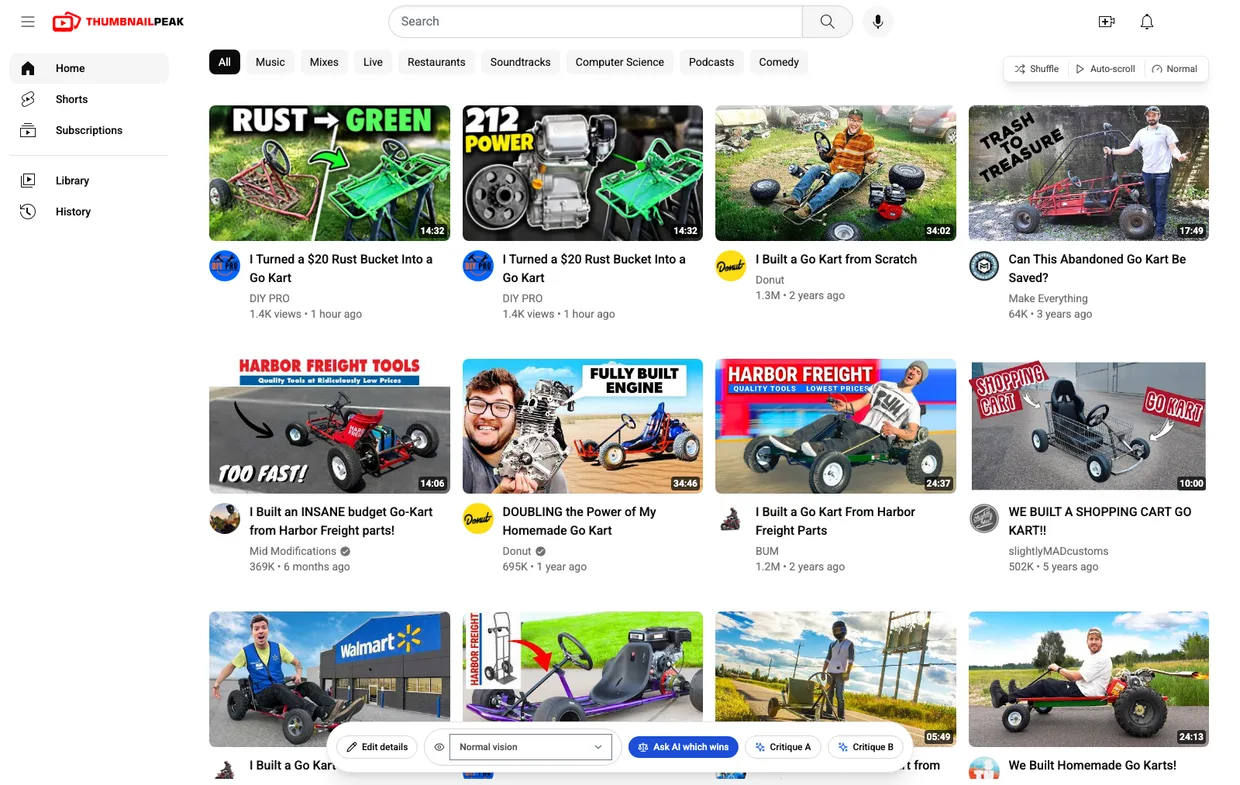
On ThumbnailPeak's thumbnail tester, the Search preview button searched YouTube for "junk go kart build" and put our two thumbnails at the top of up to 27 real results, with Shorts taken out. Each result shows its real thumbnail, title, channel, avatar, view count, age and length, and clicking one opens it on YouTube.
Three things showed up on the first screens that a chess feed could never show:
- Only one of our thumbnails stands out. Almost every other video in the first two rows is a kart out in daylight. "RUST → GREEN" is one more kart on grass. "212 POWER" is the only dark picture, and it's where your eye lands.
- Its idea is already in the feed. In the second row, Donut's "DOUBLING the Power of My Homemade Go Kart", with 695K views, shows a bare engine beside a kart under "FULLY BUILT ENGINE". That's the same idea as "212 POWER". Ours still looks different because it's dark, but anyone who searches this topic has seen an engine-and-kart thumbnail before.
- The channel's own old video is a neighbour. Further down, DIY PRO's own "$50 Rust Bucket into a Sweet Go-KART" from a year ago, with 126K views, ranks for the same search.
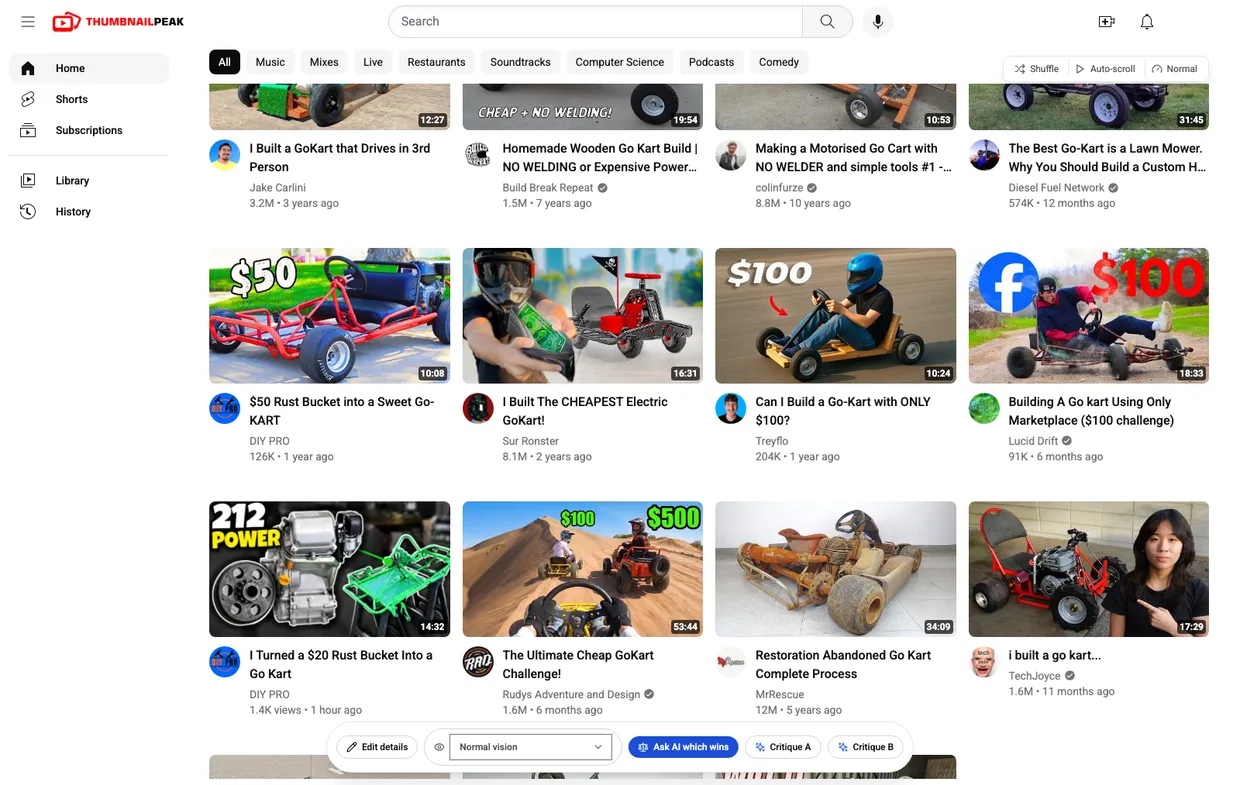
That third one matters more than it looks. The new title, "I Turned a $20 Rust Bucket Into a Go Kart", is almost the same words as the old one. A viewer who has already seen the $50 build may take the new video for it and scroll past, so the thumbnail has to say "this is a different build". A red frame on grass, which is half of "RUST → GREEN", says that less clearly than a dark engine shot does.
Further down the feed your thumbnails come back, as "212 POWER" does in the last row above, so you also see them in the middle of a scroll, not only in the best seat on the page.
Two things to know before you trust it. Search preview shows what YouTube returns for your words, on a desktop layout. A real viewer's home page also mixes in their subscriptions and watch history. And the six mockups on the thumbnail tester page itself (home page, search results, sidebar, mobile app, tablet app and TV app) use a fixed set of 100 real videos taken from YouTube's popular charts, not your topic. Search preview is the part that fetches your competition.
Where TestMyThumbnails does more
- A/B tests on your live video. Its paid plans include an A/B tester that, in its words, will "A/B test Thumbnails & Titles live for a video" and "Schedule hourly/daily switch outs". ThumbnailPeak doesn't run tests on your channel. If you want a real-traffic test, YouTube Studio's own Test & Compare is free.
- Exact sizes. Size View, described above.
- A light/dark switch inside the preview. On ThumbnailPeak the mockups follow the light/dark switch in the site's header, so you get both modes, just not from a button next to the feed.
- More AI image tools. Its paid plans run on credits: on its AI page a new thumbnail costs 40 credits, a face swap 30 and an AI edit 20. ThumbnailPeak has its own Generate, Improve and Edit, and comparing those is a job for another post.
Feature by feature
Here is what each tester offers as of 20 October 2026. TestMyThumbnails' side comes from using its previewer signed out and from its pricing and Thumbnail Rater pages.
- What a preview costs. TestMyThumbnails gave us 3 previews before asking us to sign up, and lists unlimited previews as a paid-plan feature: Standard $16 a month, Pro $32, Ultimate $80, less if billed yearly. ThumbnailPeak's thumbnail tester is free, with no account and no limit.
- The videos around yours. TestMyThumbnails showed a fixed feed of chess videos and film essays. Its search for real videos was refused for a signed-out visitor. ThumbnailPeak's Search preview fetches up to 27 real results for your title or a shorter search you type. Channel preview puts your thumbnail at the top of your own channel's Videos tab, and Competitor preview mixes it into the newest uploads of up to 10 channels you choose (that one needs a free account).
- Layouts. TestMyThumbnails: desktop home page, search results, sidebar and mobile, plus Size View. ThumbnailPeak: home page, search results, sidebar, mobile app, tablet app and TV app, with Search preview on a desktop home-page layout.
- How many at once. TestMyThumbnails takes several uploads; we used two. ThumbnailPeak takes up to nine and previews two side by side.
- What your tile says. TestMyThumbnails: a title and your channel's handle or picture. ThumbnailPeak: a title, a second title so you can test two, your handle (which brings in your real channel name and avatar), the view count, length, upload date and a verified badge.
- Checking the feed. TestMyThumbnails: Shuffle. ThumbnailPeak: Shuffle; Auto-scroll at slow, normal or fast in Search preview; scroll blur in the mobile view; and five colour-blindness views besides normal vision.
- An AI opinion. TestMyThumbnails' Thumbnail Rater gives a rating out of 10, a heat map, five suggested improvements and five suggested titles. The page offers your first two analyses free, but signed out its limit was zero, so it needs an account. We didn't run it. ThumbnailPeak's Critique A and Critique B score a thumbnail out of 100 from ten ratings: seven about the picture (legibility, hierarchy, subject clarity, contrast, curiosity value, distinctiveness, and trust and polish) and three about how it fits your title (topic match, promise consistency, and title complementarity). Then it lists specific fixes. Ask AI which wins puts the two head to head and says which wins and why. Both need a free account, which comes with 2 critiques and 1 comparison a month.
- A test with real viewers. TestMyThumbnails: its A/B tester, on paid plans. ThumbnailPeak: none of its own. Use YouTube's Test & Compare after you publish.
Run the same test on your next upload
- Open the thumbnail tester and upload your two best candidates. You don't need an account.
- Type your title. If it's a long sentence, put a short topic in the Search query box, the way we used "junk go kart build".
- Click Search preview and ask three questions. Does yours stand out from the first two rows? Is its idea already there? Is one of your own old videos there?
- Press Shuffle and Auto-scroll to check that a good result wasn't just a lucky spot in the feed.
- If you still can't choose, press Ask AI which wins.
The takeaway
A thumbnail tester is only as useful as the videos it puts next to yours. TestMyThumbnails has a polished copy of YouTube, but signed out it puts your thumbnail beside chess videos, and searching for the real ones takes an account. Next to chess, both our go-karts looked great. ThumbnailPeak put them among the real go-kart videos, where we learned that only "212 POWER" stands out, that its idea is already in the feed, and that the channel's own old build sits in the same search. It did that for free, without asking us to sign up.
Open the thumbnail tester and put your next two candidates among your real competition.
We tested both sites on 20 October 2026, in Chrome on a desktop, without signing in. TestMyThumbnails' features, limits and prices are as its site, its pricing page and its responses to our browser showed them that day, and they may have changed since. The two candidate thumbnails were made by ThumbnailPeak's generator from "$20 Rust Bucket into Kick $$$ Go Kart W/ Harbor Freight 212" by DIY PRO, published under the Creative Commons Attribution licence (CC BY 3.0); DIY PRO did not make or approve them. Every other thumbnail, title and channel shown, in either tester, belongs to its creator and appears for commentary. ThumbnailPeak is not affiliated with TestMyThumbnails, DIY PRO or any channel shown.