Disclosure: we make ThumbnailPeak. The counts below come from its free Breakouts tool, read on 1 November 2026, and the test pictures were scored by its AI critique on 13 November 2026. The thumbnails belong to their creators, who had nothing to do with this post. The two we edited, by Noah Banks and Alex Jones, are shared under CC BY.
Should you put an outline around the person in your thumbnail? It's a style choice, not a shortcut to more views. We looked at breakouts, videos that got far more views than their channel usually gets, and in October 2026 they used an outline no more often than the same channels' ordinary videos.
To add one, copy your picture, cut the person out of the top copy, and give the cut-out a white outline (a stroke) or a glow. The steps are below.
We can't tell you how many people clicked, because YouTube shows that only to the channel. What we can count is how often thumbnails use an outline, and we did that for 4,297 breakout videos. Here's what we found:
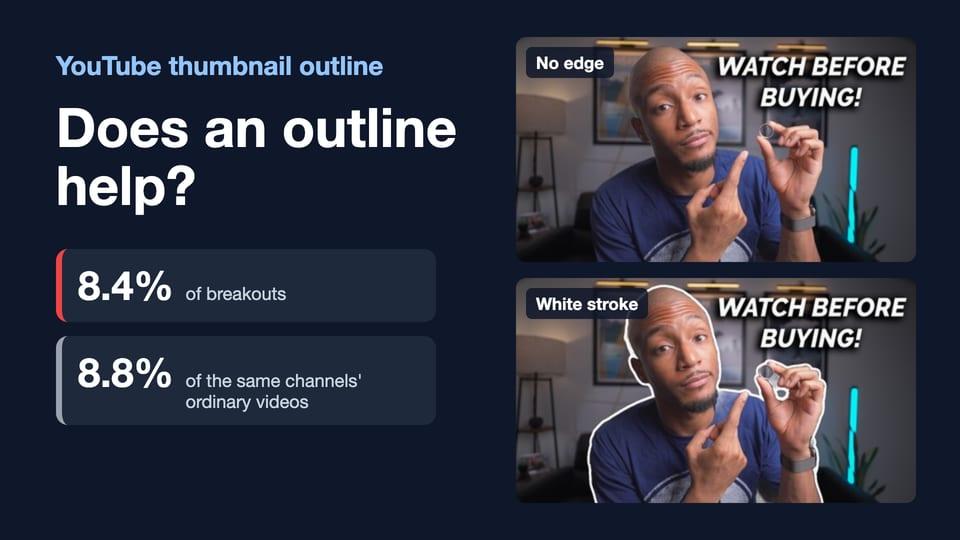
- 8.4% of breakouts had an outline or glow around a cut-out person or object, and 8.8% of the same channels' ordinary videos did. That's about the same.
- An outline is a channel's habit. We read four ordinary videos from each channel. Among the 74 channels that outlined all four, 69% of breakouts had an outline too. Among the 3,395 that outlined none, 3% did.
- Comedy, Gaming and Science & Technology use it most (19%, 14% and 13% of breakouts). Pets & Animals and Film & Animation use it least (2% and 4%).
- Adding an edge didn't raise our AI critique's score. On two test pictures, we put a white stroke, a soft white glow or a dark glow around the person. Each scored 1 to 3 points (out of 100) below the same picture with no edge: about the same, not worse.
How we counted
ThumbnailPeak's Breakouts sweeps YouTube every week for videos that got far more views than their channel usually gets. On 1 November 2026 we took every channel whose best video from 2 to 29 October had at least three times its usual views: 4,297 breakouts in 12 YouTube categories. For almost every channel we also took its four newest ordinary videos, ones that got between half and one and a half times the channel's usual views: 17,178 in all.
An AI model then labeled every thumbnail against a written rule. A thumbnail counts as outlined when it has a cut-out person or object with a white or colored stroke or glow around it. So the count includes a car or a product with an outline, not only a person.
We checked the label by eye. Of 30 random breakouts labeled as outlined, 25 clearly were, 2 weren't (a glowing patch on a map, and a woman with no edge), and 3 were too faint to tell at the size we read them. Of 30 labeled as not outlined, none clearly had an outline and 1 was too faint to tell. The same model read the breakouts and the ordinary videos, so its few mistakes should fall on both sides of the comparison.
Do breakouts use outlines more often?
No. Across all 4,297 breakouts, 8.4% had an outline, against 8.8% of the same channels' ordinary videos.
We also compared each breakout only with its own channel's ordinary videos, for the 4,275 channels where we read all four. There, 8.5% of breakouts had an outline, against 8.8%: a gap of less than half a percentage point. Allowing for chance, the real gap is probably between 1.2 points lower and 0.4 points higher. That's about the same.
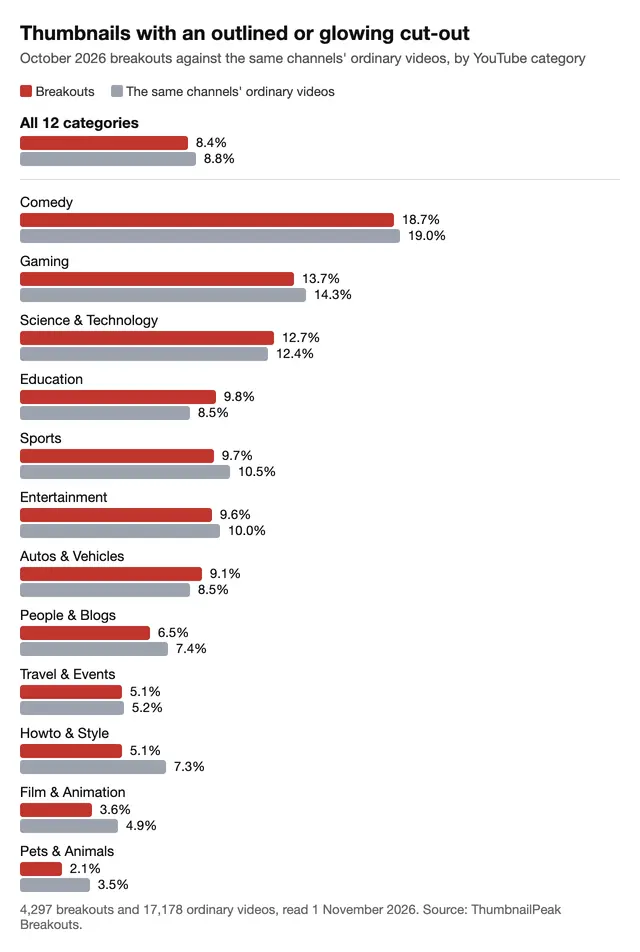
The same holds inside every category: breakouts and ordinary videos are within about 2 percentage points of each other in all 12. If outlines helped videos break out, breakouts would use them more often than their channel's ordinary videos. They don't.
An outline is your channel's style
What did predict a breakout's outline was the channel:
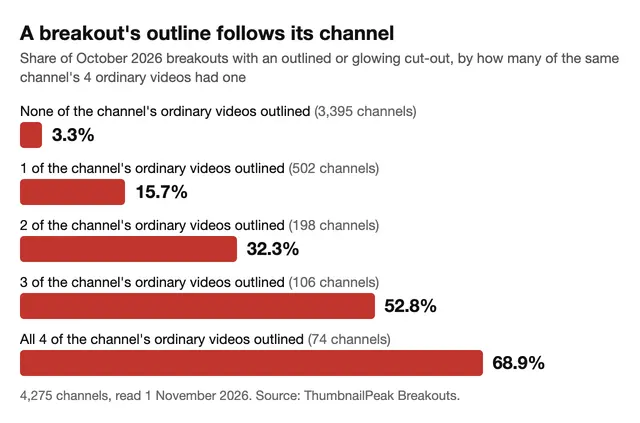
Channels that usually outline their subject also outlined the video that broke out. Channels that usually don't, mostly didn't. Among channels where none of the four ordinary videos had an outline, only 3% of breakouts did. Among channels where all four did, 69% of breakouts did. It's the same pattern we found for AI-looking thumbnails: a breakout looks like its channel's usual thumbnails.
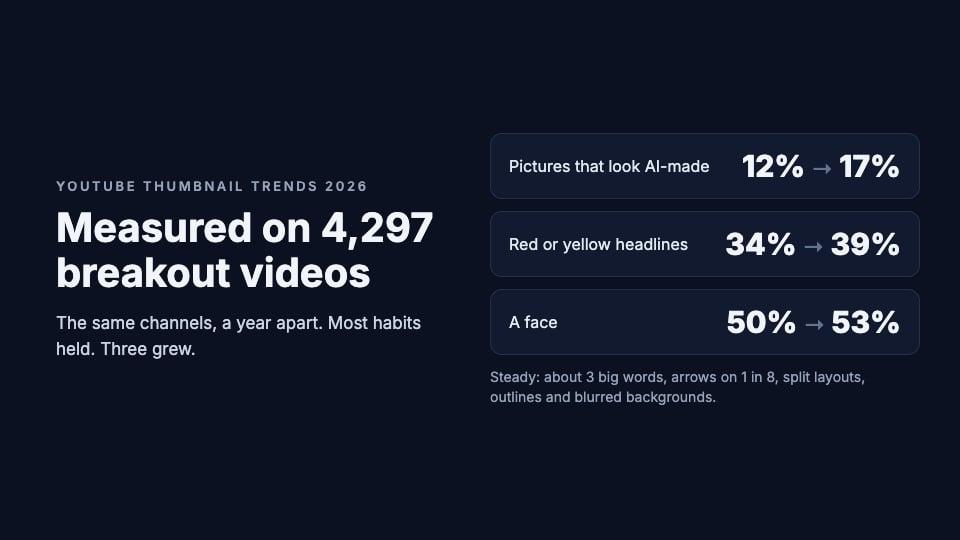
Outlines aren't fading or spreading, either. We also read thumbnails from a year earlier for 883 of these channels. In October and November 2025, 9.6% of each channel's thumbnails had an outline on average; now 10.0% do. Our 2026 trends post found the same for arrows, split layouts and blurred backgrounds: most of what these channels' thumbnails look like didn't change in a year.
Which YouTube categories outline the person in their thumbnail?
Comedy uses outlines the most: 19% of its 203 breakouts. Then Gaming (14%) and Science & Technology (13%). The fewest are in Pets & Animals (2%), Film & Animation (4%), and Travel & Events and Howto & Style (5% each).
An outline usually comes with a face and words. Of the 362 outlined breakouts:
- 94% had headline words (77% of all breakouts did),
- 81% had a face (50% of all breakouts),
- 60% had red or yellow words (40% of all breakouts),
- 37% had a face reacting (22% of all breakouts).
Did an outline raise our critique's score? Not on two test pictures
Counting tells you what creators do. It can't tell you what an outline does to one picture. So we took two thumbnails shared under a CC BY license and made four versions of each: the picture as it was, and the picture with three different edges around the person. Below, we call any stroke or glow around the person an "edge".
- Noah Banks's thumbnail for "Oura Ring 4 | 10 Things to Know Before You Buy It": a man in a dim room.
- Alex Jones's thumbnail for "Turning my CHEAP, ABANDONED Audi into Something it SHOULD have been": a man in a light gray garage.
We cut out the person with Apple's person cut-out tool on a Mac. Then we changed only the band just outside the person, and left every pixel of the person and the background as it was. Each picture got three versions: a 10-pixel white stroke on the 1280×720 picture, a soft white glow, and a dark glow.
Then we ran all eight versions through our AI critique, each with its video's own title. The critique scores a thumbnail out of 100, and it gives a picture score that leaves the title out. Here are those picture scores:
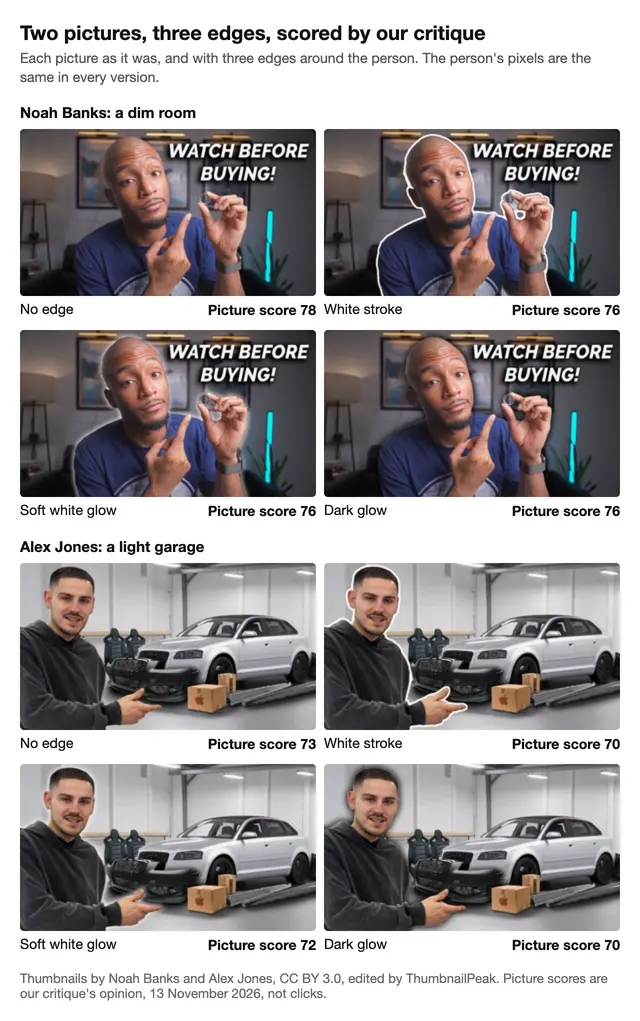
The white stroke is easy to see. The soft glow and the dark glow are faint at this size.
None of the three edges scored higher than the plain picture. Every version with an edge was 1 to 3 points lower. Before the test, we decided to count only a move of 6 points or more as a real difference: two critiques of the same picture land that far apart only about 1 time in 100 (measured on 20 public thumbnails in October), while smaller moves can happen by chance. So read these as "about the same", not "worse".
In four of the six versions with an edge, the critique's notes mention the edge or the separation it makes. On Noah's white stroke it wrote that "the creator is outlined in white", with "a clean cutout", and on the soft glow that "the man is clearly separated from the room behind him". The plain picture just didn't need the help: Noah's already had the top grade for contrast, because "the man's face and hands are brightly lit" against a dark room.
One version got a fix. On Alex's light garage, the dark glow was the only version the critique asked to fix: "The bright edges make the man and car look pasted onto the garage scene." It asked to "blend the cutout edges and match the lighting and shadows". The critique was right about the bright edge. Our cut-out left a thin light line of the old background around the man, and the dark glow made it show.
This is two pictures, one example each, and a score is our critique's opinion, not a click count. It points the same way as the counts: on neither picture did an edge make a difference big enough to count.
When can an outline help?
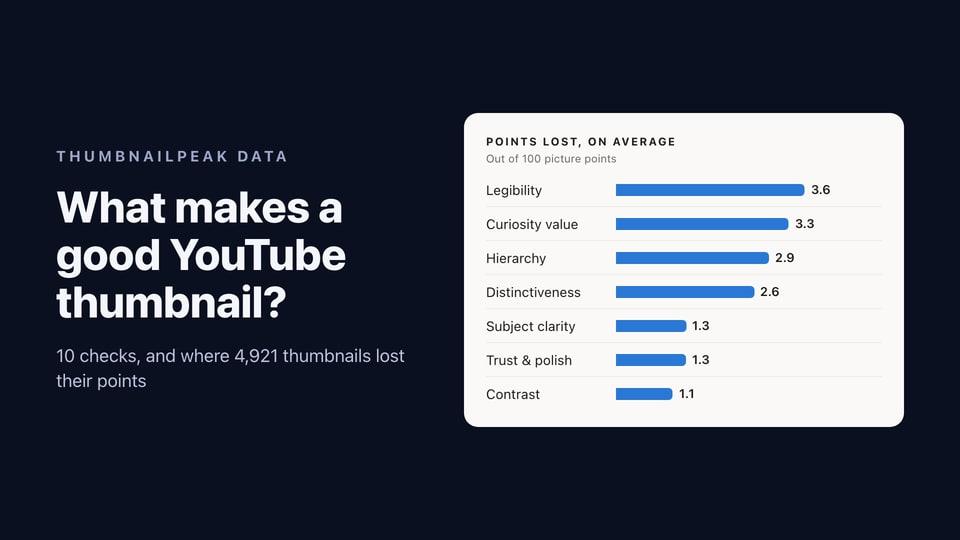
Neither the counts nor the test showed an outline lifting a thumbnail. Here is our advice, from the counts, the test and our guide to good thumbnails. An outline can still be worth adding in three cases:
- Your subject blends into the background. A busy room, a crowd, or a subject the same color as what's behind it. We didn't test a picture like this. Our guide to what makes a good thumbnail suggests an outline, or a darker or blurred background, for a picture that loses points on contrast. A darker or blurred background leaves no edge that can look pasted on.
- It's already your channel's look. Breakouts kept their channel's style. If your viewers know your thumbnails by a white outline, keep it.
- You can make it clean. Check the rim of your cut-out first. A thin line of the old background, like the one our test left, makes the person look pasted on, and it was the one thing our critique asked us to fix.
How to add a white outline to a YouTube thumbnail
You need an editor with layers. Photopea is one that's free in the browser, with no account, so these steps use its menus:
- Copy your picture and put the copy on top of the original, so the background stays underneath.
- Cut out the person on the top copy. In Photopea, choose Select, then Remove BG. (Canva lists its background remover as a Pro feature in its pricing table.)
- Check the rim. Zoom in on the cut-out's edge, and erase any thin line of the old background before you add an edge.
- Add a white outline or a glow. In Photopea, double-click the cut-out layer to open Layer Style, then turn on Stroke for a white outline or Outer Glow for a glow, and set its color and size. Ours was 10 pixels on a 1280×720 picture.
- Look at it at feed size, the small size thumbnails show at in the YouTube feed. A thin edge that looks neat full size can disappear there. Preview shows your thumbnail among real YouTube videos.
Or describe the change in words. Our Edit tool takes one sentence, such as "Add a thin white outline around the man", and AI makes that change to your image, for 3 credits. Check that the rest still looks right, because every edit redraws the whole image. Our guide to changing a thumbnail without Photoshop shows more changes made both ways.
What this means for your thumbnails
- An outline isn't what sets breakouts apart. They used one about as often as their channels' ordinary videos: 8.4% against 8.8%.
- Fix separation first. If your subject blends in, an outline is one fix, and a darker or blurred background is another.
- Follow your channel's style. Breakouts kept their channel's look, outline or not.
- Check your cut-out's rim. The one version our critique asked us to fix had a thin line of the old background around the person.
Before you add an edge, critique your thumbnail: its contrast and subject checks say whether your subject already stands out. A critique uses 1 credit, and a free account comes with 12. And Preview shows your thumbnail at feed size among real YouTube videos, for free.
Frequently asked questions
Does an outline get more clicks on YouTube?
We can't measure clicks: YouTube shows them only to the channel. What we counted is that 8.4% of October's breakouts had an outline, against 8.8% of the same channels' ordinary videos.
Should a thumbnail outline be white or colored?
Pick an edge that stands apart from your background and still looks like part of the picture, and check the rim of your cut-out first. In our test, a dark glow on a light background showed a thin light line our cut-out had left around the man, and the critique said it made him look pasted on. We didn't count outline colors.
How thick should a thumbnail outline be?
Ours was 10 pixels on a 1280×720 picture, and the critique called it a clean cutout. Check yours at feed size, where thin edges can disappear. We didn't test other widths.
Is an outline the same as a border?
No. A border frames the whole thumbnail, and 2.8% of October's breakouts had one. An outline goes around the person or object inside it. Black bars around a thumbnail are something else again: YouTube shrinks a picture that isn't 16:9 into its frame and fills the rest with black.
Are thumbnail outlines outdated?
Not by these numbers. For 883 channels we read in both years, 9.6% of each channel's thumbnails had an outline on average a year ago, and 10.0% now.
Breakouts: each channel's best video published 2–29 October 2026 with at least 3× its usual views (usual views are the median of the channel's recent eligible uploads), from ThumbnailPeak's weekly Breakouts sweep, read 1 November 2026: 4,297 channels in 12 YouTube categories. Ordinary videos: the channel's four newest uploads at 0.5–1.5× its usual views (17,178 thumbnails; 4,275 channels with all four read). A year ago: up to four uploads from October–November 2025 for 1,500 of those channels chosen at random; 883 had at least one, and each channel's share is averaged. Thumbnails were read from YouTube at 640×360. Outlines were labeled by gpt-6-luna against the rule above, and faces and headline words were found with Apple Vision; an eye check of 60 random breakouts is described above. The range on the gap is a 95% bootstrap interval across channels. The test: two CC BY 3.0 thumbnails (Noah Banks, Alex Jones), cut out with Apple Vision's person segmentation, edges drawn by a script, each version scored once by ThumbnailPeak's critique (GPT-6, seven runs averaged) on 13 November 2026 with its video's title; we report the picture score, which leaves the title out. Photopea's menus are from its own help pages, read 13 November 2026; Photopea's free plan and Canva's pricing table were read signed out on 21 October 2026. The raw rows are deleted by 1 December 2026, under YouTube's 30-day storage rule; only these totals are kept.