Disclosure: we make ThumbnailPeak, which has its own thumbnail generator and is in this test. Every result below is one try we made ourselves as a visitor with no account, on 10 and 11 November 2026. We paid for nothing and signed up for nothing. Free limits change often, so check a tool's page before you rely on one.
Which AI thumbnail generators can you really use for free, without signing up? We tried 25 of them as a visitor to find out. The short answer is: very few.
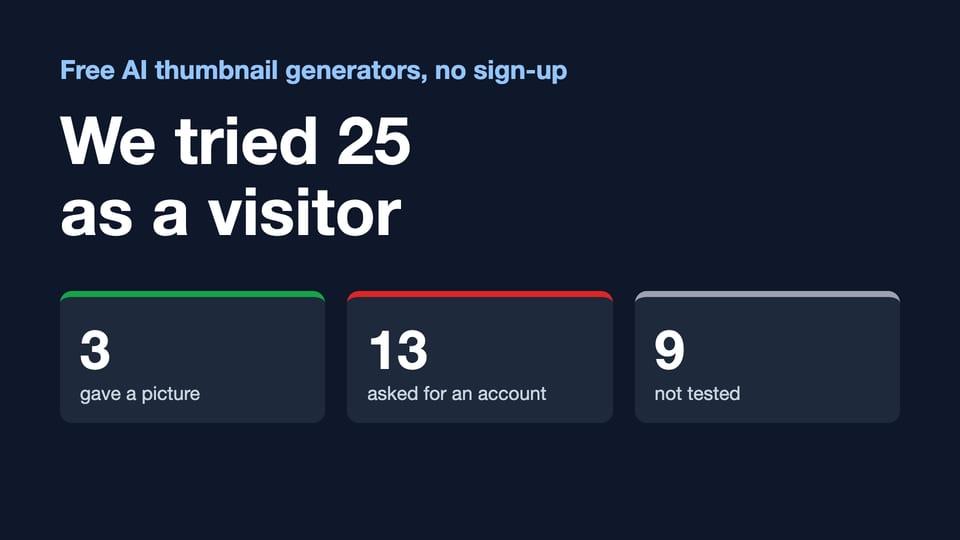
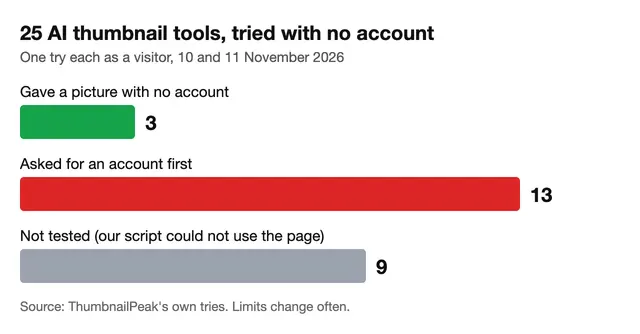
- 3 of the 25 gave us a picture with no account: OpusClip, Pixelbin and Piktochart. Each had a catch.
- 13 asked for an account before making anything. Several of them call themselves free in the page title.
- 9 we could not test. Our test ran in a scripted browser, and it could not use their pages. We do not count them as "needs an account".
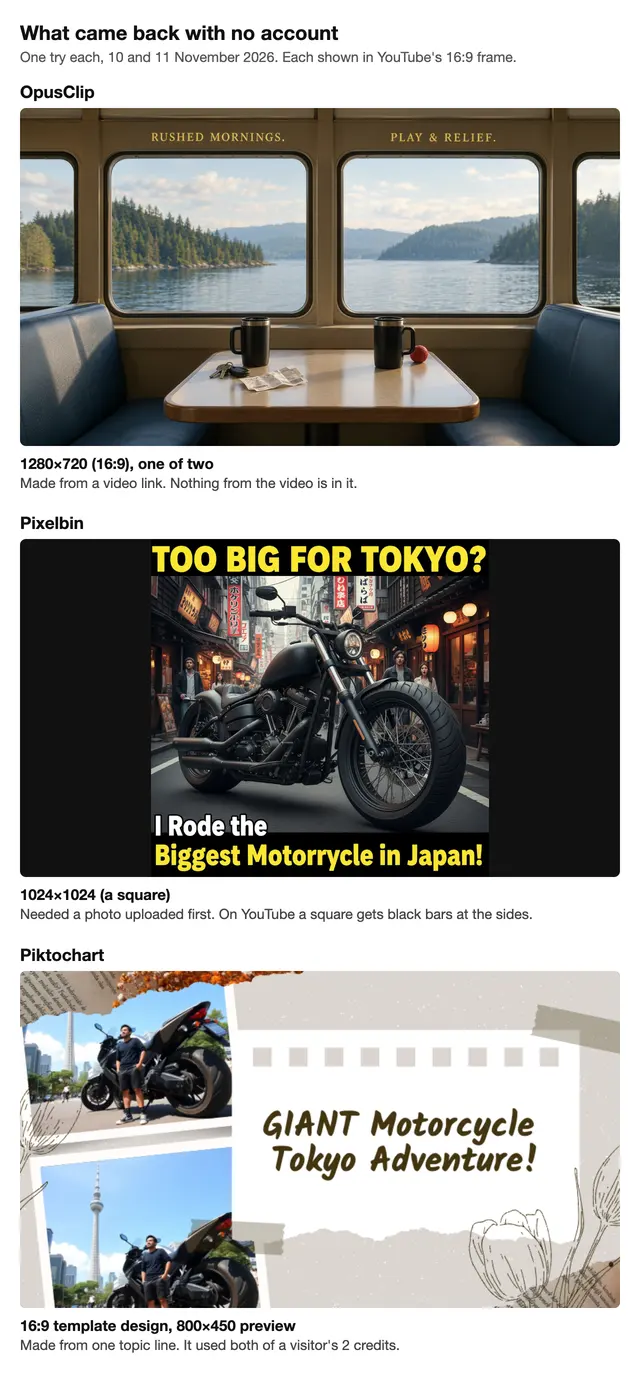
- Only one of the three free results was a finished picture in YouTube's shape. One came back as a square, and one was a template design shown as a small preview.
How we tested
We took the 25 tools from Google's first page for eight searches, such as "ai thumbnail generator", "ai thumbnail generator free" and "ai thumbnail generator without watermark". We read those pages through SerpApi, for a searcher in the US, on 10 November 2026.
Then we opened each tool as a visitor: no account, no card, no trial. A script drove an ordinary Chrome browser, set to US English, and typed the same request everywhere:
YouTube thumbnail for a video called "I Rode the Biggest Motorcycle in Tokyo": a huge black motorcycle squeezed into a narrow Tokyo side street, with the bold words TOO BIG FOR TOKYO?
Where a tool asks for a video link and not a description, it got the same one each time: Big Buck Bunny, the Blender Foundation's short film, published under a Creative Commons licence.
Each tool got one try. We wrote down what happened: a picture, or a request to sign in. For a picture, we wrote down its size in pixels and whether a mark was on it. We also saved each tool's own words about free use from its page that day.
This test says nothing about which tool makes the best thumbnail. It is one request and one try. It only answers what a visitor gets before making an account.
The three that worked without an account
OpusClip: the right size, the wrong picture
We pasted the video link and pressed Generate Thumbnail. Two pictures came back, each 1280×720, which is YouTube's 16:9 shape. Each had a "Download HD" button under it, and no mark was visible on either picture.
But neither picture showed anything from the video. Big Buck Bunny is a cartoon about a large rabbit. One picture was a ferry cabin with two mugs on a table. The other was a riverside bench with the words "LET GO, START LIVING."
We did not press the download button, so we can't say what the downloaded file looks like.
Pixelbin: no sign-up, but a square
Pixelbin's page says "No sign-up required", and that held. The catch came first: its Create Thumbnail button stays off until you upload a photo. We uploaded a photo of our own and typed the request.
One picture came back with no mark on it. It was 1024×1024, a square. That is the page's default ratio, "1:1". The page has a ratio menu, and we did not change it.
The picture followed the request closely: a black motorcycle in a Tokyo street with "TOO BIG FOR TOKYO?" across the top. It also added a second line of its own, "I Rode the Biggest Motorrycle in Japan!", with "motorcycle" misspelled and Tokyo changed to Japan.
Pixelbin's page also says the free credit allows "up to 1 time a month".
Piktochart: one template, two credits
Piktochart's editor opened with "2 credits left" for a visitor. We gave it one topic line, "I Rode the Biggest Motorcycle in Tokyo". It made a 16:9 template design: two stock-style motorcycle photos and the headline "GIANT Motorcycle Tokyo Adventure!".
That one design used both credits. The page then said "0 credits left" and offered a button, "Save & Edit Thumbnail". We could not establish what that button asks for. The preview on the page was 800×450.
The thirteen that asked for an account
These thirteen stopped us before making anything. Here is what each did:
- Canva showed a box: "you'll need to log in or sign up".
- Adobe Express said: "Sign in or sign up for free to use all generative AI tools".
- Pikzels sent us to a sign-up page.
- ThumbnailCreator sent us to the sign-up form of its 7-day trial.
- ThumbMagic sent us to a sign-up page.
- Thumbs.ai said: "Create an account to get free credits".
- Phygital+ sent us to a sign-in page.
- Simplified sent us to a sign-up page.
- invideo sent us to a sign-up page.
- Cloudinary sent us to a registration page.
- Picsart said: "Sign in to create".
- Thumber says it on its own page: "Sign in required • 1 free thumbnail".
- TestMyThumbnails said: "Sign in to continue".
An account is not the same as a payment. Several say a free amount waits behind the sign-up. But if you searched for "no sign up", none of these thirteen is what you were looking for.
Four of the thirteen have "free" in the page title we read on 10 November: Canva ("Free AI Thumbnail Maker"), Phygital+ ("Custom Thumbnails for Free"), invideo ("Free AI Thumbnail Maker") and Thumber ("Free AI"). TestMyThumbnails' title on Google's page that day ended with "(Free)". Thumber's page title says "Free AI", and the page itself says "Sign in required • 1 free thumbnail".
The nine we did not test
A script is not a person, and some pages can't be used by one. We report these nine as not tested. They may work with no account for you.
- vidIQ and WayinVideo put a "verify you are human" check beside the button. We did not work around it. vidIQ's page says: "Generate your first few thumbnails with no account, then sign up free to keep generating, edit, and download in HD". It also says there is no watermark "even on the free plan". WayinVideo's title says "(No Sign Up)", and its page says: "You can generate multiple Video thumbnails for free without signing up."
- Fliki's title says "No Sign-Up". Its Generate button did not respond to our script in three tries. Its page says "No sign-up to generate and download" and "download without a watermark".
- Perchance's title says "free, no sign-up, no limits". Its generate button worked with no account, but the four pictures failed to load in our scripted browser.
- Glif, Thumbnail AI, Fotor, Higgsfield and Recraft: our script could not get through their pages. Recraft's page says "Up to 30 free image generations per day". Fotor's title says "Free & No Watermark".
Four of these nine say "no sign-up" in their own words: vidIQ, WayinVideo, Fliki and Perchance. If no account matters most to you, they are the ones to try next. A try takes about two minutes each in a private browser window.
What "free" turned out to mean
"Free" meant four different things on these pages.
- Free with no account. A visitor gets a picture. In our test: OpusClip, Pixelbin (its page says "up to 1 time a month") and Piktochart (2 credits for a visitor).
- Free after you sign up. You make an account and get a set amount. Thumbs.ai says "20 Free Credits" and "No credit card required". Canva says "Generate a limited number of images daily for free." Thumber says "1 free thumbnail". WayinVideo says "Sign up to receive 100 free credits".
- A free trial. ThumbnailCreator's page says "7-day free trial · Cancel anytime", and its button led to that trial's sign-up form.
- Free to look at. The page says free, and the first press of the button asks you to sign in.
The word in the title does not tell you which of the four you will get. The only quick way to know is to press the button.
Check the shape before the watermark
You may be looking for a tool with no watermark. In our three results, no mark was visible on the pictures from OpusClip and Pixelbin. The shape was the bigger problem.
YouTube shows a thumbnail in a 16:9 frame, and 1280×720 is the standard size. Only OpusClip returned that. Pixelbin's square was 1024×1024. Upload a square to YouTube and it gets black bars at the sides. Crop it to 16:9 and you lose the top and the bottom, which is where Pixelbin put its words.
So before you use a free result, check two things: the size in pixels, and that no words sit where a crop would cut them. Our thumbnail size guide has the numbers, and a thumbnail resizer can fit a picture to 16:9.
Where ThumbnailPeak sits
By this test's own rule, ThumbnailPeak belongs with the thirteen. Generate, our AI thumbnail generator, needs an account. You sign in with Google, and no card is asked for.
A free account gets 12 credits, once. One thumbnail uses 3 credits, and a batch of three different ideas uses 6. Every picture is 1280×720. A download on a free account carries a small ThumbnailPeak mark in the bottom-left corner. Pro or any credit pack gives clean downloads.
We gave it the same request on 11 November 2026. We pasted the request as a description of the video and asked for one thumbnail. That uses 3 of a free account's 12 credits. We ran it twice, which is one more try than the other tools got, and the picture below is the second.
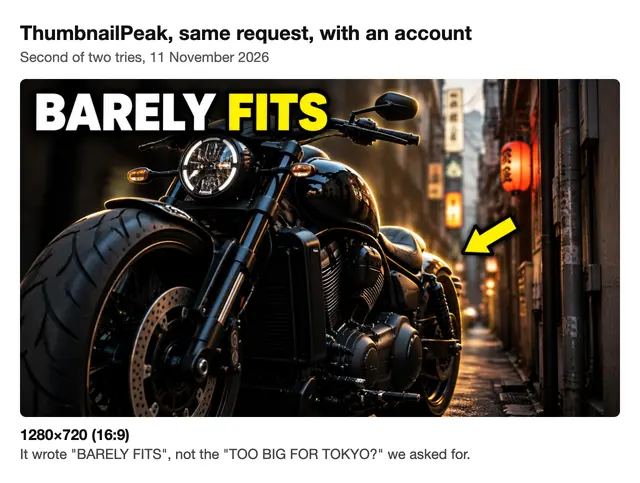
Each picture came back in under 40 seconds at 1280×720, and both show what we asked for: a black motorcycle filling a narrow Tokyo side street. But neither used our words. We asked for "TOO BIG FOR TOKYO?". The first try wrote "TIGHT FIT", with the handlebar covering part of the last letter, so we ran it again. The second wrote "BARELY FITS", with every letter clear. Generate chooses its own words unless you tell it yours in the optional guidance box, and we pasted the whole request as the description. Like the other three, this is not a quality test.
What it does differently is start from the video. You paste a YouTube link, and it reads the title, the description and frames from the footage before it draws. Our earlier test with ChatGPT shows why that matters: asked with only a title, it drew a go-kart that wasn't in the video.
Some things on ThumbnailPeak need no account at all. You can preview a thumbnail in a YouTube feed beside real videos as often as you like, whichever tool made it. If you want design editors and not AI generators, we read ten of their free plans in Free YouTube Thumbnail Software in 2026.
FAQ
Is there a free AI thumbnail generator with no sign-up?
Yes, but few. Of the 25 we tried on 10 and 11 November 2026, 3 gave a picture with no account: OpusClip, Pixelbin and Piktochart. Four more say "no sign-up" on their own pages (vidIQ, WayinVideo, Fliki and Perchance), but our script could not test them.
Which free AI thumbnail generators have no watermark?
No mark was visible on the pictures OpusClip and Pixelbin showed us with no account. We did not save OpusClip's download, so we can't speak for the file. vidIQ, Fliki and Fotor say "no watermark" on their own pages, and we did not test them.
Which of them make a 16:9 picture?
OpusClip returned two pictures at 1280×720. Piktochart made a 16:9 template design, shown as an 800×450 preview. Pixelbin returned a 1024×1024 square by default; its page has a ratio menu, which we did not change.
Do "free" AI thumbnail makers really cost nothing?
Often they cost an account first. 13 of the 25 asked us to sign up or sign in before making anything. Behind the sign-up, some give a set amount, like 20 credits or 1 thumbnail, and one starts a 7-day trial.
Why didn't you test all 25?
Our test ran in a scripted browser. Two tools showed a "verify you are human" check, which we did not work around, and seven had pages the script could not use. We list those nine as not tested.
How we tested: 25 AI thumbnail tools taken from Google's first page for eight generator searches, read through SerpApi (US, English) on 10 November 2026. Each tool got one try on 10 or 11 November 2026 from a signed-out, scripted Chrome browser set to US English, with the same typed request, or the same Creative Commons video link where a tool takes a link. We made no account, gave no card and bought nothing. A site can treat a scripted browser differently from a person, so your result may differ, and free limits change. Sizes are the pixel sizes of the pictures as the pages returned them. We made no judgment of picture quality. The tools' names belong to their owners, and ThumbnailPeak is not affiliated with any of them.
The video link is Big Buck Bunny by the Blender Foundation, published under the Creative Commons Attribution licence (CC BY 3.0). The three pictures shown were made by OpusClip, Pixelbin and Piktochart from our request and are shown unedited, for commentary. ThumbnailPeak's pictures were made on the owner's account and the one shown is the stored file, so it has no mark; a download on a free account carries one.