Disclosure: we make ThumbnailPeak. The 12 backgrounds below are ours and free to use. The counts are ours too, read on 16 November 2026 from 600 thumbnails in our Breakouts tool. The example thumbnails belong to the channels named. Nothing here says a background brings views.
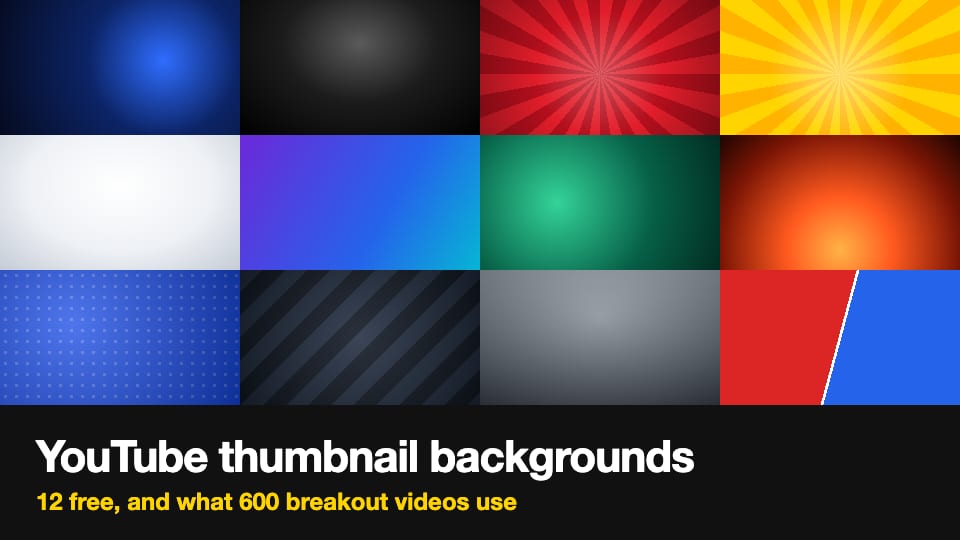
If you need a background for a YouTube thumbnail, here are 12 free ones, right under this introduction. The background is whatever is behind the subject (the person or thing the thumbnail is about) and the words. Each file is 1280×720 pixels.
Before you pick one, look at what other creators use. We sorted the backgrounds of 600 thumbnails from breakout videos: videos that got more views than their channel usually gets. Most of them show a real place, not a made background. Here is what we found:
- 62% use a real place, such as a room, a road or a field. On 54% the place is in focus, and on 8% it is blurred or darkened.
- 18% use a designed background, such as a pattern, shapes or a collage.
- 15% use game footage or animation as the background.
- Under 5% use a plain background. One flat color is on 2.5%, and a gradient, glow or rays on 2%.
- It depends on the category. A real place is behind 46 of 50 thumbnails in Autos & Vehicles and 4 of 50 in Gaming. Designed and plain backgrounds are most common in Education and Sports.
- A plain or designed background usually means a cut-out subject. On those thumbnails, the subject is cut out and placed on top about three times in four.
12 free YouTube thumbnail backgrounds
We drew these ourselves. They are not photos and no AI made them. You can use them in your thumbnails for free, and you don't need to credit us.
These fit a video with no scene to show, such as a talk, a list, a recap or an explainer. If your video has a place, a real place is the more common background. The section on how to choose, further down, says more.
To use one:
- Tap the picture or its download link. The picture opens at full size.
- Save it. On a phone, press and hold the picture and choose to save it. On a computer, right-click it and choose to save it.
- In your design tool, start a 1280×720 design and add the picture so it fills the whole design.
- Put your subject and your words on top of it.
1. Dark blue glow

Download: dark blue glow thumbnail background, 1280×720 JPG
2. Black spotlight

Download: black spotlight thumbnail background, 1280×720 JPG
3. Red rays

Download: red rays thumbnail background, 1280×720 JPG
4. Yellow rays

Download: yellow rays thumbnail background, 1280×720 JPG
5. White studio

Download: white studio thumbnail background, 1280×720 JPG
6. Purple to blue

Download: purple to blue thumbnail background, 1280×720 JPG
7. Green glow

Download: green glow thumbnail background, 1280×720 JPG
8. Orange heat

Download: orange heat thumbnail background, 1280×720 JPG
9. Blue dots

Download: blue dots thumbnail background, 1280×720 JPG
10. Dark stripes

Download: dark stripes thumbnail background, 1280×720 JPG
11. Gray backdrop

Download: gray backdrop thumbnail background, 1280×720 JPG
12. Red against blue

Download: red against blue thumbnail background, 1280×720 JPG
Number 12 is for a comparison. Put one thing on the red side and the other on the blue side.
Seven of the 12 use blue, black, red or white, which were the most common main colors among the plain and designed backgrounds we counted. The others are there for variety.
What background do YouTube thumbnails use? A count of 600
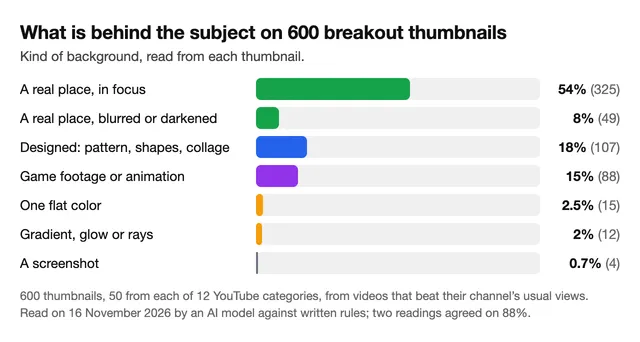
We took 600 thumbnails from our Breakouts tool, 50 from each of 12 YouTube categories. An AI model sorted each thumbnail by written rules, and we checked the kind of background on 30 by eye.
We sorted the backgrounds into kinds:
- A real place, in focus: 325 of 600 (54%). A room, a road, a field, a workshop. On 255 of these 325, the subject is not cut out: the whole picture is one real place.
- A real place, blurred or darkened: 49 (8%). The place is still there, but it is pushed back so the subject stands out.
- Designed: 107 (18%). A pattern, shapes, a drawing, a map, or a collage of several pictures.
- Game footage or animation: 88 (15%).
- One flat color: 15 (2.5%).
- A gradient, a glow or rays: 12 (2%).
- A screenshot of a phone or computer screen: 4 (0.7%).
So a plain color or a glow, the kind of background we offer above, is on 27 of the 600 thumbnails (15 flat colors and 12 gradients or glows). That is under 5%. It does not make a plain background a bad choice. It means most of these thumbnails show a real place instead.
One note on the blurred number. Our 2026 trends post counted a blurred background on 21% of 4,297 breakout thumbnails. That count used a different rule. Here each thumbnail gets one kind, and a place that is mostly in focus counts as in focus, so the number is lower. The two are not the same measure.
Here is one example of each kind, from the 600:
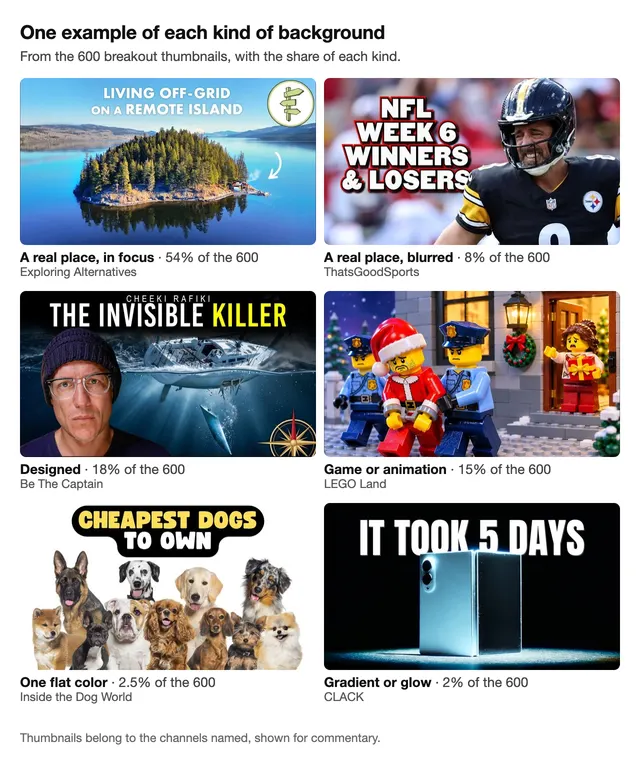
- A real place, in focus: Exploring Alternatives. 1.4 million views, 6.6 times the channel's usual views.
- A real place, blurred: ThatsGoodSports. 431,000 views, 2.7 times.
- Designed: Be The Captain. 783,000 views, 9.8 times.
- Game or animation: LEGO Land. 371,000 views, 11 times.
- One flat color: Inside the Dog World. 12,800 views, 7.4 times.
- Gradient or glow: CLACK. 40,200 views, 14 times.
The background depends on the category
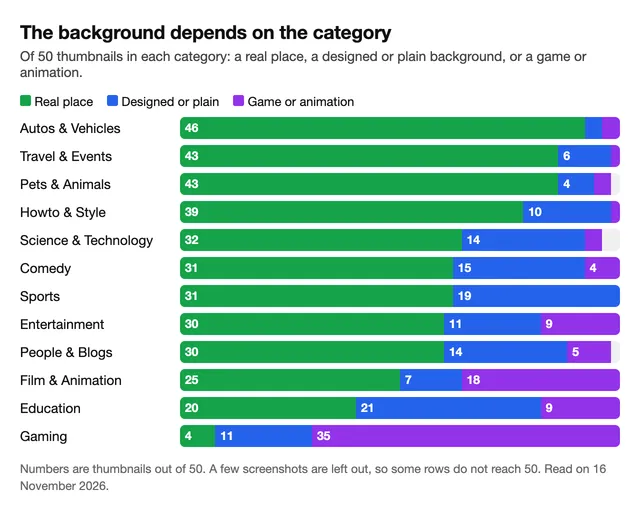
Each category has 50 thumbnails, so one thumbnail is 2%.
- Cars, travel and animals show the place. A real place is behind 46 of 50 thumbnails in Autos & Vehicles, and 43 of 50 in both Travel & Events and Pets & Animals.
- Education and Sports use the most designed and plain backgrounds: 21 of 50 in Education and 19 of 50 in Sports. Our guess is that these videos explain or recap something, so there is no single place to show.
- Gaming is its own case. 35 of 50 are game footage or animation, and only 4 show a real place.
A plain or designed background usually has a cut-out subject
On 224 of the 600 thumbnails (37%), the subject was clearly cut out and placed over the background. You can tell by an outline or a glow around it, a hard edge, or light that doesn't match.
How often depends on the background:
- Designed: 80 of 107 (75%)
- Gradient or glow: 11 of 12
- One flat color: 11 of 15
- A real place, blurred: 35 of 49 (71%)
- A real place, in focus: 70 of 325 (22%)
Together, the plain and designed backgrounds have a cut-out subject on 102 of 134 thumbnails, about three in four. Blurred places are close behind. A place in focus rarely has one.
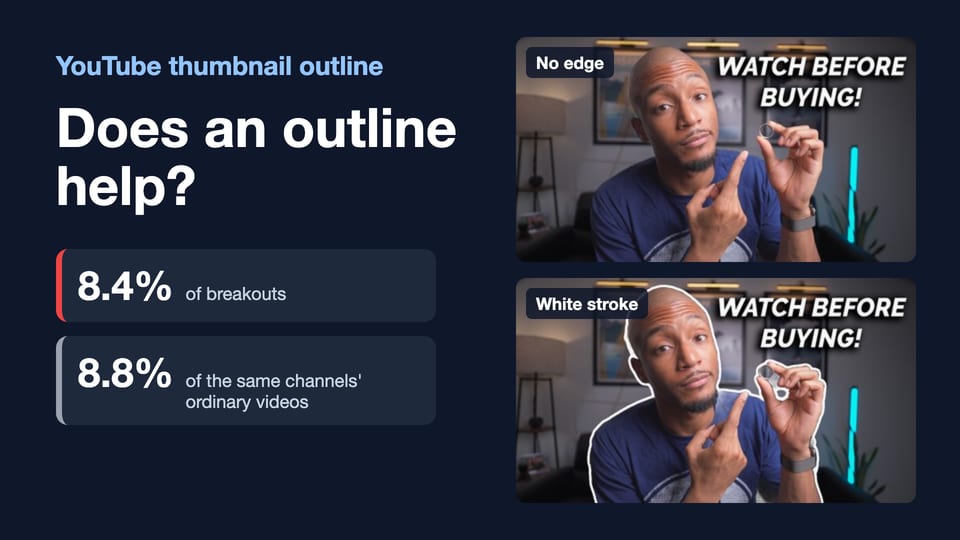
So if you download a background, you will usually need to cut out your subject and place it on top. This post does not cover how to cut a subject out. Look closely at the edge of the cut-out, because a bad edge is what makes a subject look pasted on. We tested edges in our post on the outline around a thumbnail subject. That post counts only a drawn outline or glow, which is a narrower thing than "cut out" here.
Dark or light: we found no usual choice
Neither dark nor light is the usual choice. Of the 600 backgrounds, 51% were neither dark nor light, 29% were light and 20% were dark.
Plain backgrounds (the 27 with a flat color, a gradient or a glow) are dark more often: 14 of the 27 were dark, and 9 were light. Blurred places are dark more often too, on 21 of 49.
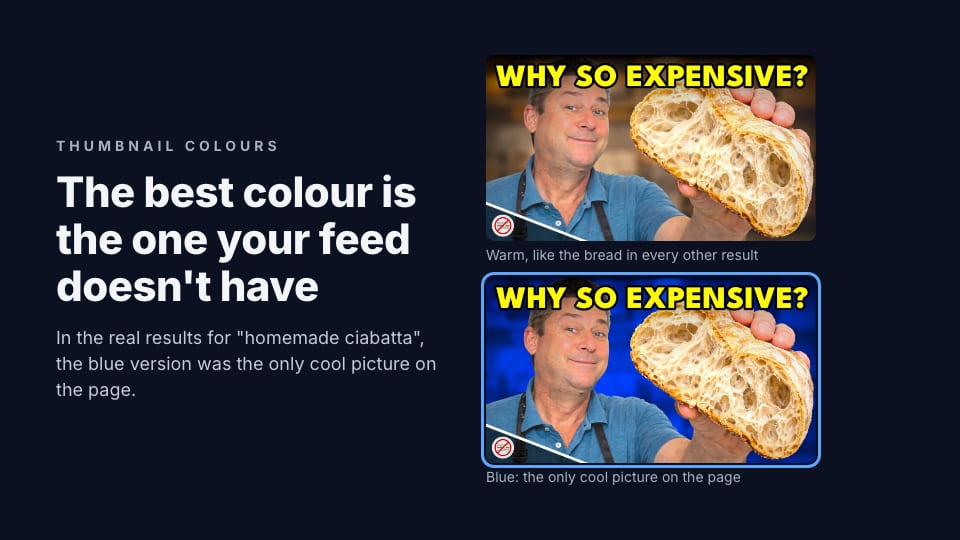
Take the plain and designed backgrounds together: 134 of the 600 (107 designed and 27 plain). 50 of them had no single main color. Of the rest, blue led with 23, then black with 17, red with 12 and white with 11. For how to choose a color that stands out in the feed, see our post on thumbnail color.
How to choose a background for your thumbnail
- If your video has a place, start with it. A real place is behind the subject on 62% of these thumbnails. We did not check where each photo came from, but a frame from your video or a photo taken while filming is the simplest source.
- If the place is busy, blur it or darken it. Then the subject stands out, and the viewer can still see where it is. 8% of the thumbnails do this.
- If there is no place to show, use a designed or plain background. This fits a talk, a list, a recap or an explainer. Pick one of the 12 above, or make your own.
- Cut the subject out cleanly. On a plain or designed background, about three thumbnails in four have a cut-out subject. Check its edge at a small size.
- Keep the background quieter than the subject. This one is our advice, not something we counted. If the words are hard to read, darken the background or blur it.
- Make it 1280×720 pixels or larger, in the same 16:9 shape as the thumbnail. Our thumbnail size guide has YouTube's current numbers.
If you already have a thumbnail and want a different background, our AI edit changes one thing on a picture you upload. You type the change, such as "replace the background with a dark blue glow". An edit costs 3 credits, and a free account comes with 12 credits, once.
To see how the result looks in a YouTube feed before you upload it, our preview is free. A critique scores the thumbnail and lists what to fix. It costs 1 credit.
What we can't tell you
- Which background gets more views. We counted what is on these thumbnails. We did not test one background against another.
- Whether these differ from ordinary videos. All 600 are from videos that beat their channel's usual views. In an earlier study, breakout thumbnails matched their channel's ordinary ones on every element we measured. The kind of background was not one of them, so read this as what these creators use, not as a formula.
- Exact shares. The model sorted every thumbnail twice. The two readings gave the same kind of background for 88% of thumbnails, and the same answer to "a real place or not" for 95%. We checked only the kind of background by eye, not the cut-out, the dark or light, or the color.
Frequently asked questions
What is the best background for a YouTube thumbnail?
There is no single best one. Of 600 thumbnails from breakout videos (videos that beat their channel's usual views) that we sorted in November 2026, 62% used a real place, 18% a designed background and under 5% a plain color or glow. It depends on the category. A real place is the norm for cars, travel and animals. Designed or plain backgrounds are on 21 of 50 Education thumbnails and 19 of 50 Sports ones.
Where can I get free YouTube thumbnail backgrounds?
There are 12 on this page, each 1280×720, drawn by us and free to use with no credit. For most of the thumbnails we sorted, though, the background was a real place, not a plain one.
Do I need a 4K or HD thumbnail background?
Our 12 files are 1280×720, which is HD and still works on YouTube. YouTube now recommends 3840×2160 (4K). If your subject photo is 4K, make the background 4K too. Enlarging a 1280×720 background to 4K makes a bigger file, not a sharper picture. Our thumbnail size guide has the details.
Should I blur the background of my thumbnail?
It can help when the place behind the subject is busy. 8% of the thumbnails we sorted had a blurred or darkened place, and most of those had a cut-out subject in front. A larger share, 54%, kept the place in focus.
What background should a gaming thumbnail have?
Usually the game itself. On 35 of the 50 Gaming thumbnails we sorted, the background was game footage or animation. 11 had a designed or plain background, and 4 showed a real place.
How do I change the background of a thumbnail I already made?
In a design tool, cut out the subject and put a new picture behind it. Or upload the thumbnail to our AI edit and type the change. An edit costs 3 credits, and a free account comes with 12, once.
How we counted: on 16 November 2026 we took the videos in the 12 category lists of our Breakouts tool whose numbers were measured on or after 2 November 2026 (9,333 videos). We drew 50 at random from each category, one video per channel, each with a full-size thumbnail: 600 thumbnails, in any language. The videos have a median of about 124,000 views and 7.6 times their channel's usual views.
An AI model (GPT-6) sorted each thumbnail twice by written rules for the kind of background, whether the subject is cut out, whether the background is dark or light, and its main color. We report the first reading.
The two readings agreed on the kind for 525 of 600 thumbnails, on the cut-out for 553, on dark or light for 517 and on the color for 460. We checked the kind of background on 30 by eye: 25 were right, 1 was wrong (a cartoon called a blurred place) and 4 could be read either way. We delete the data for each video within 30 days under YouTube's API rules. None of the channels named is affiliated with ThumbnailPeak.