Disclosure: we make ThumbnailPeak. The sizes YouTube asks for are quoted from its help pages, read on 17 November 2026. The measurements of what youtube.com shows, and the count of what channels use, are ours from the same day.
The YouTube banner size is 2560×1440 pixels. That is a 16:9 picture, and the file must be 6 MB or smaller. The minimum YouTube gives for upload is 2048×1152.
The banner is the wide picture at the top of a channel page. Some people call it channel art, the channel header or the cover photo. The dimensions are the same.
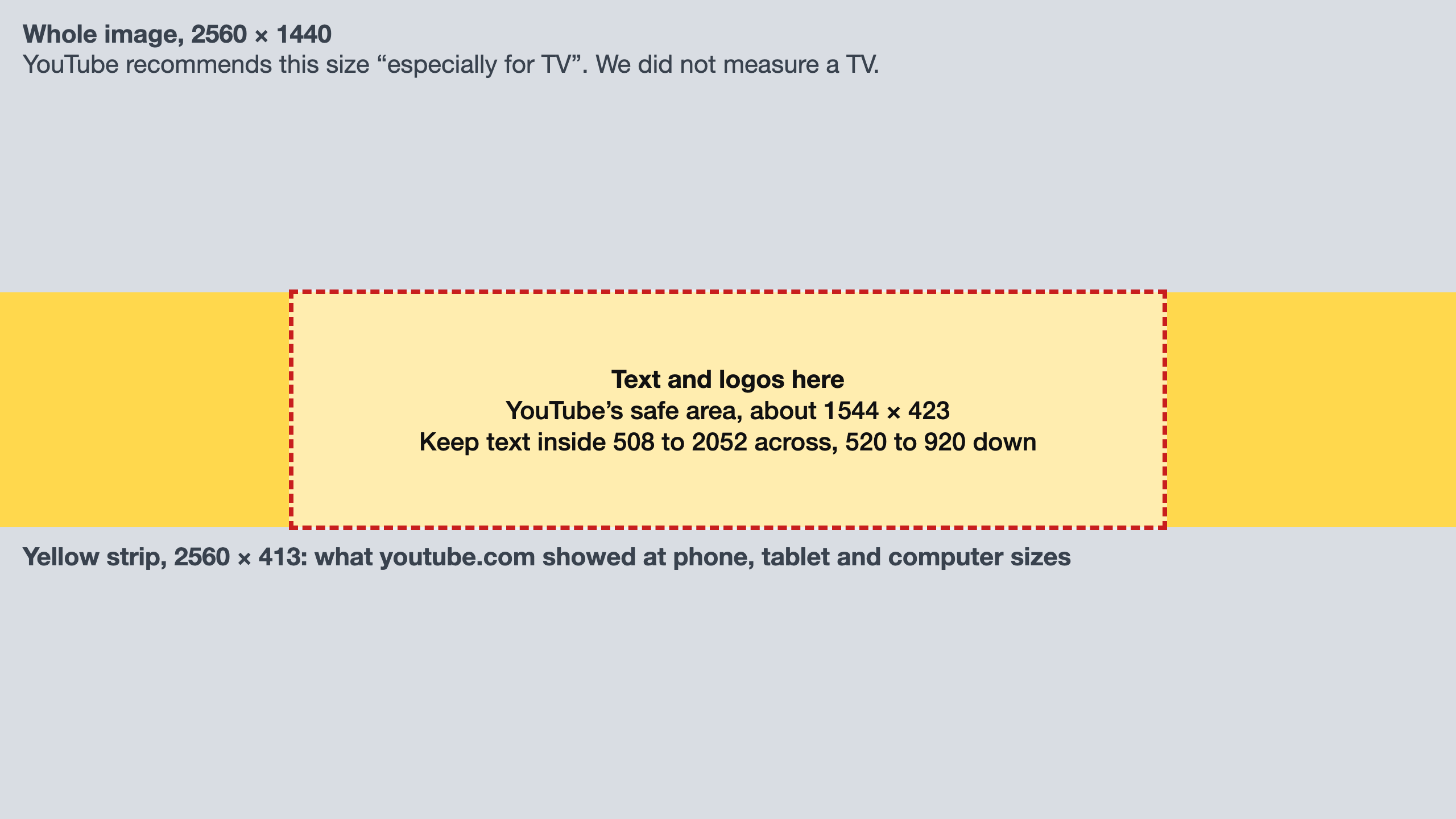
But the youtube.com website does not show the whole picture. We measured a thin strip across the middle: the full width, and about 413 of the 1440 pixels of height. We measured the website in a browser, not the YouTube app or a TV. Here is what we found:
- Make it 2560×1440. YouTube recommends that size. Of 913 real banners we checked, 43% are exactly that size and 34% are exactly the minimum, 2048×1152.
- The website showed the same strip at every screen size we tried. At a phone's, a tablet's and a computer's size, youtube.com showed the full width of the banner and the middle 29% of its height.
- Keep text and logos in the middle. YouTube gives a safe area of 1235×338 on a 2048×1152 banner. On a 2560×1440 banner that is about 1544×423. That is about 10 pixels taller than the strip the website shows, so we use a box of 1544×400.
- On the phone website the banner is small, so make the words big. The phone page drew it 358 pixels wide. A letter 100 pixels tall in your design ends up about 14 pixels tall.
The sizes YouTube asks for
These are from YouTube's help page, Manage your channel branding, as it read on 17 November 2026:
- Recommended size: 2560×1440 pixels. YouTube says this is "especially for TV".
- Minimum size for upload: 2048×1152 pixels, with a 16:9 shape.
- Safe area for text and logos: 1235×338 pixels, on a banner of the minimum size.
- File size: 6 MB or smaller.
- No extras: YouTube asks for no shadows, borders or frames added to the file.
YouTube gives the safe area only for the minimum size. A 2560×1440 banner is 1.25 times as large, so the same area on it is about 1544×423 pixels. The page does not say where the area sits. We place it in the center.
A second help page, Channel banner & profile picture tips, recommends at least 2560×1440 "to achieve the best display on all devices".
YouTube also says the same banner is used on computers, phones and TVs, "but it shows differently depending on your device". The page does not say how differently. So we measured.
YouTube banner size for mobile, tablet, computer and TV: what youtube.com shows
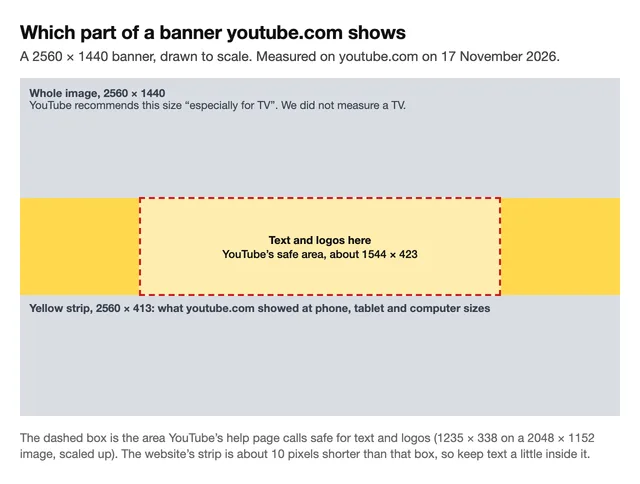
You can download this picture as a 2560×1440 template and put it on top of your design as a guide.
Here is each device in one list:
- Computer, on youtube.com: the full width and a strip about 413 pixels tall. We measured this.
- Tablet size, on youtube.com: the same strip. We measured this.
- Phone size, on youtube.com: the same strip. We measured this.
- The YouTube app: not measured. Use YouTube's safe area, about 1544×423 in the middle.
- TV: not measured. YouTube recommends the full 2560×1440 "especially for TV".
We opened 12 channel pages on youtube.com at five screen sizes: a phone's, a tablet's, and computer windows 1280, 1920 and 2560 pixels wide. We were signed out and used Chrome, set to each screen size. The 12 channels had banners of different sizes, from 2048×1152 up to 7800×4385.
Every page showed the same part of the banner:
- The full width. Nothing is cut from the left or the right.
- The middle 29% of the height. On a 2560×1440 banner, the strip starts about 514 pixels from the top and ends about 926 pixels from the top. It is about 413 pixels tall. Everything above and below it is not shown.
This was the same on all 12 channels and at all five sizes. The phone page did not cut the sides off. That surprised us. We expected the phone page to show only the middle.
One small thing follows from this. The website's strip is about 413 pixels tall, and YouTube's safe area is about 423. So about 5 pixels at the top and 5 at the bottom of the safe area are cut on the website. Keep text a little inside the box, not touching its top or bottom edge.
We could not measure the YouTube app or a TV. YouTube's page says images should "accommodate the entire screen for larger devices", so the parts above and below the strip may show on those. The app may cut the banner differently from the website. That is why the safe area still matters: it is the part YouTube's page calls safe for text and logos.
How big the banner looks on each screen
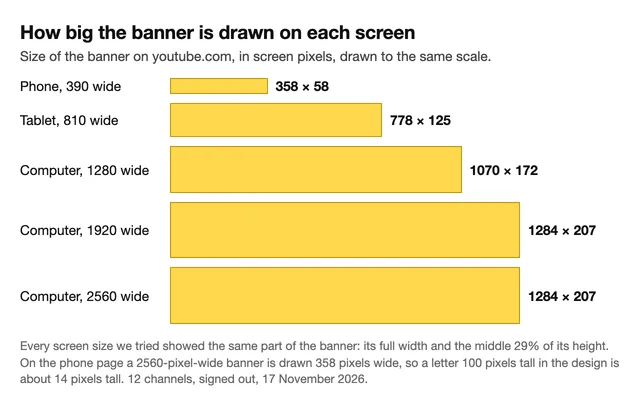
The strip is the same on each screen, but its size is not. Here is the width of the screen or window, and the size the banner was drawn at. Both are in screen pixels, not the pixels of your file:
- Phone page, screen 390 pixels wide: 358×58
- Tablet, screen 810 pixels wide: 778×125
- Computer, window 1280 pixels wide: 1070×172
- Computer, window 1920 or 2560 pixels wide: 1284×207
On a computer the banner stops growing at 1284 pixels wide, even in a 2560-pixel window.
So your design, 2560 pixels wide, is made smaller on every screen. On a large computer screen it is drawn 1284 pixels wide, which is half. On the phone page it is drawn 358 pixels wide, which is 14%. A letter 100 pixels tall in the design is about 50 pixels tall on the computer and about 14 on the phone page. Small print, such as an upload schedule in thin letters, will be hard to read on a phone.
The website also does not load your full file. On ordinary screens, the biggest copy of a banner that our browser received was 1707 pixels wide. On a high-density laptop screen it asked for a copy 2276 pixels wide. That is more than a 2048-pixel banner has, so a 2560×1440 banner can look a little sharper there. We saw nothing that would use a banner wider than 2560, but we can't say what a TV loads.
How to make a banner the right size
- Start with a 2560×1440 canvas. In your design tool, make a new design with a custom size of 2560 pixels wide and 1440 tall. If you already have a picture you want to use, the YouTube Banner preset in our free YouTube banner resizer crops or fits it to that size. It runs in your browser and needs no sign-up.
- Add our template as a guide. Download the 2560×1440 YouTube banner template, a PNG with the strip and the safe area marked. Place it so it fills the canvas, and build your design on top. Hide or delete it before you save your banner.
- Put your channel name, tagline and logo in the middle. Stay inside a box 1544 pixels wide and 400 tall, in the center of the canvas. That is YouTube's safe area, made a little shorter so nothing touches the edge of the strip the website shows. The box runs from 508 to 2052 pixels across, and from 520 to 920 pixels down.
- Make the whole strip look good. The left and right ends of the strip are visible on the website, from about 514 to 926 pixels down. Do not leave them empty, and do not let a face be cut at the top or bottom edge of the strip.
- Fill the rest of the picture too. YouTube says the image should "accommodate the entire screen for larger devices". You can use the same background as in the strip and extend it up and down.
- Make the main words big, and use few of them. Aim for letters at least 100 pixels tall in your design. The phone page draws the banner at 14% of its width, so those letters are only about 14 pixels tall there. Smaller letters will be hard to read on a phone.
- Save a JPG or PNG under 6 MB. Every banner we checked is stored as one of the two, and half are under 608 KB, so the limit is easy to meet.
- Upload it in YouTube Studio. Open Customization, then Profile, and change the banner image. Studio shows a preview where you can change the crop. We did not test what that crop changes.
After you upload, check your channel page on a phone and on a computer. That is the only sure test. Our free channel preview does not test a new banner. It shows your channel page with your banner and a new thumbnail on your Videos tab, so you can see whether they look related.
We cover thumbnail sizes in the YouTube thumbnail size guide, and sizes for other platforms in social media thumbnail sizes.
The banner sizes channels really use
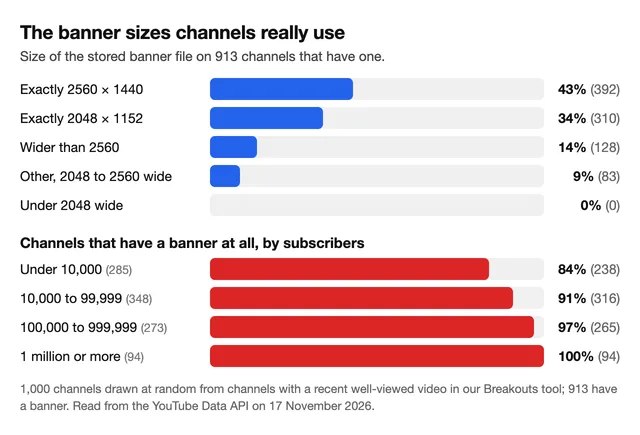
Both sizes YouTube names are common, and 2560×1440 is the most used.
We looked up 1,000 channels through YouTube's public data. We picked them at random from Breakouts, our tool that lists recent videos with more views than their channel usually gets. So they are active channels, not all of YouTube.
- 913 of the 1,000 have a banner. Among channels under 10,000 subscribers it is 84%. Among the 94 channels with a million or more, every one has a banner.
- 43% are exactly 2560×1440, and 34% are exactly 2048×1152. Another 14% are wider than 2560, up to 12,000 pixels wide.
- None is under 2048 pixels wide. That fits YouTube's stated minimum.
- The files are small. Half are under 608 KB. The largest is 5.6 MB, and none is over 6 MB. 499 are JPG files and 414 are PNG.
We can't tell whether a stored file is exactly what the creator uploaded.
Is 1024×576 a YouTube banner size?
Google's Keyword Planner showed about 27,100 searches a month for a 1024×576 YouTube banner (often typed 1024x576) when we read it on 15 November 2026. By YouTube's help page, the answer is no: the minimum for upload is 2048×1152. 1024×576 has the right 16:9 shape, but it is half of that minimum on each side.
Among the 913 banners we looked at, none is stored under 2048 pixels wide. We did not try to upload a 1024×576 file ourselves, so we can't tell you what message Studio shows.
If your picture is 1024×576, make it again at 2560×1440 if you can. Our free YouTube banner resizer can fit it to 2560×1440, but stretching it that far means about six times as many pixels, and it will look soft.
What we could not measure
- The YouTube app and a TV. We measured only the website, in Chrome set to each screen size, not on a real phone or tablet. Keeping text in the safe area is YouTube's own advice for the rest.
- Uploading. We did not upload a banner, so we can't say what Studio does with a file that is too small or too large.
- Next month. YouTube can change its page layout at any time. These numbers are from 17 November 2026.
- Whether a banner helps a channel grow. Nothing here measures that.
Frequently asked questions
What is the YouTube banner size?
2560×1440 pixels, which is a 16:9 shape, in a file of 6 MB or smaller. The minimum YouTube gives for upload is 2048×1152.
What is the YouTube banner size for mobile?
You upload one banner for every device, 2560×1440. For phones, keep text and logos inside YouTube's safe area: 1235×338 pixels of a 2048×1152 banner, or about 1544×423 of a 2560×1440 one, which we place in the center. We could not measure the YouTube app. On the phone version of youtube.com, the banner showed its full width and the middle 29% of its height, drawn 358×58 pixels on a 390-pixel-wide screen.
What is the safe area of a YouTube banner?
YouTube says the safe area for text and logos is 1235×338 pixels on a 2048×1152 banner. Its page does not say where; we place it in the center. On a 2560×1440 banner that is about 1544×423. The website showed a strip about 413 pixels tall, so keep text a little inside the box.
Can I use a 1024×576 YouTube banner?
Not by YouTube's rules. Its help page gives 2048×1152 as the minimum banner for upload, and 1024×576 is half of that on each side. None of the 913 banners we checked is stored under 2048 pixels wide. We did not try the upload ourselves.
Is 2048×1152 big enough for a YouTube banner?
It is the minimum YouTube gives, and 34% of the 913 banners we checked are stored at exactly that size. On ordinary screens the website loaded a copy at most 1707 pixels wide, so it looks the same there. On a high-density laptop screen the website asked for 2276 pixels, so a 2560×1440 banner can look a little sharper. YouTube recommends 2560×1440.
Why is my YouTube banner cut off?
Because the website shows only a strip across the middle of the picture: the full width, and about 413 of the 1440 pixels of height on a 2560×1440 banner. Move your text and logo into the middle of the picture, inside a box about 1544 pixels wide and 400 tall.
How we measured the channels: on 17 November 2026 (UTC) we drew 1,000 channels at random from the 12,954 channels in the category lists of our Breakouts tool and read each one's banner from the YouTube Data API. 913 had a banner, and we read the pixel size and file size of each stored banner file. We delete the data for each channel within 30 days under YouTube's API rules.
How we measured the pages: we opened 12 of those channels' pages on youtube.com in Chrome, signed out, at five screen sizes (390, 810, 1280, 1920 and 2560 pixels wide; the phone size used the phone version of the site). On each page we read which part of the banner the page loaded and how large it was drawn. All 60 page loads used the same part: the full width, and from 35.3% to 64.7% of the height. The page then trims about 5 more pixels of a 2560×1440 banner from the top and from the bottom to fit its box, which we assume is centered. We also opened 2 of the 12 pages on a high-density screen (a 1440-pixel window at double density).