Disclosure: we make ThumbnailPeak, a thumbnail tester. Every size in this post was measured on YouTube itself. How we did it is at the end.
You make a YouTube thumbnail at 1280×720 or larger. That is the upload size, and nobody watches at it. YouTube shrinks your thumbnail to fit wherever it shows it, and the size it ends up at decides whether your words can still be read.
So we measured. On 21 October 2026 we opened YouTube in an automated browser, signed out, and recorded the size of every thumbnail on the page: on a computer at seven window sizes, on YouTube's mobile site at two phone sizes, and in YouTube's TV app.
Here is what we found:
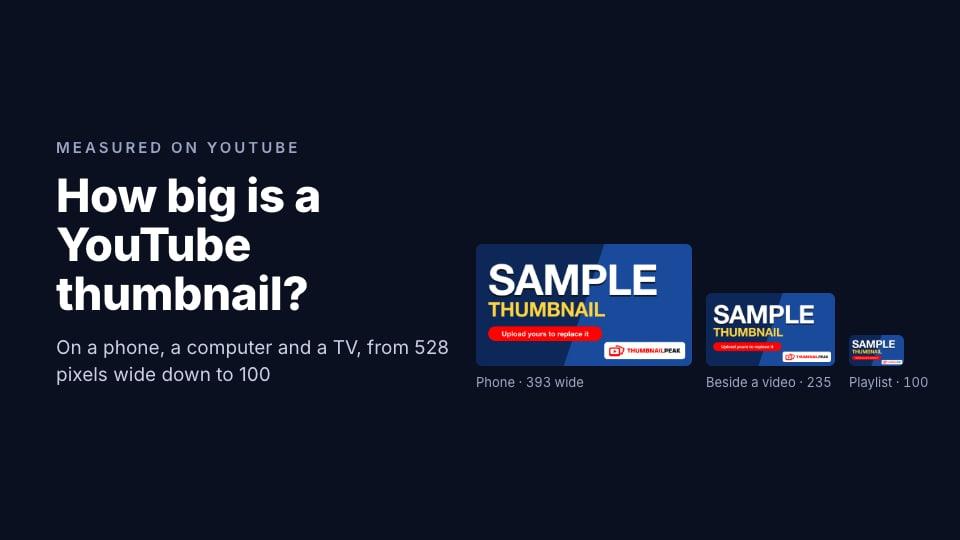
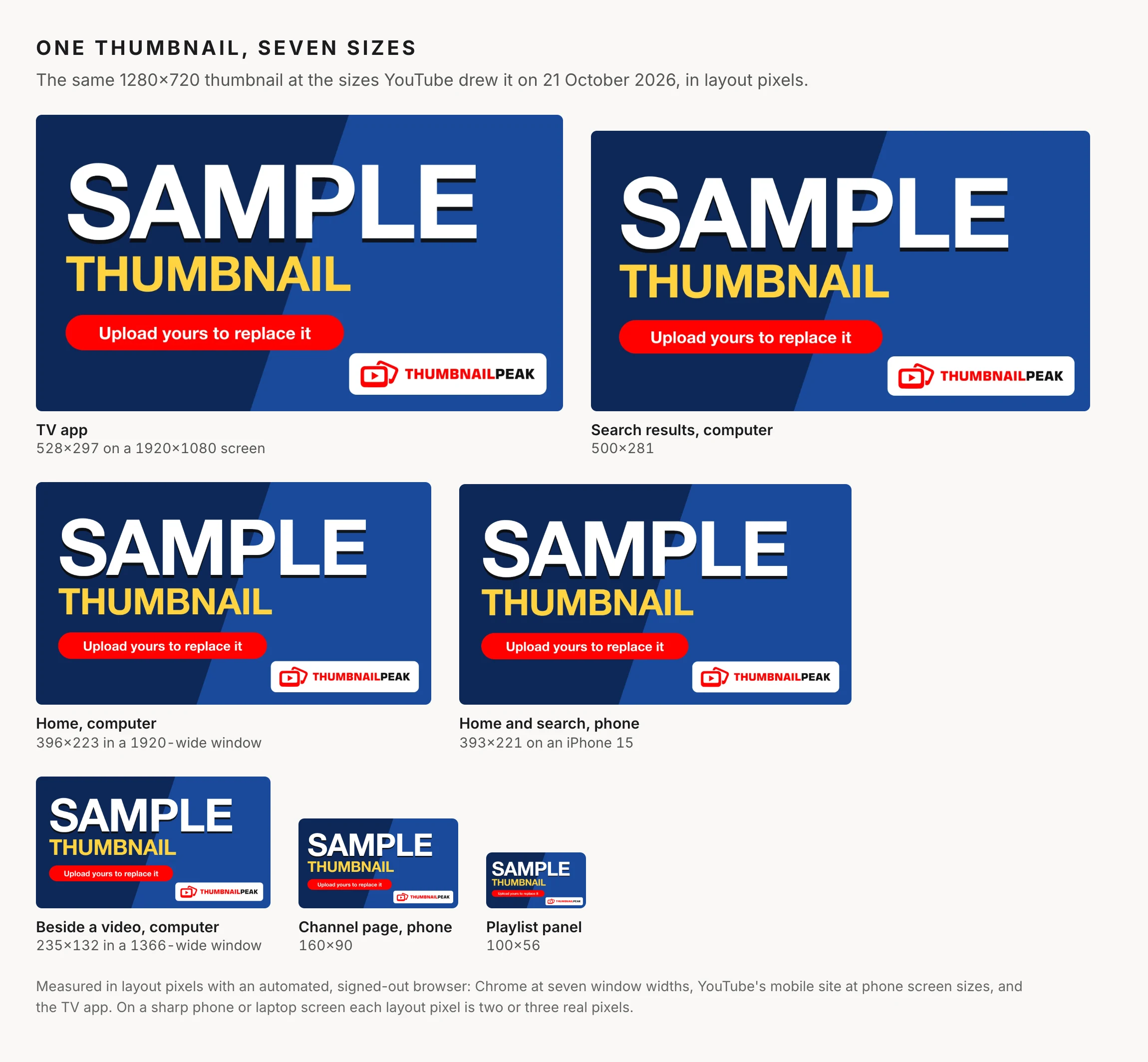
- On a phone, a thumbnail fills the screen's width. On Home and in search it was 393×221 on an iPhone 15 and 412×232 on a Pixel 7.
- On a computer, Home thumbnails were 291 to 556 pixels wide, depending on the window. Search results were 500×281 at every window size from 1280 to 2560 pixels wide.
- Beside a video, thumbnails were 200 to 479 pixels wide. We never saw the 168×94 that most guides quote, including some of ours.
- The smallest were in lists: 160×90 on a channel's Videos tab on the phone site, and 100×56 in the playlist panel beside a video.
- On a TV, a thumbnail is about a quarter of the screen's width: 528×297 in the TV app's 1920×1080 layout.
How big is a YouTube thumbnail on a phone?
On YouTube's mobile site, a thumbnail on Home and in search results runs the full width of the screen:
- iPhone 15: 393×221
- Pixel 7: 412×232
The videos under the one you're watching were full width too. The exception is a channel's Videos tab. There the phone site lists the videos with a small thumbnail on the left and the title beside it, and each thumbnail is 160×90.
Those numbers are layout pixels. A phone packs two or three real pixels into each one, so a 393-wide thumbnail on an iPhone 15 is drawn with 1,179 real pixels across. The detail in your upload survives. The size in your hand doesn't change, though: the iPhone 15's screen is about 6.5 cm (2.6 inches) wide, and so is the thumbnail.
We measured the mobile website, not the YouTube app for iPhone or Android, which may lay things out differently.
How big is a YouTube thumbnail on a computer?
On a computer, the size depends on where the thumbnail is and on how wide the browser window is. Here is what we measured:
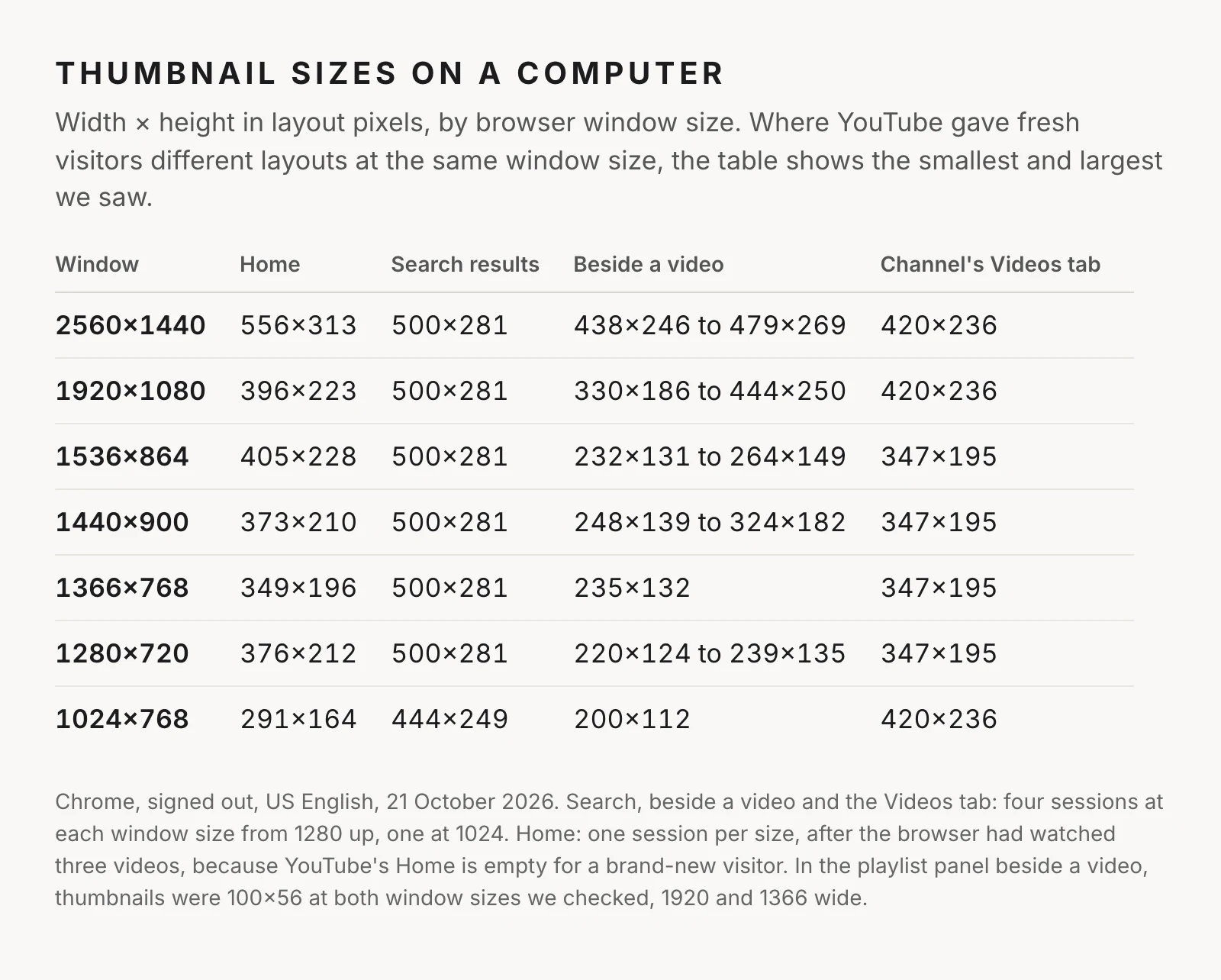
Four things stand out.
Search results are the steadiest. 500×281 at every window size from 1280 to 2560 pixels wide, and 444×249 in a 1024-wide window.
On Home, a smaller window can mean a bigger thumbnail. In a 1920-wide window Home showed four videos per row, each 396 wide. In a 1536-wide window it showed three per row, each 405 wide. YouTube fits a whole number of videos into the row, so the size jumps up and down as the window narrows.
Beside a video, the size changes from visit to visit. YouTube gave fresh visitors different layouts at the same window size. In a 1920-wide window, the videos beside the one playing were 330, 384 or 444 pixels wide, depending on the session. In one session at 1440 wide, YouTube moved them into a grid under the video. The smallest we saw beside a video was 220×124 in a 1280-wide window, and 200×112 at 1024.
The playlist panel is tiny. When a video plays as part of a playlist, the list of the playlist's videos beside it uses 100×56 thumbnails. That was the smallest thumbnail we found anywhere.
In real units: on a 24-inch monitor at 1920×1080, a Home thumbnail is about 11 cm (4.3 inches) wide, and a playlist-panel thumbnail about 2.8 cm (1.1 inches). On a 15.6-inch laptop at 1366×768, a thumbnail beside a video is about 6 cm (2.3 inches) wide.
How big is a YouTube thumbnail on a TV?
YouTube's TV app lays its screen out at 1920×1080, and its thumbnails were 528×297, in search results and on the Gaming page. That is about 27% of the screen's width.
On a 55-inch TV, that's a thumbnail about 33 cm (13 inches) wide. It's also seen from across the room, so it doesn't look as big as that sounds. A TV is still where a 4K upload shows its extra detail.
What happened to 168×94?
Most thumbnail guides, some of ours included, say a thumbnail can be as small as 168×94. That was the size of the suggested videos beside the one you're watching, and it became the standard "check it small" size.
We didn't see it once. In every session we ran, from 1024 to 2560 pixels wide, the videos beside the one playing were at least 200 pixels wide. YouTube has made that column bigger.
Small thumbnails haven't gone away, though. They've moved to lists: 160×90 on a channel's Videos tab on the phone site, and 100×56 in the playlist panel. 168×94 sits between those two, so it's still a fair size to check your words at. ThumbnailPeak's critique checks legibility at exactly 168×94, and a thumbnail that reads there will read nearly everywhere we measured.
What this means for your thumbnail
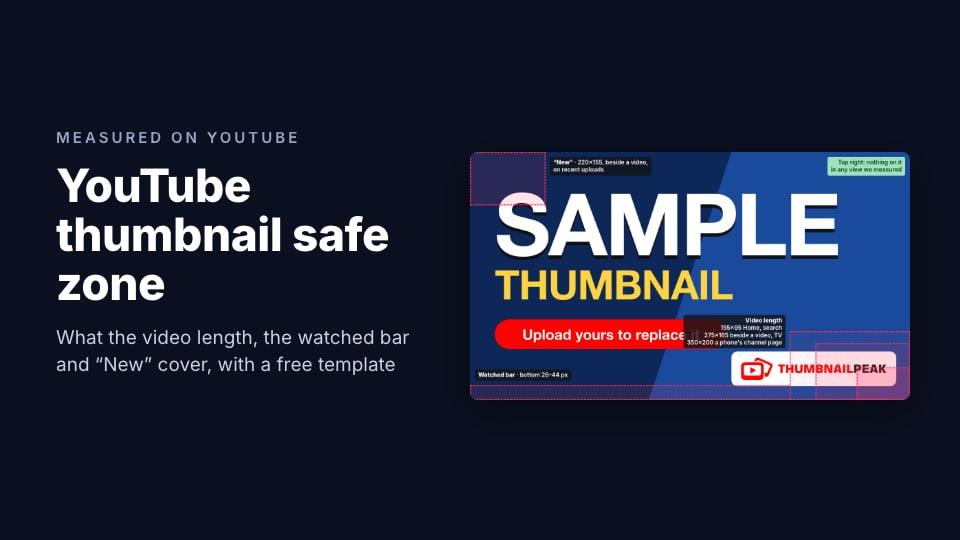
Check it at 160 pixels wide. That's how big it is on a channel page on a phone, the smallest place we found apart from the playlist panel. If a word can't be read there, make it bigger or cut it. Our sample thumbnail's "Upload yours to replace it" line fails that test, as the picture at the top shows. Fewer, bigger words in a bold font pass it.
Don't design only for the phone. A phone shows your thumbnail big. The small views are on a computer, beside a video or in a playlist, and on a phone's channel page.
Keep the bottom-right corner clear. YouTube draws the video's length there in a badge that stays the same size while the thumbnail shrinks. On a 160-wide thumbnail it covers more than a quarter of the width. Our post on the YouTube thumbnail safe zone measures it in every view, with a free template.
Look at it at those sizes before you publish. ThumbnailPeak's thumbnail tester puts your thumbnail and title into a YouTube feed with the real videos for your title, on the home page, in search, beside a video, and on mobile, tablet and TV. It's free, and you don't need an account.
Frequently asked questions
What size is a YouTube thumbnail on a phone?
On YouTube's mobile site, a thumbnail on Home and in search fills the screen's width: 393×221 layout pixels on an iPhone 15 and 412×232 on a Pixel 7. On a channel's Videos tab it is 160×90.
What size is a YouTube thumbnail on a computer?
It depends on the page and the window. In our measurements, search results were 500×281, Home thumbnails 291 to 556 pixels wide, thumbnails beside a video 200 to 479 pixels wide, and the playlist panel 100×56.
Is the YouTube sidebar thumbnail still 168×94?
Not in any session we ran on 21 October 2026. The smallest thumbnail beside a video was 200×112, in a 1024-wide window. YouTube runs experiments and may show some viewers other layouts.
What size should I make my thumbnail?
Upload it at 1280×720 or larger, at 16:9. The YouTube thumbnail size guide covers the upload rules. The sizes in this post are about how it's shown, which is much smaller.
How we measured: on 21 October 2026 we loaded YouTube in an automated Chrome browser, signed out, in US English, and measured the on-screen size of every thumbnail in layout pixels (CSS pixels). On a computer we used windows of 2560×1440, 1920×1080, 1536×864, 1440×900, 1366×768, 1280×720 and 1024×768. For search results, the videos beside a video and a channel's Videos tab, we ran four fresh sessions at each window size from 1280 up and one at 1024, because YouTube shows fresh visitors different layouts. YouTube's Home page is empty for a brand-new visitor, so we measured Home once per window size after the browser had watched three videos. The playlist panel was measured in 1920- and 1366-wide windows. On phones we used YouTube's mobile website with the screen size and settings of an iPhone 15 and a Pixel 7. For the TV, we loaded YouTube's TV app at 1920×1080 with a TV's browser settings, as a guest. We did not measure the YouTube apps for phones and tablets, or what signed-in viewers see. The sample thumbnail in the pictures is ThumbnailPeak's own. Real-world sizes assume a 24-inch 1920×1080 monitor, a 15.6-inch 1366×768 laptop, an iPhone 15 and a 55-inch TV.