Disclosure: we make ThumbnailPeak, which includes a free YouTube thumbnail downloader. Every number here is our own count, made on 16 November 2026 by asking YouTube's image server for the thumbnail files of 23,229 videos. How we measured is at the end. The thumbnails shown belong to their creators.
To download a YouTube thumbnail in HD, copy the video's link, paste it into a YouTube thumbnail downloader, and save the 1280×720 file. We call that file the HD file. It was the largest thumbnail we could download for any creator's video.
Here's what we found:
- Most recent videos have the HD file. 97.4% of 21,270 recent videos had it (20,717 videos), and every one of those files was exactly 1280×720 pixels.
- We found no 4K or 1080p thumbnail on a creator's video. YouTube's own data lists a larger thumbnail for 37% of the recent videos. We asked for all 7,937 of those files, and every request answered "not found".
- Older videos often have no HD file. Only 25% of the videos we sampled from 2006 to 2008 had a 1280×720 file, against 98% from 2023 to 2025.
- Some of the smaller copies have black bars. YouTube keeps several copies of each thumbnail. The 640×480 copy has a black bar above and below the picture, each about 60 pixels tall.
How to download a YouTube thumbnail
It takes three steps:
- Copy the video's link. Use the address bar or the Share button. A normal watch link, a youtu.be link, a Shorts link and a live link all work.
- Paste it into the thumbnail downloader. Every thumbnail file YouTube keeps for that video appears at once. You don't need an account.
- Press Download under "Max resolution (HD)". It saves as a JPG. If a video has no HD file, the tool says so on that card. Then save the largest file the video does have, usually 640×480, and cut off its black bars (we show how below).
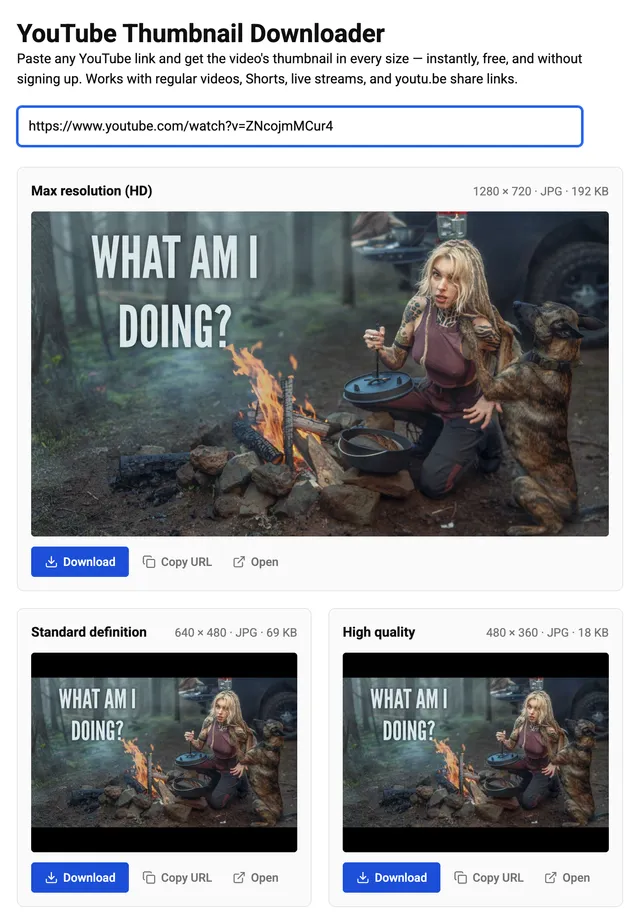
This works on your own videos too. What you get is YouTube's 1280×720 copy, not the file you uploaded. We had no uploaded file to compare it with, so we can't say how much quality the copy loses.
You can also do it without a tool, by opening the thumbnail's own web address. That way is below.
How we counted
We checked two groups of videos on 16 November 2026. We call them the recent group and the by-year group:
- The recent group: 21,383 videos from 4,303 channels in Breakouts, our tool that finds videos doing much better than their channel usually does. From each channel we took its best video of October 2026 and its newest ordinary uploads. By 16 November, 113 of them were gone from YouTube. That left 21,270, and our shares are of those 21,270.
- The by-year group: 1,846 videos, about 90 for each upload year from 2006 to 2025. For each year, we asked YouTube's own search for videos uploaded in June of that year.
For each video we asked YouTube's image server for each thumbnail file. We count a file as existing only when the server sent the file itself. We read every pixel size from the file, never from its name or label.
The recent group comes only from channels that had a hit video lately. It is not all of YouTube.
Can you download a YouTube thumbnail in 4K or 1080p?
We could not find one to download for any creator's video. We found no larger file for a tool to fetch, and a 1280×720 picture stretched to 3840×2160 holds no more detail than before.
This answer needs an explanation, because YouTube's own data suggests that larger thumbnails exist. When an app asks YouTube for a video's details, the answer lists the video's thumbnail files. For 7,934 of the 21,383 videos in the recent group (37%), that list held an extra entry. On the four videos we read again, the entry was marked 1920×1080, 2560×1440 or 3840×2160, and it had its own web address (URL).
We asked for all 7,937 of those addresses (3 videos had two). Every one answered "not found". The videos themselves were still there: the 1280×720 file opened for 7,902 of the same 7,934 videos.
YouTube's documentation for developers does not mention these larger entries. It describes the 1280×720 file as "the highest resolution version of the thumbnail image" (read on 16 November 2026).
We did find 27 files of 1920×1080, all in the by-year group. None of them was a creator's video. All 27 were film listings on the channel "YouTube Movies", with a film poster as the picture.
Some pages do advertise 4K thumbnail downloads. One guide on Google's first page for "how to download a youtube thumbnail" lists "4K, 1080p, 720p, SD" (read on 15 November 2026). We did not test those tools.
We can't say that no 4K thumbnail exists anywhere. Those addresses may open for YouTube's own apps, or start working later. On 16 November 2026 they did not open for a signed-out visitor in the US.
The five thumbnail files YouTube keeps
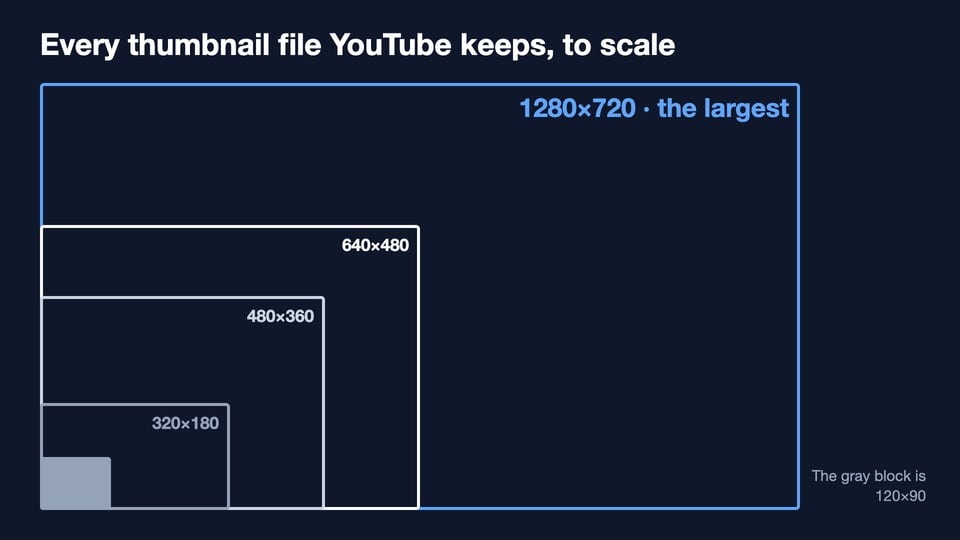
YouTube does not hand out the file the creator uploaded. It keeps up to five copies at fixed sizes:
- 1280×720 (
maxresdefault.jpg): the HD file, 16:9, about 220 KB. - 640×480 (
sddefault.jpg): 4:3, with black bars, about 80 KB. - 480×360 (
hqdefault.jpg): 4:3, with black bars, about 23 KB. - 320×180 (
mqdefault.jpg): 16:9, about 15 KB. - 120×90 (
default.jpg): 4:3 and tiny, with thin black bars, about 3 KB.
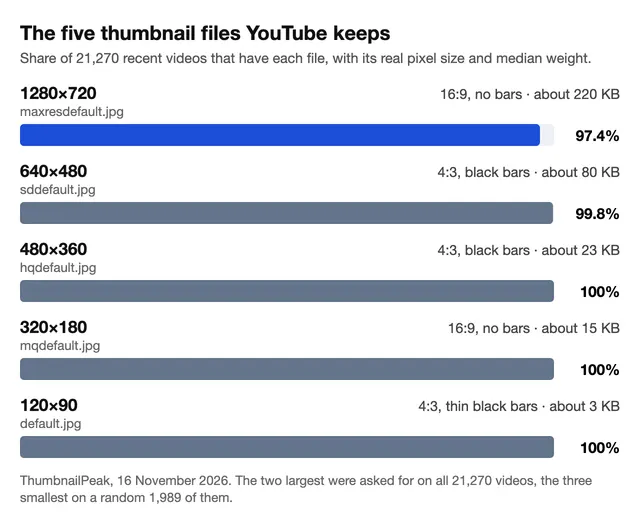
The chart shows how many recent videos had each file. The file sizes in KB are medians: half of the files we read were larger and half were smaller. YouTube's documentation lists the same five sizes. Our YouTube thumbnail size guide covers the size to upload, which is a different question.
Why do some videos have no HD thumbnail?
Old videos are the most likely to lack one. In the by-year group, 25% of the videos uploaded from 2006 to 2008 had a 1280×720 file, and 98% of those from 2023 to 2025.
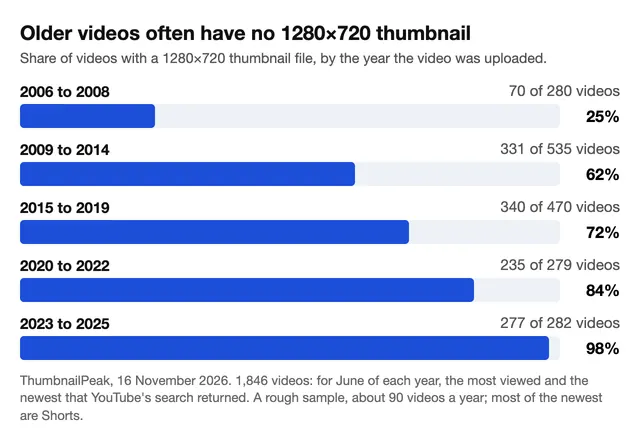
These shares are rough, because about 90 videos a year is a small group. Most of the newest videos in it are Shorts: 419 of the 470 from 2021 to 2025.
The quality of the video matters too, but it does not decide everything. Of the videos YouTube marks as high definition, 86% had a 1280×720 thumbnail (1,161 of 1,354). Of the videos it marks as standard definition, 19% had one (92 of 492). And most of the oldest videos are standard definition: 254 of the 280 from 2006 to 2008.
We don't know YouTube's exact rule. Its documentation says the 1280×720 file "is available for some videos", and that "an HD video may support higher resolution thumbnails than non-HD videos".
What you get when there is no HD file depends on the video's age:
- Recent videos: the largest file is usually the 640×480 one. Of the 553 recent videos without an HD file, 513 had it.
- Old videos: often less. In the by-year group, 552 videos had no HD file, and 330 of them had nothing larger than 480×360.
Why does my downloaded thumbnail have black bars?
Because you saved one of the 4:3 files. A YouTube thumbnail is 16:9. To fit it into a 4:3 file, YouTube adds a black bar above and below. We measured each bar in rows of pixels:
- 640×480: about 60 rows above and 60 below. The picture inside is 640×360.
- 480×360: about 45 rows above and 45 below. The picture inside is 480×270.
- 120×90: about 11 rows above and 11 below.
We measured this on 200 random videos from the recent group. Of the 199 that had a 640×480 file, 172 had exactly 60 black rows above and below, and 25 more were within a few rows. The other two had fewer.
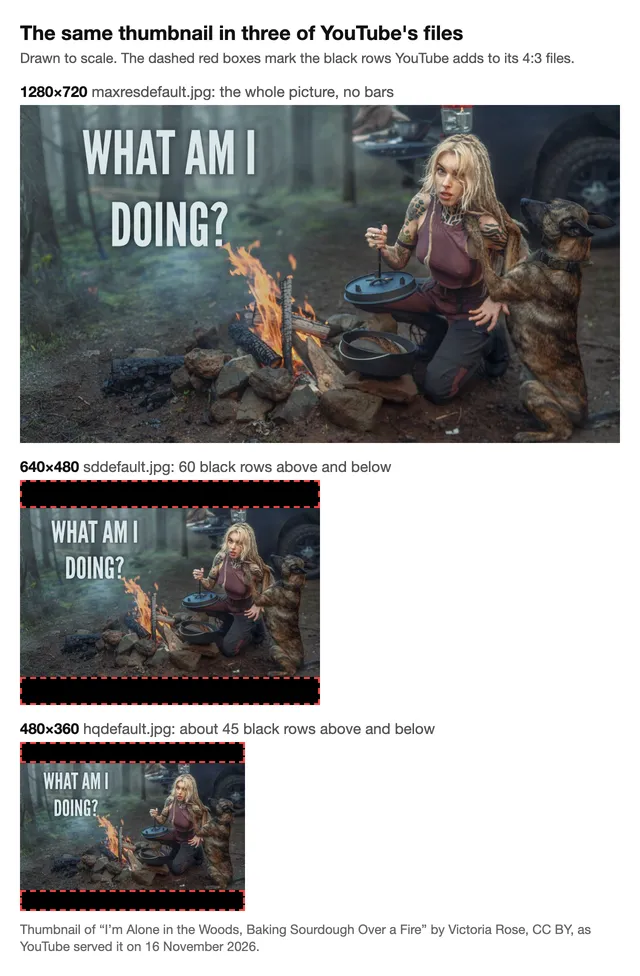
For a picture with no bars, save the 1280×720 file. If a video doesn't have it, save the 640×480 file and crop it to 16:9 in the thumbnail resizer. That cuts off the bars. The picture inside is only 640×360, so it will not be as sharp. The 320×180 file has no bars either, but it is half that size.
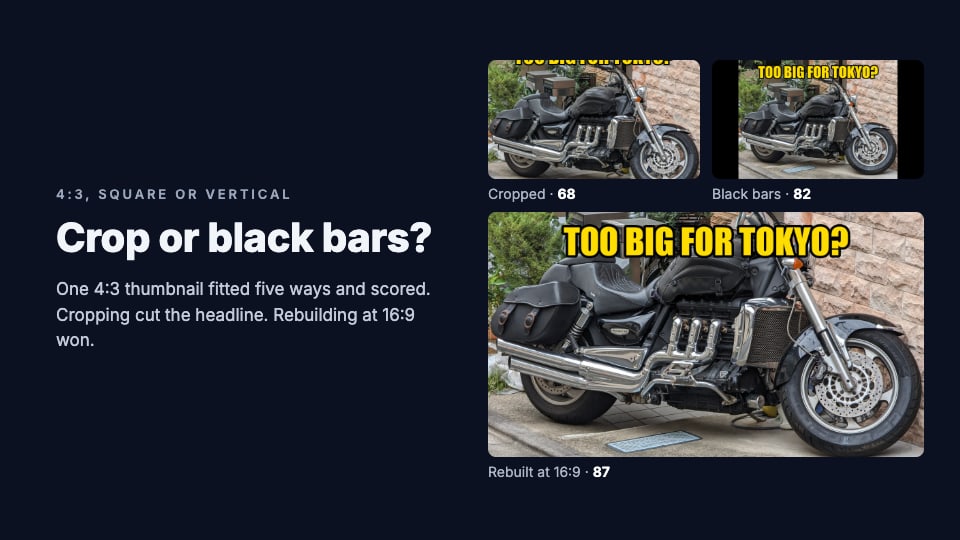
Bars can also come from the upload itself. Our post on crop or black bars shows what YouTube does with a picture that isn't 16:9.
Shorts and live streams work the same way
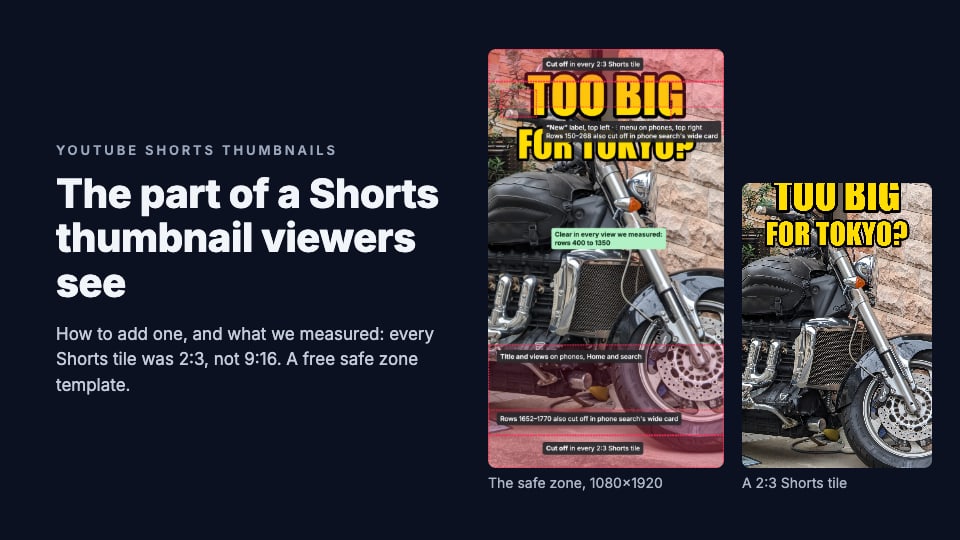
- Shorts: of 419 Shorts uploaded from 2021 to 2025 in the by-year group, 395 (94%) had a 1280×720 file. It is a wide picture, even though a Short is tall. YouTube's documentation also describes a tall 9:16 thumbnail for Shorts that have a custom thumbnail. Its data listed one for 2 of the 419.
- Live streams: of 1,610 finished live streams and premieres in the recent group, 1,569 (97.5%) had the HD file. Ordinary uploads in the same group were about the same, at 97.4%.
So a Shorts link or a live link goes into the downloader like any other.
How to get a YouTube thumbnail from its URL (maxresdefault.jpg)
You can download a thumbnail with no tool at all. Every thumbnail file has a fixed web address (URL), made of three parts joined together:
https://i.ytimg.com/vi/- the video's ID
/maxresdefault.jpg
The ID is the 11 characters after v= in a watch link. For the video in our example the ID is ZNcojmMCur4, and this is its HD file. Open an address like that in your browser, then save the picture.
For the other sizes, change the last part to sddefault.jpg, hqdefault.jpg, mqdefault.jpg or default.jpg.
Three things we noticed about these addresses:
- A missing file answers "not found", but it still sends a picture. The picture is a tiny gray image with three dots. If your saved "HD" thumbnail is that gray image, the video has no HD file.
hq720.jpglooks like a second name for the HD file. It existed for the same 20,717 videos asmaxresdefault.jpg, and it had the same size in KB for 20,715 of them.- Most videos also have a copy in WebP, a newer image format with smaller files. Of 1,989 random videos still on YouTube, 1,943 had one: the same videos that had the HD file. It was about 110 KB, against 220 KB for the JPG.
Can you use someone else's thumbnail?
A thumbnail belongs to whoever made it. You can save one to study it. Before you put one on your own video, ask the creator. We aren't lawyers, and this isn't legal advice.
There is also a practical reason not to copy one: your video would sit beside the original in search, with the same picture.
What to do with the file
- Save the 1280×720 file. If you typed the address yourself and got the tiny gray image with three dots, the video has no HD file.
- Need another size? The thumbnail resizer crops or fits a picture to the sizes other platforms use. It's free and needs no account.
- Checking your own thumbnail? Put it in the thumbnail preview to see it at the small sizes viewers get. Preview is free. If the thumbnail looks blurry there, our post on blurry YouTube thumbnails lists the usual causes.
Frequently asked questions
What is the highest quality YouTube thumbnail I can download?
1280×720 pixels, for every creator's video we checked. All 20,717 HD thumbnail files in our group of recent videos were exactly that size on 16 November 2026.
Can I download a YouTube thumbnail in 4K?
We found no 4K file to download. YouTube's data listed a larger thumbnail for 37% of 21,383 recent videos, but all 7,937 of those addresses answered "not found".
Can I download a YouTube thumbnail without a tool?
Yes. Open https://i.ytimg.com/vi/, then the video's ID, then /maxresdefault.jpg, as one address in your browser, and save the picture. That is the 1280×720 file.
Can I download my own YouTube thumbnail?
Yes. Paste your video's link like any other. You get YouTube's 1280×720 copy, not the file you uploaded.
Why is there no HD thumbnail for my video?
A missing HD thumbnail is most common on old videos. Only 25% of the videos we sampled from 2006 to 2008 had a 1280×720 file. Take the largest file the video has, 640×480 or 480×360, and crop off its black bars.
Why does the thumbnail I saved have black bars?
You saved a 4:3 file. The 640×480 file has about 60 black rows above and below, and the 480×360 file has about 45. The 1280×720 file has none.
Is it free to download a YouTube thumbnail?
Yes. ThumbnailPeak's downloader is free and needs no account, and opening a thumbnail's address in your browser costs nothing either.
How we measured: on 16 November 2026 (UTC) a script asked YouTube's image server, signed out, from one computer in the US, for the thumbnail files of two groups of videos. The recent group is 21,383 videos from 4,303 channels in our Breakouts lists (each channel's best October 2026 video and its newest ordinary uploads); 113 had left YouTube, so shares are of 21,270. The by-year group is 1,846 videos: for June of each year from 2006 to 2025, the 50 most viewed and the 50 newest that the YouTube Data API's search returned (some videos were in both lists).
A file counts as existing when the server sent it, and its pixel size was read from the file's own header. The larger entries come from the YouTube Data API's thumbnail list, read on 7 November 2026 and again for four videos on 16 November. The three smallest files and the WebP copy were asked for on a random 2,000 of the recent videos (11 were gone, which left 1,989), and black rows were measured on a random 200. File sizes are medians, with 1 KB as 1,000 bytes. Shorts are videos uploaded in 2021 or later, 3 minutes or shorter, whose Shorts address opened. We checked 30 files by downloading them whole, and all 30 matched.
The recent group is channels with a recent hit, not all of YouTube, and about 90 videos a year is a small sample. Per-video rows are deleted within 30 days under YouTube's API rules. The example thumbnail is from "I'm Alone in the Woods, Baking Sourdough Over a Fire" by Victoria Rose, published under YouTube's Creative Commons Attribution license (CC BY), shown as YouTube served it.