Disclosure: we make ThumbnailPeak, and this post uses its Edit. Every result below is what Edit returned on 22 October 2026, on our own account, one try each. The thumbnails are by three creators who publish under a Creative Commons licence; the edited versions are ours.
The words are the part of a thumbnail you're most likely to want to change. Between 15 August and 22 October 2026, ThumbnailPeak's AI critique looked at 4,942 thumbnails, and a third of them (1,589) got at least one fix about their words. For 1 in 4 it was the first fix. The most common:
- Make the words bigger (679 thumbnails), so they can be read at feed size.
- Stop repeating the title (472), because the title is already printed right under the thumbnail.
- Use fewer words (434).
Changing words should be easy. Often it isn't, because the thumbnail you have is a flat picture: a JPG or PNG where the letters are pixels like everything else.
Three ways to change the words
1. Edit the design file. If you made the thumbnail in Canva, Photoshop, Figma or another editor, and still have the file, open it, retype the text layer and export again. Nothing else in the picture changes. This is the best way, every time it's available.
2. Paint over the old words in an image editor. With only the flat image, you cover the old words, with a clone, healing or fill tool, then type new ones on top in a font that matches. Over a plain background that's quick. Over a photo, a texture or a person, it's slow, and patched areas often show. You also need the font: a font-identifier tool can usually name it from a screenshot.
3. Type the change as a sentence. An AI image editor changes a picture from a request in plain words. That's what ThumbnailPeak's AI thumbnail editor, Edit, does. You upload the thumbnail and type something like "Change OFFROAD to TRAIL RIG in the same style". No file, no font hunting, no painting.
The third way is the one we tested. It has a cost the other two don't, which we'll come to: the AI redraws the whole picture, not just the words.
Five text changes on one thumbnail
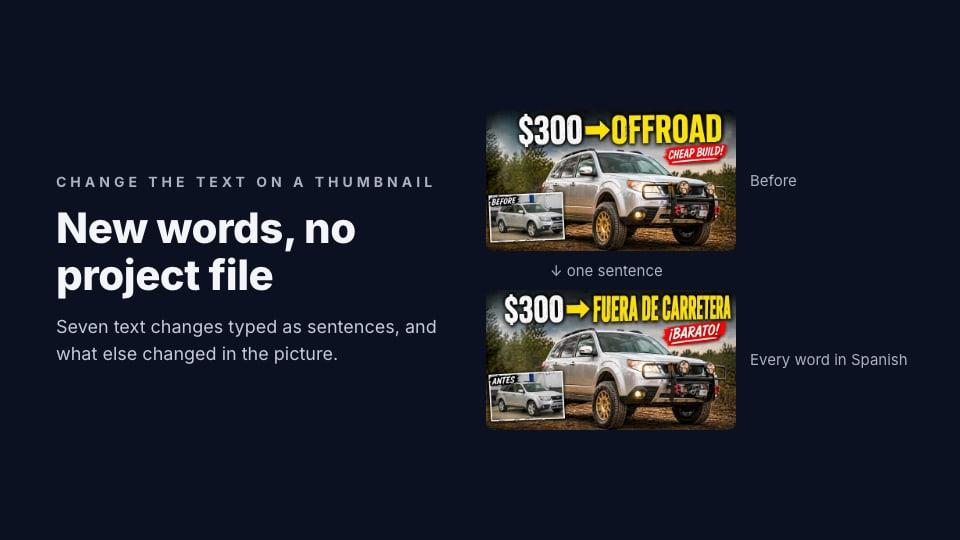
We started from Man Vs Cars' thumbnail for "I Turned a $300 Subaru Into an Off-Road Beast (Cheap Build)". It has every kind of text a thumbnail usually has: a big headline ("$300 → OFFROAD") in scuffed white and yellow letters, a red sticker ("CHEAP BUILD!") and a small label on an inset photo ("BEFORE").
We typed five different requests into Edit, each starting from the original:
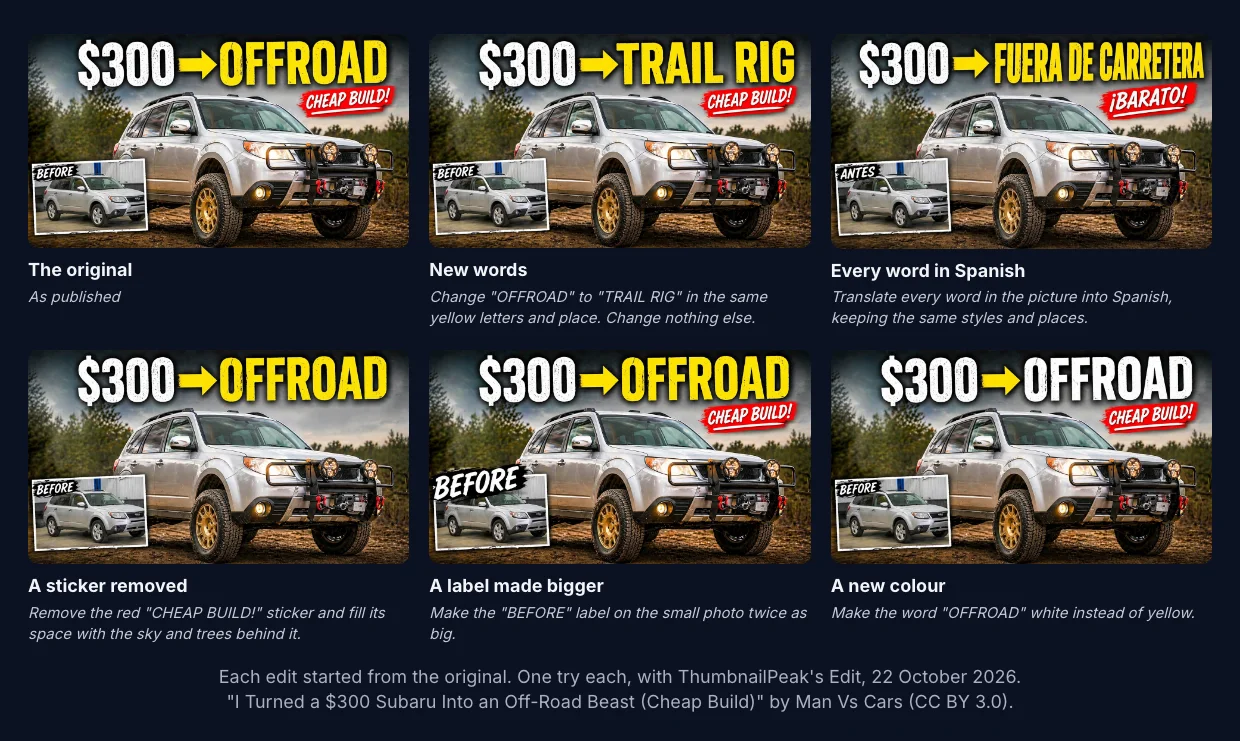
All five did what we asked, first time:
- New words. "Change "OFFROAD" to "TRAIL RIG" in the same yellow letters and place. Change nothing else." The new words came out in the same yellow, size and place. Up close, they lost most of the scuffed texture the original letters had.
- Every word in Spanish. "Translate every word in the picture into Spanish, keeping the same styles and places." All three pieces of text changed, in their own styles. The translation is literal, though: "FUERA DE CARRETERA" is a long phrase, so the letters got narrower and run nearly to the right edge, and a Spanish-speaking creator might have written "TODOTERRENO". "CHEAP BUILD!" became "¡BARATO!", which means "cheap!". Have a speaker check any translation.
- A sticker removed. "Remove the red "CHEAP BUILD!" sticker and fill its space with the sky and trees behind it." Gone, and the sky behind it looks natural.
- A label made bigger. "Make the "BEFORE" label on the small photo twice as big." It roughly doubled. To make room, the inset photo moved a little to the right, and the bigger label now covers its top-left corner.
- A new colour. "Make the word "OFFROAD" white instead of yellow." Done, with the arrow left yellow and the scuffed texture kept.
Each took under a minute.
Harder text: lettering and small boxes
Big block capitals are the easy case. We tried two harder ones.
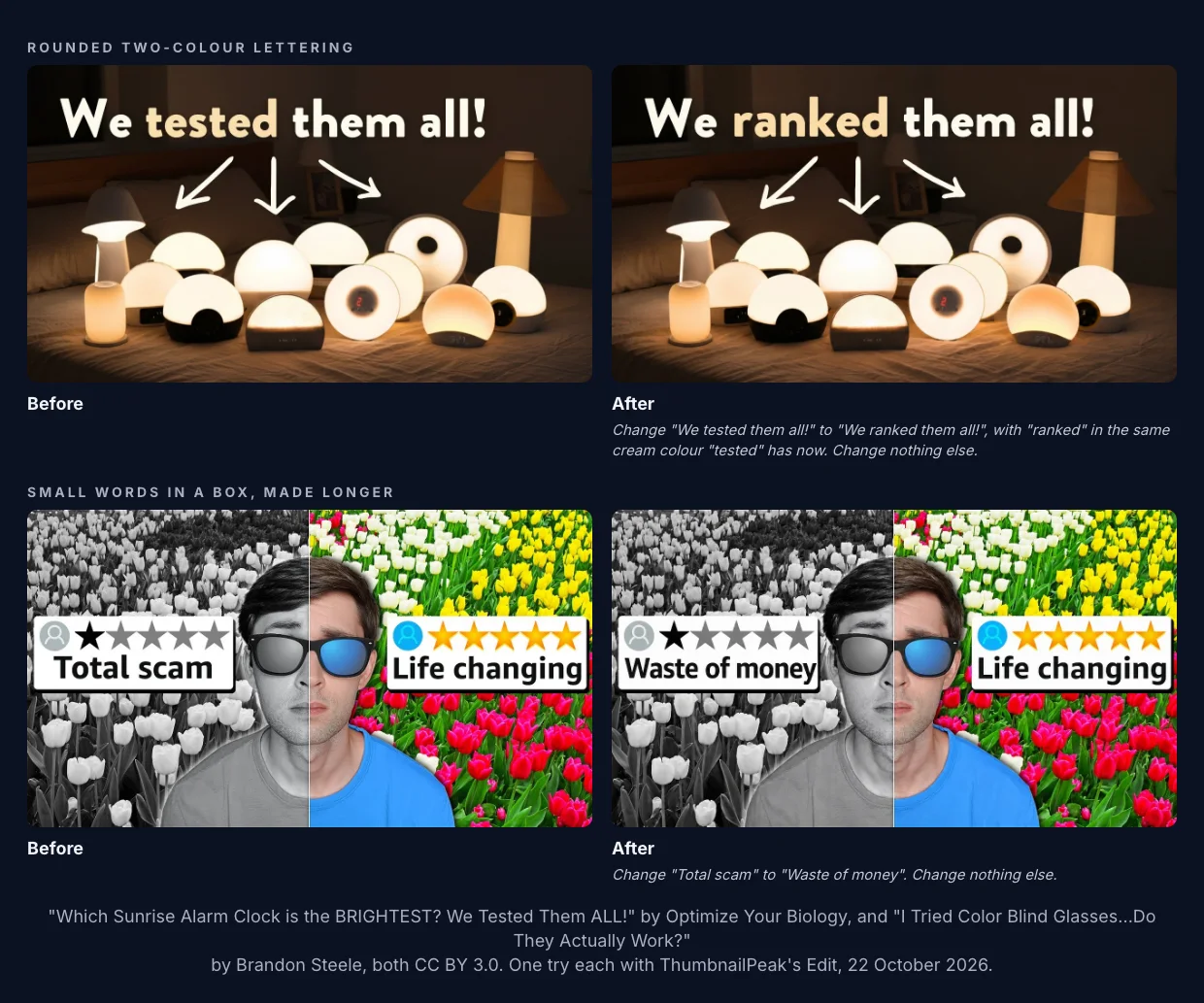
Rounded two-colour lettering. On Optimize Your Biology's alarm-clock thumbnail, we asked to change "We tested them all!" to "We ranked them all!", with "ranked" in the cream colour "tested" had. The new word matched the font and the colour, and the arrows and lamps stayed put.
Small words in a box, made longer. Brandon Steele's colour-blind-glasses thumbnail has two review cards. We changed "Total scam" to "Waste of money", which is four letters longer. Edit kept the card the same size and set the words a little smaller so they fit, with the star rating untouched.
What else changes when AI edits the words
Here's the cost. An AI image editor doesn't cut the old letters out and paste new ones in. It draws the whole picture again with your change in it. Most of the picture comes back looking the same, but not identical.
We measured it. For each edit we compared the before and after pixel by pixel:
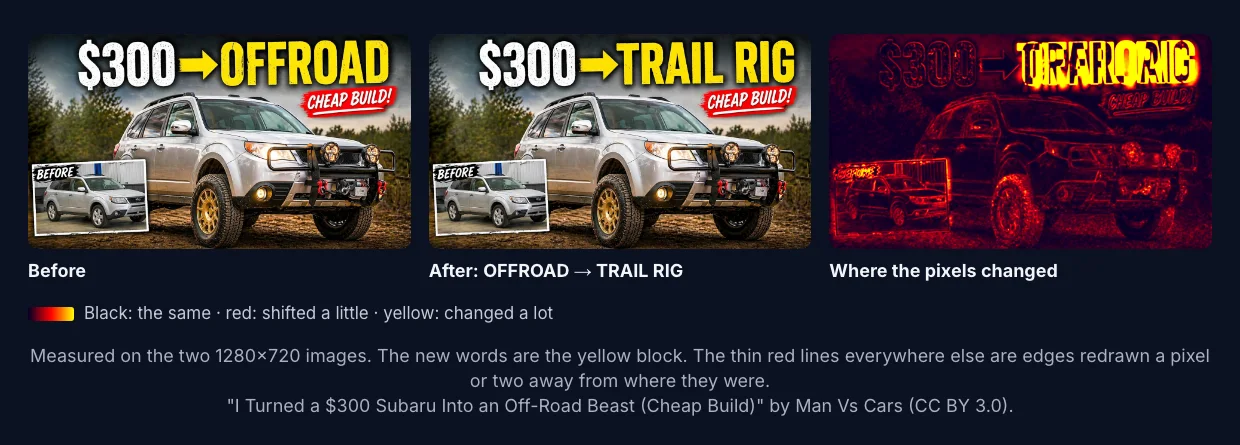
The new words are the bright block. Everything else is traced in thin red lines: edges of the car, the trees and the inset photo, redrawn a pixel or two from where they were. In the TRAIL RIG edit, 14% of the picture's pixels changed noticeably, by more than 24 of 255 brightness levels. The translation, which rewrote all three pieces of text, changed 23%. Removing the sticker changed 7%, and the alarm-clock and review-card edits about 5%.
At feed size you won't see any of it. Up close you might: a texture gets smoother, a small detail shifts, an inset photo moves over. Over many edits in a row, text can soften. So:
- Check the result at full size, not only in the small preview.
- Edit from the original when you can, rather than an edit of an edit. Edit keeps your original first in the row of versions, so you can always go back to it.
- If you have the design file, use it. For a change that has to be exact, painting the words yourself still wins.
How to write the request
The requests that worked best had four things:
- The exact words you're replacing, in quotes. "Change "Total scam" to…" leaves no doubt about which words.
- The new words exactly as you want them spelled. Edit tells the AI to spell new words the way you typed them.
- "In the same style and place", or the one thing you do want different: "in white", "twice as big", "at the top".
- "Change nothing else." It tells the AI that this is the whole job.
A few more things we'd do:
- Keep the new words close to the old length. Longer text has to get narrower or smaller to fit, as "FUERA DE CARRETERA" and "Waste of money" did. If you want it to grow, say where.
- Do one text change per request when you care about each detail, and look at each before the next.
- For a new language, check the spelling and the words with someone who speaks it. The AI translates literally.
After the change: check it
New words are a new thumbnail. Words that read well at full size can still be too thin or too small at 160 pixels wide, which is how small YouTube draws thumbnails in some places (we measured every size).
- Run it through the AI critique for a score and what to fix next. With the video's title, it also checks whether your words repeat the title.
- See it in a YouTube feed next to real videos with ThumbnailPeak's thumbnail tester, free and without an account.
- If you're choosing between the old words and the new, Compare puts the two side by side, and a one-word change can be worth an A/B test.
Edit needs a free account, which comes with 12 credits. An edit uses 3, from the same credits as your critiques. Pro is $20 a month for 300 credits a month, and a $10 credit pack adds 100 credits that never expire.
Frequently asked questions
How do I change the text on a YouTube thumbnail?
If you have the design file, edit the text layer and export again. If you only have the image, either cover the old words in an image editor and type new ones in a matching font, or use an AI image editor and type the change as a sentence, such as "Change OFFROAD to TRAIL RIG in the same style".
Can I edit text on a thumbnail without Photoshop?
Yes. An AI editor such as ThumbnailPeak's Edit changes the words from a typed request, with no layers or fonts to find. In our test, seven text changes on three thumbnails all worked on the first try.
Will changing the text with AI change the rest of my thumbnail?
A little. The AI redraws the whole picture, so edges and textures shift slightly even where nothing was asked. In our tests 5 to 23% of pixels changed noticeably, mostly invisible at feed size. Check the result at full size.
Can AI translate the text on my thumbnail?
Yes, and it keeps each piece of text in its own style. The translation is literal, so have someone who speaks the language check it. Long translated phrases may get squeezed to fit.
Do I need to change my thumbnail's text when I change my title?
If the thumbnail repeats the title, yes, or the two say the same thing twice. ThumbnailPeak's critique flagged that in 14% of the thumbnails it checked with a title.
Edits made on ThumbnailPeak on 22 October 2026, one try each, each from the creator's original. The thumbnails are from "I Turned a $300 Subaru Into an Off-Road Beast (Cheap Build)" by Man Vs Cars, "Which Sunrise Alarm Clock is the BRIGHTEST? We Tested Them ALL!" by Optimize Your Biology and "I Tried Color Blind Glasses...Do They Actually Work?" by Brandon Steele, all published under CC BY 3.0. The edited versions are our adaptations, and the creators did not make or endorse them. The pixel counts compare each 1280×720 before and after, smoothed over 5×5 pixels, and count a pixel as changed when its colour moved by more than 24 of 255. The counts across all critiques cover ThumbnailPeak's current critique prompt, each picture once, our own account's critiques left out; we read only which fixes each critique gave, never the images or titles.